Introducció
This manual provides comprehensive instructions for the setup, operation, and maintenance of your InFocus IN122a SVGA Wireless-Ready Projector. The InFocus IN122a is designed for ease of use and offers multiple ways to display content, including from mobile devices. Its high brightness and contrast ratio ensure outstanding image quality, and its lightweight design facilitates easy portability or installation.
Característiques clau
- SVGA (800 x 600) native resolution for clear image projection.
- 3500 lumens of brightness, suitable for various lighting conditions.
- Llarga vida lamp of up to 7,000 hours, contributing to long-term savings.
- High 15000:1 contrast ratio and BrilliantColor technology for vibrant and detailed images.
- Wireless connectivity with an optional USB adapter for flexible content sharing.
Guia de configuració
Follow these steps to set up your InFocus IN122a projector:
- Desembalatge: Traieu amb cura el projector i tots els accessoris de l'embalatge.
- Col·locació: Position the projector on a stable, flat surface or mount it securely. Ensure adequate ventilation around the unit.
- Connexió d'alimentació: Connect the power cord to the projector's power input and then to a grounded electrical outlet.
- Connexió font: Connect your video source (e.g., laptop, DVD player) to the appropriate input port on the projector (HDMI, VGA, USB).
- Encès: Premeu el botó d'engegada del projector o del comandament a distància per encendre la unitat.
- Enfocament i zoom: Adjust the focus and zoom rings on the lens to achieve a clear and appropriately sized image on your screen or wall.
- Correcció Keystone: If the image appears trapezoidal, use the keystone correction feature to square the image.

InFocus IN122a Projector in operation, displaying a bright light from its lens. This image illustrates the projector's appearance during use.
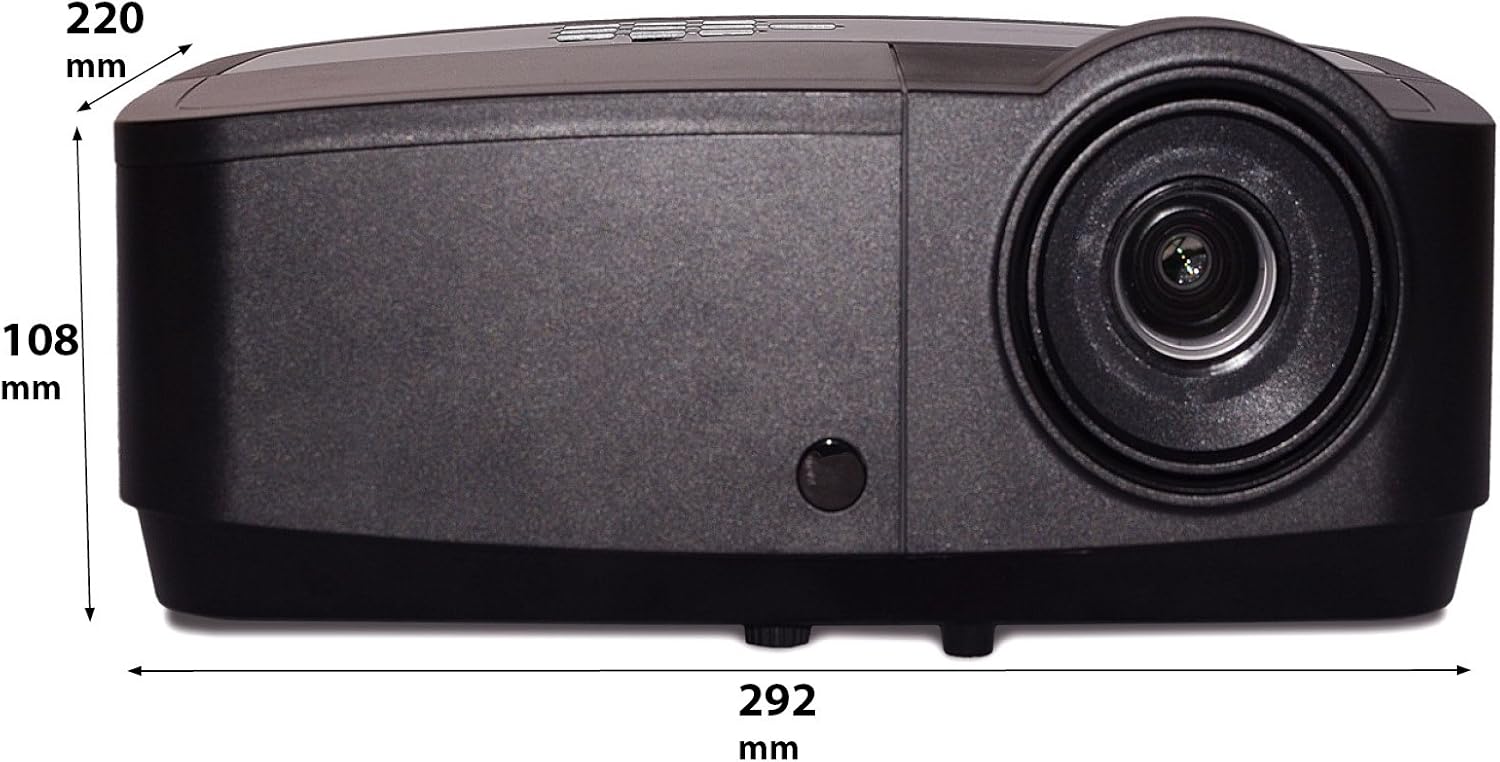
Diagram showing the dimensions of the InFocus IN122a Projector, with measurements in millimeters. This provides physical specifications for installation planning.
Instruccions de funcionament
- Encès/apagat: Press the power button once to turn on. Press twice to turn off, confirming the shutdown.
- Selecció de la font d'entrada: Use the "Source" button on the projector or remote to cycle through available input sources (HDMI, VGA, USB).
- Navegació del menú: Use the directional arrows and "Enter" button on the control panel or remote to navigate the on-screen display (OSD) menu.
- Ajustaments d'imatge: Within the OSD menu, you can adjust settings such as brightness, contrast, color, aspect ratio, and picture mode to optimize your viewexperiència.
- Àudio: If your source provides audio through HDMI, the projector's internal speaker will play it. External speakers can be connected via the audio output port.
Manteniment
- Lamp Substitució: El projector lamp has a lifespan of up to 7,000 hours. When the lamp Si s'il·lumina el llum indicador o la imatge s'enfosqueix, és hora de substituir la lampConsulteu el manual d'usuari complet per obtenir informació detallada.amp replacement procedures. Always allow the projector to cool down completely before attempting lamp substitució.
- Neteja de la lent: Feu servir un drap suau i sense borrissol dissenyat específicament per a lents òptiques per netejar suaument la lent del projector. Eviteu utilitzar productes de neteja abrasius o una pressió excessiva.
- Neteja del cos del projector: Wipe the exterior of the projector with a soft, dry cloth. Do not use liquid cleaners or solvents.
- Neteja del filtre d'aire: Regularly check and clean the air filter to ensure proper ventilation and prevent overheating. A clogged filter can reduce lamp vida i rendiment.
Resolució de problemes
Si teniu problemes amb el projector, consulteu els problemes i solucions més comuns següents:
| Problema | Causa possible | Solució |
|---|---|---|
| No hi ha imatge a la pantalla | Power cable disconnected, incorrect input source, source device off. | Check power connections. Select correct input source. Ensure source device is powered on and sending a signal. |
| La imatge és tènue o esvaïda | Lamp nearing end of life, Eco mode enabled, dirty lens. | Substitueix lamp if necessary. Disable Eco mode. Clean the projector lens. |
| La imatge és borrosa | Desenfocat, distància de projecció incorrecta. | Adjust the focus ring on the lens. Ensure projector is within recommended projection distance. |
| El projector s'sobreescalfa i s'apaga | Blocked ventilation, dirty air filter. | Ensure clear airflow around the projector. Clean or replace the air filter. |
Especificacions
| Característica | Detall |
|---|---|
| Dimensions del producte | 14.25 x 12 x 7.75 polzades |
| Pes de l'article | 7.1 lliures |
| Número de model de l'article | IN122A |
| Marca | Enfoc |
| Usos recomanats per al producte | Interior/Exterior |
| Característica especial | Preparat per a 3D |
| Tecnologia de connectivitat | HDMI, USB, Wireless |
| Resolució de visualització | 800 x 600 (SVGA) |
| Brillantor | 3500 lúmens |
| Relació de contrast | 15000:1 |
| Lamp La vida | Fins a 7,000 hores |
Garantia i Suport
For detailed warranty information, please refer to the warranty card included with your product or visit the official InFocus website. If you require technical support, have questions about product operation, or need assistance with troubleshooting beyond what is covered in this manual, please contact InFocus customer service. Contact details can typically be found on the manufacturer's weblloc o a l'embalatge del producte.
Conserveu el vostre comprovant de compra per a reclamacions de garantia.