
1. Introducció
The Tivoli Audio Albergo is a compact and versatile Bluetooth clock radio designed to provide high-fidelity audio, AM/FM radio reception, and convenient alarm clock functionalities. This manual provides detailed instructions for setting up, operating, and maintaining your Albergo unit.
2. Instruccions de seguretat
- Llegiu totes les instruccions abans d'utilitzar la unitat.
- Conserveu aquestes instruccions per a referència futura.
- Tingueu en compte totes les advertències del producte i del manual.
- No utilitzeu aquest aparell a prop d'aigua o humitat.
- Netegeu només amb un drap sec.
- No bloquegeu cap obertura de ventilació. Instal·leu-ho d'acord amb les instruccions del fabricant.
- No instal·leu a prop de cap font de calor com ara radiadors, registres de calor, estufes o altres aparells (inclosos amplificadors) que produeixen calor.
- Eviteu que el cable d'alimentació sigui trepitjat o pessigat.
- Utilitzeu només accessoris/accessoris especificats pel fabricant.
- Desendolleu aquest aparell durant les tempestes amb llamps o quan no l'utilitzeu durant llargs períodes de temps.
- Demaneu tot el servei a personal de servei qualificat.
3. Contingut del paquet
Comproveu que el vostre paquet contingui els elements següents:
- Tivoli Audio Albergo Bluetooth Clock Radio Unit
- Adaptador d'alimentació
- Control remot
- Antena FM
4. Producte acabatview
Controls i pantalla del panell frontal
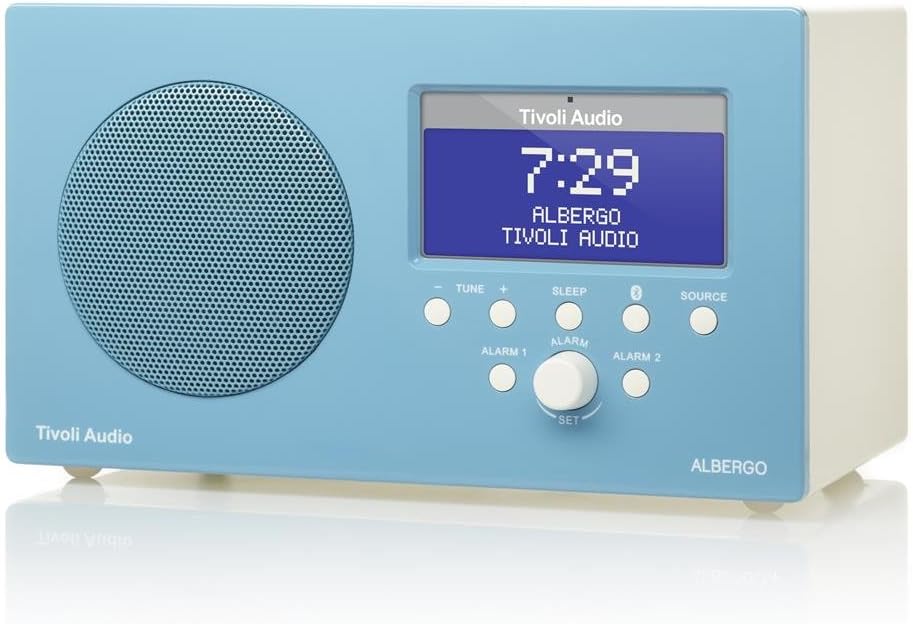
Figura 4.1: Davant view of the Albergo unit. The front panel features a speaker grille, a digital display, and control buttons for tuning, sleep, Bluetooth, source selection, and alarm settings.
- Visualització: Shows time, station, source, and menu information.
- Tune - / Tune +: Adjusts radio frequency or navigates menu options.
- Dormir: Activa el temporitzador de son.
- Botó Bluetooth: Inicia el mode d'emparellament Bluetooth.
- Font: Cycles through available audio sources (FM, AM, Bluetooth, Auxiliary).
- Alarm 1 / Alarm 2: Activates or sets Alarm 1 or Alarm 2.
- Set Knob: Rotates to adjust values and presses to confirm selections.
lateral View and Rear Connections

Figura 4.2: En angle view of the Albergo unit. The rear panel typically includes connections for power, external antenna, and auxiliary input.
The rear panel of the Albergo unit contains the following connections:
- Entrada de corrent continu: For connecting the included power adapter.
- Entrada d'antena FM: Per connectar l'antena FM externa.
- Entrada auxiliar: For connecting external audio devices via a 3.5mm cable (not included).
- Sortida d'auriculars: Per a una escolta privada.
5. Configuració
5.1 Connexió d'alimentació
- Insert the small end of the power adapter into the DC Input jack on the rear of the Albergo unit.
- Connecteu l'altre extrem de l'adaptador d'alimentació a una presa de corrent.
- The unit will power on or enter standby mode.
5.2 Connexió de l'antena
- For FM reception, connect the included external FM antenna to the FM Antenna Input on the rear of the unit.
- Esteneu l'antena completament per a una recepció òptima.
- For AM reception, the Albergo has a built-in internal AM antenna. If reception is poor, try repositioning the unit.
6. Instruccions de funcionament
6.1 Encès/Apagat
- Premeu el botó Poder button (usually integrated with the Set knob or a dedicated button on the remote) to turn the unit on or off.
- When powered off, the clock display will remain active.
6.2 Funcionament de la ràdio (AM/FM)
- Premeu el botó Font fins que aparegui "FM" o "AM" a la pantalla.
- Utilitza el Sintonitza - or Sintonitza + botons per ajustar manualment la freqüència.
- To auto-scan for the next available station, press and hold Sintonitza - or Sintonitza +.
- The Albergo supports FM RDS (Radio Data System) where available, displaying station information.
6.3 Funcionament Bluetooth
- Premeu el botó Font button until "Bluetooth" appears on the display.
- The unit will enter pairing mode, indicated by a flashing Bluetooth icon on the display.
- Al dispositiu amb Bluetooth (per exemple, un telèfon intel·ligent o una tauleta), activeu el Bluetooth i cerqueu els dispositius disponibles.
- Select "Tivoli Albergo" from the list of devices.
- Once paired, the Bluetooth icon on the Albergo display will stop flashing and remain solid. You can now stream audio wirelessly.
6.4 Configuració del rellotge i l'alarma
Many clock and alarm settings are best accessed and adjusted using the included remote control.
- Configuració de l'hora:
- En mode d'espera, manteniu premut el botó Set perilla o el Menú botó del comandament a distància.
- Navigate to "Time Set" using the Sintonitza +/- buttons or remote arrows.
- Premeu Set or Entra on the remote to confirm.
- Ajusteu hores i minuts utilitzant Sintonitza +/- or remote arrows, confirming each with Set or Entra.
- Configuració d'alarmes (Alarma 1 / Alarma 2):
- Premeu el botó Alarma 1 or Alarma 2 button on the front panel or remote.
- Follow the on-screen prompts to set the alarm time, source (buzzer, FM, AM), and volume.
- Confirm each setting using the Set knob or remote's Entra botó.
- Funció de posposar: Quan soni una alarma, premeu el botó Posposa botó (sovint el Dormir button or a dedicated button on the remote) to temporarily silence the alarm for a set period.
- Temporitzador de son: Premeu el botó Dormir button repeatedly to cycle through available sleep timer durations (e.g., 15, 30, 45, 60 minutes, Off). The unit will automatically turn off after the selected time.
6.5 Ús del control remot
The included full-function remote control provides access to all features and settings, including those not directly available on the front panel. Ensure the remote has working batteries and is pointed towards the front of the Albergo unit during use.
7. Manteniment
- Neteja: Feu servir un drap suau i sec per netejar la unitat. No utilitzeu productes de neteja abrasius, ceres ni dissolvents.
- Col·locació: Eviteu col·locar la unitat sota la llum solar directa, a prop de fonts de calor o en zones amb molta humitat o pols.
- Antena: Handle the FM antenna carefully to prevent damage.
8. Solució De Problemes
| Problema | Causa possible | Solució |
|---|---|---|
| Sense poder | L'adaptador de corrent no està connectat o la presa de corrent està defectuosa. | Assegureu-vos que l'adaptador de corrent estigui connectat correctament a la unitat i a una presa de corrent que funcioni. |
| Mala recepció de ràdio | Antenna not properly connected or positioned; weak signal. | Extend the FM antenna fully. Reposition the unit for better AM reception. Try a different location. |
| El dispositiu Bluetooth no s'aparella | Albergo not in pairing mode; device too far; previously paired device connected. | Ensure Albergo is in Bluetooth source mode and flashing. Move device closer. Disconnect from other Bluetooth devices. |
| Clock displays incorrect time | Hora no ajustada correctament; interrupció del corrent. | Refer to Section 6.4 to reset the time. Unplug and replug the unit to reset if necessary. |
| L'alarma no sona | Alarm not activated; volume too low; incorrect alarm source. | Verify Alarm 1 or Alarm 2 is enabled. Check alarm volume. Ensure correct alarm source (buzzer/radio) is selected. |
| El comandament a distància no funciona | Dead batteries; obstruction; not pointed correctly. | Replace remote control batteries. Ensure no obstructions between remote and unit. Point remote directly at the unit. |
9. Especificacions
- Marca: Tivoli Audio
- Número de model: ALBERGO
- Tecnologia de connectivitat: Bluetooth
- Tecnologia del sintonitzador: AM, FM (with RDS where available)
- Característiques especials: Digital Clock, Dual Alarms, Sleep Timer, Snooze
- Font d'alimentació: Adaptador de corrent alterna
- Tipus de visualització: LCD digital
- Components inclosos: Control remot
- Pes de l'article: Aproximadament 2.3 lliures (1.04 kg)
- UPC: 815097015581
10. Garantia i Suport
For warranty information and technical support, please refer to the documentation provided with your purchase or visit the official Tivoli Audio weblloc web. Conserveu el comprovant de compra per a reclamacions de garantia.