
1. Introducció
This manual provides detailed instructions for the installation, operation, and maintenance of your GIGABYTE GB-BXi7-4770R Mini PC Barebones. The GB-BXi7-4770R is an ultra-compact PC design featuring Intel 4th generation Core i7-4770R processors with Intel Iris Pro graphics 5200. It supports 2.5-inch hard drives, mSATA SSDs, and DDR3L SO-DIMM memory, offering a powerful computing solution in a small form factor.
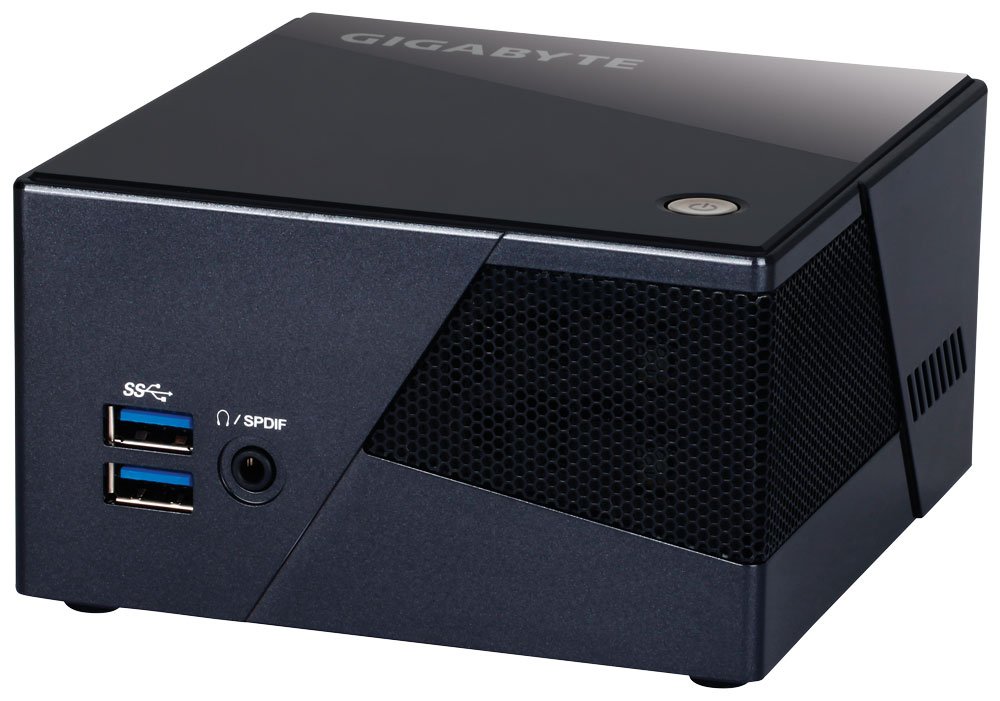
Image 1.1: GIGABYTE GB-BXi7-4770R Mini PC Barebones unit. This image shows the compact size and general appearance of the device.
2. Informació de seguretat
Please read all safety instructions carefully before using this product. Failure to follow these instructions may result in electric shock, fire, or damage to the device.
- Always disconnect the power cord from the electrical outlet before cleaning or performing any maintenance.
- No exposeu el dispositiu a la humitat, la pluja ni a temperatures extremes.
- Assegureu-vos que hi hagi una ventilació adequada. No bloquegeu cap obertura de ventilació.
- Use only GIGABYTE-approved accessories and power adapters.
- Eviteu col·locar el dispositiu sobre superfícies inestables.
- Demaneu tot el servei a personal de servei qualificat.
3. Contingut del paquet
Verifiqueu que tots els elements siguin presents al vostre paquet:
- GIGABYTE GB-BXi7-4770R Mini PC Barebones unit
- Adaptador d'alimentació
- VESA Mounting Bracket (75 x 75mm + 100 x 100mm)
- Screws for VESA mount and internal drives
- Guia d'inici ràpid (aquest document)
Note: Memory, storage drives (HDD/SSD), and operating system are not included and must be purchased separately.
4. Configuració
4.1. Instal·lació de maquinari
Before proceeding, ensure the device is unplugged from the power source.
4.1.1. Installing SO-DIMM DDR3L Memory
- Carefully remove the bottom cover of the BRIX unit.
- Locate the two SO-DIMM DDR3L slots.
- Alineeu l'osca del mòdul de memòria amb l'osca de la ranura.
- Insert the module at a 45-degree angle and push down until the clips on both sides snap into place.
- Repeat for the second module if installing dual channel memory.
4.1.2. Installing 2.5-inch SATA HDD/SSD
- Locate the 2.5-inch drive bay and SATA connector.
- Mount your 2.5-inch drive (7.0mm or 9.5mm thickness supported) into the bracket using the provided screws.
- Connect the SATA data and power cables to the drive and the motherboard.
- Secure the drive assembly within the chassis.
4.1.3. Installing mSATA SSD
- Locate the mSATA slot on the motherboard.
- Insert the mSATA SSD into the slot at an angle.
- Gently push down and secure the SSD with the small screw provided.
4.2. Connexió de perifèrics
- Visualització: Connect your monitor(s) to the HDMI or Mini DisplayPort outputs. The unit supports dual displays and 4K resolution (4096 x 2304 via HDMI).
- Dispositius USB: Connect your keyboard, mouse, and other USB devices to the available USB 3.0 ports (4 total).
- Xarxa: Connect an Ethernet cable to the Gigabit LAN port for wired network access.
- Àudio: Connect headphones or speakers to the headphone jack, which also supports S/PDIF output.
- Potència: Connect the power adapter to the DC-in jack on the BRIX unit, then plug the power cord into an electrical outlet.
4.3. Initial Power On and OS Installation
- Premeu el botó d'encesa situat a la unitat.
- The system will boot. You may need to press a key (e.g., DEL or F2) during startup to enter the BIOS/UEFI settings. Consult your motherboard manual for specific key presses.
- Install your preferred operating system (e.g., Windows, Linux) from a USB drive or network source. Ensure all necessary drivers are installed after OS setup for optimal performance.
5. Funcionament
5.1. Encendre/apagar
- Encès: Premeu el botó d'encesa una vegada.
- Apagar: Initiate a shutdown from your operating system. Alternatively, press and hold the power button for 5 seconds to force a shutdown (use only when necessary).
5.2. Muntatge VESA
The included VESA mounting bracket allows you to attach the BRIX unit to the back of a VESA-compatible monitor or TV (75x75mm or 100x100mm). This helps save desk space and creates a clean setup.
- Attach the VESA bracket to the back of your monitor using the appropriate screws.
- Slide the BRIX unit onto the bracket until it clicks securely into place.
6. Manteniment
6.1. Neteja
- Assegureu-vos que el dispositiu estigui apagat i desconnectat abans de netejar-lo.
- Utilitzeu un drap suau i sec per netejar l'exterior de la unitat.
- Per a les taques tossudes, lleugerament dampal drap amb aigua o un netejador suau i no abrasiu.
- Periodically clean the ventilation openings with compressed air to prevent dust buildup, which can affect cooling performance.
6.2. Actualitzacions de programari i firmware
Regularly check the GIGABYTE official website for the latest BIOS firmware and driver updates for your GB-BXi7-4770R. Keeping your system updated ensures optimal performance, stability, and security.
7. Solució De Problemes
| Problema | Possible solució |
|---|---|
| No hi ha alimentació/El sistema no s'encén | Check power adapter connection to the unit and the wall outlet. Ensure the power button is pressed firmly. |
| Sense sortida de visualització | Verify monitor is powered on and input source is correct. Check display cable connections (HDMI/Mini DisplayPort). Try a different display cable or monitor. |
| System is noisy / Fan runs constantly | Ensure ventilation openings are clear of obstructions. Clean dust from the fan and heatsink. High CPU load will increase fan speed; monitor CPU usage. |
| System performance is slow / Overheating | Check for dust buildup in cooling vents. Ensure proper airflow around the unit. Verify that the correct low-voltage (1.35V) DDR3L RAM is installed. Update BIOS and drivers. |
| Wi-Fi/Bluetooth not working | Ensure the Mini-PCIe Wi-Fi/Bluetooth card is properly seated. Install or update wireless drivers from the GIGABYTE weblloc. |
8. Especificacions
- Marca: GIGABYTE
- Número de model: GB-BXi7-4770R
- CPU: Intel Core i7-4770R (4th generation, 3.90 GHz)
- Gràfics: Intel Iris Pro Graphics 5200 (Integrated)
- Suport de memòria: 2 x SO-DIMM DDR3L slots (1.35V), 1333 / 1600 MHz, Max. 16GB
- Emmagatzematge: 1 x 2.5" SATA3 HDD/SSD bay (7.0/9.5mm thickness), 1 x mSATA SSD Slot
- Connectivitat sense fils: IEEE 802.11 a/b/g/n/ac Wi-Fi, Bluetooth 4.0 (Mini-PCIe card)
- Sortides de vídeo: 1 x HDMI (Max. 4096 x 2160 @24Hz), 1 x Mini DisplayPort (Max. 3840 x 2160 @24Hz) - Supports dual displays
- Ports USB: 4 x USB 3.0
- LAN: LAN Gigabit
- Àudio: Headphone jack with S/PDIF
- Dimensions: 62 x 111.4 x 114.4 mm (0.79 L)
- Muntatge VESA: 75 x 75mm, 100 x 100mm compatible
- Pes de l'article: 3.1 lliures
9. Garantia i Suport
Els productes GIGABYTE estan coberts per una garantia limitada. Per conèixer els termes i condicions detallats de la garantia, consulteu la targeta de garantia inclosa amb el producte o visiteu el lloc web oficial de GIGABYTE. website. For technical support, driver downloads, and further assistance, please visit the GIGABYTE support page or contact your local GIGABYTE service center.
Assistència en línia: www.gigabyte.com/support