
Introducció
This manual provides comprehensive instructions for the setup, operation, maintenance, and troubleshooting of your CAD Audio StageSelect WX1610 Wireless Bodypack System. This system is designed for reliable wireless audio transmission, featuring UHF agility and diversity operation to ensure clear sound quality.
Què hi ha a la caixa
En desembalar-lo, comproveu que hi hagi tots els components que s'enumeren a continuació:
- WX1600 Receiver Unit: The main receiver with two front-mounted antennas, a display, and control buttons.
- Transmissor de bossa: A compact unit designed to be worn on a belt, housing the batteries and input for microphones or instruments.
- E19 Earset Microphone: A discreet, over-the-ear microphone for vocal applications, typically supplied in a protective carrying case.
- Micròfon de solapa: A clip-on microphone for discreet placement, suitable for speech.
- Guitar Cable: An instrument cable for connecting a guitar or other instrument to the bodypack transmitter.
- Font d'alimentació: AC adapter for the receiver unit.
- Rack Mount Hardware: Brackets for installing the receiver into a standard equipment rack.
- Manual d'usuari: Aquest document.
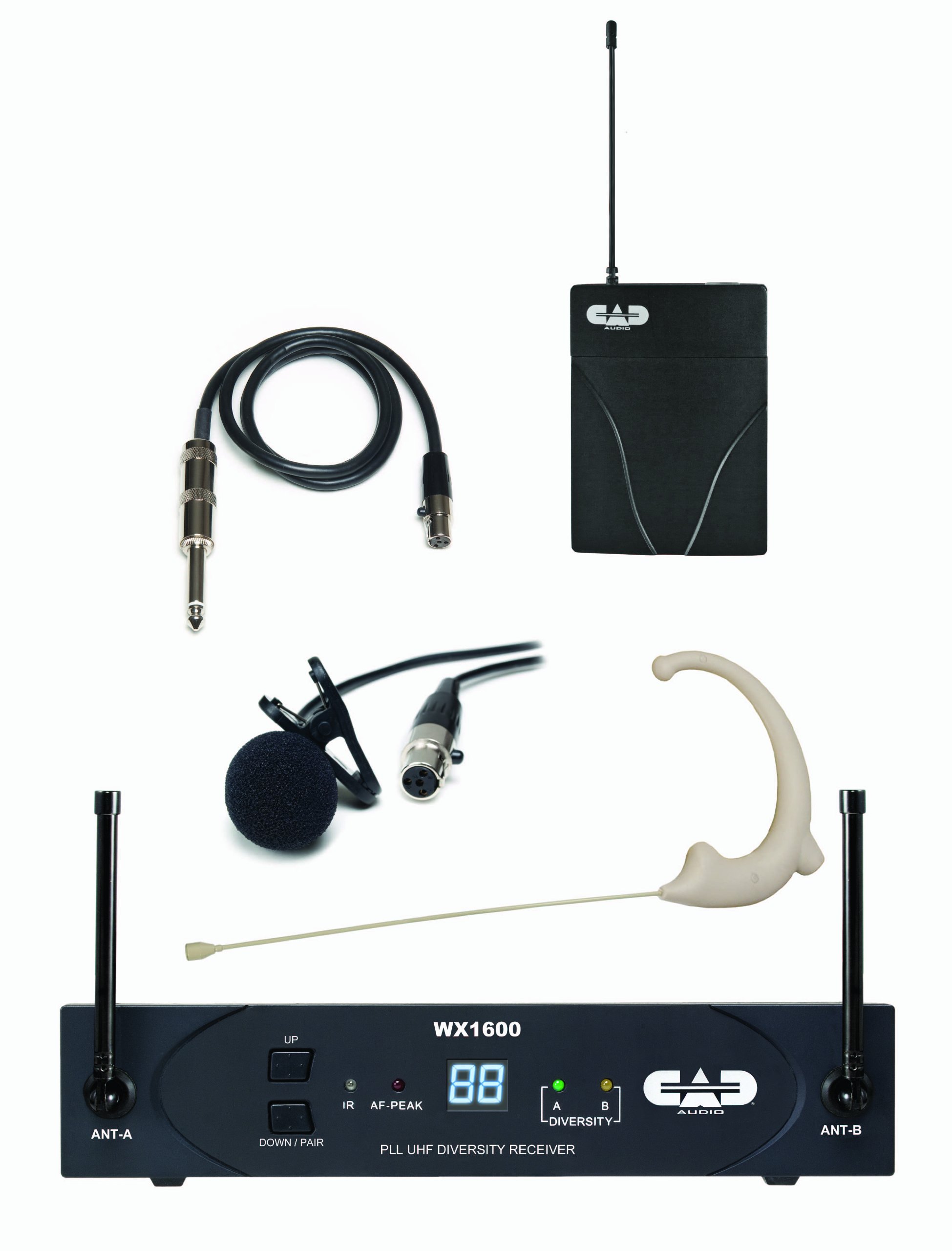
Image: The retail packaging for the CAD Audio StageSelect WX1610 Wireless Bodypack System, illustrating the components included.
Configuració
- Col·locació del receptor: Position the WX1600 receiver unit in a stable location, away from potential sources of interference (e.g., large metal objects, other wireless devices). Ensure the antennas are extended and positioned for optimal signal reception. If rack-mounting, use the provided hardware.
- Connexió d'alimentació: Connect the supplied AC power adapter to the receiver's DC input and plug it into a suitable power outlet. The receiver does not have a separate power switch; it powers on when connected.
- Sortida d'àudio: Connect the receiver's audio output (balanced XLR or unbalanced 1/4" jack) to your mixer, amplifier, or audio interface using an appropriate cable.
- Bodypack Transmitter Batteries: Open the battery compartment of the bodypack transmitter. Insert two fresh AA batteries, observing correct polarity. Close the compartment securely.
- Connexió de micròfon/instrument:
- For Earset or Lavalier Microphone: Plug the microphone's connector into the input jack on the bodypack transmitter.
- For Instrument: Connect the guitar cable to your instrument and then to the input jack on the bodypack transmitter.
- Pairing (ScanLink Technology):
The system utilizes ScanLink technology for automatic frequency selection and pairing. Follow these steps:
- On the receiver, press the "Down/Pair" button (sometimes labeled "Set/Scan" in older documentation) to initiate the scanning process. The display will flash.
- Open the battery door of the bodypack transmitter to expose the infrared (IR) node.
- Align the transmitter's IR node with the receiver's IR node (typically a small window on the front panel) within approximately 12 inches.
- The receiver will automatically set the transmitter channel. Once pairing is complete, the receiver display will stop flashing, indicating a successful link.
Instruccions de funcionament
- Encès/apagat:
- Receiver: Connect/disconnect the power supply.
- Transmitter: Use the power switch on the bodypack transmitter.
- Ajust de volum: Adjust the output volume of the receiver using the "VOL" control on the rear panel. Start with a low setting and gradually increase to avoid sudden loud audio.
- Squelch Adjustment (SQ): The system features CADLock Automatic Tone Lock Squelch to minimize unwanted interference. If you experience signal dropouts or noise, you can adjust the "SQ" control on the receiver's rear panel. Increasing the squelch level can reduce noise but may also reduce the operating range.
- Seguiment: Monitor the receiver's front panel indicators.
- RF (Radio Frequency) Indicator: Illuminates when a strong signal is received from the transmitter.
- AF (Audio Frequency) Indicator: Illuminates when audio is being transmitted.
- Battery Indicator: On the bodypack transmitter, indicates battery status. Replace batteries when low.
- Selecció de freqüència: The system offers 100 UHF channels. While ScanLink automatically selects the best channel, you can manually change channels on the receiver using the "Up" and "Down/Pair" buttons if interference is encountered. Remember to re-pair the transmitter after changing the receiver's channel.
Manteniment
- Neteja: Use a soft, dry cloth to clean the exterior surfaces of the receiver and transmitter. Do not use liquid cleaners or solvents.
- Substitució de la bateria: Replace AA batteries in the bodypack transmitter as soon as the low battery indicator appears to ensure uninterrupted performance.
- Emmagatzematge: When not in use for extended periods, remove batteries from the transmitter and store the system in a cool, dry place, preferably in its original packaging or a protective case.
- Cura de l'antena: Handle receiver antennas carefully to avoid bending or breaking.
Resolució de problemes
| Problema | Causa possible | Solució |
|---|---|---|
| Sense sortida de so |
|
|
| Interferències/Soroll |
|
|
| Durada de la bateria curta |
|
|
Especificacions
- Número de model: AMS-WX1610
- Interval de freqüència: 100 Channel UHF Agility (Specific band may vary, refer to product labeling)
- Principi de funcionament: Diversity Operation
- Suprimir: CADLock Automatic Tone Lock Squelch
- Potència del transmissor: 2 AA batteries (for bodypack)
- Potència del receptor: DC 12-15V (via included power supply)
- Receiver Output Connectors: Balanced XLR, Unbalanced 1/4"
- Dispositius compatibles: Guitar, Microphones (Earset, Lavalier)
- Tipus de material: Metal (Receiver chassis)
- Pes de l'article: Approximately 4 pounds (entire system)
- Dimensions del producte: Approximately 12.25 x 3 x 14.75 inches (packaging dimensions, actual unit dimensions may vary slightly)
Informació de la garantia
Specific warranty details for the CAD Audio StageSelect WX1610 system are typically provided with the product documentation or can be found on the official CAD Audio weblloc web. Consulteu aquests recursos per obtenir els termes i condicions de garantia més precisos i actualitzats.
Atenció al client
For technical assistance, troubleshooting beyond this manual, or service inquiries, please contact CAD Audio customer support. Contact information can usually be found on the official CAD Audio weblloc web o dins de l'embalatge del producte.
Official CAD Audio Weblloc: www.cadaudio.com