
ACTi B61
ACTi B Series B61 Video Camera User Manual
Model: B61
1. Introducció
This manual provides comprehensive instructions for the installation, operation, and maintenance of the ACTi B Series B61 Video Camera. Please read this manual thoroughly before using the product to ensure proper and safe operation.
The ACTi B61 is a 5MP Indoor Zoom Dome camera designed for surveillance applications. It features a 3x zoom lens, adaptive IR illumination, and supports H.264 video compression at 1080p/30fps. Key features include:
- 5MP Indoor Zoom Dome with Day/Night functionality
- Adaptive IR for enhanced low-light performance
- Basic Wide Dynamic Range (WDR)
- 3x Zoom Lens (3-9mm / F1.2-2.1) with DC Iris Auto Focus
- 30 frames per second at 1920 x 1080 resolution
- Reducció de soroll digital (DNR)
- Entrada/sortida d'àudio
- Micro SD HC/Micro SDXC card slot for local storage
- Power over Ethernet (PoE) or DC12V power input
- IK09 vandal resistance rating
- Digital Input/Output (DI/DO)
2. Contingut del paquet
Please verify that all items are present and in good condition upon opening the package. If any items are missing or damaged, contact your vendor immediately.
- ACTi B Series B61 Video Camera
- Mounting Template/Hardware (screws, anchors)
- Guia d'inici ràpid
- CD de programari (si escau)

Figura 1: Frontal view of the ACTi B Series B61 Video Camera. The camera is a white dome-shaped unit with a dark lens assembly visible through the clear dome cover.
3. Camera Components and Connections
Familiarize yourself with the various components and connection ports of the ACTi B61 camera.
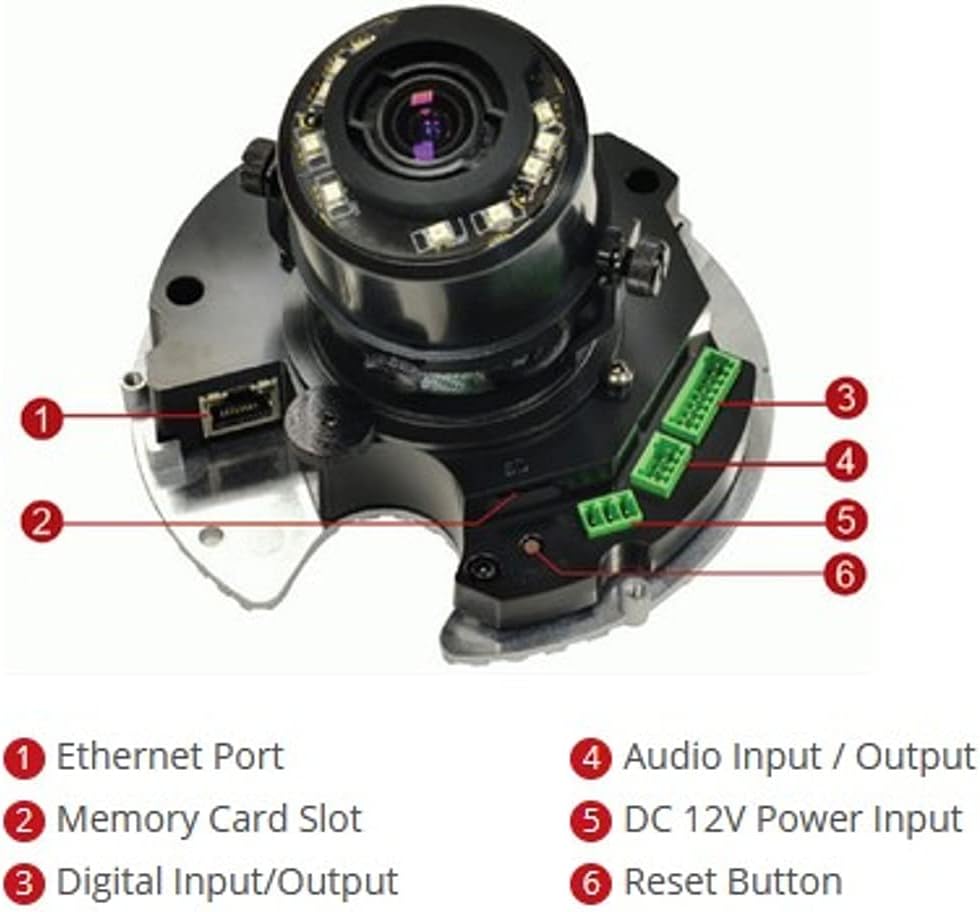
Figura 2: Intern view of the ACTi B61 camera with key components labeled.
- 1. Port Ethernet: Per a connexió de xarxa i Power over Ethernet (PoE).
- 2. Ranura per a targetes de memòria: For inserting a Micro SD HC/Micro SDXC card for local storage.
- 3. Digital Input/Output: Per connectar sensors o alarmes externes.
- 4. Entrada/Sortida d'àudio: For connecting an external microphone and speaker.
- 5. Entrada d'alimentació de 12 V CC: Entrada d'alimentació alternativa si no s'utilitza PoE.
- 6. Botó de reinici: S'utilitza per restaurar la configuració predeterminada de fàbrica.
4. Configuració i instal·lació
4.1 Muntatge de la càmera
The ACTi B61 is designed for indoor ceiling mount installation. Ensure the mounting surface is strong enough to support the camera's weight (approximately 1.58 pounds).
- Choose a suitable location on the ceiling for optimal surveillance coverage.
- Use the provided mounting template to mark the drill holes on the ceiling.
- Perforeu forats pilot i inseriu ancoratges de paret si cal.
- Secure the camera's mounting base to the ceiling using the provided screws.
- Connect necessary cables (Ethernet, power, audio, DI/DO) before fully securing the camera body.
- Adjust the camera's lens angle and zoom as needed.
4.2 Engegar la càmera
The camera can be powered via Power over Ethernet (PoE) or a 12V DC power adapter.
- PoE: Connect an Ethernet cable from a PoE-enabled switch or injector to the camera's Ethernet port (1).
- CC 12V: Connect a 12V DC power adapter (not included) to the DC 12V Power Input port (5).
Note: Do not connect both PoE and DC 12V power simultaneously.
4.3 Connexió de xarxa
Connect the camera to your network using an Ethernet cable plugged into the Ethernet Port (1). The camera will obtain an IP address automatically via DHCP by default. For initial setup, it is recommended to connect the camera to a network segment where a DHCP server is active.
While the specifications mention Wi-Fi, the primary connection method for this type of surveillance camera is typically wired Ethernet for stability and power (PoE). Refer to the camera's software manual for detailed Wi-Fi configuration if applicable.
4.4 Accés i configuració inicials
After connecting the camera to the network and powering it on, you can access its web interfície per a la configuració.
- Use the ACTi IP Utility software (typically found on the included CD or ACTi's website) to discover the camera's IP address on your network.
- Obre a web browser (e.g., Chrome, Firefox) and enter the camera's IP address in the address bar.
- Log in using the default username and password (refer to the Quick Start Guide or ACTi documentation for default credentials).
- Canvieu immediatament la contrasenya predeterminada per motius de seguretat.
- Configure network settings, video streaming parameters, recording options, and other features through the web interfície.
5. Funcionament de la càmera
5.1 Viu View i Enregistrament
Once configured, you can view the live video feed and manage recordings through the camera's web interface or compatible Network Video Recorder (NVR) software.
- Viu View: Access the "Live View" section in the web interface to see the real-time video feed.
- Gravació: Configure recording schedules, motion detection triggers, and storage locations (Micro SD card, NVR, NAS) via the "Recording" or "Event" settings.
5.2 Configuració del vídeo
Adjust video quality, resolution, frame rate, and image settings to suit your surveillance needs.
- Resolució: Supports up to 5MP effective still resolution and 1080p video capture resolution at 30 fps.
- Zoom i enfocament: Utilize the 3x optical zoom and auto-focus features to capture detailed images. These settings are typically adjusted via the web interfície.
- Mode dia/nit: The camera automatically switches between day (color) and night (black and white with IR illumination) modes based on ambient light.
5.3 Audio and I/O
If external audio devices or sensors are connected, configure their settings in the camera's web interfície.
- Àudio: Enable audio input for listening and audio output for two-way communication if supported by external devices.
- E/S digital: Configure digital inputs to trigger events (e.g., recording, alarm notification) from external sensors, and digital outputs to control external devices.
6. Manteniment
6.1 Neteja
Una neteja regular ajuda a mantenir una qualitat d'imatge òptima i allarga la vida útil de la càmera.
- Gently wipe the camera's dome cover with a soft, damp drap. Eviteu productes de neteja o dissolvents abrasius.
- For stubborn dirt, use a mild soap solution. Ensure no liquid enters the camera body.
- Clean the lens with a lens cleaning cloth and solution designed for optical surfaces.
6.2 actualitzacions de microprogramari
Periodically check the ACTi official website for firmware updates. Firmware updates can provide new features, improve performance, and address security vulnerabilities.
- Download the latest firmware for your B61 model from the ACTi support weblloc.
- Follow the instructions provided with the firmware update package for a safe upgrade process.
- Warning: Do not power off the camera during a firmware update.
7. Solució De Problemes
This section addresses common issues you might encounter with your ACTi B61 camera.
| Problema | Causa possible | Solució |
|---|---|---|
| Sense canal de vídeo |
|
|
| Mala qualitat d'imatge |
|
|
| No es pot iniciar la sessió web interfície |
|
|
For more detailed troubleshooting, refer to the comprehensive user manual available on the ACTi support website or contact ACTi technical support.
8. Especificacions
| Característica | Descripció |
|---|---|
| Model | B61 |
| Resolució de fixes efectius | 5 MP |
| Resolució de captura de vídeo | 1080p |
| Velocitat de fotogrames | 30 fps |
| Lent | 3x Zoom Lens (3-9mm / F1.2-2.1), DC Iris Auto Focus |
| Tipus de zoom | Zoom òptic |
| Tecnologia de poca llum | Night Color, Adaptive IR |
| Tecnologia de connectivitat | Wireless (Wi-Fi), Wired (Ethernet) |
| Font d'alimentació | Corded Electric (PoE/DC12V) |
| Factor de forma | Cúpula |
| Tipus de muntatge | Muntatge al sostre |
| Ús interior/exterior | Interior |
| Classificació de protecció internacional | IK09 (Vandal Resistance), IP54 |
| Dimensions (L x A x A) | 5.7 x 2 x 4.2 polzades |
| Pes de l'article | 1.58 lliures |
| Tipus de memòria flash | Micro SD HC/Micro SDXC |
| Format de captura de vídeo | H.264, MPEG-4 |
| Fabricant | ACTi CORPORATION INC. |
| Color | Blanc |
| UPC | 187441266124, 888034003507 |
9. Garantia i Suport
For detailed warranty information, technical support, and additional resources, please visit the official ACTi weblloc o poseu-vos en contacte amb el seu departament d'atenció al client.
Oficial d'ACTi Weblloc: www.acti.com
Please have your product model (B61) and serial number ready when contacting support.
Documents relacionatsB61


Ask a question about this manual
Ask about setup, troubleshooting, compatibility, parts, safety, or missing instructions. Manuals+ will review the question and use this page’s manual context to help answer it.