
1. Introducció
The PAC RP5-GM51 Radio Interface is designed to facilitate the replacement of a factory radio in specific General Motors Class II vehicles while retaining essential factory features. This interface ensures the continued functionality of the vehicle's OnStar system, warning chimes, and provides outputs for navigation radio functions.
This manual provides instructions for the proper installation, operation, and maintenance of your RP5-GM51 interface.
2. Producte acabatview
The RP5-GM51 is a RadioPro5 interface specifically designed for 2014 Chevrolet Silverado 1500 and 2014 GMC Sierra 1500 models equipped with a 29-bit GM LAN V2 Data bus, utilizing 20-pin and 16-pin harnesses. It integrates with the vehicle's electrical system to maintain critical functions after an aftermarket radio installation.
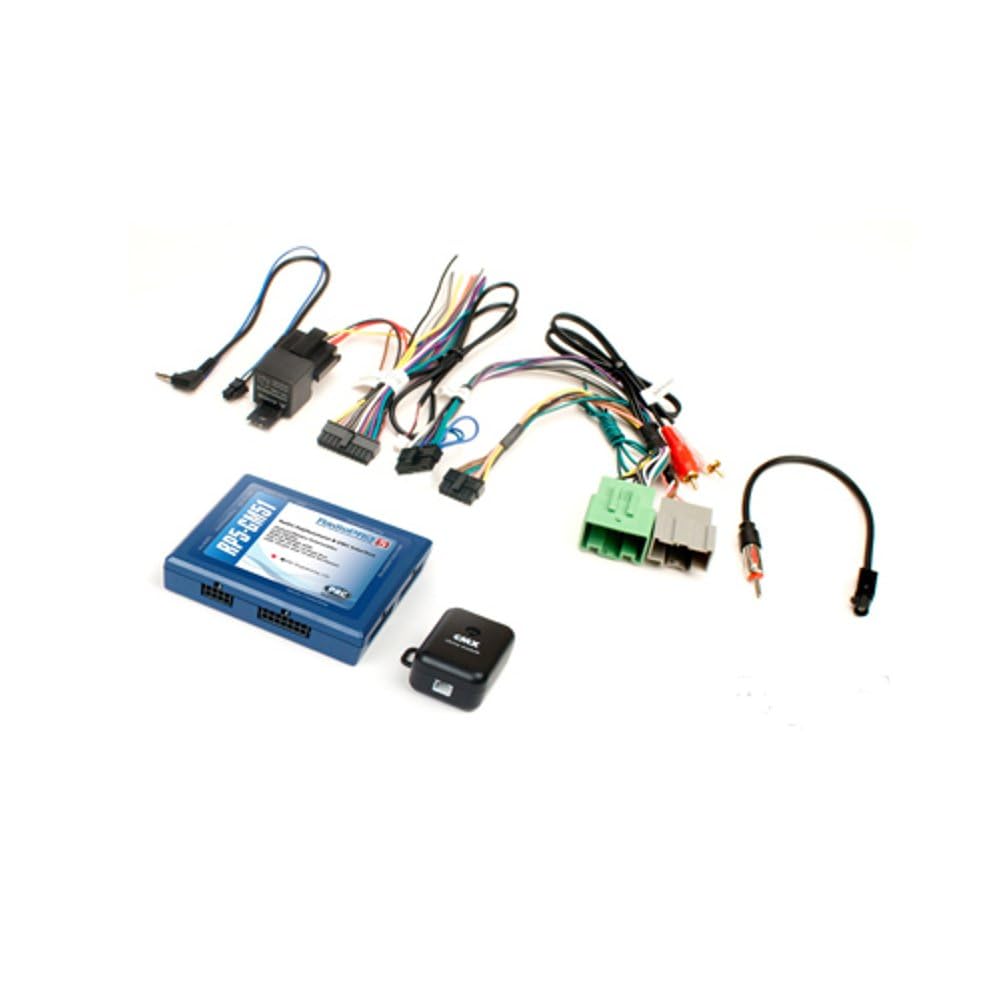
Figura 1: The PAC RP5-GM51 Radio Interface kit, including the main module, various wiring harnesses, and an antenna adapter. This kit provides all necessary components for integrating an aftermarket radio while retaining factory features.

Figura 2: A feature comparison chart highlighting capabilities of the RadioPRO 5 series, including retention of OnStar/Telematics, antenna adapter inclusion, retention of rear seat entertainment and controls, RadioPRO LINK readiness, steering wheel controls, navigation radio readiness, factory amplifier retention, and a 10 amp accessory 12-volt output. The RP5-GM51 is part of the RadioPRO 5 series.
3. Configuració i instal·lació
Installation of the PAC RP5-GM51 Radio Interface requires technical knowledge of automotive electrical systems and vehicle disassembly. It is recommended that installation be performed by a qualified professional.
3.1 Passos previs a la instal·lació
- Compatibilitat de vehicles: Confirm your vehicle is a 2014 Chevrolet Silverado 1500 or 2014 GMC Sierra 1500 with a 29-bit GM LAN V2 Data bus.
- Desconnecta la bateria: Before beginning any electrical work, disconnect the vehicle's negative battery terminal to prevent electrical shorts and damage.
- Review Esquemes de cablejat: Refer to the detailed wiring diagrams provided with the product packaging for specific connections to your aftermarket radio and vehicle harnesses.
3.2 Pautes de connexió
- Connect the RP5-GM51 module to the vehicle's 20-pin and 16-pin harnesses.
- Integrate the aftermarket radio's wiring to the RP5-GM51's output harnesses.
- Assegureu-vos que totes les connexions estiguin ben fixades i degudament aïllades per evitar curtcircuits.
- The interface provides outputs for navigation radio functions, such as parking brake, reverse, and vehicle speed sense. Connect these to your navigation-capable aftermarket radio as required.
- An antenna adapter is included in the kit for proper radio signal reception.
After all connections are made, reconnect the vehicle's battery and test all functions of the aftermarket radio and retained factory features.
4. Instruccions de funcionament
The PAC RP5-GM51 Radio Interface operates automatically once installed correctly. Its primary function is to translate vehicle data signals to allow an aftermarket radio to function seamlessly while retaining factory features.
- Retenció d'OnStar: The interface ensures that the factory OnStar system remains functional.
- Funció de timbre: All factory warning chimes (e.g., seatbelt, door ajar) are retained through the interface.
- Controls del volant: The interface is designed to retain factory steering wheel audio controls, allowing you to manage your aftermarket radio directly from the steering wheel.
- Sortides de navegació: Provides necessary signals for aftermarket navigation radios.
Refer to your aftermarket radio's user manual for specific operating instructions related to its features.
5. Manteniment
The PAC RP5-GM51 Radio Interface is designed for long-term, maintenance-free operation. The primary maintenance activity involves firmware updates.
5.1 actualitzacions de microprogramari
The interface can be updated if needed from the PAC website using a PAC-UP USB adapter (sold separately). Firmware updates may provide improved compatibility, bug fixes, or new features. Visit the official PAC weblloc web per obtenir el firmware i les instruccions més recents.
6. Solució De Problemes
If you experience issues after installing the RP5-GM51 interface, consider the following troubleshooting steps:
- Sense alimentació a la ràdio: Check all power connections to the interface and the aftermarket radio. Ensure the vehicle's battery is fully charged and properly connected.
- Sense so: Verify all speaker wire connections. Ensure the factory amplifier (if present and retained) is receiving power and signal.
- OnStar or Chimes Not Working: Double-check the specific connections related to these functions as per the wiring diagram. Ensure the interface module is receiving proper power and data signals.
- Els comandaments del volant no responen: Confirm the steering wheel control wires are correctly connected to the aftermarket radio and that the radio is configured for external steering wheel controls. Some radios may require programming.
- Problemes intermitents: Inspect all connections for looseness or corrosion. Ensure wires are not pinched or damaged.
For further assistance, refer to the detailed troubleshooting guides available on the PAC website or contact PAC technical support.
7. Especificacions
| Marca | PAC |
| Model | RP5-GM51 |
| Número de part | RP5GM51 |
| UPC | 731215043253 |
| Dimensions de l'article (L x A x A) | 6.5 x 5.9 x 1.25 polzades |
| Pes de l'article | 0.58 lliures |
| Tipus de connector | USB (per a actualitzacions) |
| Tipus de cable | USB (per a actualitzacions) |
| Diàmetre del filferro | 0.32 mil·límetres |
8. Garantia i Suport
8.1 Informació de la garantia
For detailed warranty information regarding the PAC RP5-GM51 Radio Interface, please refer to the official PAC weblloc web o la targeta de garantia inclosa amb el producte. Els termes i condicions de la garantia poden variar.
8.2 Suport tècnic
If you require technical assistance or have questions not covered in this manual, please visit the official PAC weblloc (www.pac-audio.com) for support resources, FAQs, and contact information for their technical support team.