
Introducció
This manual provides detailed instructions for setting up, operating, and maintaining your Lexmark MS312dn laser printer. Please read this guide thoroughly before using the printer to ensure optimal performance and longevity.
1. Desembalatge i configuració inicial
Carefully remove the printer from its packaging. The printer weighs approximately 14 kg (30.85 lbs). It is recommended to have assistance when lifting.

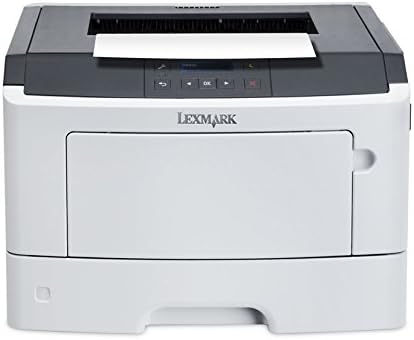
Imatge: Davant dret view of the Lexmark MS312dn laser printer, showing its compact design.
1.1 Connexió d'alimentació
Connect the power cord to the printer and then to a grounded electrical outlet. Do not connect to a power strip or extension cord during initial setup.
1.2 Connexió de xarxa i USB
The Lexmark MS312dn supports both Ethernet and USB 2.0 connectivity.
- Connexió Ethernet: Connect an Ethernet cable from your network router or switch to the Ethernet port on the printer.
- Connexió USB: Connect a USB 2.0 cable from your computer to the USB port on the printer.
1.3 Instal·lació del programari
Insert the installation CD (if provided) into your computer's CD-ROM drive, or download the latest drivers and software from the official Lexmark support weblloc. Seguiu les instruccions que apareixen a la pantalla per completar la instal·lació.
The printer supports various operating systems, including Windows, Mac, and Linux. Server operating systems such as Windows Server 2003, 2008, and 2012 are also supported.
2. Funcionament de la impressora
2.1 Tauler de control acabatview
The printer features a two-line LCD display and a control panel for easy navigation and status monitoring.

Imatge: Primer pla view of the printer's control panel, featuring the LCD screen and navigation buttons.
2.2 Càrrega de paper
The standard input capacity is 300 sheets, with a maximum input capacity of 850 sheets across multiple trays. The multi-purpose tray holds 50 sheets.
- Obriu la safata de paper.
- Ajusteu les guies del paper perquè s'ajustin a la mida del paper.
- Load the paper stack into the tray. Ensure the stack does not exceed the maximum fill line.
- Tanqueu la safata de paper.
Supported media types include plain paper, card stock, envelopes, labels, and transparencies. Standard ISO A-series sizes (A4, A5, A6) and JIS B-series sizes (B5) are supported, along with non-ISO sizes like Letter, Legal, Executive, and Folio.
Imatge: Frontal view of the Lexmark MS312dn printer with the main paper input tray extended.
2.3 Impressió de documents
The printer offers a print speed of up to 35 pages per minute (ppm) for black and white documents on A4/US Letter paper.
- Impressió estàndard: Send your document to the printer from your computer.
- Impressió a doble cara: The printer supports automatic duplex (two-sided) printing. This feature can be enabled through your printer settings on your computer.
- Impressió mòbil: The printer is compatible with Apple AirPrint for convenient printing from mobile devices.

Imatge: Superior view of the Lexmark MS312dn printer, showing the paper output tray and control panel.
2.4 Gestió de la xarxa
The Lexmark MS312dn is network-ready with Ethernet connectivity and supports Wi-Fi via optional connectivity. It features web-based management, allowing administrators to configure settings and monitor printer status remotely using supported network protocols such as HTTP, HTTPS, SNMP, DHCP, and DNS.
3. Manteniment
3.1 Substitució del cartutx de tòner
When the toner level is low, a message will appear on the printer's LCD display. Follow these steps to replace the toner cartridge:
- Obriu la coberta frontal de la impressora.
- Traieu amb cura el cartutx de tòner antic.
- Unpack the new Lexmark 501H toner cartridge (or compatible model) and gently shake it to distribute the toner.
- Introduïu el cartutx nou a la impressora fins que encaixi al seu lloc.
- Tanqueu la coberta frontal.

Image: A Lexmark 501H toner cartridge shown with its packaging, indicating the type of consumable used by the printer.
3.2 Neteja de la impressora
Una neteja regular ajuda a mantenir la qualitat d'impressió i allarga la vida útil de la impressora.
- Netegeu l'exterior de la impressora amb un drap suau i secamp, drap sense pelusa.
- Clean the paper path rollers if paper jams occur frequently. Refer to the printer's on-screen help or Lexmark support for detailed instructions.
3.3 Cicle de treball
The recommended monthly duty cycle for the Lexmark MS312dn is 500 - 2500 pages. The maximum duty cycle is 50,000 pages per month. Adhering to the recommended duty cycle helps ensure optimal printer performance and longevity.
4. Solució De Problemes
This section addresses common issues you might encounter with your Lexmark MS312dn printer.
4.1 Embussos de paper
If a paper jam occurs, the LCD display will show an error message indicating the location of the jam. Follow the on-screen instructions or consult the Lexmark support website for specific steps to clear the jam.
- Open the relevant covers and trays as indicated by the error message.
- Traieu amb cura el paper encallat, estirant-lo en la direcció de la ruta del paper per evitar que s'esquinça.
- Close all covers and trays. The printer should resume printing.
4.2 Problemes de qualitat d'impressió
If print quality is poor (e.g., streaks, faded text, smudges):
- Comproveu el nivell del cartutx de tòner i substituïu-lo si és baix.
- Assegureu-vos que feu servir els tipus de paper recomanats.
- Perform a print quality test from the printer's control panel or software to diagnose further.
4.3 Problemes de connectivitat
If the printer is not connecting to your computer or network:
- Verify that all cables (power, USB, Ethernet) are securely connected.
- Restart the printer, computer, and network router.
- Check network settings on the printer's control panel and your computer.
- Ensure the correct printer drivers are installed.
5. Especificacions tècniques
Below are the detailed technical specifications for the Lexmark MS312dn laser printer.
| Característica | Especificació |
|---|---|
| Marca | Lexmark |
| Nom del model | MS312dn |
| Tecnologia d'impressió | Làser (monocrom) |
| Resolució màxima | 1200 x 1200 DPI |
| Print Speed (Black, A4/US Letter) | 35 ppm |
| Impressió dúplex | Automàtic |
| Standard Input Capacity | 300 fulls |
| Capacitat màxima d'entrada | 850 fulls |
| Standard Output Capacity | 150 fulls |
| Freqüència del processador | 800 MHz (2-Core) |
| Memòria interna | 128 MB (Max 128 MB) |
| Connectivitat | Ethernet, USB 2.0, Optional Wireless LAN |
| Mobile Printing Technologies | Apple AirPrint |
| Mostra | LCD de 2 línies |
| Cicle de treball màxim | 50,000 pàgines al mes |
| Cicle de treball recomanat | 500 - 2500 pages per month |
| Consum d'energia (típic) | 520 W |
| Dimensions (L x P x A) | 398.7 mm x 381 mm x 261.6 mm |
| Pes | 14 kg (30.85 lliures) |
| Sistema operatiu compatible | Windows, Mac, Linux, Windows Server |
6. Garantia i Suport
For detailed warranty information, please refer to the documentation included with your printer or visit the official Lexmark website. Lexmark provides customer support and resources for troubleshooting, driver downloads, and service inquiries.
Podeu trobar més ajuda i informació de contacte a Assistència de Lexmark Weblloc.