
1. Introducció
This manual provides comprehensive instructions for the Adesso AKB-132UY Luminous Large Print Multimedia Desktop USB Keyboard. This keyboard is designed with large, high-contrast keys to enhance readability, particularly for users with visual impairments. It also integrates multimedia controls for convenience.

Figure 1: Adesso AKB-132UY Luminous Large Print Multimedia Desktop USB Keyboard. This image displays the full keyboard with its black frame and bright yellow keys, featuring large black characters.
2. Contingut del paquet
Verifiqueu que tots els elements siguin presents al paquet:
- Adesso EasyTouch 132 - Florescent Yellow Multimedia Desktop Keyboard
- Guia d'inici ràpid
3. Instruccions de configuració
3.1 Connexió del teclat
- Localitzeu un port USB disponible al vostre ordinador.
- Plug the USB connector of the Adesso AKB-132UY keyboard into the USB port.
- The operating system will automatically detect and install the necessary drivers. No additional software installation is typically required.
The keyboard is powered via the USB connection.
4. Funcionament del teclat
4.1 Característiques clau
- Fluorescent 4X Large Print Keys: The keyboard features black characters printed in a large 4X size on bright fluorescent yellow keys. This design provides high contrast for improved visibility and readability, particularly beneficial for users with visual impairments.

Figura 2: Primer pla view of the keyboard's QWERTY section, highlighting the large black characters on fluorescent yellow keys.
- Controls multimèdia: Dedicated hotkeys allow for one-touch control of media functions. These include:
- Reproductor multimèdia
- Baixa el volum
- Puja el volum
- Silenciar
- Reproduir/Pausa
- Pista anterior
- Pista següent
- Atureu-vos

Figura 3: Primer pla view of the numeric keypad and dedicated multimedia control keys located on the upper right side of the keyboard.
- Windows One-Touch Controls: Access common Windows applications directly with dedicated hotkeys:
- El meu ordinador
- Cerca
- Calculadora
- Correu
- Home (Browser)
- Favorites (Browser)
- Interruptors de clau de membrana silenciosos: The keyboard utilizes membrane key switches designed to provide a responsive and quiet typing experience. These switches are rated for a lifespan of up to five million keystrokes.
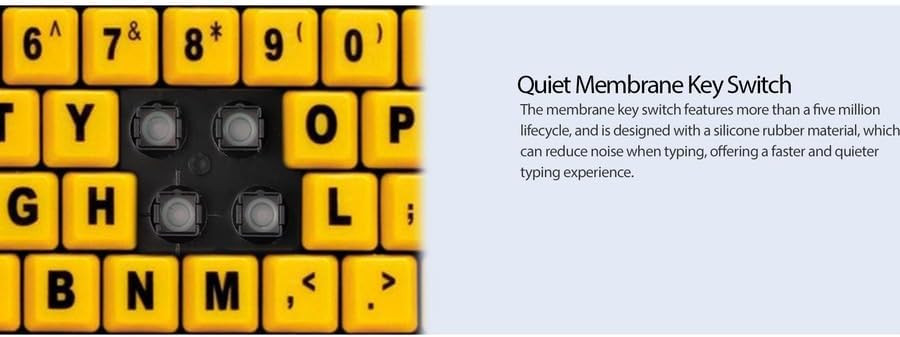
Figura 4: Detallada view showing the internal membrane key switch mechanism beneath a keycap.
- 104-Key US Layout: The keyboard features a standard 104-key US layout, providing a familiar typing experience.
5. Manteniment
5.1 Neteja del teclat
Per mantenir l'aspecte i la funcionalitat del teclat:
- Desconnecteu el teclat de l'ordinador abans de netejar-lo.
- Utilitzeu un suau, lleugerament damp cloth to wipe the surface of the keys and the keyboard body.
- For stubborn dirt or debris between keys, use compressed air or a soft brush.
- Eviteu utilitzar productes químics agressius, netejadors abrasius o humitat excessiva, ja que poden danyar l'acabat del teclat o els components interns.
6. Solució De Problemes
If you encounter issues with your Adesso AKB-132UY keyboard, refer to the following troubleshooting steps:
6.1 El teclat no respon
- Comprova la connexió USB: Ensure the keyboard's USB cable is securely plugged into a functioning USB port on your computer. Try unplugging and re-plugging the cable.
- Prova un port USB diferent: Connect the keyboard to another USB port on your computer to rule out a faulty port.
- Reinicieu l'ordinador: De vegades, un simple reinici del sistema pot resoldre els problemes de connectivitat.
- Prova en un altre ordinador: If possible, test the keyboard on a different computer to determine if the issue is with the keyboard or your computer's setup.
6.2 Keys Sticking or Not Registering
- Clean Under Keys: Dust, crumbs, or debris can get lodged under keys. Use compressed air to clear any obstructions.
- Eviteu els vessaments: Liquid spills can cause keys to stick or malfunction. If a spill occurs, disconnect the keyboard immediately and allow it to dry completely before reconnecting.
7. Especificacions
| Característica | Descripció |
|---|---|
| Marca | Adesso |
| Número de model | AKB-132UY |
| Nom del model | EasyTouch 132 |
| Tecnologia de connectivitat | USB |
| Descripció del teclat | Membrana |
| Característica especial | Large Print Keys |
| Color | Negre Groc |
| Material | Plàstic |
| Nombre de claus | 104 |
| Disposició del teclat | QWERTY (disseny dels EUA) |
| Font d'alimentació | Alimentació USB |
| Pes de l'article | 1.5 lliures |
| Dispositius compatibles | PC |
8. Informació de la garantia
The Adesso AKB-132UY keyboard comes with a Garantia limitada d'1 any from the date of purchase. This warranty covers defects in materials and workmanship under normal use. For specific terms and conditions, please refer to the warranty card included in your package or visit the official Adesso weblloc.
9. Suport
For technical support, product registration, or additional information, please visit the official Adesso weblloc a www.adesso.com. You may also find FAQs and driver downloads on their support pages.