
Introducció
This manual provides comprehensive instructions for the safe and efficient operation of your TekPower TP1863 Regulated DC Power Supply. The TP1863 is designed to deliver a stable 13.8V DC output with a current capacity of 10-12A, suitable for various electronic devices such as Ham/CB radios and amplifiers. Please read this manual thoroughly before use and retain it for future reference.
Informació de seguretat
ADVERTIMENT: Failure to follow these safety instructions may result in electric shock, fire, or damage to the product or connected devices.
- Ensure the power supply is connected to a grounded 110V AC 60Hz outlet.
- No exposeu la unitat a la pluja o la humitat.
- No obriu la c.asing; no hi ha peces a l'interior que l'usuari pugui reparar. Demaneu totes les tasques de manteniment a personal qualificat.
- Assegureu-vos una ventilació adequada al voltant de la unitat per evitar el sobreescalfament.
- Desconnecteu l'alimentació abans de fer o canviar les connexions als terminals de sortida.
- No supereu el corrent de sortida màxim de 12 A.
Contingut del paquet
Verifiqueu que tots els elements siguin presents al paquet:
- TekPower TP1863 Power Supply Unit
- Manual d'usuari (aquest document)
- Targeta de registre de garantia
Producte acabatview
The TekPower TP1863 features a robust metal enclosure and a straightforward design for reliable power delivery.

Figura 1: Davant i superior View of the TP1863 Power Supply. This image displays the main body of the power supply, highlighting its black metal casing and the ventilation grilles on the top surface, designed for heat dissipation.
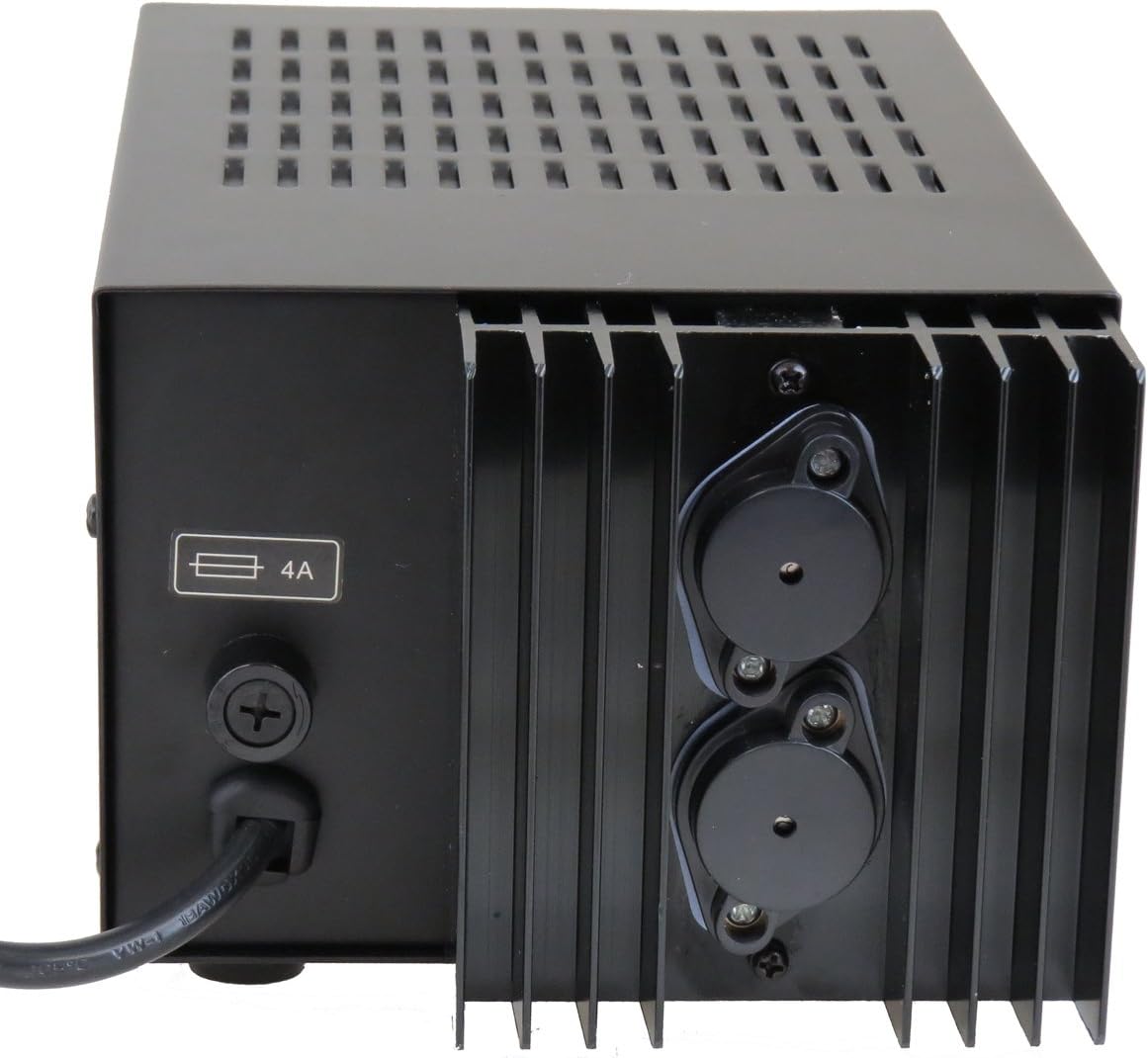
Figura 2: Rear Panel of the TP1863 Power Supply. This view shows the rear of the unit, including the AC power cord input, the fuse holder labeled '4A', and the two large binding posts for DC output connections.

Figura 3: lateral View of the TP1863 Power Supply. This image illustrates the side of the power supply, featuring additional ventilation slots and a label indicating its country of manufacture.
Configuració
- Col·locació: Place the power supply on a stable, flat surface, ensuring adequate clearance around all ventilation openings for proper airflow. Avoid placing it near heat sources or in direct sunlight.
- Connexió d'alimentació CA: Connect the supplied AC power cord to the AC input connector on the rear panel of the TP1863. Plug the other end of the power cord into a standard 110V AC 60Hz grounded wall outlet.
- DC Output Connection:
- Identify the positive (+) and negative (-) output terminals on the rear panel.
- Connect the positive lead from your device to the red (+) terminal and the negative lead to the black (-) terminal. Ensure connections are secure to prevent arcing or poor contact.
- Verify that your device's power requirements do not exceed 13.8V DC and 12A.
Instruccions de funcionament
- Encès: After all connections are made and verified, locate the power switch (typically on the front or rear panel, depending on model revision) and switch it to the 'ON' position. The power indicator light should illuminate.
- Funcionament del dispositiu: Once the power supply is active, you can power on your connected device. The TP1863 will provide a stable 13.8V DC output.
- Apagar: To turn off the power supply, switch the power switch to the 'OFF' position. Disconnect your device from the power supply if it will not be used for an extended period.
Manteniment
- Neteja: Keep the unit clean by wiping it with a soft, dry cloth. Do not use liquid cleaners or solvents. Ensure ventilation openings are free from dust and debris.
- Substitució de fusibles: The TP1863 is equipped with fuse protection. If the unit fails to power on or provide output, the fuse may need replacement.
- Disconnect the power supply from the AC outlet.
- Locate the fuse holder on the rear panel (refer to Figure 2).
- Carefully unscrew the fuse holder cap.
- Remove the old fuse and replace it with a new fuse of the same type and rating (4A, 250V, slow-blow type is typically used for power supplies).
- Securely screw the fuse holder cap back into place.
- Reconnect the power supply to the AC outlet and test. If the fuse blows again, discontinue use and contact support.
Resolució de problemes
| Problema | Causa possible | Solució |
|---|---|---|
| La unitat no s'encén. | No AC power; Blown fuse; Faulty power cord. | Check AC outlet and power cord connection. Replace fuse if blown (see Maintenance section). Try a different power cord. |
| Sense sortida de CC. | Loose output connections; Overload; Internal fault. | Ensure output leads are securely connected. Reduce load on the power supply. If problem persists, contact support. |
| La unitat s'sobreescalfa. | Ventilació insuficient; Càrrega excessiva. | Ensure clear airflow around the unit. Reduce the connected load. |
Especificacions
| Potència d'entrada | 110V CA 60Hz |
| Vol. De sortidatage | DC 13.8V (Fixed) |
| Corrent de sortida | 10A - 12A (Max) |
| Ripple Voltage | <= 30mV |
| Protecció contra fusibles | Sí (4A) |
| Dimensions (L x A x A) | 10 x 5.5 x 4.3 polzades (aprox.) |
| Pes | 9 lliures (aprox.) |
| Material de tancament | Metall |
Informació de la garantia
The TekPower TP1863 Regulated DC Power Supply comes with a 1 Year USA warranty. This warranty covers defects in materials and workmanship under normal use. Please refer to the Warranty Registration Card included in your package for full terms and conditions, and instructions on how to register your product.
Suport
For technical assistance, warranty claims, or further inquiries, please contact TekPower customer support. You may also visit the official TekPower store for additional product information and resources.
TekPower Official Store: Visit TekPower Store