
1. Introducció
Gràcies per la compraasing the TekPower TP3010E DC Adjustable Switching Power Supply. This high-quality, stable power supply is designed for various laboratory and industrial applications, providing continuously adjustable output from 0-30V DC and 0-10A. It features a large LCD display for precise voltage and current readings and includes an 8A fuse for protection. Please read this manual thoroughly before operation to ensure safe and efficient use of the device.
Important Note: This power supply is not designed for use in electroplating or anodizing applications.
2. Informació de seguretat
Per evitar descàrregues elèctriques, incendis o danys a la unitat, observeu les següents precaucions de seguretat:
- Always connect the power supply to a properly grounded AC outlet.
- No feu funcionar la unitat en llocs humits o secs.amp condicions.
- Assegureu-vos que hi hagi una ventilació adequada al voltant de la unitat. No bloquegeu les obertures de ventilació.
- No obriu la c.asing de la font d'alimentació. No hi ha peces a l'interior que l'usuari pugui reparar. Demaneu totes les tasques de manteniment a personal qualificat.
- Before making any connections or disconnections, ensure the power supply is turned off and disconnected from the AC mains.
- Verifiqueu el vol d'entradatage matches the power supply's requirements (110V for this model).
- Avoid short-circuiting the output terminals for extended periods.
- Keep the unit away from flammable materials and explosive gases.
3. Producte acabatview
The TekPower TP3010E is a compact and efficient DC switching power supply. Below are the key components and controls.
3.1 Controls i indicadors del tauler frontal

Figure 3.1: Front Panel of the TP3010E Power Supply.
This image displays the front panel of the TekPower TP3010E. Visible components include the large LCD digital display at the top, below which are four rotary knobs for adjusting voltage and current. The top two knobs are labeled "VOLTAGE" (Coarse and Fine adjustments), and the bottom two are labeled "CURRENT" (Coarse and Fine adjustments). At the bottom left is the "ON/OFF" rocker switch. To the right of the switch are the output terminals: a red positive (+) terminal and a black negative (-) terminal.
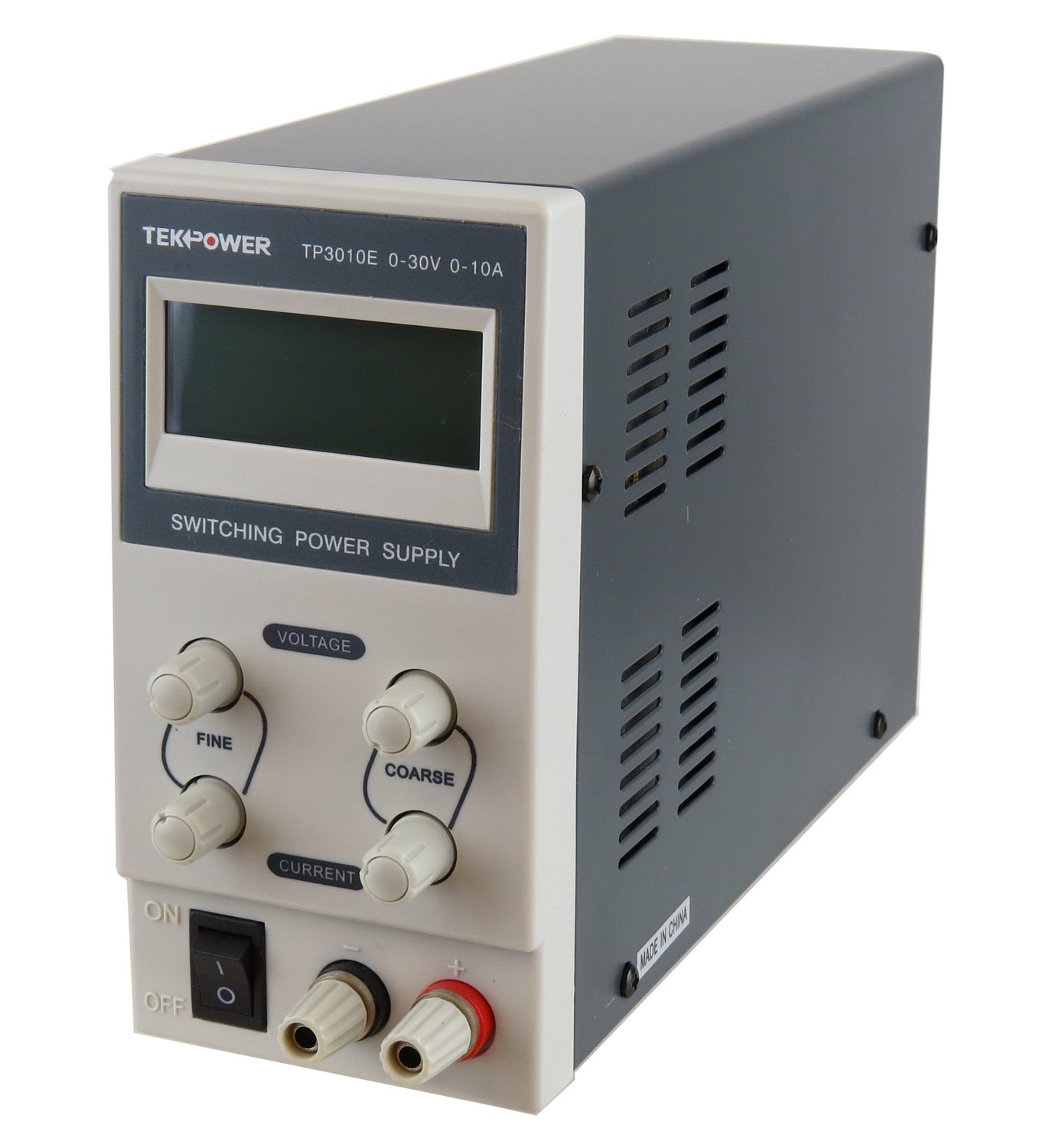
Figure 3.2: Illuminated Display of the TP3010E Power Supply.
This image shows the front panel of the TekPower TP3010E with its LCD display illuminated. The display clearly shows digital readings for voltage (V) and current (A), along with indicators for Constant Voltage (C.V) and Constant Current (C.C) modes. The voltage and current adjustment knobs, and the power switch are also visible, similar to Figure 3.1, but with the unit powered on.
- Pantalla digital LCD: Mostra el volum en temps realtage i sortida de corrent.
- Voltage Adjustment Knobs (Coarse/Fine): S'utilitza per ajustar el volum de sortida desitjattage.
- Current Adjustment Knobs (Coarse/Fine): Used to set the desired output current limit.
- Interruptor d'alimentació (ON/OFF): Controla l'alimentació principal de la unitat.
- Output Terminals (+/-): Connect your load here. Red for positive, black for negative.
3.2 Components del panell posterior

Figure 3.3: Rear Panel of the TP3010E Power Supply.
This image displays the rear panel of the TekPower TP3010E. Prominently featured is a circular cooling fan grille in the upper center. Below the fan, there is an IEC C14 power inlet socket for the AC power cord, and to its right, a fuse holder with an 8A fuse indicated. A label provides operation instructions for the radiator fan, stating it will cool automatically when the temperature exceeds 50 degrees Celsius.
- Ventilador de refrigeració: Automatically activates when the internal temperature exceeds 50°C to dissipate heat.
- Entrada d'alimentació de CA: Connects the power supply to the mains electricity using the provided power cord.
- Portafusibles: Contains an 8A fuse for overcurrent protection.
- Etiqueta del número de sèrie: Displays the unit's unique serial number.
4. Configuració
Follow these steps to set up your TekPower TP3010E power supply:
- Desembalatge: Carefully remove the power supply and all accessories from the packaging. Verify that all components are present: the TP3010E unit, power cord, and user manual.
- Col·locació: Place the unit on a stable, level surface with adequate ventilation. Ensure that the front and rear panels, especially the cooling fan, are not obstructed.
- Connexió d'alimentació:
- Ensure the power switch on the front panel is in the "OFF" position.
- Connect the provided AC power cord to the AC power input socket on the rear panel of the power supply.
- Plug the other end of the AC power cord into a grounded 110V AC outlet.
- Comprovació inicial: Before connecting any load, turn the power switch to "ON". The LCD display should illuminate and show voltage and current readings. Turn the voltage and current knobs to observe changes in the display. Then, turn the power switch to "OFF".

Figure 4.1: TP3010E Unit with Included Accessories.
This image shows the TekPower TP3010E power supply unit alongside its included accessories. These include the AC power cord (black, three-prong plug), a set of red and black output cables with banana plugs on one end and alligator clips on the other, and the user manual. This illustrates the typical contents of the product package.
5. Instruccions de funcionament
The TP3010E operates in two modes: Constant Voltage (CV) and Constant Current (CC). The unit automatically switches between these modes depending on the load and the set voltage/current limits.
5.1 Configuració Voltage i Límits de corrent
- Encès: Ensure no load is connected to the output terminals. Turn the power switch to "ON".
- Set Voltage: Adjust the "VOLTAGE COARSE" knob to set the approximate desired voltage. Use the "VOLTAGE FINE" knob for precise adjustments. The LCD will display the set voltage.
- Set Current Limit (Pre-setting):
- Turn the "CURRENT COARSE" knob fully counter-clockwise (to minimum current).
- Momentarily short-circuit the output terminals using a test lead (connect positive to negative). The "C.C" indicator on the display should light up, and the current display will show the current limit.
- Adjust the "CURRENT COARSE" and "CURRENT FINE" knobs to set the desired maximum current limit for your application.
- Remove the short-circuit from the output terminals. The "C.V" indicator should light up, and the current display will drop to zero or near zero.
- Connectar càrrega: Connect your device or circuit to the output terminals (red to positive, black to negative).
- Funcionament: The power supply will now deliver the set voltage up to the set current limit. If the load draws more current than the set limit, the unit will switch to Constant Current (CC) mode, and the output voltage will drop to maintain the set current. If the load draws less current, it will operate in Constant VoltagMode e (CV).
5.2 Apagat
Before turning off the power supply, it is recommended to disconnect the load first, especially if the load is sensitive to voltage decay. The power supply's output voltage may decay slowly after the power switch is turned off due to internal capacitor discharge.
- Disconnect the load from the output terminals.
- Turn the power switch to "OFF".
- Unplug the AC power cord from the wall outlet if the unit will not be used for an extended period.
6. Manteniment
- Neteja: Feu servir un drap suau i sec per netejar l'exterior de la unitat. No utilitzeu productes de neteja abrasius ni dissolvents.
- Ventilació: Regularly check that the ventilation openings and the cooling fan on the rear panel are free from dust and obstructions. Use compressed air to clear dust if necessary.
- Substitució de fusibles: If the unit fails to power on, check the 8A fuse located in the fuse holder on the rear panel.
- Ensure the power supply is disconnected from the AC mains.
- Carefully remove the fuse holder cap.
- Replace the blown fuse with a new fuse of the same type and rating (8A).
- Securely replace the fuse holder cap.
- Emmagatzematge: When not in use for long periods, store the power supply in a cool, dry place, away from direct sunlight and extreme temperatures.
7. Solució De Problemes
| Problema | Causa possible | Solució |
|---|---|---|
| La unitat no s'encén. | No AC power; Blown fuse; Faulty power cord. | Check AC outlet and power cord connection. Replace 8A fuse if blown. |
| Display goes blank or flickers. | Internal transient condition; Loose internal connection (rare). | Turn off the unit, wait a few seconds, then turn it back on. If persistent, contact support. |
| Sense sortida voltage / actual. | Output terminals not connected; Voltage/current knobs set to zero; Unit in CC mode with no load. | Ensure load is connected. Adjust voltage/current knobs. Check if the unit is in CV mode (C.V indicator lit) when no load is present. |
| Volum de sortidatage drops significantly under load. | Unit is in Constant Current (CC) mode; Load resistance too low for set current. | Increase the current limit setting. Ensure the load's current draw does not exceed the power supply's maximum output (10A). |
| Cooling fan is running constantly or loudly. | High internal temperature; Fan obstruction. | Ensure adequate ventilation. Clear any obstructions from the fan grille. This is normal operation if the unit is under heavy load. |
8. Especificacions
| Paràmetre | Valor |
|---|---|
| Vol. De sortidatage | 0-30V CC (ajustable) |
| Corrent de sortida | 0-10A (Ajustable) |
| Entrada Voltage | 110 V AC |
| Voltage Regulation (CV) | <= 0.02% + 10mV |
| Load Regulation (CV) | <= 0.02% + 5mV |
| Ripple Noise (CV) | <= 100mVp-p |
| Protecció | Current Limit, 8A Fuse |
| Entorn de funcionament | 0-40 °C, Relative Humidity <80% |
| Dimensions (L x A x A) | 9 x 3.4 x 6.3 polzades (aprox. 22.86 x 8.64 x 16.0 cm) |
| Pes | 4 lliures (aprox. 1.81 kg) |
| Mètode de refrigeració | Air (Automatic Fan) |
9. Garantia i Suport
The TekPower TP3010E DC Adjustable Switching Power Supply comes with a 1-year basic warranty from the date of purchase. This warranty covers defects in materials and workmanship under normal use.
For warranty claims, technical support, or service inquiries, please contact TekPower customer service. Please have your product model number (TP3010E) and serial number ready when contacting support.
Conserveu el comprovant de compra per validar la garantia.