
Introducció
The Movo VXR500 is a professional-grade stereo condenser microphone designed for recording high-quality audio directly to DSLR cameras, camcorders, and audio recorders. Its robust metal construction and advanced features make it suitable for various video production environments. This manual provides comprehensive instructions for the proper setup, operation, and maintenance of your VXR500 microphone.
Configuració
1. Instal·lació de la bateria
The VXR500 microphone requires one 9V battery for operation (not included). To install the battery:
- Localitzeu el compartiment de la bateria a la part inferior del cos del micròfon.
- Carefully slide the battery cover away from the microphone body until it opens. Note that the cover may require some finesse to open.
- Introduïu una pila nova de 9 V, assegurant-vos de la polaritat correcta.
- Tanqueu la tapa de la bateria fent-la lliscar de nou al seu lloc fins que sentiu un clic.

Image: The Movo VXR500 microphone with its battery compartment open, showing where to insert the 9V battery.
2. Muntatge del micròfon
The VXR500 can be mounted on a camera's hot shoe or any 1/4-inch thread mount.
- Attach the microphone's integrated shock mount to your camera's hot shoe by sliding it in and tightening the fastening wheel. Ensure it is secure to prevent wobbling.
- Alternatively, the shock mount features a 1/4-inch thread for mounting on tripods, light stands, or other compatible accessories.
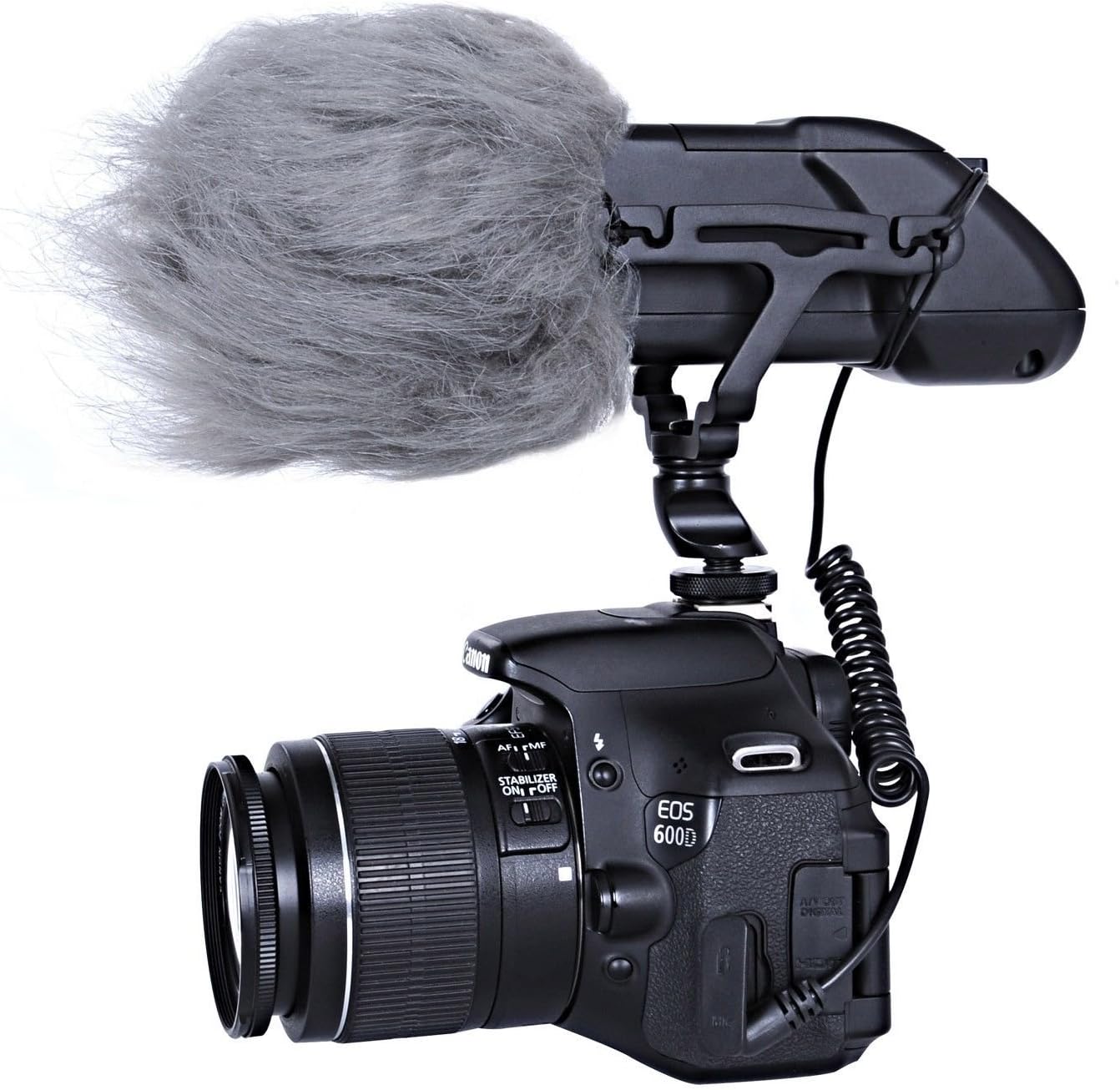
Image: The Movo VXR500 microphone securely mounted on a Canon DSLR camera, demonstrating typical camera attachment.
3. Connexió al vostre dispositiu
Connect the microphone to your recording device using the integrated 3.5mm coiled cable.
- Plug the 3.5mm TRS connector from the microphone's coiled cable into the microphone input jack on your DSLR camera, camcorder, or audio recorder.
- Ensure the connection is firm to avoid audio interruptions.

Image: The Movo VXR500 microphone showing its coiled 3.5mm cable, ready for connection to a recording device.
Instruccions de funcionament
1. Encès / apagat
After battery installation, locate the power switch on the rear of the microphone. Slide the switch to the "ON" position to power on the microphone. A visible light indicator will illuminate to confirm the microphone is active. Slide the switch to "OFF" when not in use to conserve battery life.
2. Filtre de pas alt (HPF)
The VXR500 features a selectable high-pass filter at 80Hz (12 dB/octave). This filter helps to reduce low-frequency noise such as air conditioners, traffic, or wind rumble, which can interfere with your audio recording. To activate the high-pass filter, slide the HPF switch to the "80Hz" position. For full frequency response, set the switch to the "FLAT" position.
3. Obtenir el control
Adjust the microphone's output gain using the switches on the rear panel. You can select between -10dB, 0dB, and +10dB settings. Adjusting the gain allows you to optimize the audio signal level for your recording device, preventing distortion or ensuring a strong enough signal.

Imatge: Una imatge detallada view of the rear panel of the Movo VXR500 microphone, highlighting the power switch, high-pass filter (HPF) switch, and gain control switches.
Manteniment
1. Neteja
To maintain the microphone's performance and appearance, wipe the body with a soft, dry cloth. Avoid using harsh chemicals or abrasive cleaners. Keep the microphone grille free from dust and debris.
2. Cura de la bateria
Remove the 9V battery if the microphone will not be used for an extended period to prevent battery leakage and potential damage to the device.
3. Wind Protection
For outdoor recording or in windy conditions, use the included outdoor wind muff (dead cat) to minimize wind noise. This accessory slides over the microphone's grille.

Image: The Movo VXR500 microphone with the included dead cat wind muff installed, demonstrating its use for wind noise reduction.
Resolució de problemes
- No Audio or Low Audio Level:
- Ensure the 9V battery is correctly installed and has sufficient charge.
- Verify the microphone is powered on (check the indicator light).
- Confirm the 3.5mm cable is securely connected to both the microphone and the recording device's microphone input.
- Check the gain settings on the microphone and the input level settings on your camera/recorder. Adjust as necessary.
- If your camera's preamps are weak, consider using an external audio recorder or preamp.
- Excessive Noise or Hiss:
- Activate the high-pass filter (HPF) to reduce low-frequency ambient noise.
- Ensure the microphone is not picking up excessive handling noise; the shock mount is designed to mitigate this.
- If recording outdoors, use the included wind muff.
- Comproveu si hi ha interferències electromagnètiques d'altres dispositius electrònics.
- Wobbly Mount:
- Ensure the fastening wheel on the hot shoe mount is tightened completely.
- Periodically check the rubber bands on the shock mount for wear and tear; replace if necessary.
Especificacions
| Característica | Detall |
|---|---|
| Principi acústic | Gradient de pressió |
| Patró direccional | Súper cardioide |
| Resposta de freqüència | 38Hz-20kHz with Selectable high-pass filter @ 80Hz 12 dB/octave |
| Impedància de sortida | 2200 ohms |
| Sensibilitat | -38dB +/- 2dB @ 1kHz |
| Soroll equivalent | 20 dB SPL |
| Interval dinàmic | 115 dB SPL |
| SPL màxim | 135 dB SPL |
| Relació senyal/soroll | 75 dB |
| Requisits d'alimentació | Bateria de 9 V |
| Pes | 470 g |
| Material | Metall, Zinc |
| Tecnologia de connectivitat | Wired (3.5mm TRS) |
| Tipus de connector | Jack TRS de 3.5 mm |
| Dispositius compatibles | DSLR Cameras, Camcorders, Audio Recorders |
Informació de la garantia
The Movo VXR500 microphone comes with a 1 anys de garantia. This warranty covers manufacturing defects and ensures the product performs as intended under normal use. Please retain your proof of purchase for warranty claims.
Atenció al client
For any questions, technical assistance, or warranty inquiries regarding your Movo VXR500 microphone, please contact Movo's friendly US-Based customer support team. Contact information can typically be found on the official Movo weblloc web o a través de la vostra plataforma de compra.