
Introducció
This manual provides comprehensive instructions for the installation, operation, and maintenance of your Balboa Water Group 53189-01 Topside Control Panel. This panel is designed to operate 7 functions: Auxiliary, Mode, Jet 1, Jet 2, Light, Warm, and Cool. It is compatible with various Balboa circuit boards, including 52295-01, 52518, 54175-02, 52320-01, 52076, 54122, 50768, 50759, 51414, 51512, 51536, and 54372-03. Please read these instructions carefully before installation and use to ensure proper function and longevity of your product.
Configuració i instal·lació
The Balboa Water Group 53189-01 Topside Control Panel is designed for straightforward installation, often described as "plug and play." It utilizes a standard phone-type connector for easy integration with compatible spa systems.
Passos d'instal·lació:
- La seguretat primer: Before beginning any installation, ensure that the power to your hot tub or spa system is completely disconnected at the main breaker.
- Elimina el panell antic: Carefully remove the existing topside control panel from its housing. Note how it is connected.
- Desconnecteu el cablejat: Disconnect the phone-type connector from the main control board.
- Connect New Panel: Connect the new Balboa 53189-01 panel's phone-type connector to the corresponding port on your spa's main control board. Ensure a secure connection.
- Munta el panell nou: Place the new control panel into the designated opening, ensuring it fits snugly. Secure it in place according to your spa's design (e.g., with adhesive backing or mounting clips, if applicable).
- Restaura l'alimentació: Once the panel is securely installed and all connections are verified, restore power to your hot tub system.
- Funcionalitat de prova: Power on the spa and test all buttons and display functions to ensure proper operation.
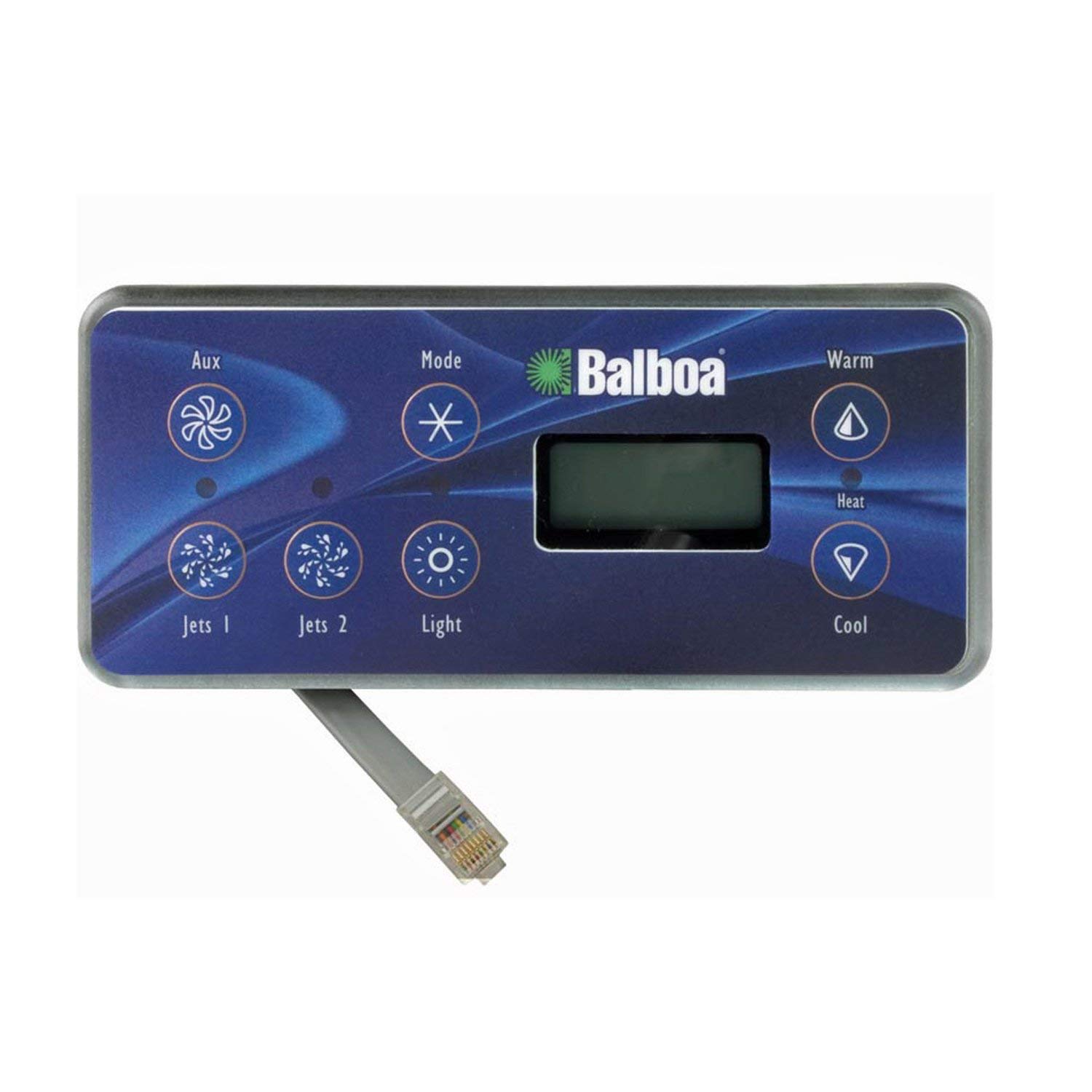
Image: Balboa Water Group 53189-01 Topside Control Panel. This image displays the control panel with its seven buttons (Aux, Mode, Jets 1, Jets 2, Light, Warm, Cool) and a digital display. The panel measures approximately 7.4 inches wide and 3.3 inches tall, and features a phone-type connector cable extending from the bottom left.
Instruccions de funcionament
The 53189-01 control panel features seven distinct buttons for managing your spa's functions. Familiarize yourself with each button's purpose for optimal use.
- Auxiliary (Aux): Activates or deactivates an auxiliary function, such as a blower or an additional pump, depending on your spa's configuration.
- Mode: Cycles through different operating modes (e.g., Standard, Economy, Sleep). Each mode has specific heating and filtration schedules. Refer to your spa's main system manual for detailed mode descriptions.
- Jet 1: Controls the primary jet pump. Press once to turn on low speed (if applicable), press again for high speed, and a third time to turn off.
- Jet 2: Controls the secondary jet pump. Functions similarly to Jet 1.
- Llum: Turns the spa's internal lighting system on or off. Multiple presses may cycle through different light modes or colors if your spa is equipped with such features.
- Warm (Up Arrow): Increases the desired water temperature setting.
- Cool (Down Arrow): Decreases the desired water temperature setting.
The digital display will show the current water temperature or the set temperature when adjusted. It may also display error codes or mode indicators.
Manteniment
Proper maintenance of your topside control panel ensures its longevity and reliable performance.
- Neteja: Regularly wipe the panel surface with a soft, damp cloth. Avoid abrasive cleaners, solvents, or harsh chemicals, as these can damage the display and button overlays.
- Protecció: Keep the panel free from direct sunlight for extended periods if possible, and protect it from extreme weather conditions to prevent degradation of materials.
- Inspeccions: Periodically check the cable and connector for any signs of wear, damage, or corrosion. Ensure the panel remains securely mounted.
Resolució de problemes
Si teniu problemes amb el tauler de control, consulteu els problemes i solucions més comuns següents:
| Problema | Causa possible | Solució |
|---|---|---|
| Panel is unresponsive or buttons require multiple presses. | Loose connection, internal panel fault, or debris under buttons. |
|
| Display flickers or freezes. | Loose connection, power fluctuation, or internal display fault. |
|
| Specific buttons (e.g., Mode, Jet, Light) do not work. | Button malfunction, internal circuit issue, or main control board fault. |
|
| No power to the control panel. | No power to the spa, disconnected cable, or main control board failure. |
|
For persistent issues or complex problems, it is recommended to contact a qualified spa technician or Balboa Water Group customer support.
Especificacions
- Número de model: 53189-01 (VL701S)
- Dimensions del panell: 7.4 inches (18.8 cm) Wide x 3.3 inches (8.4 cm) Tall
- Longitud del cable: Seven Foot Cable (approx. 2.1 meters)
- Tipus de connector: Phone Plug Connector
- Configuració del botó: 7-Button (Auxiliary, Mode, Jet 1, Jet 2, Light, Warm, Cool)
- Compatible Circuit Boards: 52295-01, 52518, 54175-02, 52320-01, 52076, 54122, 50768, 50759, 51414, 51512, 51536, 54372-03
- Pes de l'article: 14.4 unces (0.41 kg)
Informació de la garantia
Balboa Water Group products typically come with a manufacturer's warranty, often for a period of one year from the date of purchase. This warranty generally covers defects in materials and workmanship under normal use.
Consideracions importants:
- Warranty terms may vary; always refer to the specific warranty documentation provided with your purchase.
- Customers are typically responsible for all shipping costs associated with warranty claims.
- A service fee may apply if the manufacturer determines the issue is not covered under warranty.
- Unauthorized repairs or modifications may void the warranty.
Conserveu el comprovant de compra per a qualsevol reclamació de garantia.
Atenció al client
For further assistance, technical support, or warranty inquiries, please contact Balboa Water Group directly or the authorized dealer from whom you purchased the product. Have your model number (53189-01) and proof of purchase ready when contacting support.
Sovint podeu trobar informació de contacte a la pàgina oficial del fabricant website or through your product documentation.