
TPC UC400
Manual d'usuari del netejador ultrasònic TPC UC400
Model: UC400
1. Introducció
Gràcies per triar el netejador ultrasònic TPC UC400. Aquest manual proporciona informació essencial per al funcionament, manteniment i resolució de problemes segurs i eficients del vostre netejador ultrasònic. Llegiu atentament aquest manual abans de fer servir el dispositiu i conserveu-lo per a futures consultes. L'UC400 està dissenyat per a aplicacions de neteja professionals, utilitzant ones sonores d'alta freqüència per crear bombolles de cavitació que netegen suaument però eficaçment diversos articles.
2. Informació de seguretat
Observeu sempre les següents precaucions de seguretat per evitar lesions o danys a la unitat.
- No feu funcionar la unitat sense líquid al dipòsit. El funcionament en sec pot danyar el transductor.
- Assegureu-vos que la unitat estigui col·locada sobre una superfície estable i plana, allunyada de fonts de calor i de la llum solar directa.
- No submergiu la unitat principal en aigua ni altres líquids. Només el dipòsit està dissenyat per a líquids.
- Desendolleu sempre la unitat abans de netejar, omplir o buidar el dipòsit.
- Feu servir només solucions de neteja recomanades per a netejadors ultrasònics. Eviteu solucions inflamables, corrosives o abrasives.
- Mantenir fora de l'abast dels nens.
- No toqueu el dipòsit ni la solució durant el funcionament, ja que es poden escalfar.
- Si la unitat mostra signes de danys, no la feu funcionar. Poseu-vos en contacte amb personal de servei qualificat.
3. Producte acabatview
El netejador ultrasònic TPC UC400 compta amb un dipòsit i una tapa d'acer inoxidable resistents, dissenyats per a una neteja eficient i completa.
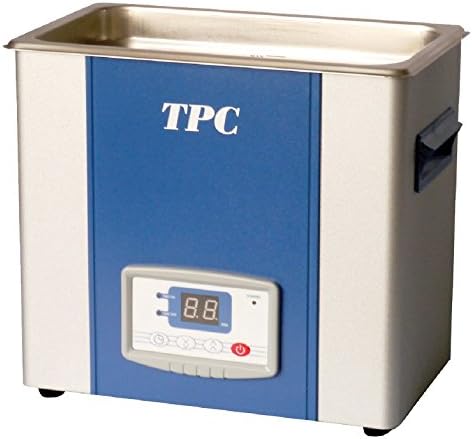
Figura 1: Netejador ultrasònic TPC UC400. Aquesta imatge mostra el disseny compacte del netejador ultrasònic, amb un dipòsit d'acer inoxidable a la part superior, un panell frontal blau amb el logotip "TPC" i un panell de control digital amb pantalla i botons a la part inferior. Les nanses són visibles als costats.
Components:
- Tanc d'acer inoxidable: Conté la solució de neteja i els articles que s'han de netejar.
- Coberta d'acer inoxidable: Redueix el soroll i evita les esquitxades durant el funcionament.
- Tauler de control: Disposa d'una pantalla digital per a la configuració de temps i temperatura, juntament amb botons de control.
- Cable d'alimentació: Per connectar la unitat a una presa de corrent.
- Vàlvula de desguàs: Situat a la part inferior per facilitar el buidatge del dipòsit.
4. Configuració
- Desembalatge: Traieu amb cura el netejador ultrasònic del seu embalatge. Inspeccioneu-lo per si hi ha signes de danys. Conserveu l'embalatge per a futurs transports o emmagatzematges.
- Col·locació: Col·loqueu la unitat sobre una superfície ferma, anivellada i seca. Assegureu-vos que hi hagi una ventilació adequada al voltant de la unitat. No la col·loqueu a prop de fonts de calor ni sota la llum solar directa.
- Connexió d'alimentació: Assegureu-vos que l'interruptor d'alimentació estigui en la posició OFF. Connecteu el cable d'alimentació a una presa de corrent amb connexió a terra i el voltatge correcte.tage (vegeu les especificacions).
- Omplir el dipòsit: Obriu la tapa i ompliu el dipòsit d'acer inoxidable amb la solució de neteja adequada. No supereu la línia d'ompliment MÀX. Assegureu-vos que els articles que s'han de netejar estiguin completament submergits però no toquin directament el fons del dipòsit. Feu servir una cistella si en teniu.
5. Instruccions de funcionament
- Encès: Connecteu la unitat i engegueu l'interruptor principal. La pantalla digital s'il·luminarà.
- Estableix el temps de neteja: Feu servir els botons "Temps" del tauler de control per configurar la durada de neteja desitjada. Els cicles de neteja típics oscil·len entre 5 i 15 minuts, depenent dels elements i del nivell de contaminació.
- Temperatura configurada (si escau): Si el vostre model té una funció d'escalfament, utilitzeu els botons "Temp" per configurar la temperatura desitjada de la solució. Escalfar la solució pot millorar l'eficiència de la neteja per a determinades aplicacions. Deixeu temps perquè la solució arribi a la temperatura configurada.
- Comença a netejar: Premeu el botó "Inici/Atura" per iniciar el procés de neteja per ultrasons. La unitat emetrà un brunzit d'alta freqüència.
- Durant l'operació: Mantingueu la tapa tancada durant el funcionament per minimitzar el soroll i evitar esquitxades. No toqueu el dipòsit ni la solució.
- Fi de cicle: La unitat s'aturarà automàticament quan s'acabi el temps configurat. També podeu prémer el botó "Inici/Atura" per aturar manualment el procés en qualsevol moment.
- Eliminar elements: Obriu la tapa amb cura. Feu servir guants o una cistella per treure els articles netejats del dipòsit. Esbandiu els articles a fons amb aigua neta si cal i eixugueu-los.
- Apagar: Apagueu l'interruptor principal i desendolleu la unitat de la presa de corrent.
6. Manteniment
Un manteniment regular garanteix la longevitat i el rendiment òptim del vostre netejador ultrasònic.
- Drenatge del dipòsit: Després de cada ús o quan la solució estigui visiblement bruta, buideu el dipòsit utilitzant la vàlvula de drenatge.
- Neteja del dipòsit: Esbandiu el dipòsit amb aigua neta. Per a residus resistents, utilitzeu un drap suau i un netejador suau i no abrasiu. No utilitzeu productes químics agressius ni esponges abrasives.
- Neteja exterior: Netegeu l'exterior del bloc amb l'anunciamp drap. No ruixeu aigua directament sobre el tauler de control ni sobre la unitat principal.
- Substitució de la solució: Feu servir sempre una solució de neteja neta per obtenir resultats òptims. No reutilitzeu solucions molt contaminades.
- Emmagatzematge: Quan no l'utilitzeu, assegureu-vos que la unitat estigui neta, seca i emmagatzemada en un lloc fresc i sec.
7. Solució De Problemes
| Problema | Causa possible | Solució |
|---|---|---|
| La unitat no s'encén. | No hi ha alimentació; cable d'alimentació no connectat; interruptor apagat. | Comproveu la presa de corrent; assegureu-vos que el cable d'alimentació estigui ben connectat; engegueu l'interruptor. |
| Sense acció ultrasònica (sense brunzit). | Dipòsit buit; unitat no engegada; transductor defectuós. | Ompliu el dipòsit amb la solució; premeu el botó "Inici"; contacteu amb el servei tècnic si el problema persisteix. |
| Mals resultats de neteja. | Solució incorrecta; temps de neteja insuficient; dipòsit sobrecarregat; solució massa freda. | Feu servir la solució de neteja adequada; augmenteu el temps de neteja; reduïu la càrrega; deixeu que la solució s'escalfi. |
| La unitat s'sobreescalfa. | Funcionament prolongat; ventilació insuficient. | Deixeu que la unitat es refredi; assegureu-vos que hi hagi una ventilació adequada al voltant de la unitat. |
8. Especificacions
| Característica | Detall |
|---|---|
| Model | UC400 |
| Marca | TPC |
| Pes de l'article | 24 lliures |
| Formulari d'article | Coberta i dipòsit d'acer inoxidable amb desguàs soldat |
| Usos específics per al producte | La tecnologia Sweep garanteix una eficiència de neteja excepcional |
| Recompte d'unitats | 1.0 recompte |
| Nombre d'articles | 1 |
9. Garantia i Suport
Per obtenir informació sobre la garantia, assistència tècnica o consultes de servei, poseu-vos en contacte amb el vostre distribuïdor autoritzat de TPC o visiteu el lloc web oficial de TPC. weblloc web. Si us plau, tingueu a mà el número de model (UC400) i la data de compra quan us poseu en contacte amb el servei d'assistència.
Nota: Les declaracions sobre els suplements dietètics no han estat avaluades per la FDA i no tenen com a objectiu diagnosticar, tractar, curar o prevenir cap malaltia o afecció mèdica. Aquest producte està pensat per a aplicacions de neteja professional.
Documents relacionatsUC400


Ask a question about this manual
Ask about setup, troubleshooting, compatibility, parts, safety, or missing instructions. Manuals+ will review the question and use this page’s manual context to help answer it.