
Pentax K-S1
Pentax K-S1 SLR Lens Kit Instruction Manual
Model: K-S1
Your guide to operating and maintaining your Pentax K-S1 SLR Camera.
1. Configuració
Before you begin using your Pentax K-S1 camera, please follow these steps to ensure proper setup and functionality.
1.1 Instal·lació de la bateria
The Pentax K-S1 uses a Lithium Ion battery. Ensure the battery is fully charged before first use. Open the battery compartment cover located at the bottom of the camera body. Insert the battery with the correct orientation, aligning the contacts. Close the cover securely until it clicks into place.
1.2 Fixació de la lent
To attach the DA L 18-55 mm lens, align the red dot on the lens barrel with the red dot on the camera's lens mount. Gently push the lens into the mount and turn it clockwise until it clicks into place. To remove the lens, press the lens release button on the camera body and turn the lens counter-clockwise.
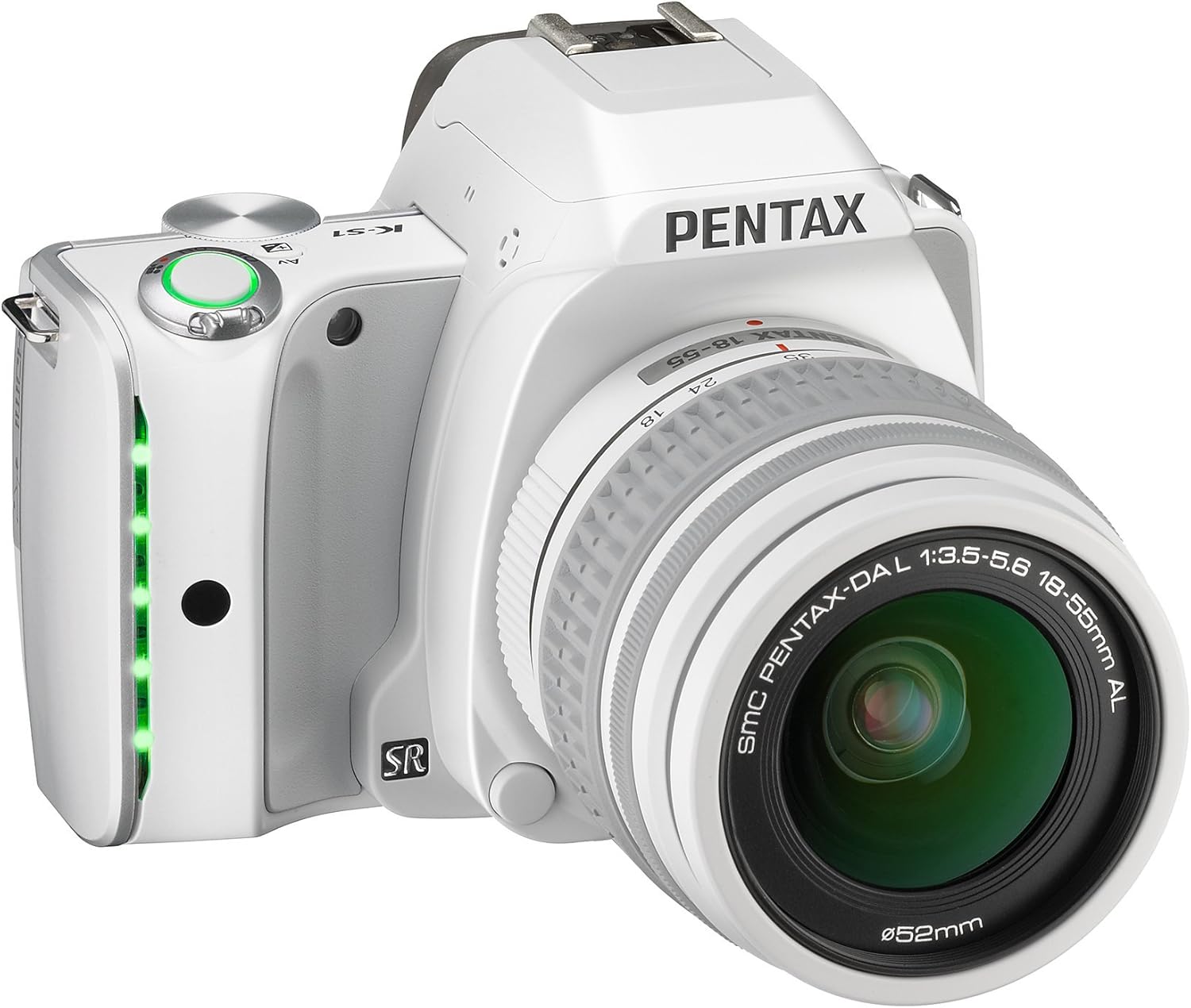
Figura 1: Angle view of the Pentax K-S1 SLR Camera with the DA L 18-55mm Lens attached. This image shows the compact body design and the lens in its default position.
2. Funcionament de la càmera
The Pentax K-S1 offers a range of features for both novice and experienced photographers. Familiarize yourself with the controls and settings to capture stunning images.
2.1 Fotografia bàsica
Turn the camera on using the power switch. Select your desired shooting mode using the mode dial. For beginners, the 'Auto Pict' mode (green camera icon) is recommended as it automatically optimizes settings for various scenes. Press the shutter button halfway to focus, then press fully to take a picture.

Figura 2: Frontal view of the Pentax K-S1 SLR Camera with the DA L 18-55mm Lens. This view highlights the lens and the camera's grip.
2.2 Funcions avançades
The K-S1 includes advanced features for enhanced photographic control:
- 20 MP APS-C CMOS Sensor: Ofereix imatges d'alta resolució amb un detall excel·lent.
- Body Illumination Interface: Innovative LED indicator lamps in the grip and lighted camera controls for intuitive operation.
- 5.4 frames per second continuous shooting: Capture fast-moving subjects with ease.
- ISO Speeds up to 51200: Enables clear images in very low light conditions.
- In-body Shake Reduction: Works with all K-mount lenses to minimize blur from camera shake.
- AA Filter Simulator (SR unit): Provides moiré reduction without sacrificing sharpness.
- Eye-Fi and FLU Card Compatibility: For wireless image transfer.
- Full 1080p h.264 HD video recording: Grava vídeos d'alta definició.
- In-body RAW development & HDR shooting: Process RAW files and create High Dynamic Range images directly in the camera.
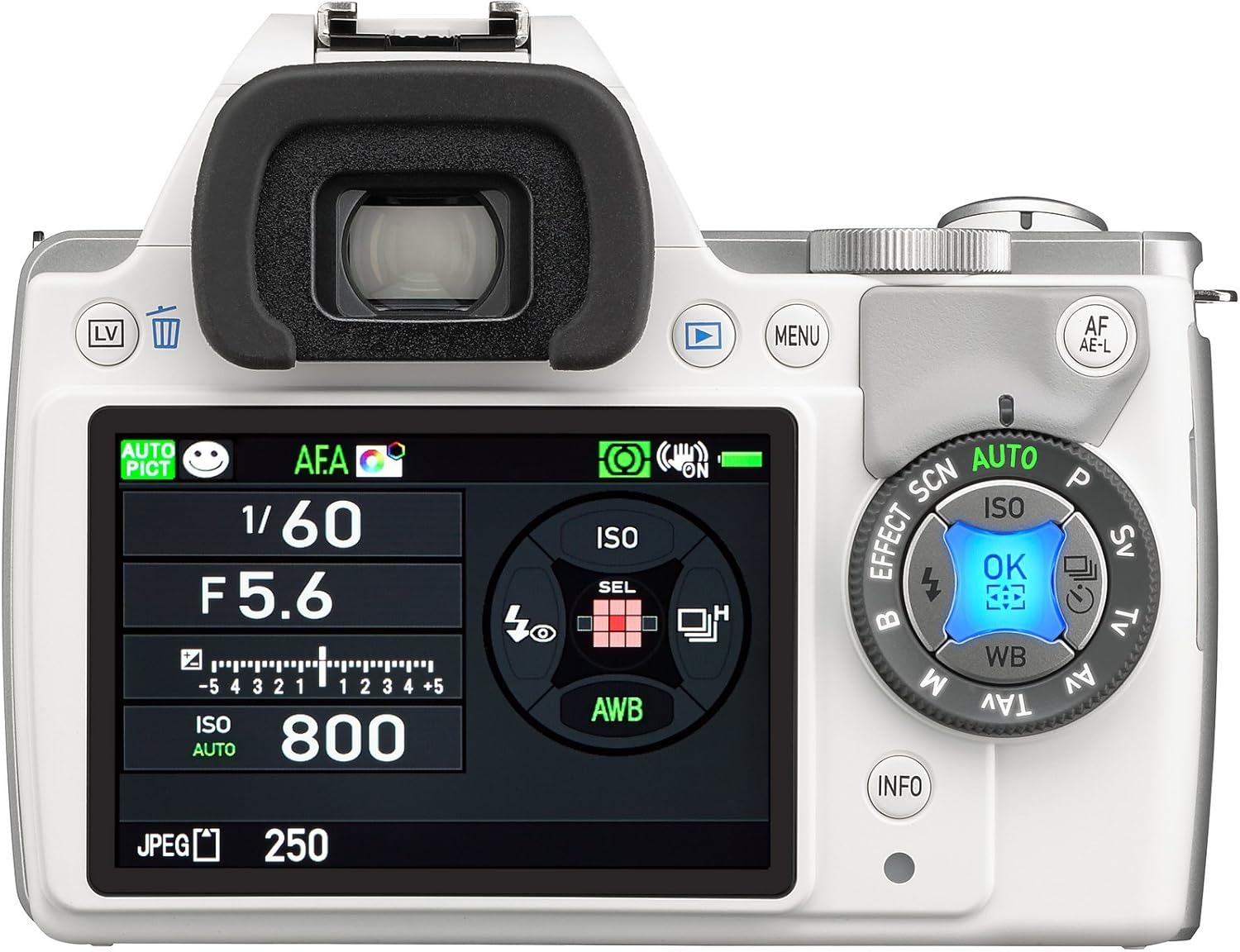
Figura 3: posterior view of the Pentax K-S1 SLR Camera, displaying the LCD screen with exposure settings and the surrounding control dials for quick adjustments.

Figura 4: superior view of the Pentax K-S1 SLR Camera, illustrating the mode dial, shutter button, and hot shoe for external flash units.
3. Manteniment
Proper maintenance ensures the longevity and optimal performance of your Pentax K-S1 camera.
3.1 Neteja de la càmera i l'objectiu
- Feu servir un drap suau i sense borrissol per netejar el cos de la càmera. Per a la brutícia persistent, netegeu lleugeramentampen el drap amb aigua.
- Per a la lent, feu servir un raspall per eliminar la pols i, a continuació, netegeu suaument amb un drap de microfibra. Eviteu tocar la superfície de la lent amb els dits.
- Never use organic solvents (e.g., paint thinner, alcohol) to clean the camera or lens.
3.2 Emmagatzematge
When not in use, store the camera in a cool, dry, and well-ventilated place, away from direct sunlight and high humidity. Remove the battery if the camera will not be used for an extended period.
4. Solució De Problemes
If you encounter issues with your Pentax K-S1, refer to the common problems and solutions below.
- La càmera no s'encén: Ensure the battery is charged and correctly inserted. Check if the battery contacts are clean.
- No es poden fer fotos: Check if the memory card is inserted and has sufficient free space. Ensure the lens is properly attached and the focus mode is set correctly.
- Les imatges són borroses: Verify that the lens is clean. Check focus settings and ensure the Shake Reduction feature is enabled if shooting handheld in low light.
- El flaix no es dispara: Check flash mode settings. Ensure the flash is not obstructed.
- LCD screen is blank: Press the DISP button to cycle through display modes. Check battery level.
Per a problemes més complexos, poseu-vos en contacte amb l'atenció al client.
5. Especificacions
Detailed technical specifications for the Pentax K-S1 SLR Lens Kit.
| Característica | Especificació |
|---|---|
| Marca | Pentax |
| Nom del model | K-S1 |
| Número de model | Pentax K-S1 SLR Lens Kit |
| Resolució del sensor fotogràfic | 20 MP |
| Mida del sensor fotogràfic | APS-C |
| Estabilització d'imatge | Òptic |
| Muntatges compatibles | Pentax KAF |
| Distància focal màxima | 55 mm |
| Zoom òptic | 3 x |
| Apertura màxima | 3.5 f |
| ISO Màxim ampliat | 51200 |
| Mida de la pantalla | 3 polzades |
| Resolució de vídeo | FHD 1080p |
| Pes de l'article | 1.2 lliures |
| Tecnologia de connectivitat | USB, Wi-Fi |
6. Garantia i Suport
Your Pentax K-S1 SLR Lens Kit comes with a manufacturer's warranty. Please refer to the warranty card included in your product packaging for specific terms and conditions.
For technical support, service, or warranty claims, please visit the official Pentax weblloc web o poseu-vos en contacte amb el seu departament d'atenció al client. Mantingueu a mà el comprovant de compra quan contacteu amb el servei d'assistència.
Online resources, including FAQs and software updates, may also be available on the Pentax support weblloc.
Ask a question about this manual
Ask about setup, troubleshooting, compatibility, parts, safety, or missing instructions. Manuals+ will review the question and use this page’s manual context to help answer it.