
GeoVision GV-FE5302
Geovision GV-FE5302 5MP H.264 WDR Fisheye IP Camera User Manual
Model: GV-FE5302
Introducció
This manual provides detailed instructions for the installation, operation, and maintenance of the GeoVision GV-FE5302 5MP H.264 WDR Fisheye IP Camera. The GV-FE5302 is an indoor fisheye camera designed for comprehensive surveillance, offering a wide field of view and advanced monitoring capabilities.
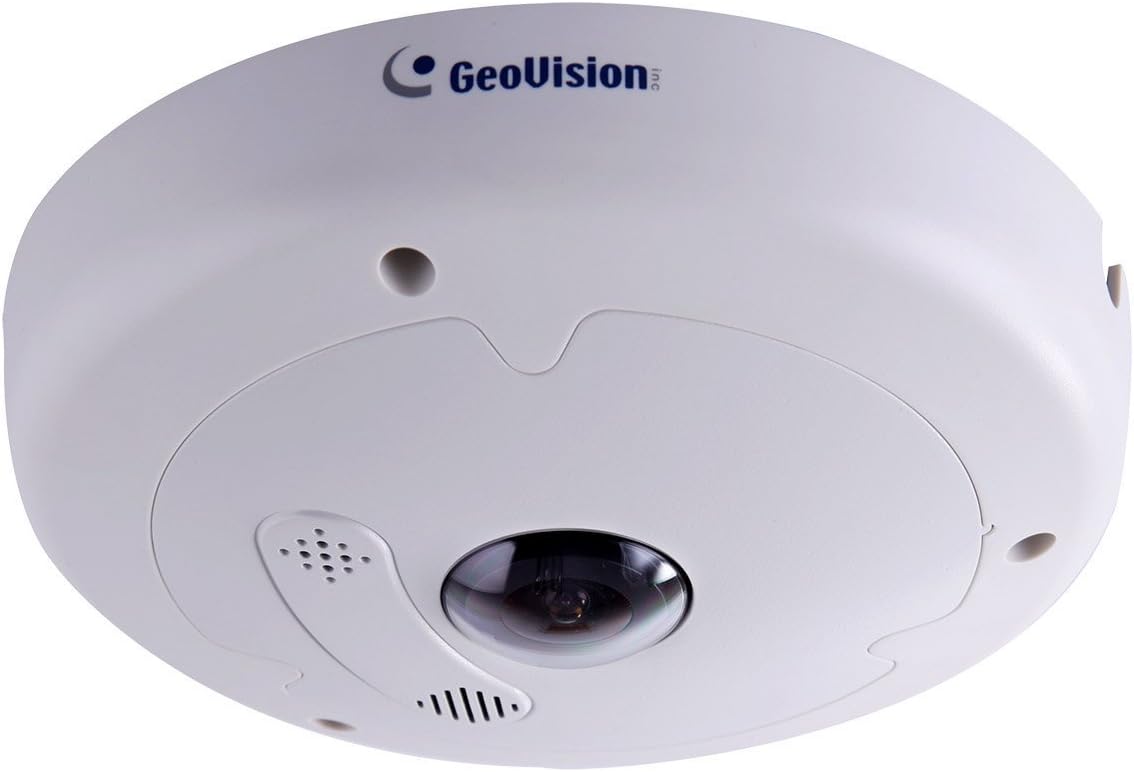
Imatge: Frontal view of the Geovision GV-FE5302 Fisheye IP Camera, showing its dome shape and central lens.
Característiques clau
- Imatges d'alta resolució: 1/2.5" progressive scan CMOS sensor, 5MP effective video resolution, up to 10 fps at 2560 x 1920.
- Dual Streaming: Supports H.264 and MJPEG dual streams.
- Funcionalitat de dia i nit: Equipped with a removable IR-cut filter for optimal performance in varying light conditions.
- Durabilitat: Vandal resistance (IK10+ for metal casing).
- Alimentació per Ethernet (PoE+): IEEE 802.3at compliant for simplified installation.
- Emmagatzematge local: Built-in micro SD card slot (SD/SDHC) for local recording.
- Capacitats d'àudio: Built-in microphone and speaker for two-way audio.
- Ampli rang dinàmic (WDR): Enhances image quality in high-contrast lighting.
- Advanced Surveillance Features: Motion detection, privacy mask, alert notification, digital object tracking, defog, tampering alarm, virtual PTZ, auto pan function, visual automation, text overlay.
- Connectivitat: ONVIF (Profile S) conformant, Wi-Fi support via Mini USB slot for WiFi Adapter.
- Flexible Viewing: Provides 360° and 180° panorama views, with different angles accessible by multiple users simultaneously.
Configuració i instal·lació
The GV-FE5302 camera is designed for indoor use and can be mounted on ceilings or walls. Ensure proper power and network connectivity during installation.
1. Opcions de muntatge
La càmera admet tant el muntatge al sostre com a la paret. Trieu una ubicació que proporcioni el camp de visió desitjat. view i està a l'abast de connexions elèctriques i de xarxa.
- Muntatge al sostre: Ideal for 360° panoramic views of a room.
- Muntatge en paret: Suitable for 180° panoramic views along a wall.

Image: Geovision GV-FE5302 camera mounted on a ceiling, providing an overhead view.

Image: Geovision GV-FE5302 camera mounted on a wall, capturing a wide horizontal view.
2. Connexió d'alimentació i xarxa
The camera supports Power over Ethernet Plus (PoE+, IEEE 802.3at), allowing both power and data to be transmitted over a single Ethernet cable. Alternatively, it can be powered via an AC/DC adapter (not included) and connected to a network via Ethernet or Wi-Fi (using a compatible Wi-Fi adapter in the Mini USB slot).
- Connect an Ethernet cable from a PoE+ enabled switch or injector to the camera's Ethernet port.
- If not using PoE+, connect a compatible AC/DC power adapter to the camera's power input and an Ethernet cable to a network switch or router.
- For Wi-Fi connectivity, insert a compatible Wi-Fi adapter into the Mini USB slot and configure network settings via the web interfície.
3. Configuració Inicial
Accedir a la càmera web interfície utilitzant a web browser. Refer to the GeoVision documentation for default IP addresses and login credentials. From the web interface, you can configure network settings, video parameters, motion detection zones, and other advanced features.
Funcionament de la càmera
The GV-FE5302 offers versatile monitoring options through its web interface and integration with GV-System software.
1. Fisheye De-warping and Viewmodes
The camera captures a hemispherical fisheye image, which can be de-warped into conventional rectilinear projections for easier viewing. Multiple viewEls modes d'ing estan disponibles:
- Fisheye Source Image: The raw, undistorted hemispherical view captat per la càmera.
- Solter View: A de-warped, rectilinear view focusing on a specific area.
- Panorama 180° View: A wide, horizontal view, typically used when the camera is wall-mounted.
- Panorama 360° View: A full circular panoramic view, ideal for ceiling-mounted cameras.
- Quad View: Divides the screen into four sections, each showing a different de-warped perspective.
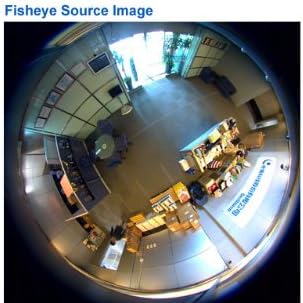
Imatge: Example of the raw fisheye source image captured by the camera, showing a wide, circular field of view.

Image: A de-warped single view, focusing on a specific area within the camera's field of vision.

Image: A de-warped 180-degree panoramic view, suitable for monitoring along a wall.
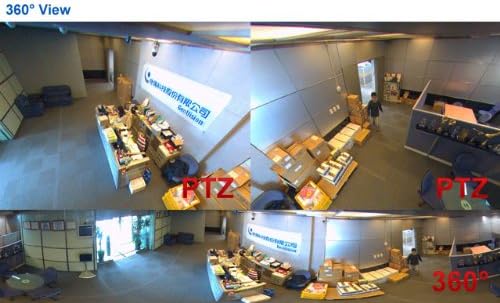
Image: A de-warped 360-degree panoramic view, providing a complete overview of a circular area.
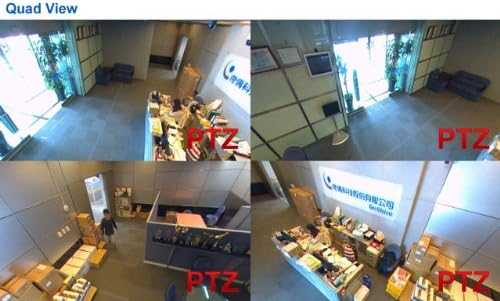
Image: A quad view display, showing four different de-warped perspectives simultaneously from the fisheye camera.
2. Funcions avançades
- Virtual PTZ: Pan, Tilt, and Zoom digitally within the fisheye image without mechanical movement.
- Auto Pan: Configure the camera to automatically cycle through different viewangles d'ajust.
- Detecció de moviment: Set up detection zones to trigger recording or alerts when movement is detected.
- Màscara de privadesa: Mask out specific areas within the camera's view to protect privacy.
- Notificació d'alerta: Receive notifications via email or other methods when events like motion detection or tampering alarms are triggered.
- Àudio bidireccional: Utilize the built-in microphone and speaker for communication.
Manteniment
Regular maintenance ensures optimal performance and longevity of your GV-FE5302 camera.
- Neteja: Gently clean the camera lens and housing with a soft, dry cloth. Avoid abrasive cleaners.
- Actualitzacions de firmware: Periodically check the GeoVision website for firmware updates to ensure the camera has the latest features and security patches.
- Seguretat de la xarxa: Ensure your network is secure and change default passwords for the camera's web interfície.
- Condicions ambientals: Operate the camera within its specified temperature and humidity ranges.
Resolució de problemes
This section addresses common issues you might encounter with the GV-FE5302 camera.
- Sense canal de vídeo:
- Check power connection and ensure the camera is receiving power (PoE+ or AC/DC adapter).
- Verify network cable connection and ensure the network is operational.
- Confirmeu que l'adreça IP i la configuració de xarxa de la càmera siguin correctes.
- Restart the camera and the network switch.
- Mala qualitat d'imatge:
- Netegeu la lent de la càmera per detectar qualsevol pols o taques.
- Check lighting conditions; ensure sufficient illumination or proper WDR settings.
- Adjust video resolution and frame rate settings in the web interfície.
- No es pot accedir Web Interfície:
- Assegureu-vos que l'ordinador estigui al mateix segment de xarxa que la càmera.
- Verify the camera's IP address.
- Disable any firewall or antivirus software temporarily to check for interference.
- Try resetting the camera to factory defaults (refer to GeoVision documentation for procedure).
Especificacions
| Característica | Detall |
|---|---|
| Número de model | GV-FE5302 |
| Sensor d'imatge | CMOS d'escaneig progressiu d'1/2.5" |
| Resolució de vídeo efectiva | 5 MP (2560 x 1920) |
| Velocitat de fotogrames | Fins a 10 fps a 2560 x 1920 |
| Compressió de vídeo | H.264, MJPEG |
| Tecnologia de connectivitat | Wireless (Wi-Fi via USB), Wired (Ethernet) |
| Protocol de connectivitat | ONVIF (Profile S), Wi-Fi |
| Font d'alimentació | PoE+ (IEEE 802.3at), AC/DC |
| Tipus de muntatge | Muntatge al sostre, muntatge a la paret |
| Camp de View | 360 graus (ull de peix) |
| Emmagatzematge local | Built-in micro SD card slot (SD/SDHC) |
| Àudio | Built-in microphone and speaker (Two-way audio) |
| Característiques especials | Motion Sensor, WDR, Defog, Tampering Alarm, Virtual PTZ, Auto Pan, Privacy Mask, Digital Object Tracking |
| Resistència vàndal | IK10+ (for metal casing) |
| Classificació de protecció internacional | IP67 |
| Material | Metall |
| Dimensions (L x A x A) | 6.6 x 1.9 x 6.6 polzades |
| Pes de l'article | 2.4 lliures |
Garantia i Suport
For warranty information, please refer to the official GeoVision warranty policy available on their website or contact your authorized GeoVision dealer. Technical support and additional resources can be found on the GeoVision official support portal.
Fabricant: GeoVision
Data de primera disponibilitat: 25 de setembre de 2014
Ask a question about this manual
Ask about setup, troubleshooting, compatibility, parts, safety, or missing instructions. Manuals+ will review the question and use this page’s manual context to help answer it.