
Introducció
This manual provides essential information for the safe and effective operation, setup, and maintenance of your SawStop Industrial Cabinet Saw, Model ICS51230-TGI252. This industrial-grade 10-inch cabinet saw features a 5HP, 1-phase, 230V motor and a 52-inch industrial T-Glide fence assembly. Please read all instructions thoroughly before use.
Característiques de seguretat
The SawStop Industrial Cabinet Saw incorporates advanced safety features designed to minimize injury risk during operation.
SawStop Patented Safety System
This revolutionary system detects contact with skin and stops the spinning blade in less than 5 milliseconds, retracting it below the table. This action significantly reduces the severity of potential injuries.

Figure 1: Illustration of the SawStop safety system's four-step process: detect, stop, drop, and reset.

Figure 2: The SawStop blade, highlighting its ability to stop upon skin contact for enhanced safety.
Integrated Lock-Out Tag-Out Switch
The saw includes a lock-out tag-out switch to prevent unauthorized operation, ensuring that only trained personnel can use the equipment.

Figure 3: The integrated lock-out tag-out switch, crucial for preventing unintended saw activation.
Interruptors d'enclavament
Interlock switches on the motor access panels prohibit saw operation if any doors are unlatched, adding another layer of protection.
Dust Collection Blade Guard
The included dust collection blade guard provides 99% dust collection above the table, improving visibility and air quality. Advanced shrouding below the table further enhances dust management.
Configuració
Proper setup is crucial for safe and accurate operation. Refer to the detailed assembly instructions provided with your saw for specific steps.
- Desembalatge i inspecció: Carefully unpack all components and inspect for any shipping damage. Report any damage immediately.
- Muntatge: Assemble the saw cabinet, extension wings, and T-Glide fence system according to the manufacturer's instructions. Ensure all fasteners are securely tightened.
- Connexió d'alimentació: This model requires a 5HP, 1-phase, 230V AC power supply. Ensure your electrical system meets these requirements and that the saw is properly grounded. Consult a qualified electrician if unsure.
- Instal·lació de la fulla: Install the 10-inch blade and standard brake cartridge. Ensure the blade is clean, sharp, and correctly oriented.
- Fence Alignment: Calibrate the 52-inch T-Glide fence assembly to ensure it is parallel to the blade and square to the table surface.
- Sistema de recollida de pols: Connect your dust collection system to the saw's dust ports, including the dust collection blade guard.
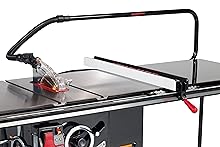
Figure 4: The SawStop Industrial Cabinet Saw, shown with various optional accessories that can enhance its functionality.
Instruccions de funcionament
Always wear appropriate personal protective equipment (PPE), including eye protection, hearing protection, and a dust mask, when operating the saw.
- Comprovacions prèvies a l'operació:
- Ensure the blade is clean, sharp, and free of damage.
- Verify the blade guard and riving knife are properly installed and adjusted.
- Check that the fence is locked securely and accurately set for the desired cut width.
- Confirm the dust collection system is active and functioning.
- Netegeu la zona de treball d'obstacles i assegureu-vos que hi hagi una il·luminació adequada.
- Inici de la serra: Engage the main power switch. The saw is equipped with a soft-start feature for smooth power-up.
- Fent un tall:
- Position the workpiece firmly against the fence and table.
- Use a push stick or push block for narrow cuts and to keep hands away from the blade.
- Feed the material at a consistent, controlled rate. Avoid forcing the material.
- Maintain a firm grip on the workpiece throughout the cut.
- Aturar la serra: Turn off the main power switch. Allow the blade to come to a complete stop before leaving the saw or reaching near the blade.
- Using the Miter Gauge: For cross-cuts, use the included miter gauge. Ensure it is set to the correct angle and the workpiece is held firmly against it.
Video 1: Demonstration of general saw operation and safety procedures. This video shows the saw in use, highlighting proper techniques for cutting various materials.
Manteniment
Regular maintenance ensures the longevity and safe operation of your SawStop Industrial Cabinet Saw. Always disconnect power before performing any maintenance.
- Neteja: Regularly clean sawdust and debris from the table surface, fence, and internal components. Use compressed air for hard-to-reach areas.
- Cura de la fulla: Inspect the blade for dullness, damage, or missing teeth. Replace dull or damaged blades promptly. Keep blades clean and free of pitch buildup.
- Fence and Rail System: Keep the T-Glide fence and rail system clean and lubricated for smooth operation.
- Motor and Belts: Periodically check the motor for unusual noises or excessive heat. Inspect drive belts for wear and tension.
- Safety System Test: Perform routine checks of the SawStop safety system as outlined in the full product manual to ensure it is functioning correctly.
- Connexions elèctriques: Inspect all electrical connections for tightness and signs of wear.
Resolució de problemes
This section addresses common issues you might encounter. For more complex problems, consult the full product manual or contact SawStop customer support.
| Problema | Causa possible | Solució |
|---|---|---|
| La serra no arrenca | No power, lock-out switch engaged, motor access panel open, safety system fault. | Check power supply, disengage lock-out, close all access panels, consult safety system diagnostics. |
| Blade stops unexpectedly | SawStop safety system activated (contact with conductive material), power interruption. | Inspect for safety system activation (e.g., brake cartridge deployed), reset system if safe, check power. |
| Talls imprecisos | Fence misalignment, dull blade, improper blade height. | Re-align fence, replace or sharpen blade, adjust blade height correctly. |
| Vibració excessiva | Unbalanced blade, loose components, motor issues. | Check blade for damage, tighten all fasteners, inspect motor and belts. |
Especificacions
Key technical specifications for the SawStop Industrial Cabinet Saw, Model ICS51230-TGI252.
| Característica | Detall |
|---|---|
| Marca | SawStop |
| Número de model | ICS51230-TGI252 |
| Potència del motor | 5 CV |
| Fase | 1 fases |
| Voltage | 230 Volts |
| Diàmetre de la fulla | 10 polzades |
| Tipus de tanca | Industrial T-Glide |
| Fence Length | 52 polzades |
| Dimensions del producte (L x A x A) | 85.5 cm de llargada x 36.5 cm d'amplada x 34 cm d'alçada |
| Pes de l'article | 685 lliures |
| Components inclosos | 10" Blade Standard Brake Cartridge, 5HP 1ph 230v Industrial Cabinet Saw, Blade Wrenches(2), Cast Iron Extension Wing (2), Dust Collection Blade Guard, Industrial T-Glide 52" Extension Table Assembly, Industrial T-Glide 52" Rails Assembly, Industrial T-Glide Fence Assembly, Miter Gauge, Push Stick, Riving Knife |
| Compliment de seguretat | OSHA |
Garantia i Suport
Your SawStop Industrial Cabinet Saw is backed by a manufacturer's warranty and dedicated customer support.
- Garantia: The saw comes with a 2-year warranty, and the motor is covered by a 5-year warranty. Refer to the official warranty documentation for full terms and conditions.
- Atenció al client: For technical assistance, parts, or warranty claims, please contact SawStop customer support. Contact information can typically be found on the manufacturer's weblloc o en els materials d'embalatge.