
1. Introducció
The Ooma Telo Air provides crystal-clear nationwide calling for free, requiring only monthly applicable taxes and fees. This device connects to your high-speed internet and existing home phone, offering superior voice quality with Ooma PureVoice™ HD technology. It includes essential features such as voicemail, caller-ID, call-waiting, and 911 service with text alerts. Users can choose a new phone number or port an existing one for a one-time fee. Optional Ooma Premier service offers advanced features like robocall blocking, free calls to Canada and Mexico, an Instant Second Line, and voicemail-to-email forwarding. The Ooma Telo Air also integrates with smart home products like Amazon Echo and Nest for enhanced convenience and security.

Figure 1: The Ooma Telo Air integrated into a modern home environment, demonstrating its seamless use.

Figura 2: superior view of the Ooma Telo Air device, highlighting its sleek design and control buttons.
2. Què hi ha a la caixa
Verifiqueu que tots els elements siguin presents al paquet:
- Ooma Telo Air Device
- Adaptador Bluetooth
- Cable Ethernet
- Adaptador d'alimentació

Figure 3: The Ooma Telo Air Bluetooth Adapter, included for wireless connectivity.
3. Instruccions de configuració
Setting up your Ooma Telo Air is a straightforward process. Ensure you have a high-speed internet connection and a standard home phone available.
- Connectar-se a Internet: Plug one end of the provided Ethernet cable into the "INTERNET" port on the Ooma Telo Air and the other end into an available Ethernet port on your home router or modem.
- Connecta el telèfon: Plug your existing home phone into the "PHONE" port on the Ooma Telo Air.
- Encès: Connect the power adapter to the Ooma Telo Air and then plug it into a wall outlet. The Ooma logo on the device will light up.
- Activa el servei: Visit the Ooma website or use the Ooma Mobile HD app to activate your service. You will need the activation code located on the bottom/back of your Ooma Telo Air device.
- Optional Bluetooth Adapter: If using the Bluetooth adapter, insert it into the USB port on the Ooma Telo Air. Follow the instructions in the Ooma Mobile HD app to pair Bluetooth devices.
Vídeo 1: Un producte acabatview demonstrating the Ooma Telo Air device and its features, including setup and connectivity options.
4. Instruccions de funcionament
4.1 Fer i rebre trucades
Once your Ooma Telo Air is set up, you can use your connected home phone to make and receive calls just as you would with a traditional landline. Enjoy crystal-clear voice quality thanks to PureVoice HD technology.
4.2 Voicemail and Caller-ID
The Ooma Telo Air includes voicemail and caller-ID features. Access your voicemail by pressing the voicemail button on your Ooma Telo Air device or through the Ooma Mobile HD app. Caller-ID information will display on your connected phone's screen.
4.3 911 Calling and Text Alerts
Ooma provides address-based 911 service, ensuring dispatchers know your exact location in an emergency. Text alerts can also be configured for 911 calls.
4.4 Ooma Mobile HD App
Download the Ooma Mobile HD app to manage your service on-the-go. Make calls using your Ooma number, check voicemail, and configure settings directly from your smartphone.
4.5 Ooma Premier Features (Optional)
With an optional Ooma Premier subscription, you gain access to advanced features:
- Bloqueig de trucades automàtiques: Block unwanted telemarketers and scammers.
- Free International Calling: Make free calls to Canada and Mexico.
- Segona línia instantània: Provides an additional line for simultaneous calls.
- Correu de veu a correu electrònic: Rebre àudio files of your voicemails directly in your email inbox.
5. Manteniment
To ensure optimal performance and longevity of your Ooma Telo Air, follow these maintenance guidelines:
- Mantenir net: Netegeu el dispositiu regularment amb un drap suau i sec. Eviteu utilitzar netejadors líquids o aerosols.
- Ventilació: Assegureu-vos que el dispositiu estigui col·locat en una zona ben ventilada per evitar el sobreescalfament. No bloquegeu les obertures de ventilació.
- Cicle d'alimentació: If you experience minor issues, try power cycling the device by unplugging it from the power outlet, waiting 10 seconds, and then plugging it back in.
- Actualitzacions de programari: Ooma Telo Air automatically receives software updates. Ensure your device is connected to the internet for these updates.
6. Solució De Problemes
If you encounter problems with your Ooma Telo Air, refer to the following common issues and solutions:
- Sense to de marcatge:
- Check all cable connections (internet, phone, power).
- Ensure your Ooma Telo Air is powered on and the Ooma logo is lit.
- Verifiqueu que la vostra connexió a Internet estigui activa.
- Poor Voice Quality:
- Ensure your internet connection is stable and has sufficient bandwidth.
- Try connecting the Ooma Telo Air directly to your modem, bypassing the router, to rule out router issues.
- Restart your modem, router, and Ooma Telo Air.
- No puc fer/rebre trucades:
- Confirm your Ooma service is activated and your account is in good standing.
- Check if your phone is properly connected to the "PHONE" port.
- Problemes d'emparellament de dispositius Bluetooth:
- Ensure the Bluetooth adapter is securely inserted into the USB port.
- Follow the pairing instructions within the Ooma Mobile HD app carefully.
For further assistance, contact Ooma customer support.
7. Especificacions
| Característica | Detall |
|---|---|
| Marca | ooma |
| Model | Ooma Telo Air |
| Color | Negre |
| Font d'alimentació | Elèctric amb cable |
| Dimensions (L x A x A) | 10.4 x 2.99 x 8.2 polzades |
| Pes de l'article | 1.63 lliures |
| Tipus de contestador | Digital (22 Minutes Recording Capacity) |
| Identificació de trucades | Sí |
| Dispositius compatibles | Smartphone (via Ooma Mobile HD app) |
| Mitjans integrats | Bluetooth Adapter, Ooma Telo Air |
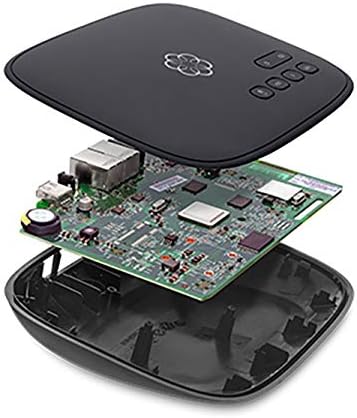
Figure 4: Internal components of the Ooma Telo Air device, showcasing its advanced circuitry.
8. Garantia i Suport
The Ooma Telo Air is backed by a 30-day money-back guarantee and an extendable 1-year warranty. For customer support, visit ooma.com or call 866-747-6887. 24/7 customer support is available.