
Introducció
This manual provides comprehensive instructions for the setup, operation, maintenance, and troubleshooting of your Proscan CRK83X PSVR82 TV Remote Control. This remote is designed to work seamlessly with various Proscan TV and VCR models, offering a direct replacement or compatible control solution.
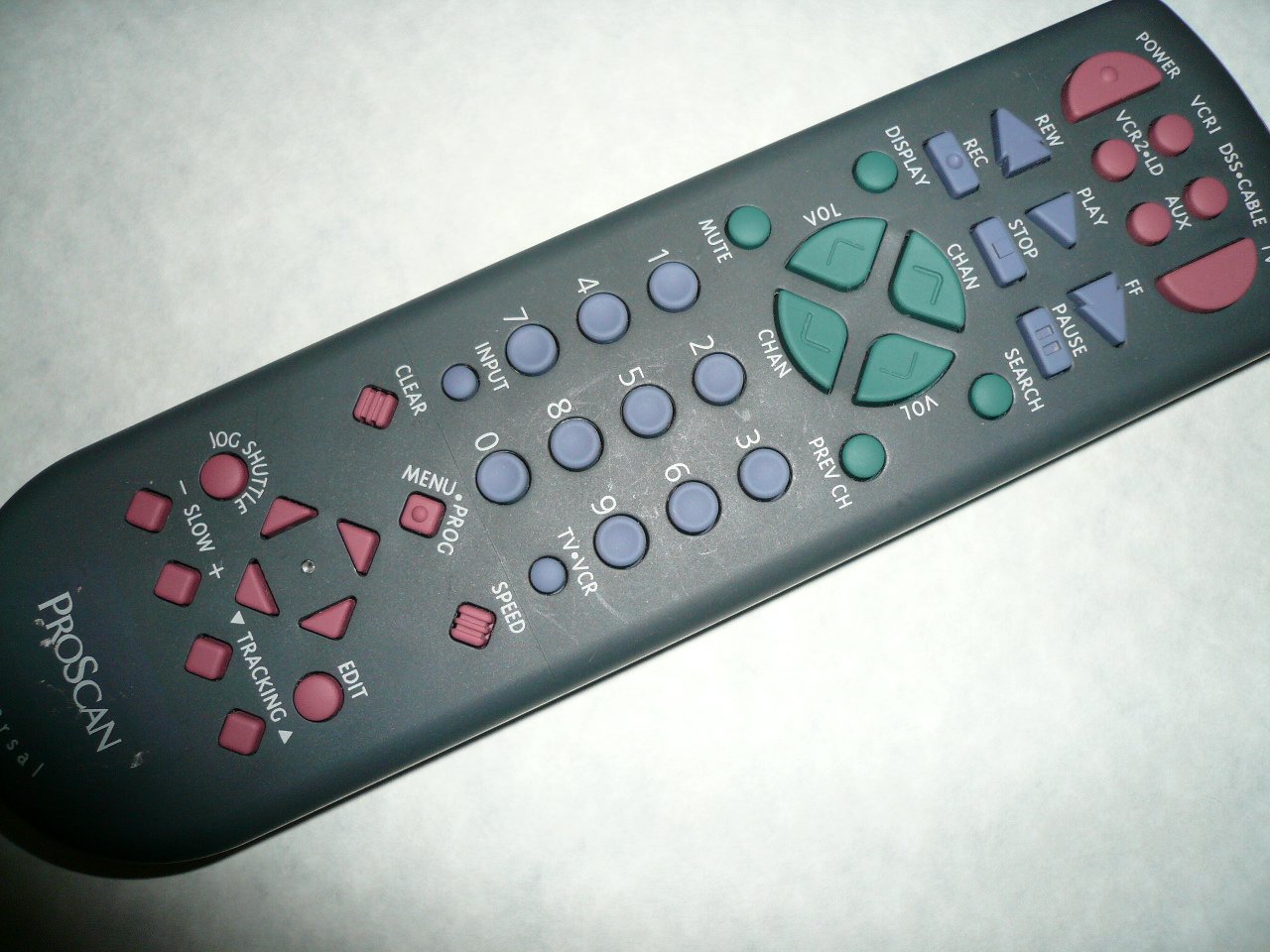
An image showing the Proscan CRK83X PSVR82 TV Remote Control, highlighting its ergonomic design and button layout. The remote is dark gray with purple and teal buttons, clearly labeled for various functions.
Configuració
1. Instal·lació de la bateria
- Localitzeu la tapa del compartiment de la bateria a la part posterior del comandament a distància.
- Feu lliscar la coberta cap avall o premeu el pestell per obrir-la.
- Introduïu dues (2) piles AAA (no incloses), assegurant-vos que els terminals positiu (+) i negatiu (-) s'alineïn correctament amb les marques de l'interior del compartiment.
- Torneu a col·locar la tapa del compartiment de la bateria fent-la lliscar fins que faci clic de manera segura.
2. Ús inicial
The Proscan CRK83X PSVR82 remote control is typically pre-programmed for compatible Proscan TV and VCR models. No complex programming steps are usually required for initial use with supported devices. Simply point the remote at your device and press the desired function button.
This remote is compatible with a wide range of models, including but not limited to: P5VR74, PAVR57, PCVR72, PRVR71, PSDR72, PSDR73, PSNKVSR72, PSNPSVR57, PSNPSVR65, PSNPSVR70, PSNPSVR71, PSNPSVR72, PSNPSVR73, PSNPSVR74, PSNPSVRR73, PSNR65, PSNVR74, PSRV65, PSRV71, PSRV72, PSRV74, PSRVR65, PSRVR71, PSUR70, PSUR72, PSV174, PSV65, PSV71, PSV72, PSVDR73, PSVER72, PSVH57, PSVP71, PSVR22, PSVR27, PSVR57, PSVR61, PSVR62, PSVR65, PSVR72L, PSVR72VCR, PSVR75, PSVR79, PSVR83, PSVT73, PSVV73, PSZR65, PSZR71, PSZR73, PVSR73, R65, RCU800, RSVR73, SPVR65, SSVR62, VR653HF, VR730, VR730HF.
Instruccions de funcionament
Familiarize yourself with the buttons and their functions for optimal control of your television and VCR.
| Nom del botó | Funció |
|---|---|
| PODER | Turns the connected device (TV/VCR) on or off. |
| VCR1, DSS/CABLE, VCR2/LD, AUX | Selects the input source for the television or VCR. |
| MUT | Silencia o activa la sortida d'àudio. |
| VOL +/- | Ajusta el nivell de volum amunt o avall. |
| CANVI +/- | Canvia el canal cap amunt o cap avall. |
| CAP ANTERIOR | Canvia a l'anterior viewcanal ed. |
| VISUALITZACIÓ | Displays on-screen information such as channel number or time. |
| REC | Initiates recording on the VCR. |
| REW | Rewinds the tape during VCR playback. |
| JUGAR | Starts playback of a tape or disc. |
| FF | Fast forwards the tape during VCR playback. |
| STOP | Atura la reproducció o la gravació. |
| PAUSA | Pauses playback or recording. |
| CERCAR | Activates search function, typically for VCR content. |
| Teclat numèric (0-9) | Introdueix directament números de canal o seleccions de menú. |
| ENTRADA | Passa ciclicament per les fonts d'entrada disponibles. |
| CLAR | Clears entered numbers or menu selections. |
| MENU / PROG | Accesses the on-screen menu or programming functions. |
| TV-VCR | Toggles control between TV and VCR modes. |
| JOG SHUTTLE | Provides frame-by-frame or variable speed control for VCR playback. |
| LENT +/- | Adjusts slow-motion speed during VCR playback. |
| VELOCITAT | Adjusts playback speed, typically for VCR. |
| TRACKING ▲/▼ | Adjusts the VCR tracking for optimal picture quality. |
| EDITAR | Activates editing functions, typically for VCR. |
Manteniment
Neteja del comandament a distància
- Netegeu el comandament a distància amb un drap suau i sec.
- Per a la brutícia persistent, lleugerament dampNetegeu el drap amb aigua o un netejador suau i no abrasiu. No ruixeu el netejador directament sobre el comandament a distància.
- Avoid using harsh chemicals, solvents, or abrasive cleaning pads, as these can damage the remote's surface or internal components.
Canvi de bateria
Replace batteries when the remote's response becomes sluggish or it stops functioning. Refer to the "Battery Installation" section under Setup for detailed instructions.
Desfeu-vos sempre de les piles usades de manera responsable d'acord amb la normativa local.
Resolució de problemes
| Problema | Possible causa/solució |
|---|---|
| El comandament a distància no funciona. |
|
| El remot funciona de manera intermitent. |
|
| Alguns botons no responen. |
|
Especificacions
- Marca: PROSCÀ
- Model: CRK83X PSVR82
- Fabricant: Proscan
- Dispositius compatibles: Television (and various Proscan VCR models as listed in Setup section)
- Tecnologia de connectivitat: infrarojos
- Tipus de controlador: Control de botons
- Característica especial: Disseny ergonòmic
- ASIN: B00P82T2LS
- Data de primera disponibilitat: 4 de novembre de 2014
Garantia i Suport
Specific warranty information for the Proscan CRK83X PSVR82 TV Remote Control is not provided in this manual. Please refer to the product packaging or contact your retailer for details regarding warranty coverage.
For further assistance or technical support, please contact the manufacturer or your point of purchase. No specific support contact details are available in this document.