
1. Introducció
The Gustard U12 is a high-performance USB Digital Audio Interface designed to convert USB audio signals into various digital output formats. It utilizes the XMOS X-CORE 32-bit digital signal processing unit, offering robust multi-core processing capabilities for high-fidelity audio. The U12 supports asynchronous USB Audio Class 2.0 and features an independent power supply for optimal audio performance.
Les característiques clau inclouen:
- Support for 32-bit / 384kHz asynchronous 2.0 audio.
- Native 32-bit / 384kHz XMOS DAC capabilities.
- Precision audio clock circuit using 0.1PPM active crystals.
- Independent power supply for enhanced audio quality.
- Multiple digital outputs: Coaxial (RCA), Optical, AES/EBU, and IIS (HDMI port).
2. Contingut del paquet
Please ensure all items are present upon unpacking:
- Gustard U12 Digital Audio Interface Unit
- Cable d'alimentació
- Mini-CD with XMOS Driver (version 3.20 or later)
3. Disseny del dispositiu
3.1 Tauler frontal
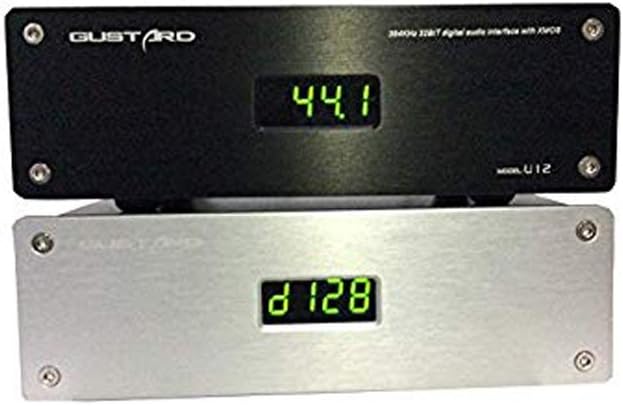
Figura 3.1: Davant view of the Gustard U12, displaying the current sampli taxa.
The front panel features a digital display that indicates the current audio sample rate. There are no physical controls on the front panel.
3.2 Panell posterior

Figura 3.2: Rear panel connections of the Gustard U12.
The rear panel provides all necessary input and output connections:
- 230V/115V AC Input: Connexió d'alimentació.
- AES: AES/EBU digital audio output.
- PERSUADIR: Coaxial (RCA) digital audio output.
- IIS: IIS digital audio output via HDMI port.
- TPTICA: Optical (Toslink) digital audio output.
- ENTRADA USB: USB 2.0 input for connection to a computer.
4. Instruccions de configuració
- Connexió d'alimentació: Connect the provided power cable to the 230V/115V AC input on the rear panel of the U12 and then to a suitable power outlet.
- Connexió USB: Connect a USB cable from your computer (Windows, macOS, or Linux) to the USB IN port on the rear panel of the U12.
- Connexió de sortida digital: Connect one of the digital outputs (Coaxial, Optical, AES/EBU, or IIS) from the U12 to the corresponding digital input on your Digital-to-Analog Converter (DAC) or audio ampmés viu.
- Driver Installation (Windows Users):
- Insert the provided mini-CD into your computer's CD drive.
- Locate and install the XMOS driver. A common driver version is 4.13.0 (e.g., "XMOS-Stereo-USB-Audio-Class2-Driver-3033_v4.13.0").
- Seguiu les instruccions que apareixen a la pantalla per completar la instal·lació del controlador. Reinicieu l'ordinador si se us demana.
- For optimal performance, it is recommended to use ASIO output when configuring your audio playback software (e.g., jRiver Media Player, Foobar2000).
- Driver Installation (macOS/Linux Users): The U12 is generally plug-and-play with macOS and Linux operating systems, requiring no additional driver installation.
- Encesa inicial: Once all connections are secure and drivers are installed (if applicable), the U12 will power on automatically when the computer is turned on or when the USB cable is connected. The front display will show the current sampli taxa.
5. Instruccions de funcionament
Reproducció d'àudio 5.1
After successful setup, select the Gustard U12 as your audio output device in your computer's sound settings or preferred audio playback software. Begin playing audio, and the U12 will automatically detect and display the incoming sample rate on its front panel.
5.2 Supported Output Formats and Sample Tarifes
- Coaxial (RCA), Optical, AES/EBU: These outputs conform to IEC60958 and AES3-r2009 standards, supporting a maximum resolution of 24-bit / 192kHz.
- IIS (HDMI port): This output can transmit up to 32-bit / 384kHz audio.
The U12 employs two independent active crystals to provide precise clock signals for different sample rate series: one for 44.1/88.2/176.4/352.8kHz and another for 48/96/192/384kHz. Only the crystal corresponding to the selected clock rate operates, preventing mutual interference.
5.3 Gestió de l'energia
The U12 features an automatic standby mode. When your computer enters sleep mode or is powered off (provided the USB power is also off), the U12's display will turn off. Waking your computer or restoring USB power will instantly reactivate the U12 and its display.

Figura 5.1: The U12's display indicating various samples tarifes.
6. Manteniment
To ensure the longevity and optimal performance of your Gustard U12, follow these maintenance guidelines:
- Neteja: Use a soft, dry cloth to wipe the exterior of the unit. Avoid using liquid cleaners or abrasive materials, as they may damage the finish.
- Col·locació: Place the U12 on a stable, flat surface with adequate ventilation. Avoid placing it near heat sources, direct sunlight, or in areas with high humidity.
- Apagar: If the unit will not be used for an extended period, it is advisable to unplug it from the power outlet.
- Components interns: Do not attempt to open the unit or service it yourself. Refer all servicing to qualified personnel. Opening the unit may void your warranty.

Figura 6.1: Interna view of the U12's XMOS chip and circuitry.

Figura 6.2: Interna view highlighting the independent power supply with toroidal transformer.
7. Solució De Problemes
| Problema | Causa possible | Solució |
|---|---|---|
| Sense alimentació / Pantalla apagada |
|
|
| No sound / Device not recognized by computer |
|
|
| Juttering, clicking, or loss of sync on Coaxial output at high sample rates (e.g., 192kHz/24bit) |
|
|
| El dispositiu s'apaga aleatòriament |
|
|
8. Especificacions
| Marca | Gustard |
| Número de model | U12 |
| Dispositius compatibles | Ordinador personal |
| Tecnologia de connectivitat | USB, XLR (for AES/EBU) |
| Nombre de canals | 4 |
| Pes de l'article | 1.5 quilos |
| Suport del sistema operatiu | Linux, Windows, macOS |
| Entrada d'àudio | USB |
| S màximampli Rate | 384 kHz |
| Sortides digitals | Coaxial (RCA), Optical (Toslink), AES/EBU (XLR), IIS (HDMI) |
| UPC | 652252617682, 674387795905, 686560911064 |
| ASIN | B00PU3R6KY |
9. Garantia i Suport
Per obtenir informació sobre la garantia o assistència tècnica, consulteu la documentació que s'inclou amb la compra o poseu-vos en contacte directament amb el fabricant. Conserveu el comprovant de compra per a reclamacions de garantia.
Manufacturer: Gustard