
1. Introducció
This manual provides comprehensive instructions for the installation, operation, and maintenance of your 1byone OUSQH-0535 Easy Chime Wireless Doorbell Kit. This kit includes two plug-in receivers and one push button, designed to provide a reliable and convenient notification system for your home or office. Please read this manual thoroughly before use to ensure proper functionality and safety.
2. Contingut del paquet
Verifiqueu que tots els elements siguin presents al vostre paquet:
- 2 x 1byone Plug-in Receivers
- 1 x 1byone Wireless Push Button
- 1 x AAA Battery (pre-installed in push button)
- Mounting Hardware (screws and adhesive tape)

Figure 2.1: Complete 1byone Wireless Doorbell Kit
3. Característiques del producte
- Interval sense fil ampliat: Operates up to 100 meters (300 feet) in open areas, ensuring reliable signal transmission throughout most homes.
- Multiple Chime Tones: Offers 36 selectable CD-quality melodies.
- Volum ajustable: Three volume levels ranging from 25dB to 85dB.
- Alerta visual: Integrated LED flash provides a visual notification, beneficial for the hearing impaired or noisy environments.
- Weatherproof Push Button: IP44 rated for outdoor use, protecting against dust and splashing water.
- Sistema ampliable: Supports adding additional 1byone chimes or push buttons.
- Fàcil instal·lació: Simple plug-and-play setup for receivers and flexible mounting options for the push button.

Figure 3.1: Wireless Range Illustration
4. Identificació de components
4.1. Plug-in Receiver
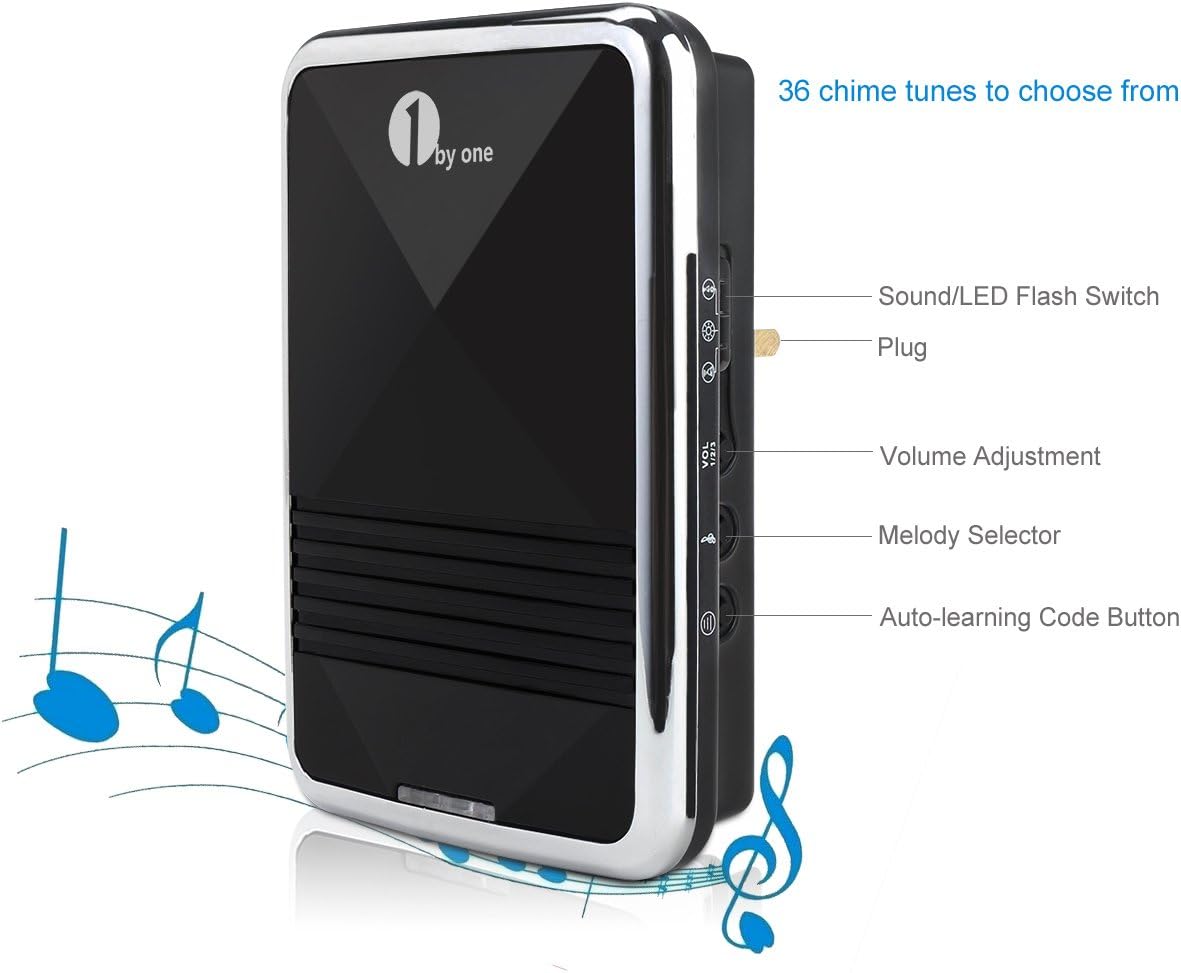
Figure 4.1: Receiver Controls and Features
- Sound/LED Flash Switch: Toggles between sound only, LED flash only, or sound and LED flash modes.
- Endoll: For connecting to a standard electrical outlet.
- Ajust de volum: Cycles through three volume levels (low, medium, high).
- Melody Selector: Cycles through the 36 available chime melodies.
- Auto-learning Code Button: Used for pairing the receiver with a push button.
4.2. Wireless Push Button
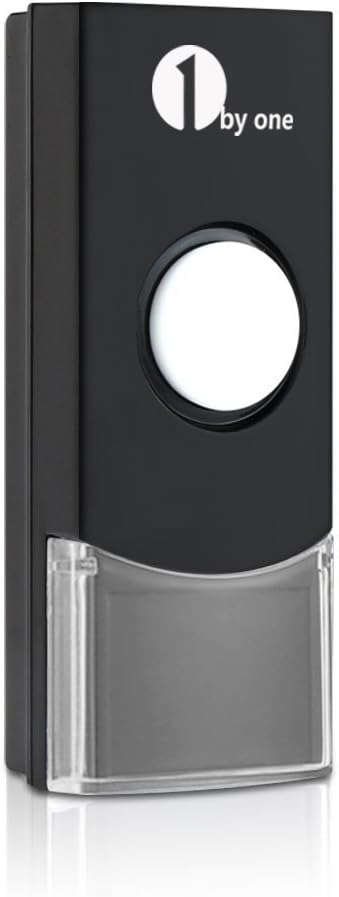
Figure 4.2: Wireless Push Button
- Polsador: Activates the doorbell chime.
- Indicador LED: Illuminates when the button is pressed, confirming signal transmission.
- Compartiment de la bateria: Located on the back, houses the AAA battery.
5. Configuració
5.1. Installing the Push Button
- Instal·lació de la bateria: The push button comes with a pre-installed AAA battery. If replacement is needed, carefully open the back cover to access the battery compartment. Ensure correct polarity.
- Lloc de muntatge: Choose a flat, vertical surface near your door. Ensure the location is easily accessible to visitors and within the wireless range of your receivers.
- Opcions de muntatge:
- Cinta adhesiva: Peel off the protective film from the included double-sided adhesive tape and firmly press the push button onto the desired surface for at least 30 seconds.
- Cargols: Use the provided screws and wall anchors to securely fasten the push button to the wall. It is recommended to apply a small amount of silicone sealant around the screw holes on the back of the button to enhance weather resistance.
5.2. Installing the Receivers
- Select a standard electrical outlet in a central location within your home or in areas where you wish to hear the chime.
- Plug the receiver directly into the electrical outlet. The receiver will power on.
- Repeat for the second receiver in another desired location.
5.3. Pairing the Push Button with Receivers (Auto-Learning)
The push button and receivers are typically pre-paired at the factory. If they do not work out of the box, or if you wish to add additional push buttons/receivers, follow these steps:
- Plug the receiver into an electrical outlet.
- Manteniu premut el botó Botó de codi d'aprenentatge automàtic on the receiver for approximately 5 seconds until the receiver emits a 'ding' sound and its LED indicator flashes. This indicates it is in pairing mode.
- Immediately press the wireless push button. The receiver will chime, confirming successful pairing.
- Test the pairing by pressing the push button. The receiver should chime.
- Repeat this process for any additional receivers you wish to pair with the same push button.
6. Funcionament
6.1. Canvi de melodies
To select a different melody:
- Premeu el botó Selector de melodies button on the side of the receiver. Each press will cycle to the next available melody.
- Stop pressing when you hear your desired melody. The selected melody will be saved.
6.2. Ajust de volum
To change the volume level:
- Premeu el botó Ajust de volum button on the side of the receiver. Each press will cycle through the three available volume levels (low, medium, high).
- Seleccioneu el nivell de volum que millor s'adapti al vostre entorn.
6.3. Sound and LED Flash Modes
To switch between notification modes:
- Utilitza el Sound/LED Flash Switch on the side of the receiver.
- Toggle the switch to select sound only, LED flash only, or both sound and LED flash.
7. Manteniment
7.1. Push Button Battery Replacement
When the push button's LED indicator no longer illuminates or the signal becomes unreliable, it's time to replace the battery.
- Carefully open the back cover of the push button. Note that the cover may be tight to ensure weather resistance.
- Traieu la pila AAA antiga.
- Insert a new AAA battery, ensuring correct positive (+) and negative (-) polarity.
- Tanqueu de manera segura la coberta posterior.
- Test the push button with the receivers to confirm functionality.
7.2. Neteja
To clean the doorbell components, use a soft, dry cloth. Do not use abrasive cleaners, solvents, or immerse any part in water.
8. Solució De Problemes
| Problema | Causa possible | Solució |
|---|---|---|
| Receiver does not chime. | El receptor no està encès. Push button battery low/dead. No emparellat. Fora de rang. | Ensure receiver is plugged into a live outlet. Replace push button battery. Re-pair the push button and receiver (Section 5.3). Move receiver closer to push button. |
| Doorbell chimes randomly. | Interferències d'altres dispositius sense fil. Factors ambientals. | Re-pair the push button and receiver to reset the code (Section 5.3). Ensure no other strong radio frequency devices are directly adjacent to the doorbell components. |
| Receiver loses pairing after power cut. | Temporary power interruption. | Re-pair the push button and receiver (Section 5.3). |
| Push button difficult to open for battery replacement. | Tight seal for weather protection. | Use a small, flat tool to gently pry open the cover. Exercise caution to avoid damage. |
| Sound quality not as expected. | Subjective perception. Limitacions dels altaveus. | While the system offers 36 melodies, sound quality can vary. Ensure volume is set appropriately. |
9. Especificacions
| Característica | Detall |
|---|---|
| Nom del model | OUSQH-0535 |
| Marca | 1 per un |
| Color | Negre |
| Material | Metal (components may include plastic) |
| abast sense fils | Fins a 100 metres (300 peus) |
| Melodies | 36 seleccionables |
| Nivells de volum | 3 (25dB to 85dB) |
| Classificació del botó | IP44 (resistent a la intempèrie) |
| bateria de botó | 1 x AAA (incloses) |
| Alimentació del receptor | AC Plug-in (Voltage: 12V, Power Consumption: <5W) |
| Pes de l'article | Aproximadament 7.8 unces (0.49 lliures) |
| Dimensions del producte | Receivers: 4.72 x 3.15 x 4.72 inches Push Button: 3.42 x 1.38 inches (approx.) |
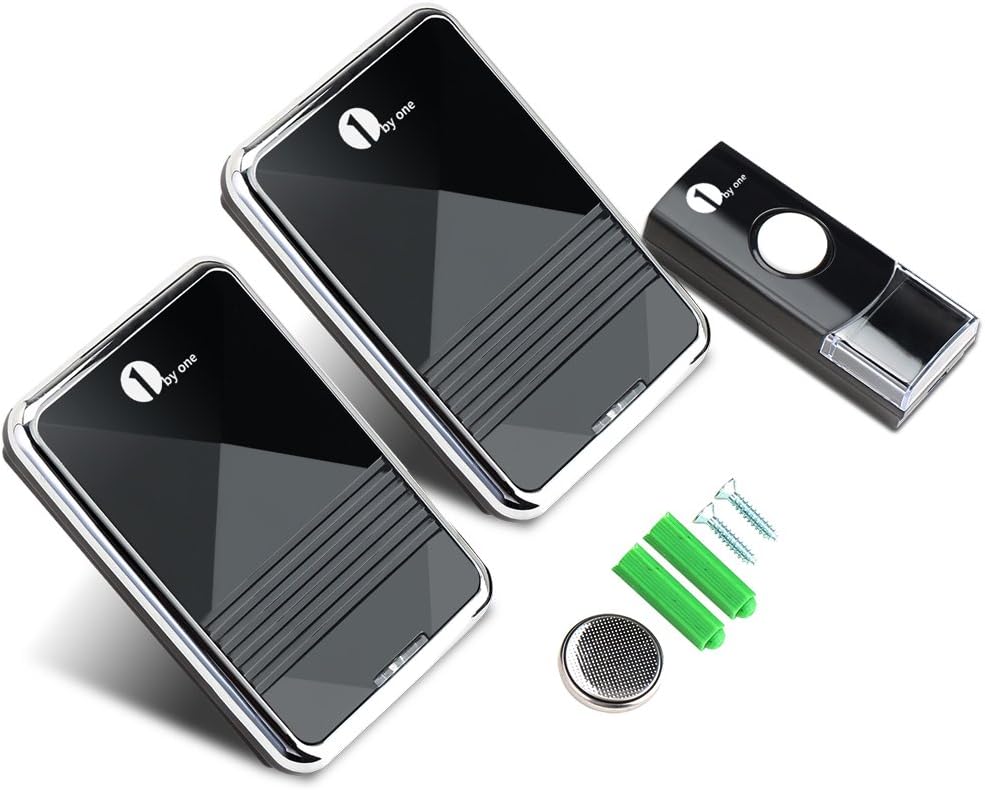
Figura 9.1: Dimensions del producte
10. Informació de seguretat
- Do not expose the push button to extreme temperatures or direct sunlight for prolonged periods.
- Ensure receivers are plugged into easily accessible outlets for quick disconnection if needed.
- Do not attempt to disassemble or repair the product yourself. Refer all servicing to qualified personnel.
- Mantingueu les piles fora de l'abast dels nens. Elimineu les piles usades d'acord amb la normativa local.
- Avoid placing receivers near strong electromagnetic fields, which may interfere with operation.
11. Garantia i Suport
For warranty information or technical support, please contact 1byone customer service through their official website or the retailer where the product was purchased. Please have your model number (OUSQH-0535) and purchase details ready.