
Introducció
This manual provides detailed instructions for the setup, operation, maintenance, and troubleshooting of your GPX TCR340 Intelli-Set Clock with Digital Tune AM-FM Radio. Please read this manual thoroughly before using the device to ensure proper function and to maximize your user experience. Keep this manual for future reference.
Configuració
1. Connexió d'alimentació
Connect the provided AC power adapter to the DC input jack on the back of the unit and then plug the adapter into a standard wall outlet. The unit is designed for corded electric operation.
2. Instal·lació de bateria de seguretat
For battery backup, install the required batteries (not included) into the battery compartment located on the bottom of the unit. This will preserve time and alarm settings during a power outage. Refer to the battery compartment for correct polarity.
3. Automatic Time Setting (Intelli-Set)
The GPX TCR340 features Intelli-Set technology, which automatically sets the time upon initial power connection. Ensure the unit is connected to power, and the time should set itself. You may need to adjust the time zone manually if it does not match your location.
4. Configuració de l'antena
- Antena FM: Extend the built-in FM wire antenna fully for optimal FM reception. Adjust its position for best signal.
- Antena AM: The unit has a built-in AM antenna. Rotate the unit for best AM reception.
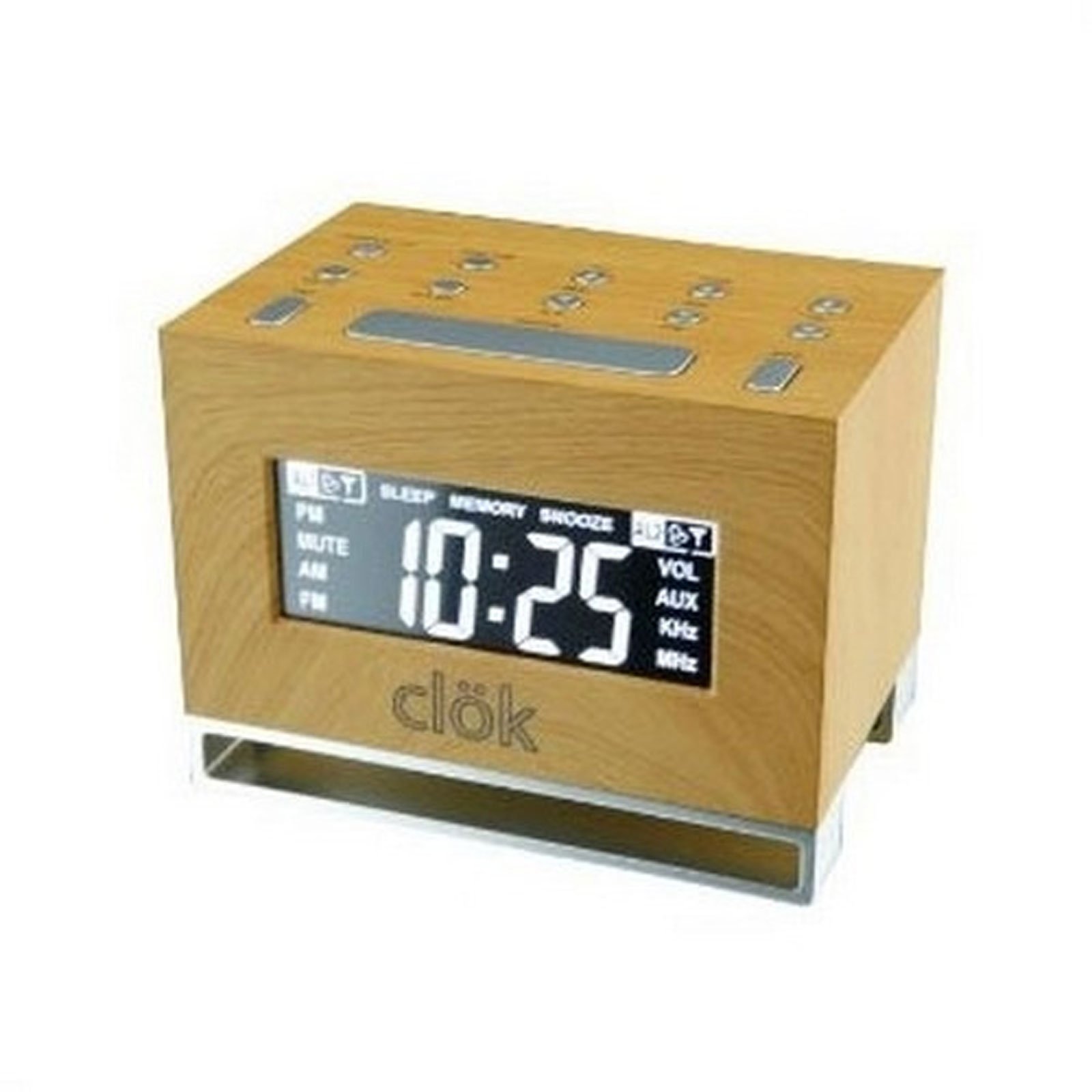
Figura 1: Frontal view of the GPX TCR340 Intelli-Set Clock Radio, showing the digital display and control buttons.
Instruccions de funcionament
1. Controls bàsics
Familiarize yourself with the buttons on the top and front of the unit. Common controls include Power, Volume Up/Down, Tune Up/Down, Alarm Set, Snooze, and Display Brightness.
2. Configuració de l'hora
- Manteniu premut el botó HORA CONFIGURADA button (location may vary, typically on the back or top).
- Mentre aguanta HORA CONFIGURADA, utilitza el HORA i MINUT buttons (or TUNE +/-) to adjust the time.
- Alliberament HORA CONFIGURADA per confirmar.
- To adjust the time zone, press and hold the PODER button while simultaneously pressing a dedicated FUS HORARI button (if available) or a button on the back of the unit to cycle through zones.
3. Funcionament de la ràdio (AM/FM)
- Premeu el botó PODER botó per encendre la ràdio.
- Premeu el botó BANDA botó per canviar entre AM i FM.
- Utilitza el TUNE +/- botons per sintonitzar manualment l'emissora desitjada. Mantingueu premut per a l'escaneig automàtic.
- Ajusteu el volum amb el botó VOLUM +/- botons.
4. Configuració d'alarmes
The unit supports dual alarms.
- Manteniu premut el botó CONJUNT ALARMA 1 or CONJUNT ALARMA 2 botó.
- Mentre manteniu la mà, utilitzeu la HORA i MINUT buttons (or TUNE +/-) to set the desired alarm time.
- Allibera el CONJUNT D'ALARMES botó.
- Premeu el botó ALARMA 1 ON/OFF or ALARMA 2 ON/OFF button repeatedly to select the alarm source (Radio, Nature Sound, or Buzzer) and activate the alarm. An alarm icon will appear on the display.
- The alarm features a gradual wake function, increasing in volume over time.
5. Funció de posposició
Quan soni una alarma, premeu el botó DORMITAR per silenciar-la temporalment durant uns minuts. L'alarma tornarà a sonar després del període de posposició.
6. Brillantor de la pantalla
Premeu el botó LLUMINOSITAT button (or a similar labeled button) to cycle through different display brightness levels. This allows adjustment for various lighting conditions.
7. Sons de la natura
The unit includes pre-programmed nature sounds. To listen, press the ELS SONS DE LA NATURA button (if available) or select it as an alarm source. Use volume controls to adjust playback level.
Manteniment
1. Neteja
Wipe the unit with a soft, dry cloth. Do not use abrasive cleaners, waxes, or solvents as they may damage the finish. Avoid spraying liquids directly onto the unit.
2. Substitució de la bateria
If the battery backup fails to maintain time during a power outage, replace the batteries in the compartment on the bottom of the unit. Ensure correct polarity when inserting new batteries.
3. Atenció general
- Mantingueu la unitat allunyada de la llum solar directa, de fonts de calor i de l'excés de pols o humitat.
- No col·loqueu objectes pesats a sobre de la unitat.
- Eviteu deixar caure la unitat o sotmetre-la a impactes forts.
Resolució de problemes
| Problema | Causa possible | Solució |
|---|---|---|
| La unitat no s'encén. | L'adaptador de CA no està connectat o està defectuós. | Ensure AC adapter is securely plugged into the unit and a working wall outlet. Test the outlet with another device. |
| Mala recepció de ràdio. | Antenna not properly positioned; interference. | Esteneu i reposicioneu l'antena de fil FM. Gireu la unitat per a una millor recepció AM. Allunyeu-vos d'altres dispositius electrònics que puguin causar interferències. |
| L'alarma no sona. | Alarma no configurada o activada; volum massa baix. | Verify alarm time is set correctly and the alarm is activated (alarm icon visible). Increase alarm volume. Ensure alarm source is selected. |
| Display is too bright or completely dark. | Brightness setting; internal issue. | Premeu el botó LLUMINOSITAT button to cycle through display levels. If the display remains dark or unresponsive, try unplugging the unit for a few minutes and then reconnecting power. |
| L'hora és incorrecta després de l'apagadatage. | Les bateries de reserva estan gastades o no estan instal·lades. | Install fresh batteries in the battery backup compartment. Ensure correct polarity. |
| One or more digits on the display are not lit. | Internal display component failure. | This indicates a potential hardware issue. If under warranty, contact customer support. Otherwise, repair may be required. |
Especificacions
- Marca: GPX
- Model: TCR340
- Tipus de visualització: LCD digital
- Sintonitzador de ràdio: AM/FM digital
- Font d'alimentació: AC Power Adapter (Corded Electric), Battery Backup (Batteries not included)
- Característiques especials: Intelli-Set Automatic Time Setting, Dual Alarm, Snooze Function, Gradual Wake, Nature Sounds, Adjustable Display Brightness
- Dimensions del producte: 3.27 cm d'amplada x 4.84 cm d'alçada
- Ús interior/exterior: Interior
Garantia i Suport
For warranty information, please refer to the documentation included with your product packaging or visit the official GPX website. For technical support or service inquiries, please contact GPX customer service directly. Contact details are typically available on the manufacturer's weblloc web o a l'embalatge original del producte.