
Introducció
This manual provides essential instructions for setting up, operating, maintaining, and troubleshooting your Samsung Galaxy Grand Prime Unlocked Smartphone (Model SSG530HLGY). Please read this manual carefully to ensure proper use and optimal performance of your device.

Figure 1: Samsung Galaxy Grand Prime Smartphone (Front, Back, and Side Views)
The image displays the Samsung Galaxy Grand Prime smartphone from three angles: front, back, and side. The front shows the display with a colorful wallpaper, the home button, and front camera. The back reveals the main camera, flash, and Samsung logo. The side view destaca el Slim Profile i botons físics.
Configuració
1. Contingut del paquet
Comproveu que el vostre paquet contingui els elements següents:
- Samsung Galaxy Grand Prime Smartphone
- Adaptador
- Cable USB
- Handsfree (Earphones)
- Bateria (preinstal·lada o separada)
2. Instal·lació de la targeta SIM i la bateria
Your device supports dual SIM cards. Ensure the device is powered off before proceeding.
- Traieu amb cura la tapa posterior del telèfon.
- If the battery is not pre-installed, insert the battery into its compartment, aligning the gold contacts.
- Locate the SIM card slots. Insert your SIM card(s) into the designated slots with the gold contacts facing down.
- If using a microSD card for expanded storage (up to 64GB), insert it into the microSD card slot.
- Torneu a col·locar la coberta posterior, assegurant-vos que encaixi correctament al seu lloc amb un clic.
3. Engegada i configuració inicials
- Press and hold the Power button (located on the side of the device) until the Samsung logo appears.
- Follow the on-screen prompts to complete the initial setup, including language selection, Wi-Fi connection, Google account setup, and date/time settings.
- Your device runs on Android v4.4.2 (Kit Kat).
Funcionament del vostre dispositiu
1. Navegació bàsica
- Pantalla tàctil: Navigate by tapping, swiping, pinching, and spreading on the 5-inch TFT display.
- Botó d'inici: Press to return to the home screen. Double-press for recent apps (functionality may vary).
- Botó enrere: Premeu per tornar a la pantalla anterior.
- Botó d'aplicacions recents: Premeu per view i canviar entre les aplicacions utilitzades recentment.
2. Fer trucades i enviar missatges
- Obriu el Telèfon aplicació per marcar números o seleccionar contactes.
- Obriu el Missatges app to compose and send text or multimedia messages.
3. Ús de la càmera
Your device features an 8 Megapixel rear camera with autofocus and LED flash, and a 5 Megapixel front-facing camera.
- Obriu el Càmera app from the home screen or app drawer.
- Toca la pantalla per enfocar.
- Press the shutter button to capture photos or videos.
- Canvia entre la càmera frontal i la posterior amb la icona de commutació de la càmera.
4. Connectivitat
- Wi-Fi: Access Wi-Fi settings from the Notification Panel or Settings menu to connect to wireless networks.
- Dades mòbils: Enable or disable mobile data (2G/3G/4G LTE) from the Notification Panel or Settings menu.
- Bluetooth: Pair with other Bluetooth devices via the Settings menu.
5. Ultra Power Saving Mode
To extend battery life, activate Ultra Power Saving Mode. This mode changes the screen to grayscale and limits the number of usable applications to essential functions, significantly reducing power consumption.
- Access this mode via the Quick Settings panel or the Battery section in the Settings menu.
Manteniment
1. Carregant la bateria
- Connect the USB cable to the adapter and then to your phone's charging port.
- Connecteu l'adaptador a una presa de corrent estàndard.
- A charging indicator will appear on the screen.
- Use only Samsung-approved chargers and cables to prevent damage to the device.
2. Neteja del dispositiu
- Netegeu suaument la pantalla i el cos amb un drap suau i sense borrissol.
- Eviteu utilitzar productes químics agressius, netejadors abrasius o aerosols.
- No exposeu el dispositiu a una humitat excessiva.
3. Actualitzacions de programari
Periodically check for software updates to ensure your device has the latest features and security enhancements. Updates can be found in the Settings menu under "About device" or "Software update."
Resolució de problemes
If you encounter issues with your device, try the following solutions before seeking professional assistance:
- El dispositiu no s'encén: Assegureu-vos que la bateria estigui carregada. Connecteu el carregador i espereu uns minuts abans d'intentar tornar-lo a engegar.
- Pantalla congelada o no respon: Premeu i manteniu premut el botó d'engegada durant aproximadament 10 segons per forçar un reinici.
- No es pot connectar a Wi-Fi: Ensure Wi-Fi is enabled. Restart your router and the phone. Forget the network and reconnect.
- Poor call quality or dropped calls: Check your signal strength. Move to an area with better reception. Ensure your SIM card is properly inserted.
- La bateria s'esgota ràpidament: Reduce screen brightness, close unused apps, disable unnecessary connectivity features (Bluetooth, GPS), and consider using Ultra Power Saving Mode.
- Problemes d'emmagatzematge: Elimineu-les innecessàries files, esborra la memòria cau de les aplicacions o mou fitxers multimèdia a una targeta microSD.
Per a problemes més complexos, consulteu el suport oficial de Samsung. weblloc o contacteu amb el servei d'atenció al client.
Especificacions
| Característica | Detall |
|---|---|
| Nom del model | Galaxy Grand Prime |
| Número de model | SSG530HLGY |
| Sistema operatiu | Android v4.4.2 (Kit Kat) |
| Processador | Quad-Core 1.2 GHz Cortex-A53 (Qualcomm MSM8916 Snapdragon 410) |
| Mostra | 5-inch TFT Capacitive Multi-Touchscreen |
| Càmera posterior | 8 Megapixel (3264 x 2448 pixels) w/ Autofocus, LED Flash |
| Càmera frontal | 5 megapíxels |
| Memòria interna | 8 GB |
| RAM | 1 GB |
| Emmagatzematge ampliable | microSD Slot, up to 64GB |
| Tecnologia cel·lular | 2G GSM (850/900/1800/1900), 3G HSDPA (850/900/1900/2100), LTE |
| Connectivitat | Wi-Fi, Bluetooth |
| Dimensions | 5.7 x 2.84 x 0.34 polzades |
| Pes | 4 unces (0.25 lliures) |
| Bateria | 1 bateria de ions de liti (inclosa) |
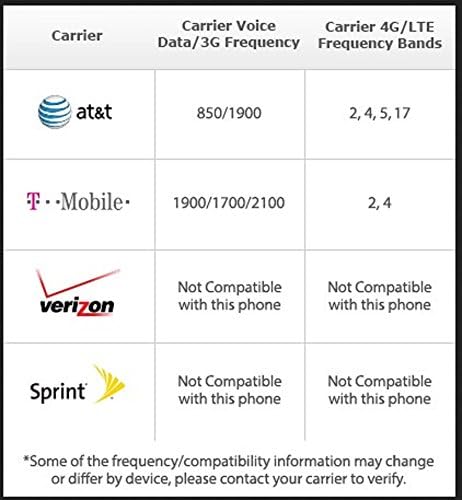
Figure 2: Carrier Compatibility Information
This table illustrates the carrier compatibility for the Samsung Galaxy Grand Prime. It shows that AT&T supports 850/1900 MHz for voice/3G and bands 2, 4, 5, 17 for 4G/LTE. T-Mobile supports 1900/1700/2100 MHz for voice/3G and bands 2, 4 for 4G/LTE. Verizon and Sprint are listed as "Not Compatible with this phone" for both voice/3G and 4G/LTE frequencies. Users are advised to contact their carrier to verify compatibility.
Garantia i Suport
1. Informació de la garantia
Your Samsung Galaxy Grand Prime Smartphone is covered by a limited warranty. Please refer to the warranty card included in your product packaging or visit the official Samsung weblloc web per obtenir informació detallada sobre els termes i condicions de la cobertura de la garantia, la durada i els procediments de servei.
2. Atenció al client
For technical assistance, troubleshooting, or service inquiries, please contact Samsung Customer Support. You can find contact information, FAQs, and additional resources on the official Samsung support weblloc: www.samsung.com/us/support/