
1. Introducció
The LEDLUX WF201 is a WiFi Multi Point Controller Slave Repeater designed to extend and enhance your LED RGB lighting control system. This device functions as a slave unit, receiving commands from a compatible master controller to manage connected LED RGB interfaces. It facilitates wireless control of LED lighting, typically integrated into systems that allow management via smartphone applications (iPhone/Android) through a master controller.
This manual provides essential information for the proper installation, operation, and maintenance of your WF201 Slave Repeater. Please read it thoroughly before use to ensure optimal performance and safety.
2. Informació de seguretat
Si us plau, observeu les següents precaucions de seguretat per evitar danys al dispositiu o lesions personals:
- Assegureu-vos que la font d'alimentació voltage matches the device's requirements (DC 12V-24V). Connecting an incorrect voltage pot causar danys permanents.
- Do not exceed the maximum output current of 4A per channel. Overloading can lead to overheating and device failure.
- Aquest dispositiu està pensat només per a ús en interiors. No l'exposeu a la humitat, la pluja ni a temperatures extremes.
- Desconnecteu l'alimentació abans de fer qualsevol connexió o realitzar tasques de manteniment.
- No intenteu obrir ni modificar el dispositiu. Envieu totes les tasques de manteniment a personal qualificat.
- Mantenir fora de l'abast dels nens.
3. Producte acabatview
The WF201 Slave Repeater is a compact unit designed for seamless integration into your LED control network. It features various ports and indicators for connectivity and configuration.
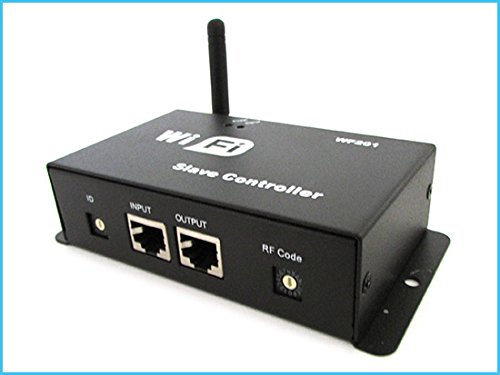
Figura 3.1: En general view of the LEDLUX WF201 Slave Repeater. This image shows the device from a top-down angle, highlighting the WiFi antenna, the "WiFi Slave Controller" label, and the front panel with INPUT and OUTPUT RJ45 ports, along with ID and RF Code adjustment dials.
Components clau:
- Antena WiFi: For wireless communication with the master controller.
- ID Dial: Used to set the unique identification number for the slave unit within a multi-point system.
- INPUT (RJ45) Port: Connects to the master controller or another slave unit in a daisy-chain configuration.
- OUTPUT (RJ45) Port: Connects to another slave unit or an LED interface.
- RF Code Dial: For setting the radio frequency code, typically used for pairing with the master controller.
- Power Input Terminals: Screw terminals for connecting the DC 12V-24V power supply.
- LED Output Terminals: Screw terminals for connecting LED RGB strips.
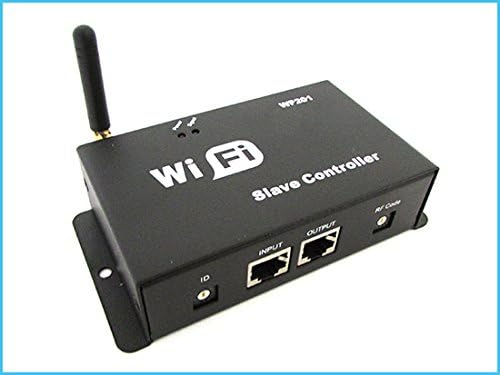
Figura 3.2: Front panel of the WF201. This image provides a clear view of the front panel, detailing the "ID" dial, "INPUT" and "OUTPUT" RJ45 ports, and the "RF Code" dial, all essential for system configuration.

Figura 3.3: Rear panel of the WF201. This image displays the back of the device, showing the screw terminals for "OUTPUT" (LED connections) and "INPUT" (DC 5V-DC 24V power supply), along with the antenna connector.
4. Instruccions de configuració
Follow these steps to properly set up your LEDLUX WF201 Slave Repeater:
- Preparació dels components: Ensure you have the WF201 Slave Repeater, a compatible master controller, LED RGB strips, a suitable DC 12V-24V power supply, and necessary connection cables (Ethernet/RJ45, power wires).
- Connect LED Strips: Connect your LED RGB strips to the screw terminals labeled SORTIDA on the rear panel of the WF201. Ensure correct polarity and channel assignment (R, G, B, V+).
- Connecteu la font d'alimentació: Connect your DC 12V-24V power supply to the screw terminals labeled INPUT: DC5V-DC24V on the rear panel. Observe correct polarity (positive to V+, negative to V-).
- Connecteu l'antena: Securely screw the WiFi antenna onto the antenna connector on the rear panel.
- Connect to Master Controller: Use an Ethernet cable (RJ45) to connect the ENTRADA port of the WF201 to the corresponding output port of your master controller. If daisy-chaining multiple slave units, connect the SORTIDA port of one WF201 to the ENTRADA port of the next.
- Set ID and RF Code:
- ID Dial: Ajusteu el ID dial on the front panel to assign a unique identification number to this slave unit. This is crucial for systems with multiple slave controllers. Refer to your master controller's manual for specific ID assignment guidelines.
- RF Code Dial: Ajusteu el RF Code dial to match the radio frequency code set on your master controller. This ensures proper communication between the master and slave units.
- Encès: Once all connections are secure and settings are configured, connect the power supply to a power outlet. The device should power on, and indicators (if present) will illuminate.
5. Instruccions de funcionament
The LEDLUX WF201 functions as a slave repeater and does not have direct user controls for lighting effects. Its operation is entirely dependent on the commands received from a compatible master controller.
- Master Controller Interaction: All lighting adjustments, color changes, brightness control, and effect selections are performed through your master controller. Refer to the instruction manual of your specific master controller for detailed operating procedures.
- Control del telèfon intel·ligent: If your master controller supports smartphone applications (e.g., for iPhone or Android), you will use these apps to send commands to the master controller, which then relays them to the WF201 slave unit.
- Multi-Point System: In a multi-point setup, ensure that each WF201 slave unit has a unique ID set via its ID dial to allow the master controller to address and control them individually or in groups.
- Indicadors d'estat: Observe any LED indicators on the WF201 for status (e.g., power, data transmission). Consult your master controller's manual or the WF201's specifications for indicator meanings.
6. Manteniment
To ensure the longevity and reliable performance of your WF201 Slave Repeater, follow these simple maintenance guidelines:
- Neteja: Gently wipe the device with a soft, dry cloth. Do not use liquid cleaners or solvents, as they may damage the casing o components interns.
- Medi ambient: Keep the device in a clean, dry environment, away from direct sunlight, excessive heat, and moisture.
- Connexions: Periodically check all cable connections (power, RJ45, LED strips) to ensure they are secure and free from corrosion or damage.
- Ventilació: Ensure adequate airflow around the device to prevent overheating, especially if it is enclosed.
7. Solució De Problemes
If you encounter issues with your WF201 Slave Repeater, refer to the following common problems and solutions:
| Problema | Causa possible | Solució |
|---|---|---|
| El dispositiu no s'encén. | Sense font d'alimentació, volum incorrectetage, loose power connection. |
|
| LED strips are not responding or showing incorrect colors. | Incorrect wiring of LED strips, no signal from master controller, incorrect ID/RF Code. |
|
| Intermittent control or signal loss. | Weak WiFi signal, interference, loose connections. |
|
If the problem persists after trying these solutions, please contact LEDLUX customer support or your reseller for further assistance.
8. Especificacions
| Característica | Detall |
|---|---|
| Model | WF201 |
| Marca | LEDLUX |
| Entrada Voltage | DC 12V-24V |
| Corrent de sortida màx | 4A per channel (4A/CH) |
| Connectivitat | WiFi (via Master Controller), RJ45 (Input/Output) |
| Dispositius compatibles | Master Controller, LED RGB Strips, Router (for master controller) |
| Pes de l'article | 0.31 g |
| ASIN | B00TOM7IDW |
| Referència del fabricant | CL1125 |
9. Garantia i Suport
LEDLUX products are manufactured to high-quality standards. For specific warranty terms and conditions, please refer to the warranty card included with your purchase or visit the official LEDLUX website. If you require technical assistance or have questions regarding your WF201 Slave Repeater, please contact your reseller or LEDLUX customer support with your product model and purchase details.