
Hughes HRMC-8
Hughes HRMC-8 DirecTV 5-Device Learning Remote Control User Manual
Introducció
This manual provides comprehensive instructions for the setup, operation, and maintenance of your Hughes HRMC-8 DirecTV 5-Device Learning Remote Control. Please read this manual thoroughly before using the device to ensure proper functionality and to prevent damage.
Informació de seguretat
- No exposeu el comandament a distància a temperatures extremes, llum solar directa o humitat elevada.
- Eviteu deixar caure el comandament a distància ni sotmetre'l a impactes forts.
- No intenteu desmuntar ni modificar el comandament a distància. Això anul·larà la garantia.
- Mantingueu les piles fora de l'abast dels nens. En cas d'ingestió, busqueu atenció mèdica immediata.
- Eliminar les bateries usades d'acord amb la normativa local.
Configuració
1. Instal·lació de la bateria
The Hughes HRMC-8 remote control requires two (2) AA batteries (not included). Follow these steps to install the batteries:
- Localitzeu la tapa del compartiment de la bateria a la part posterior del comandament a distància.
- Premeu la pestanya i feu lliscar la coberta cap avall per treure-la.
- Introduïu dues piles AA noves, assegurant-vos que els terminals positiu (+) i negatiu (-) s'alineïn amb les marques de l'interior del compartiment.
- Torneu a col·locar la tapa del compartiment de la bateria fent-la lliscar fins que faci clic de manera segura.
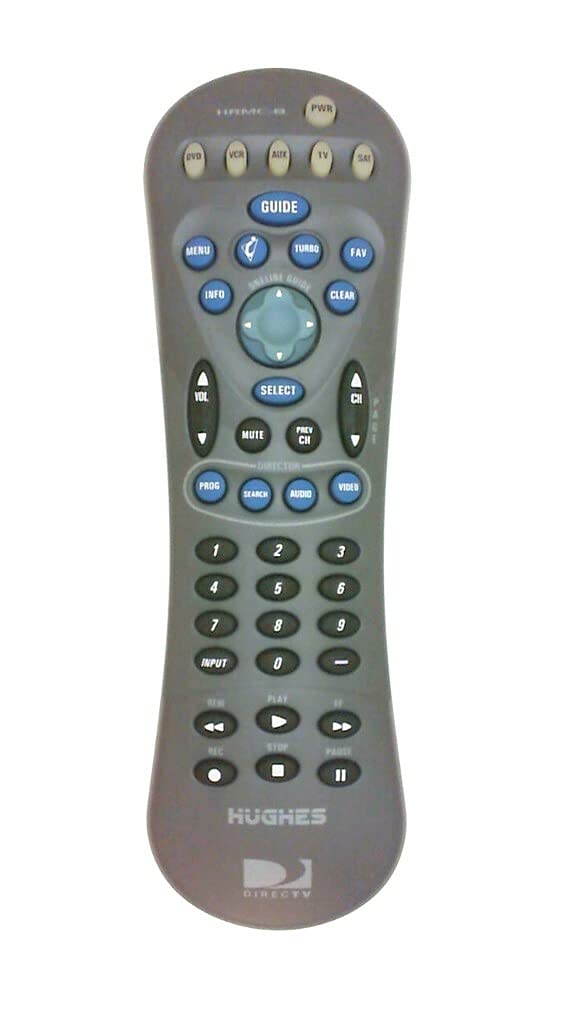
Figura 1: Esquena view of the HRMC-8 remote control, indicating the battery compartment location.

Figure 2: Close-up of the battery compartment with AA batteries correctly installed, showing polarity markings.
2. Programació del control remot
The HRMC-8 is a learning remote designed to control up to 5 devices, including DirecTV receivers. Refer to your DirecTV receiver's manual or the specific device's manual for detailed programming codes and instructions. Generally, the process involves:
- Turning on the device you wish to program (e.g., TV, DVD player, DirecTV receiver).
- Pressing and holding the appropriate device button on the HRMC-8 remote (e.g., TV, VCR, SAT) until the indicator light illuminates.
- Entering the 4-digit programming code for your device.
- Testing the remote's functions. If the device does not respond, try alternative codes or the learning function.
3. Using the Learning Function
If a direct code is not available, the HRMC-8 can learn commands from your original remote control. This feature allows you to customize button functions.
- Place the HRMC-8 remote and your original remote control head-to-head on a flat surface, approximately 1-2 inches apart.
- Press and hold the "LEARN" button (if available, or a combination as per specific instructions) on the HRMC-8 until the indicator light blinks.
- Press the button on the HRMC-8 you wish to program.
- Premeu el botó corresponent del vostre comandament a distància original.
- The HRMC-8 indicator light will confirm successful learning. Repeat for all desired buttons.
Funcionament del comandament a distància
Once programmed, the HRMC-8 remote control operates similarly to your original device remotes. Use the device selection buttons (e.g., TV, VCR, SAT) to switch control between your connected equipment.
- Botó d'encesa: Encén o apaga el dispositiu seleccionat.
- Canal amunt/avall: Changes channels on your DirecTV receiver or TV.
- Pujar/baixar el volum: Adjusts the volume of the selected audio device (typically TV or audio receiver).
- Bloc numèric: Per a l'entrada directa de canals o la navegació pel menú.
- Menu/Guide: Accesses the menu or program guide of your DirecTV receiver.
- Directional Pad (Arrows) & Select: Navigates through on-screen menus.
Manteniment
Neteja
To clean the remote control, use a soft, dry cloth. Do not use abrasive cleaners, solvents, or wet cloths, as these can damage the surface or internal components.
Canvi de bateria
When the remote control's performance degrades or the indicator light fails to illuminate, it is time to replace the batteries. Follow the battery installation steps outlined in the "Setup" section.
Resolució de problemes
| Problema | Causa possible | Solució |
|---|---|---|
| El comandament a distància no respon. | Piles gastades o instal·lades incorrectament. | Canvieu les piles, assegurant-vos de la polaritat correcta. |
| Remote control does not operate a specific device. | Incorrect programming code or device not selected. | Ensure the correct device button is selected. Re-program the device using the correct code or the learning function. |
| Els botons no responen o són enganxosos. | Brutícia o restes sota els botons. | Netegeu el comandament a distància tal com es descriu a la secció Manteniment. |
| L'abast del comandament a distància es redueix. | Bateria baixa o obstrucció entre el comandament a distància i el dispositiu. | Replace batteries. Ensure a clear line of sight to the device's IR receiver. |
Especificacions
- Model: HRMC-8
- Marca: Hughes
- Tecnologia de connectivitat: infrarojos
- Tipus de controlador: Control de botons
- Nombre de dispositius: 5
- Font d'alimentació: 2 piles AA (no incloses)
- Dimensions del producte: 8.25 x 2.5 x 1.35 polzades (20.96 x 6.35 x 3.43 cm)
- Pes de l'article: 3.87 unces (109.7 grams)
- Color: Gris
- Material: Plàstic, metall
- Característica especial: Learning Function, Ergonomic Design
Ask a question about this manual
Ask about setup, troubleshooting, compatibility, parts, safety, or missing instructions. Manuals+ will review the question and use this page’s manual context to help answer it.