
1. Introducció
Thank you for choosing the AUTO-VOX A118C Dash Camera. This manual provides essential information for the proper installation, operation, and maintenance of your device. Please read it thoroughly before use to ensure optimal performance and safety.
The AUTO-VOX A118C is a discreet car recorder designed to capture high-definition video footage while driving. It features a Novatek NT96650 processor and an Aptina AR0330 CMOS sensor, offering reliable video recording. Its compact form factor allows for discreet mounting, making it less noticeable from outside the vehicle.
2. Contingut del paquet
Verifiqueu que tots els elements que s'enumeren a continuació s'inclouen al vostre paquet:
- AUTO-VOX B40-C Dash Camera
- cable USB
- In-car charging cable
- Brackets and Adhesive Mount System
- Manual d'usuari
- 32GB micro SD card (included with some packages)

3. Producte acabatview
3.1 Disseny del dispositiu


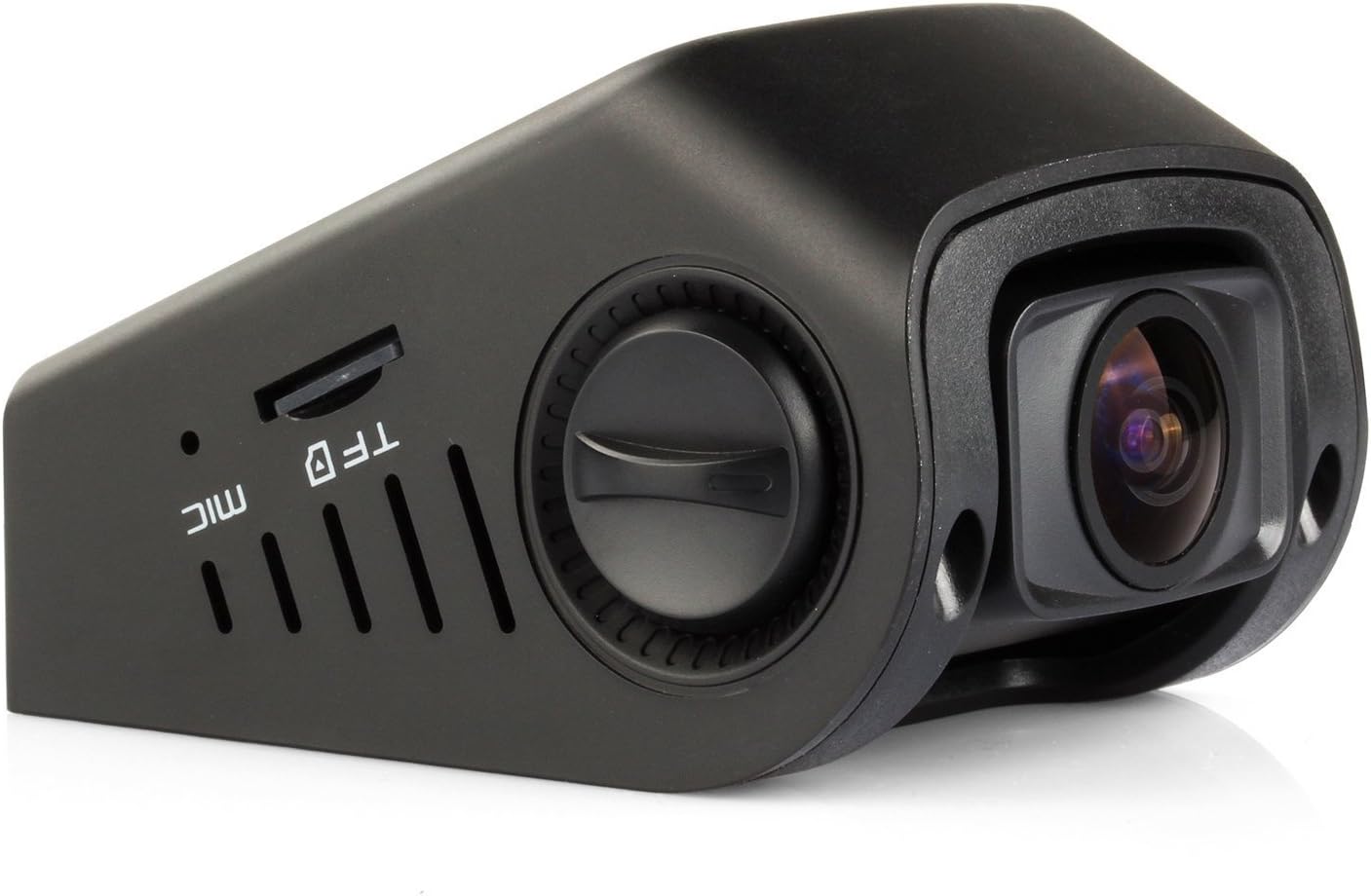
3.2 Característiques clau
- Novatek NT96650 Chipset + Aptina AR0330 Lens: Ensures high-definition video compression and smooth imaging with low power consumption.
- Compact & Contoured Design: Designed for discreet placement, often behind the rear-view mirall.
- 170 Degree Wide 6G Angle Lens: Captura una àmplia view de la carretera.
- Full 1080P HD Recording: Records at 30 FPS, with 720P at 60 FPS, featuring Night Vision and WDR Technology.
- Detecció automàtica de moviment: Initiates recording upon detecting movement.
- G-Sensor Enabled Recording: Automatically saves footage during sudden braking, impact, rapid acceleration, or sharp cornering.
- Capacitor Edition: Utilizes a capacitor instead of an internal battery for enhanced heat resistance and reliability.
- 1.5-inch HD LCD Screen: En temps real viewi navegació per menús.
- Suport multi-idioma: Offers various language options for user interface.
4. Configuració
4.1 Inserció de la targeta Micro SD
Before using the dash camera, insert a Micro SD card (up to 32GB, Class 10 or higher recommended) into the TF slot on the side of the device. Ensure the camera is powered off before inserting or removing the card.
4.2 Muntatge de la càmera del cotxe
The AUTO-VOX A118C uses an adhesive mount system for discreet installation on your windshield.
- Clean the area on your windshield where you intend to mount the camera. Ensure it is free of dust and grease.
- Attach the adhesive mount to the camera unit.
- Traieu la pel·lícula protectora de la coixinet adhesiva del suport.
- Firmly press the mount onto the chosen spot on your windshield, ideally behind the rearview mirror for minimal obstruction. Hold for at least 30 seconds to ensure a secure bond.
- Adjust the camera lens angle using the knob on the side to ensure it captures the desired view de la carretera.


4.3 Connexió d'alimentació
Connect the in-car charging cable to the camera's power port and plug the other end into your vehicle's 12V power outlet (cigarette lighter socket). The camera will automatically power on and begin recording when the vehicle starts.
4.4 Configuració inicial
Upon first use, or after a reset, you may need to configure basic settings:
- Data/Hora: Set the correct date and time for accurate video timestamps.
- Zona horària: Adjust to your local time zone.
- Resolució: Select your preferred video resolution (e.g., 1080P FHD).
- Enregistrament en bucle: Configure the duration of video segments (e.g., 1, 3, or 5 minutes).
- WDR (ampli rang dinàmic): Enable for improved video quality in varying light conditions.
- Sensibilitat del sensor G: Adjust the sensitivity of the G-Sensor to prevent accidental file bloqueig.
Access these settings via the camera's menu button. Refer to the "Operating Instructions" section for detailed menu navigation.
5. Instruccions de funcionament
5.1 Encès/Apagat
- Automàtic: The camera powers on and off automatically with your vehicle's ignition.
- manual: Press and hold the Power button (usually marked with a power symbol) to manually turn the device on or off.
5.2 Modes d'enregistrament
- Enregistrament en bucle: The camera continuously records video in segments. When the memory card is full, it automatically overwrites the oldest unlocked files.
- Sensor G (enregistrament d'emergència): In the event of a sudden impact or collision, the G-Sensor will automatically lock the current video segment, preventing it from being overwritten.
- Detecció de moviment: When enabled, the camera will start recording automatically if it detects movement in front of the lens while parked. This feature requires continuous power supply.
5.3 Navegació de menús
Use the physical buttons below the screen to navigate the menu:
- Botó MENÚ: Press to enter the menu or exit current settings.
- Up/Down Buttons (often shared with REC/MIC): Use to scroll through menu options.
- OK Button (center button): Press to confirm a selection or start/stop recording.
5.4 Reproducció
Per tornarview foo gravattage:
- Stop recording if currently active.
- Enter playback mode via the menu.
- Seleccioneu el vídeo desitjat file utilitzant els botons de navegació.
- Press the OK button to play the video.
Alternatively, you can remove the Micro SD card and view fileen un ordinador que utilitza un lector de targetes.
6. Manteniment
- Netegeu la lent: Regularly clean the camera lens with a soft, lint-free cloth to ensure clear video quality.
- Format Micro SD Card: Periodically format the Micro SD card (e.g., once a month) to prevent data corruption and ensure optimal recording performance. Back up any important files abans de formatar.
- Check Mount Security: Ensure the adhesive mount remains firmly attached to the windshield. Reapply if necessary.
- Eviteu temperatures extremes: While designed with a capacitor for heat resistance, prolonged exposure to extreme temperatures can affect device longevity.
7. Solució De Problemes
| Problema | Causa possible | Solució |
|---|---|---|
| La càmera no s'encén. | No power supply; faulty cable; vehicle's 12V outlet issue. | Check power cable connection. Ensure vehicle's 12V outlet is functional. Try a different power source or cable. |
| Camera stops recording. | Micro SD card full; card error; power interruption. | Format the Micro SD card. Replace the card if errors persist. Ensure stable power supply. |
| Vídeo footage és borrós/poc clar. | Lent bruta; pel·lícula protectora encara a la lent; enfocament incorrecte. | Clean the lens. Remove any protective film. Ensure the lens is adjusted correctly. |
| "Please insert TF card" error. | Micro SD card not inserted or not detected; card is faulty. | Reinsert the Micro SD card. Try a different, compatible Micro SD card. |
| Els botons no responen. | Device frozen; temporary software glitch. | Press the reset button (located on the side) with a thin object. |
8. Especificacions
| Característica | Detall |
|---|---|
| Marca | AUTO VOX |
| Nom del model | A118C |
| Chipset | Novatek NT96650 |
| Tecnologia del sensor fotogràfic | CMOS (Aptina AR0330) |
| Resolució de vídeo | 1080p (30 FPS), 720p (60 FPS) |
| Angle real de View | 170 graus |
| Mida de la pantalla | LCD de 1.5 polzades |
| Emmagatzematge | Micro SD card, up to 32GB (Class 10 recommended) |
| File Format | AVI |
| Característiques especials | WDR, G-Sensor, Motion Detection, Night Vision |
| Font d'alimentació | Capacitor (No Internal Battery) |
| Ports | USB, HDMI, AV, Micro SD card slot |
| Enregistrament d'àudio | Built-in Microphone/Speaker (AAC) |
| Dimensions de l'article (D x W x H) | 1.69 "P x 2.83" W x 2.05" H |
| Pes de l'article | 0.3 quilos |
9. Garantia i Suport
For warranty information and technical support, please refer to the official AUTO-VOX weblloc web o contacteu directament amb el servei d'atenció al client. Conserveu el rebut de compra com a comprovant de compra per a reclamacions de garantia.
Informació de contacte:
- Weblloc: Visit the AUTO-VOX Store on Amazon
- Correu electrònic: Refer to your product packaging or the official AUTO-VOX website for specific email support.