
LAMAX DRIVE C7
LAMAX DRIVE C7 Dashcam Car Camera User Manual
Model: LAMAX DRIVE C7

Imatge: Davant i darrere view of the LAMAX DRIVE C7 Dashcam, showcasing el seu disseny compacte i la seva lent.
Introducció
This manual provides comprehensive instructions for the proper installation, operation, and maintenance of your LAMAX DRIVE C7 Dashcam. Please read this manual thoroughly before using the device to ensure optimal performance and longevity. The LAMAX DRIVE C7 is designed to record your journeys in Full HD 1080p, offering crucial evidence in case of incidents and enhancing your driving safety.
Contingut del paquet
- LAMAX DRIVE C7 Dashcam
- Carregador de cotxe
- Muntatge per ventosa
- Muntatge adhesiu
- cable USB
- Memory Card (as per product specifications)
- Manual d'usuari (aquest document)
Dispositiu acabatview
Familiarize yourself with the various components and controls of your LAMAX DRIVE C7 Dashcam.
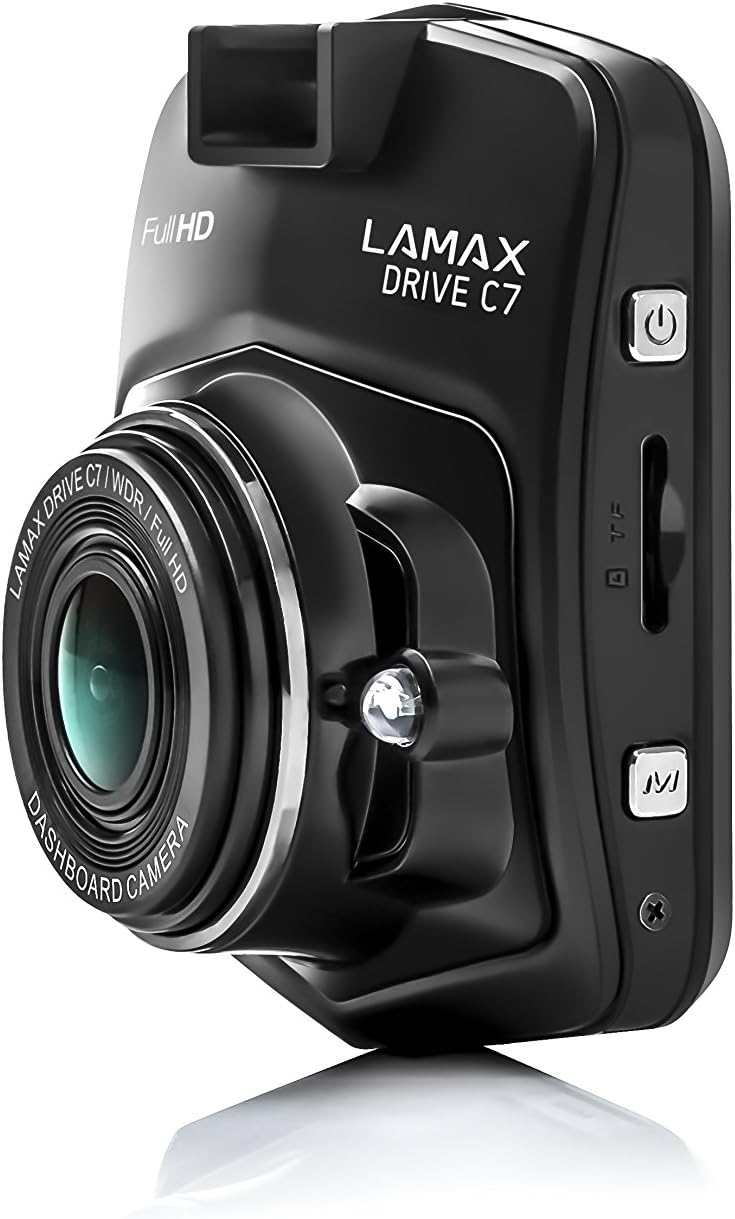
Imatge: Lateral view of the dashcam, highlighting the power button, memory card slot, and USB port.

Imatge: Frontal view of the dashcam with the 2.4-inch LCD display and control buttons below.
- Lent: High-resolution camera lens.
- Visualització: 2.4-inch LCD screen for viewing recordings and menu.
- Botó d'encesa: Encén/apaga el dispositiu.
- Botó de menú: Accedeix a la configuració i les opcions.
- Botons amunt / avall: Navegueu per les opcions del menú.
- Botó D'acord: Confirma les seleccions.
- Ranura per a targeta MicroSD: Insert memory card here.
- Port USB: For power supply and data transfer.
- Botó de restabliment: Resets the device (use a thin object).
Configuració
1. Inserció de la targeta de memòria
Ensure the dashcam is powered off before inserting or removing the microSD card. Insert the card into the slot until it clicks into place. Use a Class 10 or higher microSD card, up to 32GB capacity, for optimal performance. It is recommended to format the memory card within the dashcam settings before first use and periodically thereafter.
2. Muntatge de la Dashcam
Trieu una ubicació al parabrisa que no us obstrueixi la vista view of the road. Clean the windshield surface thoroughly before applying the mount.

Image: The dashcam attached to its suction cup mount, ready for windshield installation.

Imatge: Part posterior view of the dashcam with the suction cup mount attached, showing the screen and buttons.
- Attach the chosen mount (suction cup or adhesive) to the dashcam.
- Press the mount firmly against the windshield and secure it.
- Ajusta l'angle de la càmera per garantir una visió clara view del camí per davant.
3. Connexió a l'alimentació
Connect the car charger to the dashcam's USB port and plug the other end into your vehicle's 12V power outlet (cigarette lighter socket). The dashcam will automatically power on and begin recording when the vehicle's ignition is turned on.
Instruccions de funcionament
Encès/Apagat
- Automàtic: The dashcam powers on/off automatically with the vehicle's ignition.
- manual: Premeu i manteniu premut el botó d'engegada per encendre o apagar manualment el dispositiu.
Modes d'enregistrament
- Enregistrament en bucle: The dashcam records video in continuous loops (e.g., 1, 3, or 5 minutes). When the memory card is full, the oldest unlocked files es sobreescriuen.
- Sensor G: In the event of a sudden impact or collision, the G-Sensor automatically locks the current recording, preventing it from being overwritten. The sensitivity of the G-Sensor can be adjusted in the settings.
- Mode d'aparcament: When enabled, the dashcam will automatically start recording if it detects motion or an impact while the vehicle is parked. This feature provides 24-hour surveillance for your vehicle.
- Vídeo de lapse de temps: This feature allows the camera to record at a lower frame rate (e.g., 1 frame per second), compressing long periods of time into short videos. This can significantly extend the recording capacity of your memory card.
Navegació pel menú
Premeu el botó Menú button to access the settings. Use the Amunt/Avall botons per navegar per les opcions i el OK per confirmar les seleccions. Premeu el botó Menú again to exit the settings.
Reproducció
A view recorded videos, stop recording (if active), then press the Mode button to switch to playback mode. Use the Amunt/Avall botons per seleccionar a file i OK to play it. You can also connect the dashcam to a computer via USB to access files directament.
Manteniment
Gestió de targetes de memòria
- Format: Regularly format your microSD card (at least once a month) using the dashcam's format function to prevent data corruption and ensure smooth recording.
- Capacitat: Ensure sufficient free space on the memory card. Locked files from G-Sensor events can accumulate and fill the card. Periodically review and delete unnecessary locked files.
Neteja
Wipe the camera lens with a soft, lint-free cloth to ensure clear video quality. Use a slightly damp cloth to clean the body of the dashcam. Do not use harsh chemicals or abrasive cleaners.
Actualitzacions de firmware
Check the official LAMAX website periodically for available firmware updates. Updates can improve performance, add new features, or fix bugs. Follow the instructions provided with the firmware update carefully.
Resolució de problemes
| Problema | Possible causa/solució |
|---|---|
| La càmera del salpicader no s'encén. |
|
| L'enregistrament s'atura inesperadament. |
|
| La qualitat del vídeo és deficient o borrosa. |
|
| Dashcam freezes or becomes unresponsive. |
|
Especificacions
| Característica | Detall |
|---|---|
| Resolució de vídeo | Full HD 1080p |
| Viewangle ing | 150° |
| Mida de la pantalla | 2.4 inches (6.1 cm) LCD |
| Enregistrament en bucle | Sí |
| Sensor G | Sí |
| Mode d'aparcament | Yes (24h) |
| Visió nocturna | Sí |
| GPS integrat | Optional (via external module) |
| Emmagatzematge | MicroSD card (Class 10+, up to 32GB recommended) |
| Dimensions | 3.3 x 6.1 x 7.2 cm |
| Pes | 60 g |
| Components inclosos | Memory Card (as per product details) |
Garantia i Suport
Informació de la garantia
The LAMAX DRIVE C7 Dashcam comes with a standard manufacturer's warranty. Please refer to the warranty card included in your package or visit the official LAMAX weblloc web per obtenir informació detallada sobre els termes i condicions de la garantia específics de la vostra regió. Conserveu el comprovant de compra per a reclamacions de garantia.
Atenció al client
For technical assistance, troubleshooting, or product inquiries, please visit the official LAMAX support weblloc web o poseu-vos en contacte amb el seu departament d'atenció al client. Normalment, podeu trobar les dades de contacte a la pàgina oficial de la marca. weblloc web o a l'embalatge del producte.
Official LAMAX Store: Visit LAMAX Store on Amazon
Ask a question about this manual
Ask about setup, troubleshooting, compatibility, parts, safety, or missing instructions. Manuals+ will review the question and use this page’s manual context to help answer it.