
1. Producte acabatview
The Bloody AL90 Optical Gaming Mouse is engineered for precision and durability, featuring Light Strike (LK) Optical Switches for rapid response times. Designed with an ergonomic right-hand grip, it includes 8 programmable buttons and supports advanced macros for a customized gaming experience. The mouse also offers colored profile selection and a sweat-resistant, texturized soft-rubber surface for enhanced comfort and control.

Figure 1.1: Bloody AL90 Optical Gaming Mouse.
2. Guia de configuració
2.1 Contingut del paquet
- Bloody AL90 Optical Gaming Mouse
- Manual d'usuari (aquest document)
- Additional weights (if included with specific models)
2.2 Connexió del ratolí
- Localitzeu un port USB disponible al vostre ordinador.
- Plug the USB connector of the Bloody AL90 mouse into the USB port.
- The mouse will automatically install the necessary drivers. This may take a few moments.
- Once installed, the mouse's LED lighting will illuminate, indicating it is ready for use.
Nota: For advanced customization and macro programming, download the official Bloody software from the manufacturer's website. The mouse is compatible with Windows 10, Windows 8, Windows 7, Windows Vista, Windows XP, and Linux operating systems.
3. Instruccions de funcionament
3.1 Funcions dels botons
The AL90 mouse features 8 programmable buttons designed for optimal gaming and productivity. These include the left click, right click, scroll wheel (click and scroll), two side buttons, and three top-mounted buttons (often labeled 1, N, 3 or similar for mode selection).
- Clic esquerre/dret: Standard mouse functions. Equipped with Light Strike (LK) Optical Switches for ultra-fast response and durability (up to 50 million clicks).
- Roda de desplaçament: For vertical scrolling and as a clickable button. Features an optical wheel for precise and durable scrolling.
- Botons laterals: Typically assigned for 'forward' and 'back' navigation by default, but fully programmable via software.
- Top Buttons (1, N, 3): These buttons allow for quick switching between different firing modes or profiles, often indicated by colored LED changes. Refer to the software for specific customization.

Figure 3.1: Optical Wheel and Durable Click Technology. The image shows the mouse with callouts for the optical wheel and the "No Accidental Double Clicks" and "Ultra Durable Clicks 50 Million Clicks" features.
3.2 Ajust de DPI
The mouse supports a maximum sensitivity of 4000 Dots per Inch (DPI). DPI settings can be adjusted through the dedicated software to match your preference for speed and precision. Different profiles can be saved and switched on-the-fly using the programmable buttons.
3.3 Weight Tuning System
The AL90 mouse features a customizable weight tuning system, allowing you to adjust the mouse's weight for optimal balance and feel. This system typically involves removable weights located in a compartment on the underside of the mouse.
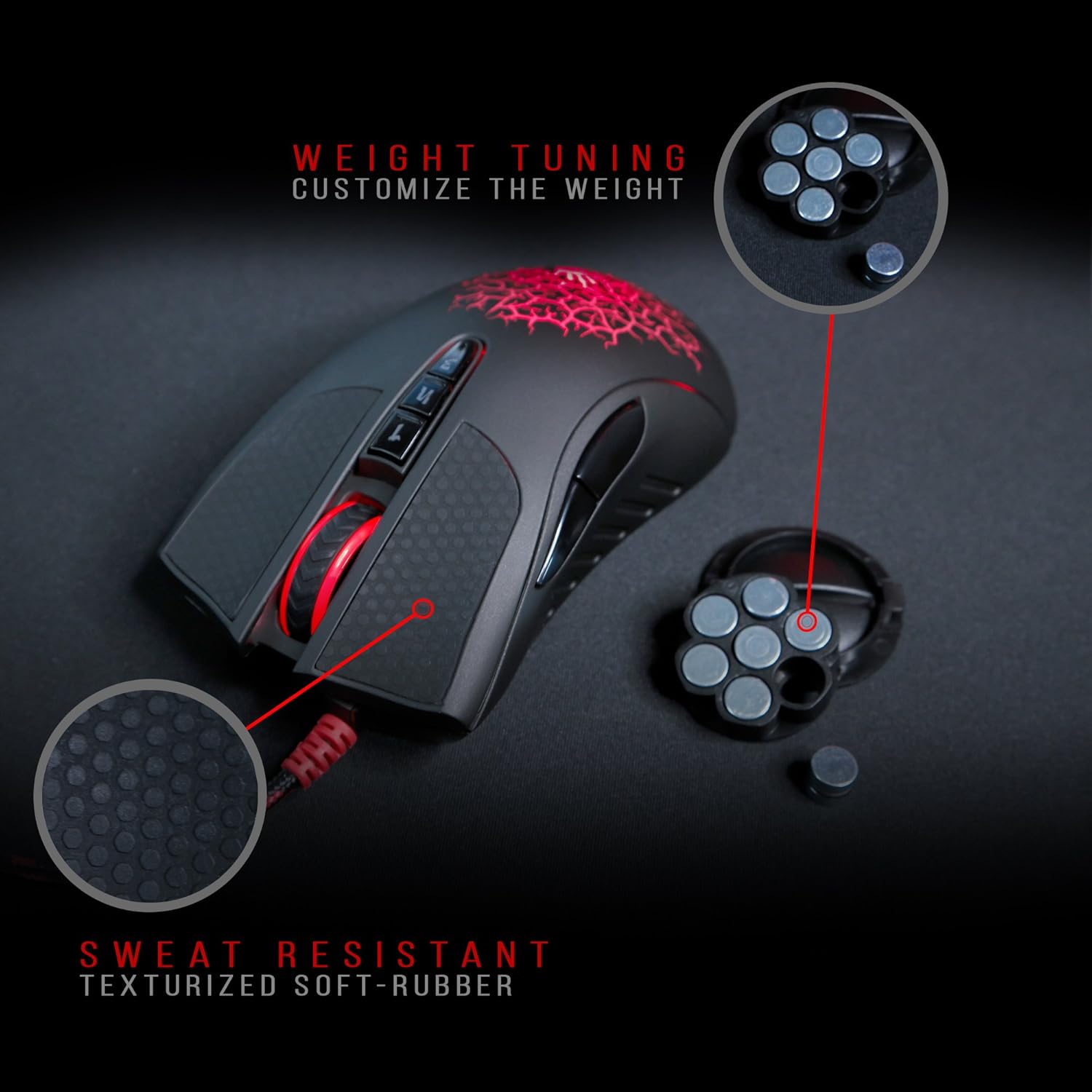
Figure 3.2: Weight Tuning and Sweat-Resistant Grip. The image shows the mouse with callouts for "WEIGHT TUNING CUSTOMIZE THE WEIGHT" and "SWEAT RESISTANT TEXTURIZED SOFT-RUBBER".

Figure 3.3: Mouse with Weight Tuning Components. This image shows the Bloody AL90 mouse alongside its removable weights, illustrating the customizable weight system.
4. Manteniment
4.1 Neteja del ratolí
To ensure optimal performance and longevity of your Bloody AL90 mouse, regular cleaning is recommended.
- Desconnecteu el ratolí de l'ordinador abans de netejar-lo.
- Utilitzeu un suau, lleugerament damp cloth to wipe the exterior of the mouse. The sweat-resistant, texturized soft-rubber surface is designed for easy cleaning.
- Eviteu utilitzar productes químics agressius, netejadors abrasius o humitat excessiva, ja que poden danyar el ratolí.
- For the optical sensor on the underside, use a dry cotton swab to gently remove any dust or debris.
5. Solució De Problemes
If you encounter issues with your Bloody AL90 mouse, please refer to the following common solutions:
- El ratolí no respon:
- Assegureu-vos que el cable USB estigui ben connectat al port USB de l'ordinador.
- Prova de connectar el ratolí a un port USB diferent.
- Reinicieu l'ordinador.
- Moviment erràtic del cursor:
- Netegeu el sensor òptic de la part inferior del ratolí.
- Assegureu-vos que feu servir el ratolí sobre una superfície adequada (per exemple, una estora de ratolí). Eviteu superfícies molt reflectants o transparents.
- Check for any software conflicts or outdated drivers. Reinstalling the mouse software may resolve the issue.
- Botons que no funcionen correctament:
- Verify button assignments within the Bloody software.
- Assegureu-vos que el programari estigui actualitzat.
- Els llums LED no funcionen:
- Check software settings for LED control.
- Ensure the mouse is properly connected and receiving power.
For further assistance, please visit the official Bloody support weblloc o contacteu amb el servei d'atenció al client.
6. Especificacions tècniques
| Número de model | AL90 |
| Marca | Sagnant |
| Tecnologia de connectivitat | USB (per cable) |
| Detecció de moviment | Òptic |
| Quantitat de botons | 8 Botons programables |
| Orientació de la mà | D'acord |
| Dispositius compatibles | Consola de jocs, ordinador personal |
| Sistema operatiu | Linux, Windows 10, Windows 7, Windows 8, Windows Vista, Windows XP |
| Sensibilitat màxima | 4000 DPI |
| Dimensions del producte (L x A x A) | 4.88 x 2.64 x 1.67 polzades |
| Pes de l'article | 0.32 lliures (5.12 unces) |
| Material | Plastic (with sweat-resistant rubberized finish) |
| Longitud del cable | 5.0 metres (aproximadament 16.4 peus) |

Figura 6.1: Dimensions del producte.
7. Garantia i Suport
For information regarding product warranty, technical support, or service, please refer to the warranty card included with your product or visit the official Bloody website. You can also contact their customer support for assistance with any product-related inquiries.