
Pentax K-3II
Pentax K-3II DSLR Camera Instruction Manual
Model: K-3II
1. Introducció
Welcome to the instruction manual for your new Pentax K-3II DSLR camera. This camera is designed for top performance, offering high-resolution image reproduction with approximately 24 effective megapixels, a 27-point AF system, and high-speed continuous shooting at approximately 8.3 images per second. It features a newly designed 86,000 pixel RGB light-metering sensor, a large, high-resolution LCD monitor, and an optical viewfinder. The K-3II also includes built-in GPS and a compass with sensor shift for Astro photography, all within a compact form factor.
Key features include the innovative AA simulator to minimize moiré without an optical AA filter, and Pixel Shift Resolution technology for ultra high-definition images with excellent detail and color reproduction. The camera's dustproof and weather-resistant body ensures reliable performance in various environments.
2. Informació de seguretat
Please read all safety instructions carefully before using your Pentax K-3II camera to ensure safe and proper operation. Keep this manual for future reference.
- Seguretat de la bateria: Use only the specified D-LI90 Lithium-Ion rechargeable battery. Do not expose batteries to excessive heat, direct sunlight, or fire. Do not short-circuit or disassemble batteries.
- Aigua i humitat: Although the camera is weather-resistant, avoid submerging it in water or exposing it to heavy rain for extended periods. Ensure all covers and ports are securely closed when operating in damp condicions.
- Manipulació: Do not drop the camera or subject it to strong impacts. Avoid pointing the lens directly at the sun or other strong light sources, as this can damage the image sensor.
- Neteja: Always turn off the camera and remove the battery before cleaning. Use a soft, dry cloth for the camera body. For the lens and sensor, use specialized cleaning tools and solutions.
3. Contingut del paquet
Verifiqueu que tots els elements que s'enumeren a continuació s'inclouen al paquet de la càmera:
- Pentax K-3II DSLR Camera Body
- D-LI90 Lithium-Ion Rechargeable Battery
- Carregador de bateria
- AC Plug Cord
- Corretja
- Body Mount Cap
- Ocular
- CD-ROM de programari
- Manual d'instruccions (aquest document)

Descripció: This image displays the Pentax K-3II DSLR camera body from a front-angle perspective. The camera is black with a prominent PENTAX logo on the front prism housing. The lens mount is visible, indicating it is a body-only unit. Various control dials and buttons are also visible on the top and front of the camera.
4. Configuració
4.1. Instal·lació de la bateria
- Assegureu-vos que la càmera estigui apagada.
- Obriu la tapa del compartiment de la bateria que es troba a la part inferior de la càmera.
- Insert the D-LI90 battery with the contacts facing inward, ensuring it clicks into place.
- Tanqueu bé la tapa del compartiment de la bateria.
4.2. Inserció de la targeta de memòria
The K-3II supports Dual SD/SDHC/SDXC memory cards.
- Assegureu-vos que la càmera estigui apagada.
- Obriu la tapa de la ranura de la targeta de memòria que hi ha al lateral de la càmera.
- Insert the SD card(s) into the designated slots (Slot 1 and Slot 2) with the label facing the front of the camera until they click into place.
- Tanqueu bé la tapa de la ranura de la targeta de memòria.
4.3. Col·locació d'una lent
The Pentax K-3II uses the Pentax KAF3 and KAF2 lens mounts.
- Remove the body mount cap from the camera body and the rear cap from the lens.
- Align the red mounting index mark on the lens with the red index mark on the camera body.
- Introduïu l'objectiu a la muntura de la càmera i gireu-lo en sentit horari fins que encaixi al seu lloc.
- Per treure l'objectiu, premeu el botó d'alliberament de l'objectiu del cos de la càmera i gireu l'objectiu en sentit antihorari.
5. Funcionament de la càmera
5.1. Encès / apagat
Per encendre o apagar la càmera, gireu l'interruptor d'alimentació que es troba al voltant del botó de l'obturador.
5.2. Modes bàsics de tret
The mode dial on the top of the camera allows you to select various shooting modes, including:
- Hyper Program (P): Automatic exposure with manual override.
- Sensitivity Priority (Sv): Adjust ISO while the camera sets aperture and shutter speed.
- Shutter and Aperture Priority (TAv): Set both shutter speed and aperture, camera sets ISO.
- Prioritat d'obturació (Televisió): Tu ajustes la velocitat d'obturació, la càmera ajusta l'obertura.
- Prioritat d'obertura (Av): Tu ajustes l'obertura del diafragma, la càmera ajusta la velocitat d'obturació.
- Metered Manual (M): Full manual control over exposure.
- Bombeta: For long exposures where the shutter remains open as long as the button is pressed.
- User (1, 2, 3): Custom settings for quick recall.

Descripció: This image shows the back of the Pentax K-3II camera, highlighting the large LCD screen, the optical viewfinder, and various control buttons such as the four-way controller, menu button, info button, and playback button. The mode dial is also partially visible on the top right.
5.3. Sistema d'enfocament automàtic
The K-3II features the SAFOX 11 autofocus system with 27 autofocus points (25 cross-type). You can select various AF modes including Single AF, Continuous AF, and Face Detection. The camera also supports Live View enfocament automàtic.
5.4. Image Stabilization (Sensor-shift)
The camera incorporates a sensor-shift type image stabilization system, which effectively reduces camera shake for sharper images, regardless of the lens used.
5.5. Pixel Shift Resolution
This innovative technology moves the image sensor unit in minute increments to capture four shots. These shots are then merged into a single image to generate an ultra high-definition image with superior detail and color reproduction.
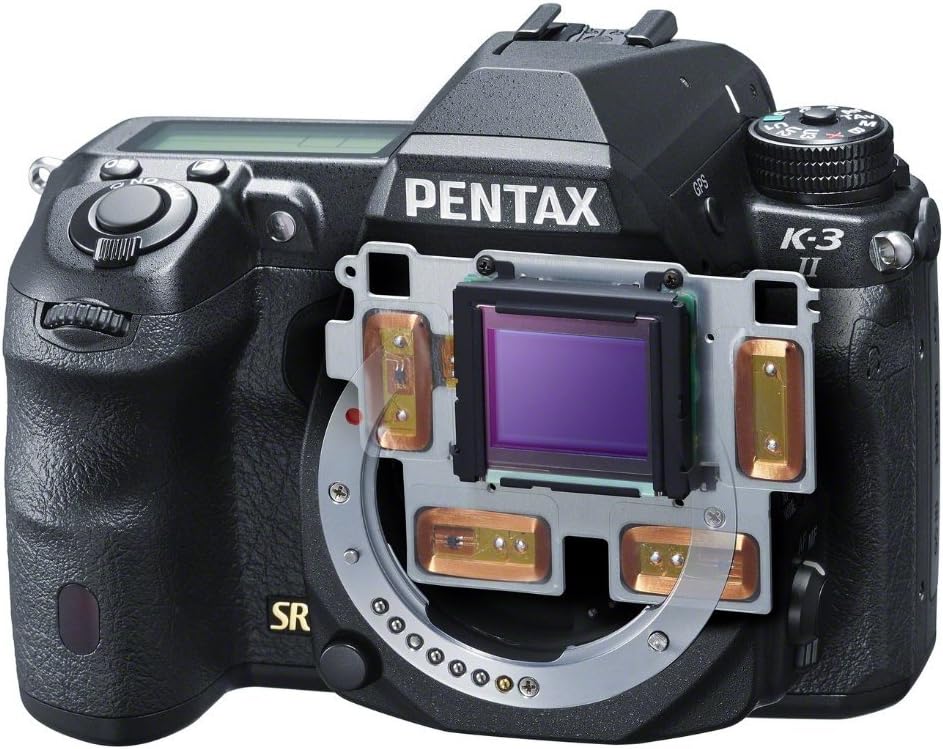
Descripció: Aquesta imatge proporciona una imatge interna view of the Pentax K-3II, specifically highlighting the image sensor and the mechanical components responsible for its sensor-shift image stabilization and Pixel Shift Resolution functions. The sensor is centrally located, surrounded by the stabilization frame.
5.6. Built-in GPS and Astro Tracer
The K-3II includes a built-in GPS module and an Astro Tracer function. The Astro Tracer works in conjunction with the camera's sensor-shift mechanism to track celestial bodies, allowing for sharp, un-streaked astrophotography without the need for an equatorial mount.
5.7. Gravació de vídeo
The camera supports Full HD (FHD 1080p) video recording in MPEG-4 and H.264 formats. To start recording, press the dedicated video recording button.
5.8. Transferència d'imatges
Images and videos can be transferred from the camera using the dual SD card slots, or by connecting the camera directly to a computer via USB or HDMI.
6. Manteniment
6.1. Neteja del cos i l'objectiu de la càmera
- Feu servir un drap suau i sense borrissol per netejar el cos de la càmera. Per a la brutícia persistent, netegeu lleugeramentampen el drap amb aigua.
- For the lens, use a lens brush to remove dust, then gently wipe with a lens cleaning cloth and lens cleaning solution.
6.2. Neteja del sensor
If dust spots appear on your images, the image sensor may need cleaning. Use the camera's built-in sensor cleaning function or consult a professional for manual cleaning.
6.3. Emmagatzematge
Quan no la feu servir durant períodes prolongats, guardeu la càmera en un lloc fresc i sec, allunyat de la llum solar directa i de la humitat elevada. Traieu la bateria abans de guardar-la.
7. Solució De Problemes
Aquesta secció ofereix solucions a problemes comuns que podeu trobar.
| Problema | Causa possible | Solució |
|---|---|---|
| La càmera no s'encén. | La bateria està esgotada o inserida incorrectament. | Carregueu la bateria completament i assegureu-vos que estigui inserida correctament. |
| Les imatges són borroses. | Tremolor de la càmera, enfocament incorrecte o lent bruta. | Use a faster shutter speed, ensure proper focus, or clean the lens. Activate image stabilization. |
| L'enfocament automàtic és lent o imprecís. | Low light conditions, low contrast subject, or lens compatibility. | Ensure sufficient light, focus on a high-contrast area, or check lens compatibility. |
| Error de la targeta de memòria. | La targeta està plena, malmesa o incompatible. | Elimineu-les innecessàries files, formateu la targeta (això esborrarà totes les dades) o proveu una altra targeta compatible. |
8. Especificacions
Key technical specifications for the Pentax K-3II DSLR camera:
| Característica | Especificació |
|---|---|
| Nom del model | Pentax K-3II |
| Sensor d'imatge | CMOS APS-C de 24.3 MP |
| Sensibilitat ISO | 100-51200 |
| Velocitat d'obturació | 1/8000 a 30 segons |
| Tir continu | Aprox. 8.3 fps |
| Sistema d'enfocament automàtic | SAFOX 11, 27 points (25 cross-type) |
| Estabilització d'imatge | Tipus de canvi de sensor |
| Mostra | 3.2-inch LCD, 1,037,000 dots |
| Resolució de vídeo | Full HD 1080p (MPEG-4, H.264) |
| Mitjans d'emmagatzematge | Dual SD/SDHC/SDXC slots |
| Connectivitat | USB, HDMI |
| Tipus de bateria | D-LI90 Lithium-Ion |
| Durada de la bateria (CIPA) | Aprox. 720 trets |
| Pes (només cos) | Aprox. 1.76 lliures (798 g) |
| Dimensions (A x A x P) | Aprox. 5.16 x 3.94 x 3.03 polzades (131.5 x 100 x 77.5 mm) |
9. Garantia i Suport
9.1. Informació de la garantia
The Pentax K-3II DSLR camera typically comes with a Garantia limitada d'1 any from the manufacturer, covering defects in materials and workmanship under normal use. Please retain your proof of purchase for warranty claims. Warranty terms may vary by region and retailer. For detailed warranty information, refer to the warranty card included in your product packaging or visit the official Pentax weblloc.
9.2. Atenció al client
For technical assistance, service, or further inquiries, please contact Pentax customer support through their official weblloc web o la informació de contacte que es proporciona a la documentació del producte. També podeu visitar el Pentax Store on Amazon per obtenir informació i recursos addicionals sobre el producte.
Ask a question about this manual
Ask about setup, troubleshooting, compatibility, parts, safety, or missing instructions. Manuals+ will review the question and use this page’s manual context to help answer it.