
Introducció
The M-AUDIO AV42 Compact Active Desktop Reference Monitor Speakers are designed to provide clear and accurate audio reproduction for various applications, including multimedia playback, gaming, and professional media creation. This manual provides essential information for the proper setup, operation, and maintenance of your AV42 speakers.
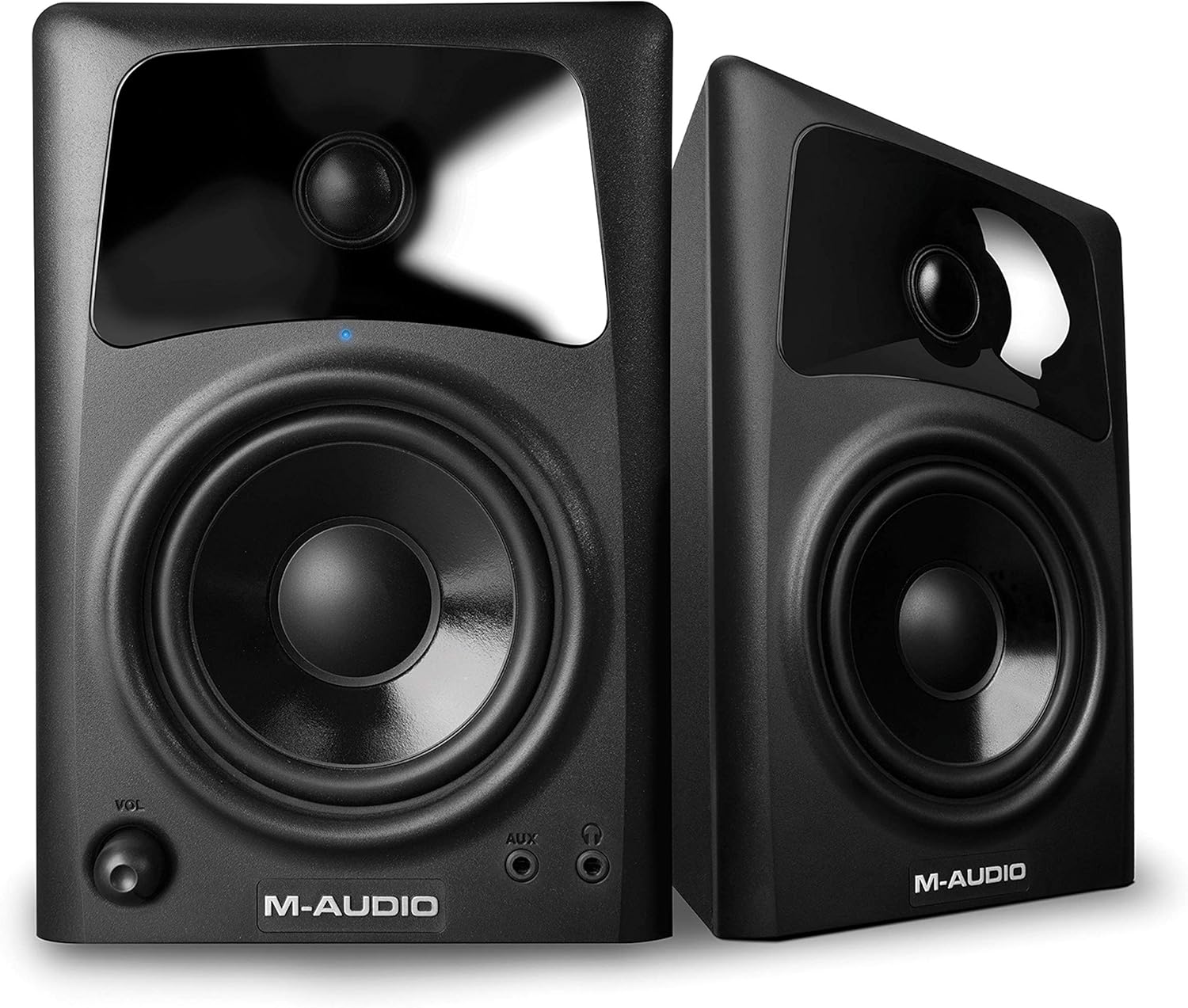
Figura 1: Frontal view of the M-AUDIO AV42 Active Speaker, featuring the 4-inch woofer, 1-inch tweeter, volume control, and front-panel inputs.
Configuració
1. Desembalatge i contingut
Traieu amb cura tots els components de l'embalatge. Assegureu-vos que hi hagi els elements següents:
- M-AUDIO AV42 Active Speaker (1)
- M-AUDIO AV42 Passive Speaker (1)
- 1/8-inch (3.5mm) Stereo Audio Cable (1)
- 1/8-inch (3.5mm) to Stereo RCA Cable (1)
- Premium Speaker Wire (for connecting active to passive speaker) (1)
- Acoustic Traction Pads (4)
- Cable d'alimentació (1)
2. Col·locació d'altaveus
For optimal sound quality, place the speakers on a stable, flat surface, such as a desktop or speaker stands. Position them to form an equilateral triangle with your listening position, with the tweeters at approximately ear level. Use the included acoustic traction pads to minimize vibrations and improve sound clarity.
3. Connexions
Follow these steps to connect your AV42 speakers:
- Connecteu l'altaveu actiu al passiu: Use the included premium speaker wire to connect the active speaker (which has the power and input connections) to the passive speaker. Ensure correct polarity (+ to + and - to -) for optimal sound.
- Connecta la font d'àudio:
- Entrades RCA: Use the 1/8-inch to stereo RCA cable to connect your computer, audio interface, or other audio device to the RCA inputs on the rear of the active speaker.
- Entrada auxiliar: For mobile devices, use the 1/8-inch stereo audio cable to connect to the front-panel AUX input.
- Connectar l'alimentació: Plug the power cable into the active speaker's power input, then into a standard AC power outlet.
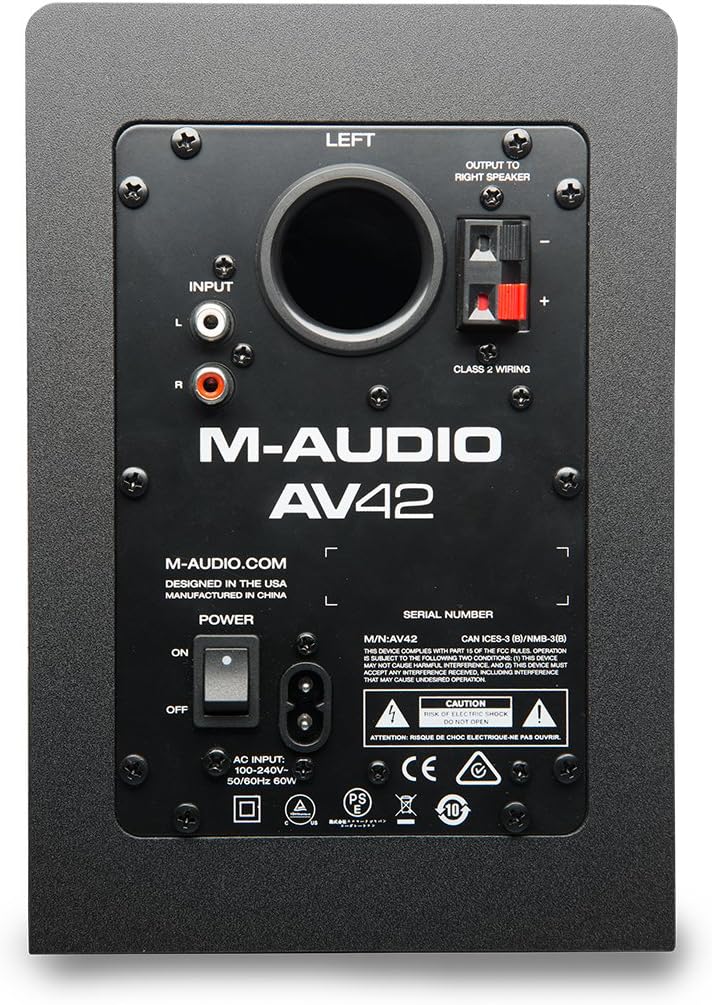
Figure 2: Rear panel of the M-AUDIO AV42 Active Speaker, illustrating input and output connections.
Instruccions de funcionament
1. Encendre/apagar
Locate the power switch on the rear panel of the active speaker. Flip the switch to the 'ON' position to power on the speakers. The blue LED on the front of the active speaker will illuminate. Flip the switch to 'OFF' to power down.
2. Control de volum
Adjust the master volume using the 'VOL' knob on the front panel of the active speaker. Start with a low volume and gradually increase it to a comfortable listening level. It is recommended to set your audio source (computer, mobile device) volume to a moderate level and use the speaker's volume knob for primary control.
3. Sortida d'auriculars
For private listening, plug your headphones into the 1/8-inch (3.5mm) headphone jack on the front panel of the active speaker. Connecting headphones will automatically mute the main speakers. The volume knob will then control the headphone output level.
4. Entrada auxiliar
The front-panel 1/8-inch (3.5mm) AUX input allows for quick connection of portable audio devices like smartphones or MP3 players. When a device is connected to the AUX input, it will override the rear RCA inputs. Disconnect the AUX device to revert to the RCA inputs.
Manteniment
Proper maintenance ensures the longevity and performance of your AV42 speakers:
- Neteja: Use a soft, dry cloth to clean the speaker cabinets. Avoid using abrasive cleaners, solvents, or waxes, as these can damage the finish.
- Protecció contra la pols: Keep the speakers free from dust accumulation, especially around the drivers and ports, to maintain optimal sound quality.
- Condicions ambientals: Eviteu exposar els altaveus a temperatures extremes, humitat elevada o llum solar directa.
- Protecció del conductor: The AV42 speakers feature durable drivers designed to withstand minor accidental pokes, which will pop back out without damage. However, avoid intentional force or sharp objects.
Resolució de problemes
If you encounter issues with your M-AUDIO AV42 speakers, refer to the following common problems and solutions:
- Sense so:
- Ensure the power switch is ON and the blue LED is illuminated.
- Check all audio cable connections (RCA, AUX, speaker wire) are secure and correctly inserted.
- Verify the volume knob on the active speaker is turned up.
- Confirm your audio source (computer, mobile device) is playing and its volume is not muted or too low.
- If headphones are plugged in, unplug them to enable main speaker output.
- So distorsionat:
- Reduce the volume on both the speakers and your audio source. Excessive volume can cause distortion.
- Check if the audio source is producing a clean signal. Try a different audio source or cable.
- Ensure speaker wire connections are secure and not frayed.
- Un altaveu no funciona:
- Verify the speaker wire connecting the active and passive speakers is securely connected at both ends and not damaged.
- Check the balance settings on your audio source.
- Static or Hum:
- Ensure all cables are properly shielded and away from power cables or other electronic devices that might cause interference.
- Try plugging the speakers into a different power outlet.
- Disconnect all audio inputs and check if the hum persists. If not, the issue may be with the audio source or cable.
Especificacions
The following are the technical specifications for the M-AUDIO AV42 Desktop Reference Monitor Speakers:
- Tipus d'altaveu: Active Desktop Reference Monitors
- Woofer: 4-inch polypropylene-coated
- Tweeter: 1-inch ferrofluid-cooled silk cone with OptImage IV wave guides
- AmpPotència més viva: 20 Watts per channel (40 Watts total peak)
- Mode de sortida d'àudio: Estèreo (2.0 canals)
- Connectivitat: Auxiliary (1/8-inch), RCA
- Relació senyal/soroll (SNR): 90 dB
- Font d'alimentació: Elèctric amb cable
- Tipus de muntatge: Muntatge de taula
- Material del tancament: Plàstic
- Pes de l'article: 7.5 lliures (aproximadament)
- Dispositius compatibles: Smartphone, Tablet, MP3 Player, Desktop, Laptop
Producte acabatview Vídeo
This official M-Audio video provides an overview of the AV Series desktop monitor speakers, including the AV42 model, highlighting key features, design, and connectivity options.
Garantia
The M-AUDIO AV42 speakers come with a 1 any de garantia covering parts and labor from the date of original purchase. This warranty protects against defects in materials and workmanship under normal use. Please retain your proof of purchase for warranty claims.
Suport
For further assistance, technical support, or detailed product information, please visit the official M-AUDIO weblloc web. Podeu trobar preguntes freqüents, descàrregues de controladors i informació de contacte per al servei d'atenció al client.