
Introducció
This manual provides comprehensive instructions for the installation, operation, and maintenance of your Alcatel-Lucent 4018 Extended Edition IPTouch VoIP Phone. Please read this manual carefully before using the device to ensure proper functionality and to prevent damage.
Informació de seguretat
Observe the following safety precautions to reduce the risk of fire, electric shock, and injury:
- Use only the power adapter supplied with the phone.
- No exposeu el telèfon a l'aigua ni a la humitat.
- Avoid placing the phone near heat sources or in direct sunlight.
- No intenteu obrir ni reparar el telèfon vosaltres mateixos. Encarregueu totes les tasques de manteniment a personal qualificat.
- Assegureu-vos una ventilació adequada al voltant del dispositiu.
Contingut del paquet
Comproveu que el vostre paquet contingui els elements següents:
- Alcatel-Lucent 4018 Extended Edition IPTouch VoIP Phone
- Telèfon
- Cable de l'auricular
- Cable Ethernet
- Adaptador d'alimentació (si escau)
- Guia d'inici ràpid
Producte acabatview
The Alcatel-Lucent 4018 Extended Edition IPTouch VoIP Phone is designed for efficient communication. Familiarize yourself with its components:
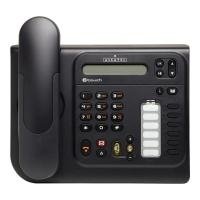
Davant view of the Alcatel-Lucent 4018 Extended Edition IPTouch VoIP Phone, showing the display, keypad, and function buttons.
Components clau:
- Pantalla de visualització: Shows call information, menus, and status.
- Contextual Keys: Buttons below the display that change function based on the current menu.
- Tecles de navegació: For scrolling through menus and options.
- Teclat de marcatge: Teclat numèric estàndard per marcar.
- Tecles de funció: Dedicated buttons for features like voicemail, hold, transfer, and speakerphone.
- Auricular: Per a converses privades.
- Altaveu: Per a la comunicació amb mans lliures.
Configuració
1. Connexió del telèfon
- Connect the handset cord to the handset and the designated port on the phone base.
- Connect one end of the Ethernet cable to the LAN port on the back of the phone and the other end to your network switch or router.
- If Power over Ethernet (PoE) is not available, connect the power adapter to the phone's power port and then to an electrical outlet.
2. Configuració Inicial
Upon first power-up, the phone will attempt to connect to your network and register with your VoIP server. This process may require network credentials or specific server settings, which are typically provided by your IT administrator.
- Seguiu les instruccions que apareixen a la pantalla per a la configuració inicial.
- Contact your system administrator for specific IP address, subnet mask, gateway, and DNS server settings if manual configuration is required.
Instruccions de funcionament
Fer una trucada:
- Aixequeu el telèfon o premeu Altaveu botó.
- Marqueu el número de telèfon desitjat amb el teclat.
- Premeu el botó Marqueu contextual key or wait for the call to connect automatically.
Respondre una trucada:
- Quan soni el telèfon, aixequeu l'auricular o premeu la tecla Altaveu botó.
- Alternativament, premeu el botó Respon contextual key.
Finalització d'una trucada:
- Pengeu l'auricular o premeu la tecla Finalitzar la trucada contextual key or Altaveu botó.
Correu de veu:
- Premeu el botó dedicat Correu de veu button (often indicated by an envelope icon).
- Follow the audio prompts to access and manage your messages.
Hold and Transfer:
- Durant una trucada activa, premeu Aguanta botó per posar la trucada en espera.
- To transfer a call, press the Transferència , marqueu el número nou i, a continuació, premeu el botó Transferència again or hang up (consult your system's specific transfer method).
Manteniment
- Neteja: Use a soft, dry cloth to clean the phone's surface. Do not use liquid cleaners or aerosols directly on the phone.
- Emmagatzematge: If storing the phone for an extended period, disconnect it from power and network, and store it in a cool, dry place.
- Actualitzacions de programari: Firmware updates are typically managed by your IT department. Do not attempt to update the firmware without guidance from your administrator.
Resolució de problemes
| Problema | Causa possible | Solució |
|---|---|---|
| El telèfon no s'encén. | No hi ha connexió a la xarxa elèctrica o l'adaptador de corrent és defectuós. | Check power cable connection. Ensure power adapter is functional. If using PoE, verify network cable and switch. |
| No es poden fer ni rebre trucades. | Network connectivity issue or VoIP registration failure. | Check Ethernet cable connection. Restart the phone. Contact your IT administrator to verify VoIP server settings and registration status. |
| Sense to de marcatge. | Handset not properly connected or phone not registered. | Ensure handset cord is securely connected. Verify phone is registered to the VoIP server (check display for status). |
| Mala qualitat d'àudio. | Network congestion or faulty handset/speaker. | Check network connection. Try restarting the phone. If problem persists, contact support. |
For issues not listed here, please contact your IT support or the product manufacturer.
Especificacions
| Característica | Detall |
|---|---|
| Número de model | 3GV27063DB |
| Dispositius compatibles | Internet, computers, VoIP services |
| Tipus de telèfon | Cordat |
| Material | Plàstic |
| Font d'alimentació | Cable elèctric |
| Tipus de marcador | Single keypad |
| Tipus de contestador | Digital |
| Pes de l'article | 4.52 lliures |
| Identificador de trucada | Sí |
| Piles necessàries | Non-standard battery requires batteries (Note: This usually implies a backup battery or specific type, not standard AA/AAA) |
Garantia i Suport
For warranty information, technical support, or service inquiries, please contact your vendor or IT administrator. Alcatel-Lucent provides support through authorized channels.
Spare parts availability: Information unavailable on spare parts.
Software updates guaranteed until: Information not available.