
1. Introducció
Thank you for choosing the ttec 2BH01 SoundMatePlay Portable Speaker. This manual provides essential information for setting up, operating, and maintaining your speaker to ensure an optimal audio experience. Please read these instructions carefully before using the product.
2. Contingut del paquet
Marqueu la casella per als elements següents:
- 1 x ttec 2BH01 SoundMatePlay Portable Wireless Speaker
- 1 x cable de càrrega USB
- 1 x Manual d'usuari (aquest document)
3. Producte acabatview
The ttec 2BH01 SoundMatePlay is a versatile portable speaker designed for an advanced wireless audio experience. It features a functional design with an integrated phone stand, allowing you to enjoy media hands-free while listening to audio. It supports both Bluetooth wireless connectivity and wired audio input via its built-in AUX cable.
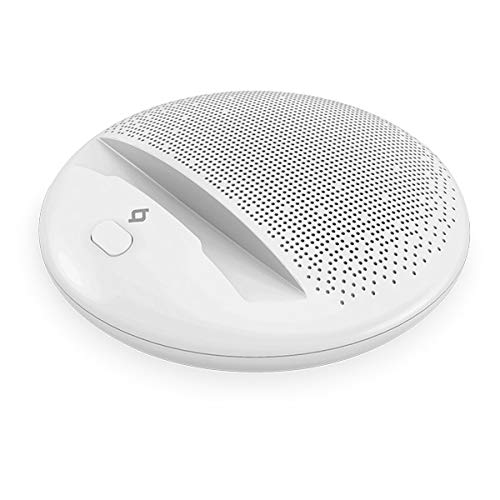
Image: ttec 2BH01 SoundMatePlay Portable Speaker in white, with a black smartphone horizontally placed on its integrated stand. A white AUX cable connects the smartphone to the speaker, illustrating its wired connectivity option. The speaker features a minimalist design with a speaker grille visible at the top and control buttons at the front.
4. Configuració
4.1 Càrrega inicial
Before first use, fully charge your SoundMatePlay speaker. Connect the provided USB charging cable to the speaker's charging port and the other end to a USB power adapter (not included) or a computer's USB port. The charging indicator light will show the charging status and turn off or change color once fully charged. A full charge provides up to 6 hours of battery life, depending on usage and volume level.
4.2 Engegada/apagada
- To power on: Press and hold the Power button (usually marked with a power symbol) for a few seconds until you hear an audible prompt or see an indicator light.
- To power off: Press and hold the Power button again for a few seconds until the speaker powers down.
5. Instruccions de funcionament
5.1 Vinculació Bluetooth
- Assegureu-vos que l'altaveu estigui encès i en mode d'emparellament Bluetooth. Normalment, l'indicador lluminós Bluetooth parpellejarà.
- On your smartphone or tablet, go to the Bluetooth settings.
- Cerca available devices and select "ttec SoundMatePlay" de la llista.
- Once paired, the speaker will indicate a successful connection (e.g., a solid indicator light or an audible prompt).
- Ara pots reproduir àudio sense fil des del teu dispositiu a través de l'altaveu.
5.2 AUX (Wired) Connection
The SoundMatePlay speaker includes a built-in AUX audio cable for wired connectivity.
- Locate the integrated AUX cable on the speaker.
- Plug the 3.5mm jack of the AUX cable into the headphone jack or audio output port of your audio device (smartphone, tablet, MP3 player, etc.).
- The speaker will automatically switch to AUX mode or you may need to select it manually if there's a mode button.
- Reprodueix àudio des del teu dispositiu.
5.3 Ús del suport del telèfon
The speaker features an integrated stand designed to hold your smartphone or tablet horizontally, providing a convenient viewing angle while enjoying audio or video content.
5.4 Control de volum
Adjust the volume directly from your connected audio device (smartphone, tablet) or using any volume control buttons present on the speaker itself, if applicable.
6. Càrrega
When the battery is low, the speaker may give an audible warning or an indicator light may flash. Connect the USB charging cable to recharge the speaker. Charging time may vary. Avoid using the speaker while it is charging for optimal battery health, though it is generally safe to do so.
7. Manteniment
- Neteja: Feu servir un drap suau i sec per netejar la superfície de l'altaveu. No utilitzeu productes de neteja abrasius ni dissolvents.
- Emmagatzematge: Guardeu l'altaveu en un lloc fresc i sec, allunyat de la llum solar directa i de temperatures extremes quan no l'utilitzeu durant períodes prolongats.
- Cura de la bateria: Per allargar la durada de la bateria, eviteu descarregar completament l'altaveu amb freqüència. Carregueu-lo regularment, fins i tot si no l'esteu fent servir.
8. Solució De Problemes
| Problema | Possible solució |
|---|---|
| Sense poder | Ensure the speaker is charged. Connect the USB cable and charge for at least 30 minutes. |
| No es pot emparellar per Bluetooth | Make sure the speaker is in pairing mode. Turn off and on Bluetooth on your device. Move closer to the speaker. |
| Sense so | Check volume levels on both the speaker and your connected device. Ensure the correct input mode (Bluetooth/AUX) is selected. |
| Mala qualitat del so | Move your device closer to the speaker to reduce interference. Ensure the AUX cable is fully inserted if using wired connection. |
9. Especificacions
- Model: 2BH01 SoundMatePlay
- Marca: TTEC
- Tecnologia de connectivitat: Bluetooth, AUX (Wired)
- Tipus d'altaveu: Portàtil
- Característiques especials: Bluetooth, Portable, Integrated Phone Stand
- Durada de la bateria: Fins a 6 hores (varia segons l'ús)
- Font d'alimentació: Rechargeable Battery (Corded Electric via USB)
- Color: Blanc
10. Informació de seguretat
- No exposeu l'altaveu a l'aigua ni a una humitat excessiva.
- Eviteu temperatures extremes, la llum solar directa i els ambients polsegosos.
- Do not disassemble, repair, or modify the product. This will void the warranty.
- Mantenir fora de l'abast dels nens.
- Feu servir només els cables de càrrega proporcionats o certificats.
- Escolteu a un volum moderat per evitar danys auditius.
11. Garantia i Suport
Your ttec 2BH01 SoundMatePlay Portable Speaker is covered by a limited warranty. For detailed warranty terms and conditions, please refer to the warranty card included in your package or visit the official TTEC website. For technical support or customer service, please contact TTEC customer support through their official channels.
Conserveu el vostre comprovant de compra per a reclamacions de garantia.