
ATEQ VT30-0000
ATEQ VT30 Universal TPMS Activation and Reset Tool User Manual
Model: VT30-0000
1. Introducció
The ATEQ VT30 is a universal Tire Pressure Monitoring System (TPMS) activation and reset tool designed for automotive professionals and enthusiasts. This handheld device facilitates the activation of TPMS sensors and assists in resetting TPMS systems, supporting both manual and auto relearn procedures for a wide range of domestic and European vehicles. It displays essential sensor information such as ID, frequency, temperature, battery condition, and tire pressure, making it an invaluable diagnostic tool for TPMS maintenance.
2. Informació de seguretat
- Always read and understand this manual before operating the VT30 tool.
- Use the tool only for its intended purpose as described in this manual.
- Keep the tool away from water, moisture, and extreme temperatures.
- Do not attempt to disassemble or modify the tool. Refer all servicing to qualified personnel.
- Ensure proper ventilation when working in enclosed spaces.
- Always wear appropriate personal protective equipment (PPE) when working on vehicles.
- Eliminar les bateries segons la normativa local.
3. Contingut del paquet

Verifiqueu que tots els elements siguin presents al vostre paquet:
- ATEQ VT30 Universal TPMS Activation and Reset Tool
- USB Cable for connectivity and updates
- Software CD (contains drivers and update utility)
- Manual d'usuari (aquest document)
If any items are missing or damaged, please contact ATEQ customer support immediately.
4. Producte acabatview
4.1. Components i controls
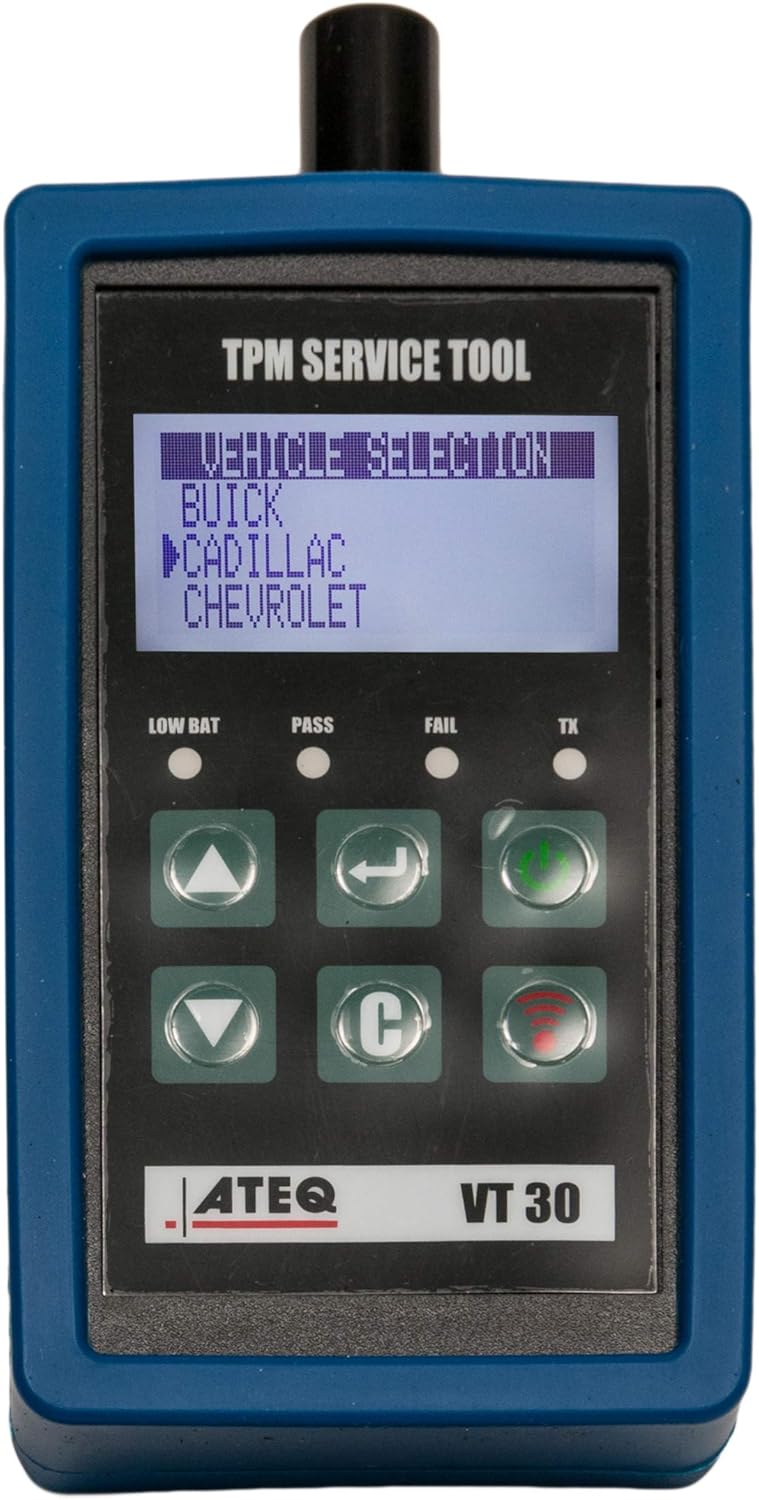
The ATEQ VT30 features a clear LCD display and intuitive button layout for easy operation:
- Pantalla LCD: Shows vehicle selection, sensor data, and operational prompts.
- Botons amunt/avall (▲ / ▼): Navegueu pels menús i opcions.
- Enter Button (↵): Confirma les seleccions.
- Botó d'engegada (⏻): Turns the tool on/off.
- Cancel/Back Button (C): Torna a la pantalla anterior o cancel·la una operació.
- Activation Button (📶): Initiates TPMS sensor activation.
- Status Indicators (LOW BAT, PASS, FAIL, TX): Provide visual feedback on battery status, successful/failed operations, and transmission.
4.2. Mostra informació
The LCD display provides critical information during operation:
- Selecció de vehicles: Allows you to choose the make, model, and year of the vehicle.
- ID del sensor: Unique identifier for each TPMS sensor.
- Pressió dels pneumàtics: Real-time tire pressure reading.
- Temperatura: Sensor temperature reading.
- Estat de la bateria: Indicates the health of the TPMS sensor battery.
- Freqüència: Displays the sensor's operating frequency (e.g., 315 MHz, 433 MHz).
- Operational Prompts: Guides the user through activation and relearn procedures.
5. Configuració
5.1. Instal·lació de la bateria
The ATEQ VT30 is powered by a 9V battery. To install or replace the battery:
- Localitzeu la tapa del compartiment de la bateria a la part posterior de l'eina.
- Feu lliscar o desenganxeu la tapa per obrir-la.
- Insert a fresh 9V battery, ensuring correct polarity (+/-).
- Tanqueu bé la tapa del compartiment de la bateria.
Note: Remove the battery if the tool will not be used for an extended period to prevent leakage.
5.2. Actualitzacions de programari i firmware
To ensure optimal performance and compatibility with the latest vehicle models and TPMS sensors, it is crucial to keep your VT30's software and firmware updated. Updates typically include new vehicle coverage, bug fixes, and performance enhancements.
- Install the update utility software from the provided CD onto your computer.
- Connect the VT30 tool to your computer using the supplied USB cable.
- Launch the update utility. The software will detect your tool and check for available updates.
- Seguiu les instruccions a la pantalla per baixar i instal·lar el microprogramari més recent.
- Do not disconnect the tool during the update process.
It is recommended to check for updates regularly, especially before working on newer vehicle models.
6. Instruccions de funcionament
6.1. Activating TPMS Sensors

To activate a TPMS sensor and read its data:
- Turn on the VT30 tool.
- Select the correct vehicle make, model, and year from the menu using the Up/Down and Enter buttons.
- Position the tool's antenna near the tire sidewall, close to the valve stem.
- Press the Activation Button (📶).
- The tool will attempt to activate the sensor. Once successful, the sensor's ID, pressure, temperature, and battery status will be displayed on the screen. The "PASS" indicator will illuminate.
- If activation fails, reposition the tool and try again. The "FAIL" indicator will illuminate.
Note: Some vehicles may require the ignition to be in a specific position (e.g., ON, ACC) or the vehicle to be in a "relearn mode" before sensors can be activated. Refer to your vehicle's service manual for specific instructions.
6.2. Resetting TPMS Systems and Relearn Procedures
After replacing a TPMS sensor or rotating tires, the vehicle's TPMS system often needs to be reset or "relearned" to recognize the new sensor IDs and their positions. The VT30 supports various relearn procedures:
- Reaprenentatge automàtic: For vehicles that automatically learn new sensor IDs after a certain driving period. The VT30 helps activate the sensors to ensure they are transmitting.
- Manual Relearn: For vehicles that require a specific sequence of actions (e.g., horn honks, ignition cycles) to enter relearn mode. The VT30 activates sensors during this process.
- OBD Relearn: For vehicles that require sensor IDs to be transferred to the vehicle's Engine Control Unit (ECU) via the OBD-II port. The VT30 can be used in conjunction with a diagnostic scan tool or ATEQ Quickset accessory for this purpose.
Consult your vehicle's owner's manual or a reliable service guide for the exact relearn procedure specific to your vehicle. The VT30 will guide you through the activation steps required during these procedures.
7. Manteniment
7.1. Neteja
- Netegeu l'eina amb un drap suauamp tela. No utilitzeu netejadors abrasius ni dissolvents.
- Ensure no liquids enter the tool's openings.
7.2. Emmagatzematge
- Store the VT30 in a cool, dry place, away from direct sunlight and extreme temperatures.
- If storing for an extended period, remove the 9V battery to prevent potential damage from battery leakage.
- Keep the tool in its original packaging or a protective case to prevent physical damage.
8. Solució De Problemes
| Problema | Causa possible | Solució |
|---|---|---|
| L'eina no s'encén. | Dead or incorrectly installed 9V battery. | Substituïu la pila de 9 V, assegurant-vos de la polaritat correcta. |
| Cannot activate TPMS sensor. | Incorrect vehicle selection; tool not positioned correctly; vehicle not in relearn mode; sensor is faulty or dead. | Verify vehicle selection. Reposition tool closer to valve stem. Ensure vehicle is in correct relearn mode. Check sensor for damage or replace if necessary. |
| Incorrect sensor readings (pressure/temperature). | Sensor not fully activated; tool firmware is outdated; environmental interference. | Re-activate the sensor. Update tool firmware. Move away from strong electromagnetic fields. |
| Tool not recognized by computer during update. | USB cable issue; driver not installed; software not running correctly. | Try a different USB port/cable. Reinstall drivers from the CD. Restart the update utility and computer. |
If you encounter issues not listed here or require further assistance, please contact ATEQ customer support.
9. Especificacions
| Característica | Detall |
|---|---|
| Número de model | VT30-0000 |
| Marca | ATEQ |
| Pes de l'article | 4.6 unces |
| Dimensions del producte | 3 x 4.5 x 9 polzades |
| Font d'alimentació | 1 x 9V battery (required) |
| Cobertura de vehicles | 100% up to 2020 (as per product features) |
| Funcions | TPMS Sensor Activation, TPMS Reset, Sensor Data Display (ID, Frequency, Temp, Battery, Pressure) |
10. Garantia i Suport
10.1. Informació de la garantia
ATEQ products are manufactured to high-quality standards. For specific warranty terms and conditions, please refer to the warranty card included with your product or visit the official ATEQ weblloc web. Conserveu el comprovant de compra per a reclamacions de garantia.
10.2. Atenció al client
For technical assistance, troubleshooting, or general inquiries regarding your ATEQ VT30 tool, please contact ATEQ customer support. You can find contact information and additional resources on the official ATEQ weblloc:
Please have your product model number (VT30-0000) and purchase details ready when contacting support.
Documents relacionatsVT30-0000


Ask a question about this manual
Ask about setup, troubleshooting, compatibility, parts, safety, or missing instructions. Manuals+ will review the question and use this page’s manual context to help answer it.