
1. Introducció
The SIIG CE-H22C12-S1 is a 4Kx2K HDMI 4-Port Splitter designed to distribute a single HDMI source signal to four separate HDMI displays simultaneously. This device supports high-resolution video up to 4Kx2K and 3D content, making it suitable for various home theater, educational, or commercial applications. It ensures that all connected displays receive the same audio and video signal from the source.
Característiques principals:
- Distributes one HDMI source signal to four HDMI displays.
- Supports 4Kx2K resolution.
- Supports 3D video formats.
- Multiple audio output modes.
2. Contingut del paquet
- SIIG CE-H22C12-S1 4Kx2K HDMI 4-Port Splitter
- Power Adapter (DC/5V)
- Manual d'usuari
3. Disseny del producte
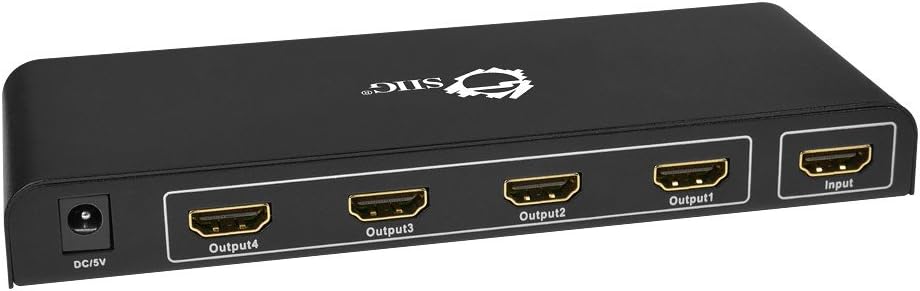
Figura 1: Front Panel - DC/5V Power Input, HDMI Output Ports (1-4), HDMI Input Port.

Figura 2: Rear Panel - Output LEDs (1-4), Input LED, On/Off Switch, Power LED.
4. Configuració i instal·lació
Follow these steps to connect your SIIG HDMI Splitter:
- Apagueu els dispositius: Ensure all HDMI source devices (e.g., Blu-ray player, game console) and display devices (e.g., TV, monitor) are powered off before making connections.
- Connecteu la font HDMI: Connecteu un cable HDMI des del dispositiu font al Entrada HDMI port on the SIIG splitter (refer to Figure 1).
- Connecteu pantalles HDMI: Connecteu els cables HDMI des del HDMI Output 1, 2, 3, and 4 ports on the splitter to your respective display devices (refer to Figure 1).
- Connectar l'alimentació: Plug the included DC/5V power adapter into the DC/5V port on the splitter and then into a standard electrical outlet.
- Encès: Turn on the splitter using the Interruptor d'encesa/apagada on the rear panel (refer to Figure 2). The Power LED will illuminate.
- Dispositius d'encesa: Power on your HDMI display devices, then power on your HDMI source device.

Figura 3: Typical Connection Diagram.
Nota important:
For optimal performance and compatibility, it is recommended that all connected display devices have similar resolutions and capabilities. Using displays with significantly different resolutions may result in signal issues or reduced quality on some outputs.
5. Instruccions de funcionament
Once all connections are made and devices are powered on, the SIIG HDMI Splitter will automatically detect the input signal and distribute it to all connected displays. No additional configuration is typically required.
- LED d'alimentació: Indicates the splitter is powered on.
- LED d'entrada: Illuminates when an active HDMI signal is detected at the input port.
- Output LEDs (1-4): Illuminate when an active HDMI signal is being sent to the corresponding output display.
Ensure that your source device is playing content and your displays are set to the correct HDMI input channel.
6. Manteniment
To ensure the longevity and proper functioning of your SIIG HDMI Splitter:
- Neteja: Feu servir un drap suau i sec per netejar el dispositiu. No utilitzeu netejadors líquids ni aerosols.
- Ventilació: Assegureu-vos que el dispositiu estigui col·locat en una zona ben ventilada per evitar el sobreescalfament. No bloquegeu cap obertura de ventilació.
- Medi ambient: Keep the device away from excessive heat, moisture, dust, and direct sunlight.
- Manipulació: Eviteu deixar caure o sotmetre el dispositiu a forts impactes.
7. Solució De Problemes
If you encounter issues with your SIIG HDMI Splitter, refer to the following common solutions:
- No Picture/Signal on Displays:
- Verify all HDMI cables are securely connected to both the splitter and the source/display devices.
- Ensure the splitter is powered on and the Power LED is illuminated.
- Check if the Input LED on the splitter is illuminated, indicating a signal from the source.
- Confirm that your display devices are set to the correct HDMI input channel.
- Prova d'utilitzar cables HDMI diferents, ja que uns cables defectuosos poden causar pèrdua de senyal.
- Test the HDMI source device directly with one display to ensure it is functioning correctly.
- Imatge parpellejant o senyal intermitent:
- Comproveu si totes les connexions dels cables estan soltes.
- Ensure the power adapter is firmly connected to the splitter.
- If using multiple displays with varying resolutions, try connecting displays with similar resolutions.
- Reduce the length of HDMI cables if they are excessively long.
- Sense àudio:
- Verify audio settings on your source device and display devices.
- Ensure HDMI cables support audio transmission.
- Input Connector Issues:
- If the input connector feels loose or requires wiggling to maintain a signal, try a different HDMI cable to rule out cable issues.
- If the problem persists, the input port may be damaged. Contact SIIG support for assistance.
8. Especificacions
| Característica | Descripció |
|---|---|
| Número de model | CE-H22C12-S1 |
| Marca | SIIG |
| Tipus de connector | HDMI |
| Nombre de Ports | 1 entrada, 4 sortides |
| Resolució suportada | Up to 4Kx2K |
| Suport 3D | Sí |
| Mode de sortida d'àudio | Multiple Audio Output Modes |
| Dispositius compatibles | Monitor, Projector, Television |
| Color | Negre |
| Pes de l'article | 258.5 g (0.57 lliures) |
| Dimensions del paquet de l'article | 7.99 L x 5.8999 W x 2.29 H polzades |
| UPC | 662774021928 |
9. Garantia i Suport
For warranty information and technical support, please refer to the documentation provided with your purchase or visit the official SIIG weblloc web. Conserveu el comprovant de compra per a reclamacions de garantia.
SIIG Contact Information:
- Refer to the SIIG weblloc web per obtenir les dades de contacte d'assistència més actualitzades.
- For product returns or exchanges, please contact your retailer.


