
1. Introducció
This instruction manual provides essential information for the proper installation, operation, and maintenance of your Dorman 68196 License Plate Light Lens. This product is designed as a direct replacement for the original lens on specified Nissan vehicles, ensuring proper illumination and protection against environmental elements. Please read this manual thoroughly before proceeding with installation.
2. Pautes de seguretat
Always prioritize safety when working on your vehicle. Failure to follow these guidelines may result in injury or damage to the vehicle.
- Ensure the vehicle's ignition is off and the parking brake is engaged before beginning any work.
- Disconnect the vehicle's battery if working near electrical components to prevent electrical shock.
- Utilitzeu equips de protecció personal adequats, com ara ulleres de seguretat i guants.
- Si no esteu segurs de cap pas, consulteu un tècnic d'automoció qualificat.
3. Contingut del paquet
Verifiqueu que tots els components siguin presents i no estiguin danyats en obrir l'envàs.
- 1 x Dorman 68196 License Plate Light Lens
4. Compatibilitat del vehicle
This Dorman 68196 License Plate Light Lens is compatible with the following Nissan models:
- Nissan Xterra: 2000, 2001, 2002, 2003, 2004
For precise fitment, it is recommended to verify compatibility using a vehicle fitment tool or by cross-referencing the OEM part number (B65107Z010) with your vehicle's specifications.
5. Instruccions d'instal·lació
Follow these steps to install the Dorman 68196 License Plate Light Lens:
- Preparació: Park the vehicle on a level surface and ensure the engine is off. Gather necessary tools, which may include a flat-head screwdriver or a plastic trim removal tool.
- Locate the Existing Lens: Identify the license plate light lens on the rear bumper of your Nissan vehicle.
- Remove the Old Lens: Carefully pry off the old license plate light lens. It is typically held in place by clips or tabs. Use a flat-head screwdriver or trim removal tool to gently release these clips. Exercise caution to avoid damaging the surrounding bumper or wiring.
- Inspect Bulb and Socket: Once the old lens is removed, inspect the light bulb and its socket for any signs of corrosion, damage, or wear. Replace the bulb if necessary.
- Install the New Lens: Align the new Dorman 68196 License Plate Light Lens with the opening on the bumper. Ensure the tabs or clips on the new lens are correctly oriented. Press firmly until the lens snaps securely into place.
- Funcionalitat de prova: Turn on your vehicle's headlights or parking lights to verify that the license plate light illuminates correctly.

Figura 1: Davant view of the Dorman 68196 License Plate Light Lens. This image shows the exterior design and clear light-emitting section of the lens.
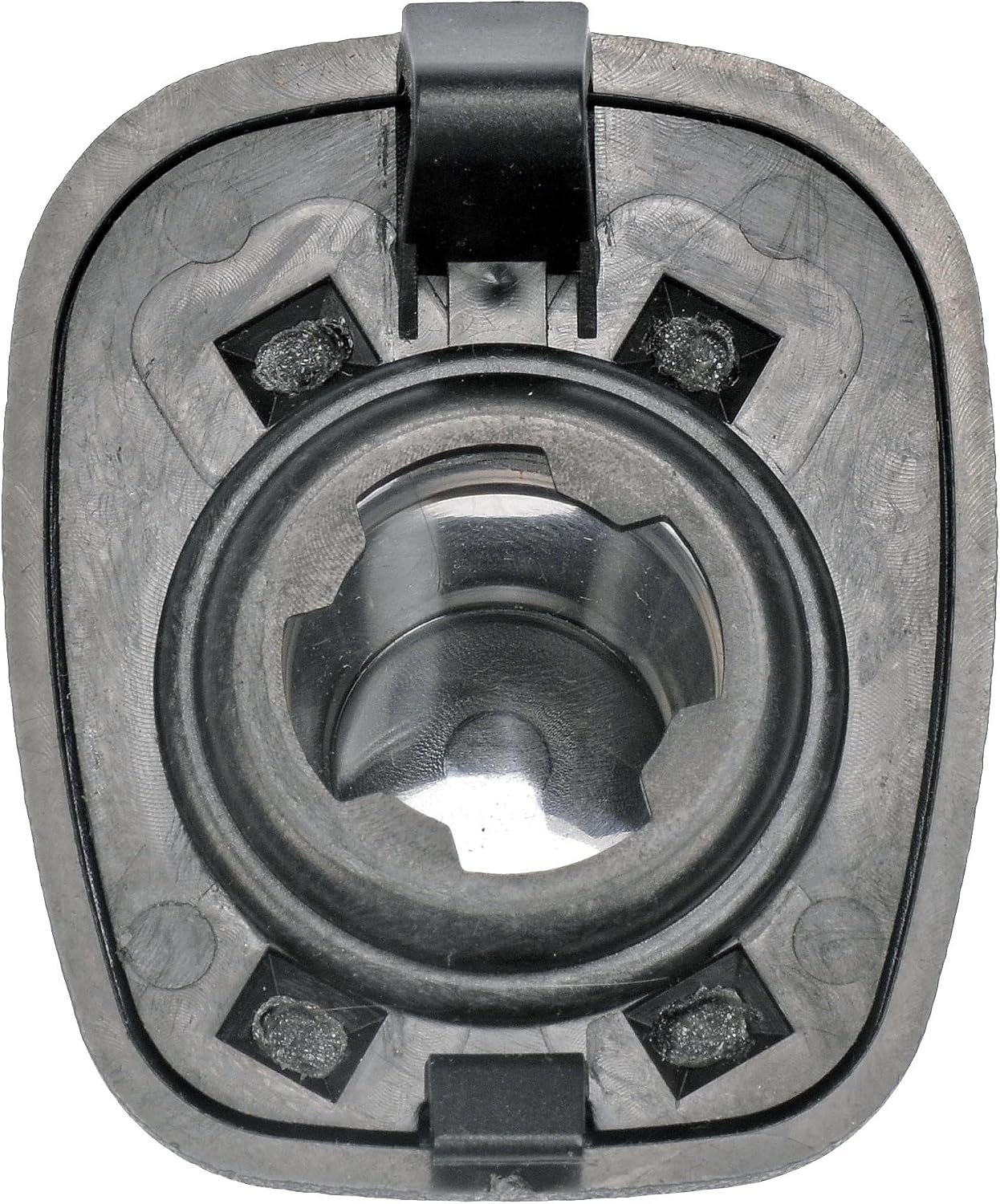
Figura 2: posterior view of the Dorman 68196 License Plate Light Lens. This image highlights the mounting tabs and internal structure designed for secure attachment and bulb housing.
6. Funcionament
The Dorman 68196 License Plate Light Lens functions automatically with your vehicle's lighting system. When the vehicle's headlights or parking lights are activated, the license plate light bulb behind the lens will illuminate, providing visibility for your license plate as required by law.
7. Manteniment
To ensure optimal performance and longevity of your license plate light lens, consider the following maintenance tips:
- Neteja regular: Periodically clean the lens with a soft cloth and mild automotive cleaner to remove dirt, grime, and road salt that can obscure light output.
- Inspecció: Routinely check the lens for cracks, discoloration, or damage. A damaged lens can allow moisture and dirt to enter, potentially leading to electrical issues.
- Substitució de bombetes: If the light fails to illuminate, the bulb may need replacement. Refer to your vehicle's service manual for the correct bulb type and replacement procedure.
8. Solució De Problemes
If you encounter issues with your license plate light, refer to the following troubleshooting guide:
- Light Not Illuminating:
- Check the light bulb: The most common cause is a burnt-out bulb. Replace it if necessary.
- Inspect the fuse: Consult your vehicle's owner's manual for the location of the fuse box and the specific fuse for the license plate lights. Replace any blown fuses.
- Examine wiring and socket: Look for loose connections, corrosion, or damaged wires at the bulb socket.
- Lens Not Fitting Securely:
- Ensure correct orientation: Double-check that the lens is aligned properly with the mounting points.
- Clear debris: Remove any dirt or old gasket material from the mounting area that might prevent a flush fit.
- Verify compatibility: Confirm that the Dorman 68196 is the correct part for your specific vehicle year and model.
9. Especificacions del producte
| Especificació | Detall |
|---|---|
| Marca | Dorman |
| Número de model | 68196 |
| Número de peça OEM | B65107Z010 |
| Material | Policarbonat |
| Color | Black (Housing), Red (Lens) |
| Dimensions de l'article (L x A x A) | 3.5 x 2.6 x 3 polzades |
| Pes de l'article | 1.12 unces |
| Característica especial | Impermeable |
| Posició de peces d'automòbil | posterior |
10. Garantia i Suport
Dorman Products are manufactured to high-quality standards. For specific warranty information regarding the Dorman 68196 License Plate Light Lens, please refer to the warranty documentation included with your purchase or visit the official Dorman Products website. For technical assistance or further support, please contact Dorman customer service directly.