
Introducció
Gràcies per la compraasing the Klip Xtreme KWS-605 Portable Bluetooth Speaker. This manual provides detailed instructions for setting up, operating, and maintaining your speaker. Please read this manual thoroughly before use to ensure proper functionality and to maximize your listening experience.
Contingut del paquet
- Klip Xtreme KWS-605 Portable Bluetooth Speaker
- Cable de càrrega USB
- Guia d'usuari
Producte acabatview
Familiarize yourself with the speaker's controls and ports.
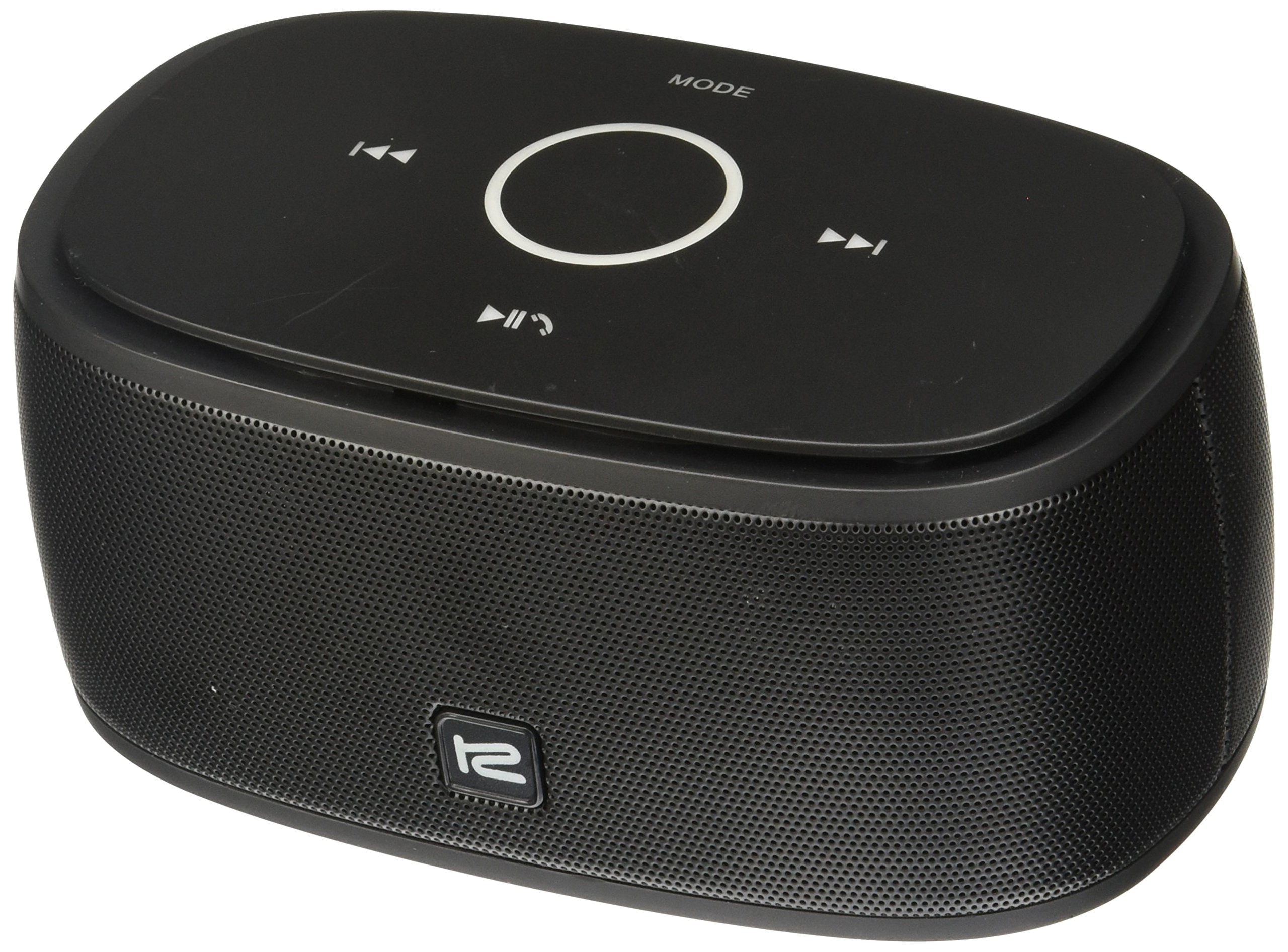
Imatge: posterior view of the Klip Xtreme KWS-605 speaker, highlighting the power button, line-in port, and DC IN (micro USB) charging port. The top panel shows playback controls (previous, play/pause, next) and a mode button.
Controls i ports:
- Botó d'encesa: Located on the rear panel, used to turn the speaker on or off.
- LINE IN Port: 3.5mm auxiliary input for connecting non-Bluetooth devices.
- Port DC IN: Port micro USB per carregar l'altaveu.
- Botó Reproduir/Pausa: On the top panel, controls media playback.
- Botons de pista anterior/següent: On the top panel, used to skip tracks.
- Botó MODE: On the top panel, switches between input modes (e.g., Bluetooth, Auxiliary).
Configuració
1. Carregant l’altaveu
- Connect the supplied USB charging cable to the DC IN port on the back of the speaker.
- Connecteu l'altre extrem del cable USB a un adaptador de corrent USB (no inclòs) o al port USB d'un ordinador.
- The charging indicator light will illuminate. Once fully charged, the light will change or turn off (refer to LED indicator behavior in specifications for details).
- Una càrrega completa sol trigar aproximadament 2-3 hores.
2. Encès / apagat
- Per encendre, premeu i manteniu premut Botó d'engegada on the rear panel until the indicator light illuminates.
- Per apagar-lo, manteniu premut el botó Botó d'engegada de nou fins que l'indicador lluminós s'apagui.
Instruccions de funcionament
1. Emparellament Bluetooth
- Assegureu-vos que l'altaveu estigui encès i en mode Bluetooth. Si no, premeu el botó MODE button to switch to Bluetooth. The Bluetooth indicator light will flash, indicating it's in pairing mode.
- Al dispositiu mòbil (telèfon intel·ligent, tauleta, ordinador portàtil), activeu el Bluetooth i cerqueu els dispositius disponibles.
- Select "Klip Xtreme KWS-605" from the list of found devices.
- Once paired, the Bluetooth indicator light will stop flashing and remain solid. You can now play audio through the speaker.
2. NFC One-Touch Pairing (if supported by your device)
- Assegureu-vos que l'NFC estigui activat al vostre dispositiu mòbil.
- Gently tap your NFC-enabled device against the NFC area on the speaker (usually indicated by an NFC logo).
- Confirm the pairing request on your device. The speaker will connect automatically.
3. Using the Auxiliary Input (LINE IN)
- Connect one end of a 3.5mm audio cable (not included) to the LINE IN port on the speaker.
- Connect the other end of the audio cable to the headphone jack or audio output of your non-Bluetooth device.
- Premeu el botó MODE button on the speaker to switch to Auxiliary mode.
- Reprodueix àudio des del dispositiu connectat.
4. Trucades mans lliures
- Quan es connecta mitjançant Bluetooth, el micròfon integrat de l'altaveu permet fer trucades amb mans lliures.
- Per respondre una trucada entrant, premeu el botó Botó Reproduir/Pausa.
- Per finalitzar una trucada, premeu el botó Botó Reproduir/Pausa de nou.
- Per rebutjar una trucada entrant, manteniu premut el botó Botó Reproduir/Pausa.
5. Controls de reproducció multimèdia
- Reproduir/pausa: Premeu el botó Botó Reproduir/Pausa per reproduir o posar en pausa l'àudio.
- Pista següent: Premeu el botó Botó Seguiment següent per passar a la següent cançó.
- Pista anterior: Premeu el botó Botó de pista anterior to go to the beginning of the current song or the previous song.
- Nota: El control de volum normalment es gestiona a través del dispositiu connectat.
Manteniment
- Mantingueu l'altaveu allunyat de l'aigua, la humitat i les temperatures extremes.
- Netegeu l'altaveu amb un drap suau i sec. No utilitzeu productes de neteja abrasius ni dissolvents.
- Eviteu deixar caure o sotmetre l'altaveu a forts impactes.
- Quan no l'utilitzeu durant períodes prolongats, guardeu l'altaveu en un lloc fresc i sec.
Resolució de problemes
| Problema | Solució |
|---|---|
| L'altaveu no s'encén. | Assegureu-vos que l'altaveu estigui carregat. Connecteu-lo a una font d'alimentació amb el cable USB. |
| No es pot emparellar amb un dispositiu Bluetooth. |
|
| No hi ha so de l’altaveu. |
|
| Mala qualitat d'àudio. |
|
Especificacions
| Característica | Detall |
|---|---|
| Model | KWS-605 |
| Tecnologia de connectivitat | Bluetooth, NFC, Auxiliary (3.5mm) |
| Característiques especials | Bluetooth, Hands-free calling |
| Tipus d'altaveu | Subwoofer (as per product data, typically refers to full-range for portable speakers) |
| Material | Plàstic |
| Dimensions (L x A x A) | 16.5 x 4.6 x 6.6 cm (6.5 x 1.8 x 2.6 polzades) |
| Pes | 367 grams (0.81 lliures) |
| Tipus de bateria | 1 Lithium Ion (Rechargeable) |
| Entrada de potència | DC IN (Micro USB) |
| Tipus de suports compatibles | MP3 |
Garantia i Suport
Klip Xtreme products are designed for reliability and performance. For warranty information, please refer to the warranty card included with your purchase or visit the official Klip Xtreme website. For technical support or customer service, please contact your local distributor or refer to the contact information provided on the Klip Xtreme weblloc.
Conserveu el vostre comprovant de compra per a reclamacions de garantia.


