
Introducció
Thank you for choosing the Virutex AG52F Set. This comprehensive kit is designed for efficient and precise edge banding applications, providing professional results for various woodworking projects. This manual contains important information regarding the safe operation, setup, maintenance, and troubleshooting of your AG52F Set, which includes the AG98F applicator, AU93 brushes, and RC21E trimmer/scraper. Please read this manual thoroughly before using the product to ensure proper function and to prevent injury or damage.
Instruccions de seguretat
Seguiu sempre les precaucions de seguretat bàsiques quan utilitzeu eines elèctriques per reduir el risc d'incendi, descàrrega elèctrica i lesions personals.
- Llegeix totes les instruccions: Familiarize yourself with the tool's operation and limitations, as well as the specific potential hazards.
- Utilitzeu l'equip de protecció individual (EPI) adequat: This includes safety glasses, hearing protection, and gloves.
- Ensure a safe working environment: Keep the work area clean, well-lit, and free from clutter. Do not operate in damp o condicions humides.
- Assegureu la peça de treball: Sempre clamp or otherwise secure the material you are working on to prevent movement during operation.
- Desconnecteu l'alimentació: Always unplug the tool from the power source before making any adjustments, changing accessories, or performing maintenance.
- Eviteu l'arrencada accidental: Assegureu-vos que l'interruptor estigui en la posició OFF abans d'endollar l'eina.
- Feu servir l'eina adequada per a la feina: No forceu una eina o un accessori petit per fer la feina d'una eina de gran capacitat.
- Mantenir les eines amb cura: Mantingueu les eines afilades i netes per obtenir un rendiment millor i més segur. Seguiu les instruccions per lubricar i canviar els accessoris.
- Mantingueu allunyats els nens i els vianants: Tots els visitants s'han de mantenir a una distància segura de la zona de treball.
- Emmagatzema les eines inactives: Quan no s'utilitzin, les eines s'han de guardar en un lloc sec, alt o tancat amb clau, fora de l'abast dels nens.
Contingut del paquet
The Virutex AG52F Set includes the following components:
- Virutex AG52F Edge Banding Set (main unit)
- AG98F Applicator
- AU93 Brushes
- RC21E Trimmer/Scraper
- Manual d'instruccions
Producte acabatview
The Virutex AG52F Set is a versatile system for applying and finishing edge banding. It features an efficient heating capability for quick application and is designed for various edge profiles.
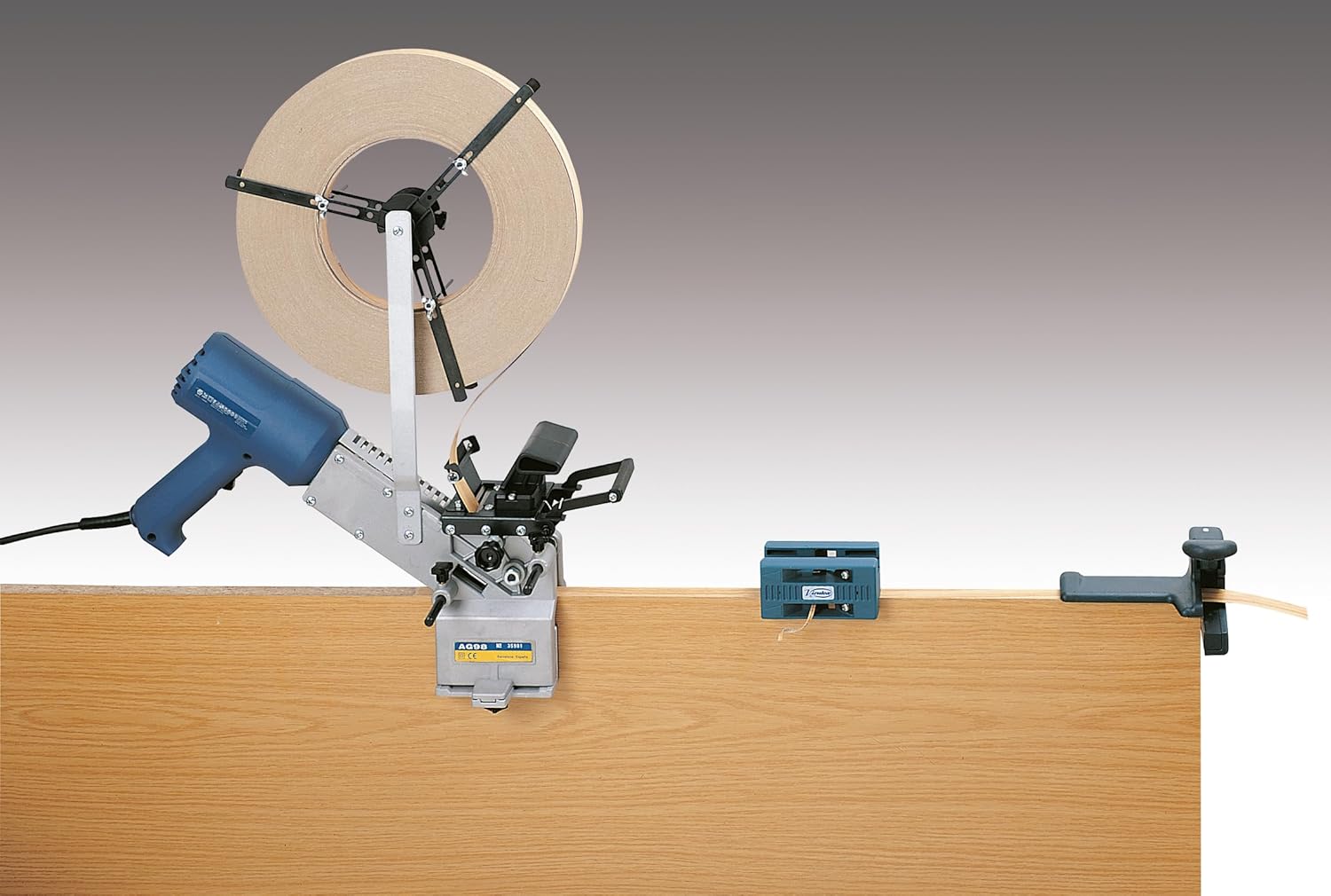
Figura 1: The Virutex AG52F Edge Banding Set in use, demonstrating the complete process of applying edge banding to a wooden panel. This image highlights the AG98F applicator, the roll of edge banding material, and the RC21E trimmer/scraper at the end of the panel.
AG98F Applicator
The AG98F applicator is the core component for applying the edge banding material. It features a heating element to activate the adhesive on the banding, ensuring a strong bond to the workpiece. Its ergonomic design allows for comfortable and controlled application.

Figura 2: A user operating the Virutex AG98F applicator on a curved edge. This demonstrates the tool's maneuverability and suitability for non-linear applications.
RC21E Trimmer/Scraper
The RC21E is a dual-function tool designed for trimming excess edge banding and scraping off any adhesive residue. It ensures a clean and flush finish after application.

Figura 3: The Virutex RC21E Trimmer/Scraper, a teal-colored hand tool used for finishing edge banding.

Figura 4: Detallada view of the RC21E Trimmer/Scraper, illustrating the distinct blades for its trimming and scraping functions.
AU93 Brushes
The AU93 brushes are used for cleaning and polishing the edge banding after trimming, ensuring a smooth and professional finish.

Figura 5: The Virutex AU93 Brushes, designed for cleaning and polishing edge-banded surfaces.
Configuració
- Desempaquetar components: Carefully remove all items from the packaging and verify that all components listed in the "Package Contents" section are present and undamaged.
- Preparació de l'àrea de treball: Ensure your work surface is clean, stable, and well-lit. Make sure there is adequate space for the workpiece and for operating the tools safely.
- Connectar l'alimentació: Plug the AG98F applicator into a suitable power outlet. Ensure the power switch is in the OFF position before connecting.
- Load Edge Banding: Mount the roll of edge banding material onto the AG98F applicator's spindle. Thread the banding through the guide mechanism as per the applicator's specific instructions (refer to the AG98F's dedicated manual for detailed threading diagrams if available).
- Pre-heat Applicator: Turn on the AG98F applicator and allow it to reach its operating temperature. The efficient heating capability ensures it is ready for use quickly.
Instruccions de funcionament
Using the AG98F Applicator
- Posició de la peça: Place the workpiece securely on your work surface.
- Inicia l'aplicació: Align the AG98F applicator with the edge of the workpiece. Gently press the applicator against the edge, ensuring even contact.
- Apply Banding: Slowly and steadily move the applicator along the edge, allowing the heated adhesive on the banding to bond to the workpiece. Maintain consistent pressure and speed for optimal adhesion.
- Cut Excess: Once the entire edge is covered, use a suitable cutting tool (or the RC21E's trimming function) to cut the edge banding cleanly at the end of the workpiece.
Using the RC21E Trimmer/Scraper
- Trim Excess Banding: For flush trimming, position the RC21E trimmer function over the excess edge banding. Apply gentle pressure and slide the tool along the edge to remove any overhang.
- Scrape Adhesive Residue: Use the scraper function of the RC21E to carefully remove any adhesive squeeze-out or residue from the workpiece surface and the edge banding. Hold the scraper at a slight angle to avoid damaging the surface.
Using the AU93 Brushes
- Polish Edges: After trimming and scraping, use the AU93 brushes to gently polish the newly applied edge banding. This helps to smooth the surface and remove any fine dust or marks, enhancing the overall finish.
Manteniment
Regular maintenance ensures the longevity and optimal performance of your Virutex AG52F Set.
- Neteja: After each use, disconnect the AG98F applicator from power. Allow all components to cool down. Clean the applicator's heating element and guides with a soft cloth to remove any adhesive residue. Clean the blades of the RC21E trimmer/scraper and the bristles of the AU93 brushes.
- Esmolat/Substitució de fulles: Periodically check the blades of the RC21E for sharpness. Dull blades can lead to poor trimming results. Sharpen or replace blades as needed according to manufacturer guidelines.
- Emmagatzematge: Store the tools in a dry, clean place, away from direct sunlight and extreme temperatures. Keep them in their original packaging or a protective case to prevent damage.
- Inspecció del cable: Regularly inspect the power cord of the AG98F applicator for any signs of damage, cuts, or fraying. If damaged, have it repaired by a qualified technician.
Resolució de problemes
| Problema | Causa possible | Solució |
|---|---|---|
| Edge banding not adhering properly. |
|
|
| Rough or uneven trimmed edges. |
|
|
| Adhesive residue on workpiece. |
|
|
If you encounter problems not listed here or if solutions do not resolve the issue, please contact Virutex customer support.
Especificacions
| Marca | Virutex |
| Número de model | AG52F Set (Part Number: 5200100) |
| Material | Alumini |
| Color | Negre |
| Font d'alimentació | Elèctric amb cable |
| Pes de l'article | 2.7 quilos |
| Piles necessàries | No |
| Components inclosos | AG98F Applicator, AU93 Brushes, RC21E Trimmer/Scraper |
| Primer disponible | 15 de gener de 2020 |
Note: Product dimensions (1x1x1 cm) listed in some specifications appear to be package dimensions and not representative of the tool's actual size. Please refer to images for visual scale.
Garantia i Suport
Virutex products are manufactured to high-quality standards. For specific warranty information, please refer to the warranty card included with your product or visit the official Virutex website. For technical support, spare parts, or service inquiries, please contact your authorized Virutex dealer or customer service department. Keep your purchase receipt as proof of purchase for warranty claims.
Informació de contacte: Please refer to the official Virutex website or product packaging for the most up-to-date contact details for your region.