
Introducció
This manual provides instructions for setting up, operating, and maintaining your Mercury MW3030R Dual Band Wireless Router. Please read this manual carefully before use to ensure proper installation and optimal performance.
Informació de seguretat
- No exposeu el dispositiu a l'aigua ni a una humitat excessiva.
- No intenteu desmuntar o reparar el dispositiu vosaltres mateixos.
- Utilitzeu només l'adaptador d'alimentació subministrat amb el dispositiu.
- Assegureu-vos que hi hagi una ventilació adequada al voltant del router per evitar el sobreescalfament.
Contingut del paquet
Comproveu que el vostre paquet contingui els elements següents:
- Mercury MW3030R Wireless Router
- Adaptador d'alimentació
- Cable Ethernet
- Quick Installation Guide (this manual serves as a detailed guide)
Producte acabatview
Familiaritzeu-vos amb els components i els indicadors del router.
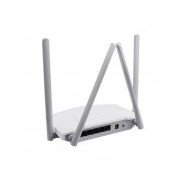
Figura 1: posterior view of the Mercury MW3030R router. This image displays the four external antennas, the WAN port (typically blue), multiple LAN ports (typically yellow), and the power input jack. The reset button and WPS button are also usually located on the rear panel.
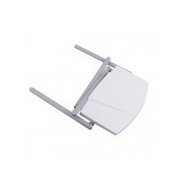
Figura 2: De dalt a baix view of the Mercury MW3030R router with its antennas folded. This perspective highlights the router's sleek, white casing and its overall compact form factor, suitable for various placements.
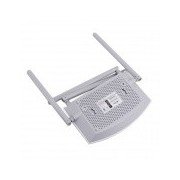
Figura 3: A baix view of the Mercury MW3030R router. This image shows the ventilation holes designed for heat dissipation and the product label, which typically contains important information such as the default Wi-Fi name (SSID), password, and web management address.
Indicadors LED:
- LED d'alimentació: Indica l'estat d'alimentació del router.
- LED d'Internet: Indicates the status of the internet connection.
- LED WLAN: Indicates wireless activity.
- LED LAN: Indicate connection status for each LAN port.
Configuració
1. Connexió de maquinari
- Encès: Connect the power adapter to the router's power port and plug it into a wall outlet. Wait for the Power LED to become stable.
- Connexió a Internet (WAN): Connect one end of an Ethernet cable to your modem's LAN port and the other end to the router's WAN port (usually distinctively colored, e.g., blue).
- Connectar dispositius (LAN): For wired connections, connect your computer or other devices to the router's LAN ports (usually yellow) using Ethernet cables.
- Antenes: Adjust the four antennas for optimal signal coverage.
2. Configuració inicial (Web Interfície)
- Connecteu-vos al router: Connect your computer to the router either via an Ethernet cable to a LAN port or wirelessly using the default Wi-Fi SSID and password printed on the router's label (refer to Figure 3).
- Accés Web Navegador: Obre a web browser (e.g., Chrome, Firefox) and type the default access address (e.g., http://192.168.1.1 or http://tplinkwifi.net) a la barra d'adreces i premeu Intro.
- Inici de sessió: Introduïu el nom d'usuari i la contrasenya predeterminats (normalment admin per a tots dos, o tal com s'especifica a l'etiqueta del router).
- Executa la configuració ràpida: Follow the on-screen instructions of the Quick Setup Wizard to configure your internet connection type (e.g., PPPoE, Dynamic IP, Static IP) and wireless settings (SSID, password).
- Canvia la contrasenya predeterminada: Per seguretat, es recomana canviar la contrasenya d'inici de sessió predeterminada del router. web interfície de gestió.
Instruccions de funcionament
Connexió a Wi-Fi
- On your wireless device (smartphone, laptop), search for available Wi-Fi networks.
- Select your router's Wi-Fi network name (SSID) that you configured during setup.
- Enter the Wi-Fi password you set.
- El dispositiu ara hauria d'estar connectat a Internet.
Funcionament de doble banda
The MW3030R supports both 2.4GHz and 5.0GHz wireless bands. The 2.4GHz band offers wider coverage, while the 5.0GHz band provides faster speeds with less interference over shorter distances. You can connect your devices to either band based on your needs.
Xarxa de convidats
Accedir al router web interface to enable and configure a separate guest network. This allows guests to access the internet without accessing your main network resources.
Manteniment
- Actualitzacions de firmware: Reviseu regularment el fabricant weblloc web per a actualitzacions de firmware. L'actualització del firmware pot millorar el rendiment, afegir noves funcions i solucionar vulnerabilitats de seguretat.
- Reinici del router: Si teniu problemes de xarxa, proveu de reiniciar el router desendollant l'adaptador de corrent, esperant 10 segons i tornant-lo a connectar.
- Neteja: Keep the router clean and free from dust. Use a soft, dry cloth. Do not use liquid cleaners.
- Col·locació: Col·loqueu el router en un lloc central, allunyat d'obstacles i dispositius que puguin causar interferències (per exemple, microones, telèfons sense fil).
Resolució de problemes
Sense accés a Internet
- Check if the Internet LED on the router is lit or blinking correctly.
- Assegureu-vos que el cable Ethernet del mòdem estigui connectat correctament al port WAN del router.
- Reinicieu el mòdem i l'encaminador.
- Verifiqueu la configuració de la connexió a Internet al router web interfície.
Velocitat sense fil lenta
- Ensure your device is connected to the 5.0GHz band if it supports it, for faster speeds.
- Move closer to the router or adjust antenna positions.
- Comproveu si hi ha interferències d'altres dispositius electrònics.
- Reduce the number of devices connected to the network or bandwidth-intensive activities.
No es pot accedir als encaminadors Web Interfície
- Assegureu-vos que el dispositiu estigui connectat al router (amb cable o sense fil).
- Verify the IP address you are typing in the browser is correct (e.g., http://192.168.1.1).
- Prova d'esborrar la memòria cau del navegador o utilitza un altre navegador.
- If you forgot the login password, you may need to perform a factory reset (Warning: This will erase all your settings).
Especificacions
| Característica | Descripció |
|---|---|
| Model | MW3030R |
| Estàndards sense fil | IEEE 802.11ac/n/g/b/a |
| Freqüència | 2.4 GHz i 5.0 GHz (doble banda) |
| Velocitat sense fil | Up to 600Mbps (combined) |
| Antenes | 4 antenes externes |
| Interfícies | 1x WAN Port, Multiple LAN Ports (typically 3 or 4) |
| Font d'alimentació | External Power Adapter (provided) |
Garantia i Suport
The Mercury MW3030R router comes with a standard manufacturer's warranty. For detailed warranty information, technical support, or service inquiries, please refer to the official Mercury weblloc web o poseu-vos en contacte amb el seu servei d'atenció al client. Conserveu el rebut de compra per a reclamacions de garantia.


