
1. Introducció
The Microsoft Surface 3 is a versatile 10.8-inch tablet designed for productivity and portability. Running on Windows 10 and powered by an Intel Atom processor, it offers a full PC experience in a compact form factor. This manual provides essential information for setting up, operating, maintaining, and troubleshooting your device.

Image: Microsoft Surface 3 Tablet with an attached red Type Cover keyboard and a silver Surface Pen. The screen displays a colorful image with digital annotations, demonstrating its versatility.
2. Què hi ha a la caixa
Upon unboxing your Microsoft Surface 3, verify that all standard components are present:
- Microsoft Surface 3 Tablet
- Power Supply Unit (Charger)
- Guia d'inici ràpid (si s'inclou)
Nota: The Surface Pen and Type Cover keyboard are optional accessories and are typically sold separately. Ensure you have these if your purchase included them.
3. Dispositiu acabatview
Familiarize yourself with the physical features and ports of your Surface 3 tablet.
3.1 Ports i botons
- Port USB 3.0: Per connectar dispositius USB com ara unitats externes, ratolins o teclats.
- Port de càrrega micro USB: S'utilitza per carregar el dispositiu.
- Mini DisplayPort: Per connectar pantalles o projectors externs.
- Auriculars Jack: Per a la sortida d'àudio a auriculars o altaveus externs.
- Ranura per a targeta MicroSD: For expanding storage with a microSDXC card.
- Botons de volum: Per ajustar els nivells d'àudio.
- Botó d'encesa: Per encendre/apagar el dispositiu o posar-lo en repòs.
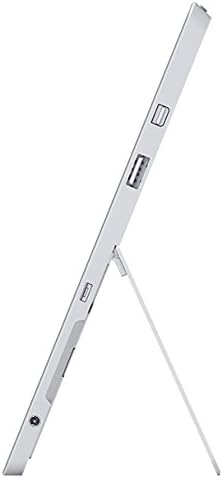
Imatge: Lateral view of the Microsoft Surface 3, illustrating the various ports including USB, Mini DisplayPort, and the kickstand in an open position.

Imatge: Primer pla view of the microSD card slot on the Microsoft Surface 3, with a microSD card partially inserted, demonstrating storage expansion capability.
3.2 Càmeres
- Càmera posterior: 8 MP for capturing photos and videos.
- Càmera frontal: 3.5 MP for video calls and selfies.
4. Configuració
4.1 Càrrec inicial
Before first use, connect the Surface 3 to the power supply using the Micro USB charging port and allow it to charge fully. The battery indicator on the screen will show charging status.
4.2 Powering On and Windows Setup
- Manteniu premut el botó Botó d'encesa until the Microsoft logo appears on the screen.
- Follow the on-screen prompts to complete the Windows 10 setup process. This includes selecting your language, connecting to a Wi-Fi network, and creating or signing in with a Microsoft account.
- Allow the system to download and install any pending updates for optimal performance and security.
4.3 Attaching Optional Accessories
- Type Cover: Align the Type Cover with the magnetic connector at the bottom edge of the Surface 3 until it clicks into place.
- Llapis Surface: The Surface Pen can be magnetically attached to the side of the Surface 3 for storage. For initial pairing, follow the instructions provided with the pen or in Windows settings.
5. Funcionament
5.1 Navegació
- Pantalla tàctil: Use gestures like tap, swipe, pinch-to-zoom for navigation.
- Llapis Surface: Use the pen for precise input, drawing, writing, and annotating.
- Type Cover (Optional): Provides a traditional keyboard and trackpad experience.

Image: Microsoft Surface 3 in use with a Type Cover keyboard and Surface Pen, displaying a Windows 10 interface with various applications.
5.2 Windows 10 Features
- Menú d'inici: Accedir a aplicacions, configuració i opcions d'energia.
- Centre d'acció: Swipe from the right edge of the screen to access quick settings and notifications.
- Tasca View: View open applications and virtual desktops.
- Mode tauleta: Switch to Tablet Mode for a touch-optimized interface.
5.3 Connexió a Wi-Fi
- Obriu el Centre d'Acció by swiping from the right edge of the screen or clicking the icon in the taskbar.
- Toqueu Wi-Fi icona.
- Seleccioneu la xarxa desitjada de la llista i introduïu la contrasenya si se us demana.
6. Manteniment
6.1 Neteja
- Utilitzeu un drap suau i sense pelusa dampened with water or a screen cleaner specifically designed for electronics to clean the screen.
- Eviteu productes químics agressius, materials abrasius o humitat excessiva.
- Clean the device exterior with a soft, dry cloth.
6.2 Actualitzacions de programari
Comproveu i instal·leu regularment si hi ha actualitzacions de Windows per assegurar-vos que el dispositiu tingui els pegats de seguretat i les millores de rendiment més recents. Aneu a Configuració > Actualització i seguretat > Actualització de Windows.
6.3 Cura de la bateria
- Eviteu les temperatures extremes, ja que poden reduir la durada de la bateria.
- For optimal battery longevity, avoid consistently draining the battery to 0% or keeping it at 100% for extended periods.
- The Surface 3 has an average battery life of up to 8 hours under typical usage conditions.
7. Solució De Problemes
7.1 El dispositiu no s'encén
- Assegureu-vos que el dispositiu estigui carregat. Connecteu la font d'alimentació i espereu uns minuts abans d'intentar tornar-lo a encendre.
- Perform a force restart by holding the Botó d'encesa for 10-15 seconds, then release and press it again briefly.
7.2 Problemes de connectivitat Wi-Fi
- Toggle Wi-Fi off and on in the Action Center.
- Restart your Surface 3 and your Wi-Fi router.
- Assegureu-vos que esteu dins de l'abast de la xarxa Wi-Fi i que teniu la contrasenya correcta.
7.3 Rendiment lent
- Tanca les aplicacions innecessàries que s'executen en segon pla.
- Comproveu i instal·leu les actualitzacions pendents de Windows.
- Assegureu-vos que teniu prou espai d'emmagatzematge lliure.
8. Especificacions
| Característica | Detall |
|---|---|
| Número de model | 7G6-00014 |
| Mida de la pantalla | 10.8 polzades |
| Resolució de pantalla | 1920 x 1280 píxels |
| Processador | Intel Atom x7-Z8700 (2.4 GHz) |
| RAM | 4 GB |
| Emmagatzematge | SSD de 128 GB |
| Sistema operatiu | Windows 10 |
| Coprocessador gràfic | Quad-core Intel Atom x7-Z8700 processor |
| Tipus sense fil | Wi-Fi 802.11ac, Bluetooth 4.0 |
| Ports USB | 1x USB 2.0, 1x USB 3.0 |
| Durada mitjana de la bateria | 8 hores |
| Pes de l'article | 1.37 lliures |
| Dimensions del producte | 14.02 x 8.64 x 1.58 polzades |
| posterior WebResolució de la càmera | 8 MP |
| Davant WebResolució de la càmera | 3.5 MP |
9. Garantia i Suport
Your Microsoft Surface 3 Tablet is covered by a limited manufacturer's warranty. For detailed warranty information, including terms and conditions, please refer to the documentation provided with your purchase or visit the official Microsoft support weblloc.
For technical assistance, software updates, and additional resources, please visit the official Microsoft Support website or contact their customer service. Keep your device's serial number (located on the back of the tablet or in Windows settings) readily available when seeking support.