
1. Introducció
The Edifier P180 is a stereo earbud headset designed for clear audio and convenient communication. Featuring an inline microphone and control, it offers a comfortable listening experience for various devices.

Figure 1: Edifier P180 Wired Earbud Headset
2. Què hi ha a la caixa
- Edifier P180 Earbud Headset
- Cable
3. Característiques clau
- Classic Comfort: Ergonomic design for comfortable wear without irritating the ear canal.
- Qualitat de so excel·lent: Equipped with 16mm neodymium magnetic monomers for high-fidelity audio playback.
- Integrated Microphone and Control: 3.5mm stereo earphones with a built-in microphone and remote button for mobile phone communication.
- Funcionalitat: Single button control for picking up/hanging up calls and skipping songs (device dependent for iOS/Android).
- Disseny durador: Constructed with quality materials for longevity.

Figure 2: Ergonomic design for comfortable fit.
4. Configuració
- Desembalar: Carefully remove the Edifier P180 headset from its packaging.
- Inspeccionar: Check the earbuds and cable for any visible damage.
- Connectar: Insert the 3.5mm audio jack into the headphone port of your compatible device (smartphone, tablet, computer, etc.). Ensure the jack is fully inserted for proper audio and microphone function.
- Posició: Place the earbuds comfortably in your ears. The ergonomic design is intended to rest well without causing irritation.
5. Instruccions de funcionament
The Edifier P180 features an inline control button for easy management of calls and music playback.
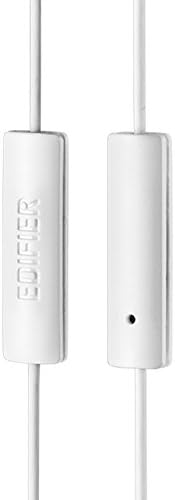
Figure 3: Inline microphone and control button.
- Respondre / finalitzar trucades: Press the control button once to answer an incoming call. Press it again to end an active call.
- Playing/Pausing Music: Press the control button once to play or pause audio playback.
- Saltant pistes: Double-press the control button to skip to the next track. Triple-press to go to the previous track (functionality may vary by device and operating system).
- Assistent de veu: Long-press the control button to activate your device's voice assistant (e.g., Siri, Google Assistant).
Vídeo 1: Producte oficial acabatview of the Edifier P180 Classic Earbud Headsets, demonstrating features and usage.
6. Manteniment
- Neteja: Netegeu suaument els auriculars i el cable amb un drap suau i sec. Eviteu utilitzar productes químics agressius o materials abrasius.
- Emmagatzematge: Quan no els utilitzeu, guardeu els auriculars en un lloc net i sec, allunyat de temperatures extremes i de la llum solar directa. Eviteu enredar el cable.
- Eviteu la humitat: Do not expose the headset to water or excessive moisture, as this can damage the internal components.
7. Solució De Problemes
- Sense so:
- Assegureu-vos que el connector de 3.5 mm estigui completament inserit al port d'àudio del dispositiu.
- Comproveu la configuració de volum del dispositiu.
- Prova els auriculars amb un altre dispositiu per descartar un problema específic del dispositiu.
- El micròfon no funciona:
- Assegureu-vos que el connector de 3.5 mm estigui completament inserit.
- Comproveu la configuració d'entrada de micròfon del dispositiu.
- Prova el micròfon amb un altre dispositiu o aplicació.
- Àudio intermitent:
- Check the cable for any kinks or damage.
- Assegureu-vos que el connector d'àudio estigui net i lliure de brutícia.
8. Especificacions
| Característica | Especificació |
|---|---|
| Número de model | P180 |
| Resposta de freqüència | 20 Hz - 20,000 Hz |
| Conector d'auriculars | 3.5 mm Jack |
| Tecnologia de connectivitat | Amb cable |
| Pes de l'article | 1.76 unces (50 grams) |
| Dimensions del producte | 2.01 x 5.59 x 0.91 polzades |
| Material | Neodimi |
| Tipus de control | Inline Control Button |
| Impedància | 32 ohms |
| Control de soroll | Aïllament acústic |
9. Garantia i assistència
The Edifier P180 headset is backed by a 1 any de garantia. For any support inquiries or warranty claims, please refer to the contact information provided with your purchase or visit the official Edifier weblloc.