
1. Introducció
Thank you for choosing the Kaiser MCS-9950 Digital AM/FM Car Stereo. This unit features a detachable faceplate, multiple media playback options including USB, SD, and MMC, an AUX input, and Bluetooth connectivity. This manual provides comprehensive instructions for the proper installation, operation, and maintenance of your new car stereo. Please read this manual thoroughly before use and keep it for future reference.
2. Contingut del paquet
Si us plau, comproveu el contingut del paquet per assegurar-vos que hi hagi tots els elements:
- Kaiser MCS-9950 Car Stereo Unit
- Placa frontal desmuntable
- Control remot
- Installation Accessories (wiring harness, mounting sleeve, removal keys)
- Manual d'usuari (aquest document)
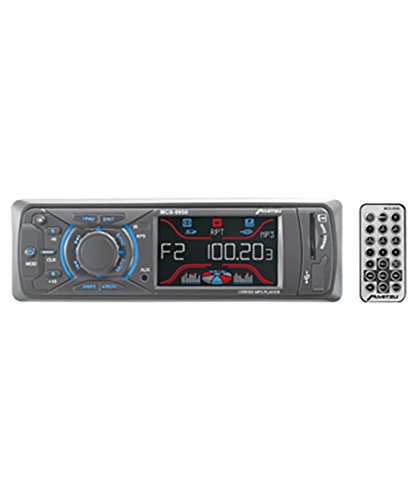
Figura 1: Kaiser MCS-9950 Car Stereo unit with its detachable faceplate and remote control. The image shows the main unit, the separate faceplate, and a remote control, illustrating the primary components included in the package.
3. Característiques del producte
- Sintonitzador digital AM/FM: High-sensitivity tuner for clear radio reception with automatic station search and storage.
- Placa frontal desmuntable: For enhanced security and convenience.
- Reproducció multimèdia: Supports USB drives, SD cards, and MMC cards.
- Entrada AUX: 3.5mm front auxiliary input for connecting external audio devices.
- Connectivitat Bluetooth: Integrated Bluetooth for wireless audio streaming and hands-free calling.
- Electronic Equalizer: Pre-set equalizer modes to optimize sound output.
- Anti-Shock Function: Ensures smooth playback even on bumpy roads.
- Visualització del rellotge: Integrated digital clock.
- Pantalla LCD: Blue and red LCD with equalizer effect for clear visibility.
- Sortida d'alta potència: 900 W PMPO (Peak Music Power Output), 4x25 W maximum audio output.
- Navegació per pista: +10 / -10 track reader for quick song selection.
- Comandament a distància: Comandament a distància amb totes les funcions per a un funcionament convenient.
4. Configuració i instal·lació
Important: Professional installation is recommended. Disconnect the vehicle's negative battery terminal before starting installation to prevent electrical shorts.
4.1 Diagrama de cablejat (orientació general)
While a specific wiring diagram is not provided in this manual, typical car stereo installations involve the following connections:
- Fil groc: Constant 12V (Battery Positive)
- Fil vermell: 12V commutat (encesa/ACC)
- Fil negre: Ground (Chassis Ground)
- Filferro blau: Antena elèctrica / AmpEngegada remota del lifier
- Cables de l’altaveu: Typically color-coded (e.g., White/White-Black for Front Left, Gray/Gray-Black for Front Right, Green/Green-Black for Rear Left, Purple/Purple-Black for Rear Right). Ensure correct polarity.
Refer to your vehicle's wiring diagram and the included wiring harness for precise connections. Insulate all connections properly.
4.2 Muntatge de la unitat
- Install the mounting sleeve into the dashboard opening. Bend the tabs outward to secure it.
- Connect all necessary wiring to the car stereo's harness.
- Slide the car stereo unit into the mounting sleeve until it locks into place.
- Attach the detachable faceplate.
- Torneu a connectar el terminal negatiu de la bateria del vehicle.
5. Instruccions de funcionament
5.1 Funcionament bàsic
- Encès/apagat: Premeu el botó PODER button (usually marked with ⏻ or SRC) per encendre o apagar la unitat.
- Control de volum: Gira el VOLUM botó o feu servir el VOL + / VOL- botons del comandament a distància.
- Selecció de la font: Premeu el botó SRC or MODE button to cycle through available sources (FM, AM, USB, SD, AUX, Bluetooth).
5.2 Funcionament de la ràdio (AM/FM)
- Selecció de la banda: Premeu el botó BANDA button to switch between FM1, FM2, FM3, and AM1, AM2.
- Sintonització automàtica: Manteniu premut el botó BUSCAR or SINTONIA botons (normalment << / >>) per cercar automàticament la següent emissora amb bona freqüència.
- Sintonització manual: Premeu breument BUSCAR or SINTONIA botons per ajustar la freqüència.
- Store/Recall Presets: To store a station, tune to the desired frequency, then press and hold one of the numeric preset buttons (1-6) until you hear a beep. To recall, simply press the corresponding preset button.
- Automatic Store: Manteniu premut el botó AMS button (if available) to automatically scan and store strong stations into presets.
5.3 USB/SD/MMC Playback
- Insert a USB drive into the USB port or an SD/MMC card into the card slot. The unit will automatically switch to USB/SD mode and begin playback.
- Reproduir/pausa: Premeu el botó REPRODUCCIÓ/PAUSA botó.
- Seguiment anterior / següent: Premeu el botó SEGÜENT (>>) o ANTERIOR (<<) botons.
- Avançar/rebobinar ràpid: Manteniu premut el botó SEGÜENT or ANTERIOR botons.
- +10 / -10 Track: Utilitzeu el dedicat +10 or -10 buttons for quick track navigation.
5.4 Funcionament de l'entrada AUX
- Connecteu el dispositiu d'àudio extern (per exemple, un telèfon intel·ligent o un reproductor MP3) a la presa d'entrada AUX de 3.5 mm del panell frontal mitjançant un cable d'àudio.
- Premeu el botó SRC or MODE botó fins que aparegui "AUX".
- Control playback from your external device. Adjust volume using the car stereo's volume control.
5.5 Funcionament Bluetooth
The Kaiser MCS-9950 features integrated Bluetooth for wireless audio and hands-free calling.
- Maridatge:
- Ensure Bluetooth is enabled on your mobile device (e.g., smartphone).
- Select "BT" or "Bluetooth" as the source on the car stereo. The unit will enter pairing mode.
- On your mobile device, search for available Bluetooth devices. Select "MCS-9950" or a similar name.
- If prompted for a PIN, enter "0000" (default). Once paired, the display will confirm connection.
- Transmissió d'àudio (A2DP):
- Once paired, you can stream audio from your mobile device to the car stereo.
- Use the car stereo's SEGÜENT / ANTERIOR buttons to skip tracks or control playback from your device.
- Hands-Free Calling (HFP):
- When a call comes in, the car stereo display will show the caller ID (if supported).
- Premeu el botó RESPOSTA button (usually ☎) on the faceplate or remote to answer.
- Premeu el botó FINALITZAR LA TRUCADA button (usually ☏) per finalitzar la trucada.
5.6 Detachable Faceplate
- Eliminació: Premeu el botó ALliberament button (usually on the top left of the faceplate). Gently pull the faceplate towards you.
- Adjunt: Align the faceplate with the main unit's slots on the right side, then push the left side until it clicks into place.
- Store the faceplate in a protective case when removed to prevent damage.
6. Manteniment
- Cleaning the Faceplate: Use a soft, dry cloth to wipe the faceplate. Do not use abrasive cleaners or solvents.
- Neteja de la unitat: Ensure the unit is off and cool. Use a soft, dry cloth. Avoid spraying liquids directly onto the unit.
- Ranures per a targetes USB/SD: Keep these slots free from dust and debris.
- Substitució de fusibles: If the unit does not power on, check the fuse located at the rear of the unit. Replace with a fuse of the same amperage rating only.
7. Solució De Problemes
| Problema | Causa possible | Solució |
|---|---|---|
| Sense poder | Cablejat incorrecte; Fusible fundit; Connexió fluixa. | Check power and ground connections. Verify fuse. Ensure ignition wire is connected. |
| Sense so | Volume too low; Mute activated; Incorrect speaker wiring; Faulty speakers. | Increase volume. Deactivate mute. Check speaker connections and polarity. Test with known good speakers. |
| La recepció de la ràdio és deficient | Antena no connectada; Antena danyada; Zona amb senyal feble. | Ensure antenna is securely connected. Check antenna for damage. Try tuning in a different location. |
| La targeta USB/SD no es reprodueix | Sense suport file format; Corromput files; Card not inserted correctly; Maximum capacity exceeded. | Assegureu-vos files are in supported format (e.g., MP3). Reinsert card. Try a different card/USB drive. |
| L'aparellament de Bluetooth falla | Bluetooth not enabled on device; Incorrect pairing procedure; Device too far. | Ensure Bluetooth is on and discoverable on your device. Follow pairing steps. Keep devices close. |
| Detachable faceplate not attaching | Misalignment; Debris in connectors. | Ensure correct alignment. Check for any obstructions in the connectors. |
8. Especificacions
| Número de model | MCS-9950 |
| Dimensions del producte | 45 x 41.5 x 24.5 cm |
| Pes del producte | 900 g |
| Tecnologia de connectivitat | MMC card, Bluetooth |
| Característiques especials | Bluetooth integrated, Detachable Faceplate, USB/SD/MMC Reader, AUX Input, AM/FM Tuner, Preset Electronic Equalizer, Anti-shock, Clock, LCD Display (Blue/Red with EQ effect), Auto Search/Store Radio Stations, Remote Control |
| Tecnologia de visualització | LCD |
| Altres funcions de visualització | Sense fil |
| Potència màxima de sortida | 900 W PMPO, 4x25 W |
| Dispositius compatibles | Smartphone |
9. Garantia i Suport
Kaiser products are manufactured to high-quality standards. For warranty information, please refer to the warranty card included with your product or contact your local dealer. Keep your purchase receipt as proof of purchase.
For technical support or service inquiries, please contact Kaiser customer service through their official weblloc web o la informació de contacte proporcionada amb la documentació del producte.