
Introducció
Thank you for choosing the Kaiser MSA-7908MX 8-inch Bluetooth Speaker. This portable amplified speaker is designed to provide high-quality audio with versatile connectivity options, including Bluetooth, USB, Micro SD, and auxiliary input. It also features a microphone input for karaoke and a recording function. Please read this manual carefully to ensure proper use and to maximize your enjoyment of the product.
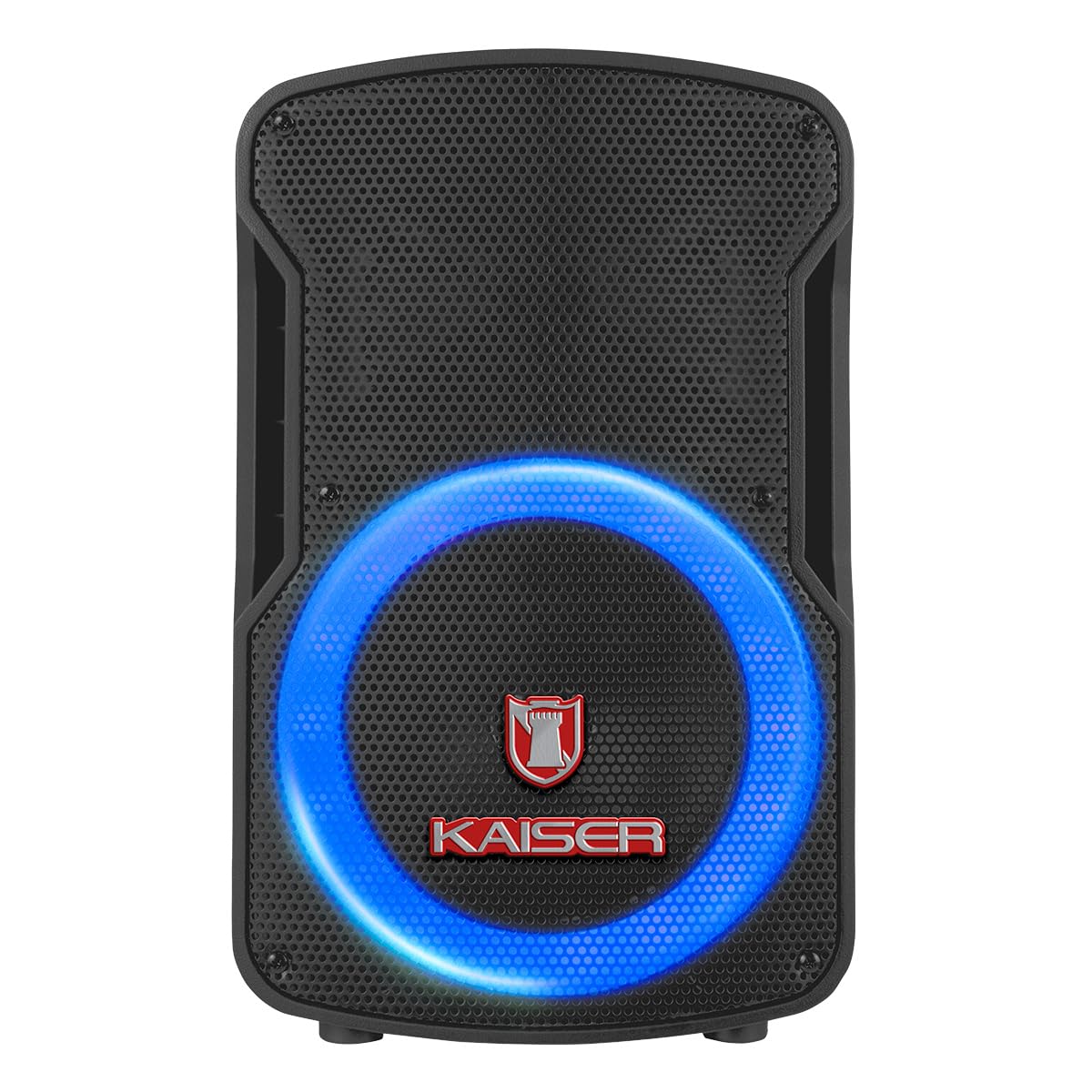
Figura 1: Frontal view of the Kaiser MSA-7908MX speaker with illuminated LED ring.
Característiques del producte
- Connectivitat sense fils: Bluetooth for seamless audio streaming from compatible devices.
- KSR-Link Technology: Allows linking two MSA-7908MX speakers wirelessly for enhanced stereo sound.
- Múltiples opcions de reproducció: USB port and Micro SD card slot for direct audio playback.
- Entrada de micròfon: 6.3mm input for wired microphone, ideal for karaoke or public speaking.
- Entrada auxiliar: Entrada de 3.5 mm per connectar dispositius d'àudio externs.
- Ràdio FM: Built-in FM tuner for listening to your favorite radio stations.
- Funció d'enregistrament: Ability to record audio directly to USB or Micro SD.
- Adjustable Audio Controls: Independent knobs for Volume, Treble (Agudos), Bass (Bajos), Echo, and Microphone Volume (Vol Mic).
- Il·luminació LED: Dynamic LED light ring around the speaker for visual effects.
- Disseny portàtil: Compact and lightweight with a built-in handle for easy transport.
Contingut del paquet
The Kaiser MSA-7908MX package includes the following items:
- Kaiser MSA-7908MX 8-inch Amporador qualificat
- Micròfon per cable
- Control remot
- Cable de càrrega
Controls i connexions
The rear panel of the MSA-7908MX speaker houses all the main controls and connection ports. Familiarize yourself with these components for optimal operation.

Figure 2: Rear control panel of the Kaiser MSA-7908MX speaker.
- Pom de volum: Ajusta el volum general.
- Treble (Agudos) Knob: Ajusta els sons d'alta freqüència.
- Bass (Bajos) Knob: Ajusta els sons de baixa freqüència.
- Botó d'eco: Controls the echo effect for the microphone.
- Microphone Volume (Vol Mic) Knob: Ajusta el volum del micròfon connectat.
- Pantalla digital: Mostra el mode actual, el número de pista i altra informació.
- Botó de mode: Switches between Bluetooth, USB, Micro SD, AUX, and FM radio modes.
- Controls de reproducció: Play/Pause, Previous Track, Next Track, Record, and KSR-Link buttons.
- Ranura per a targetes Micro SD: Inseriu una targeta Micro SD per reproduir àudio.
- Port USB: Insert a USB drive for audio playback or recording.
- Entrada AUX: Jack de 3.5 mm per connectar dispositius d'àudio externs.
- Entrada MIC: 6.3mm jack for connecting the wired microphone.
- Interruptor d'alimentació: Activa o desactiva l'altaveu.
- Interruptor LED: Turns the speaker's LED illumination ON or OFF.
Configuració
1. Càrrega inicial
Before first use, fully charge the speaker for approximately 4 hours. Connect the charging cable to the speaker's power input and a suitable power source. The charging indicator will show the charging status.
2. Encendre/apagar
Locate the Power Switch on the rear panel. Flip the switch to the 'ON' position to power on the speaker. Flip it to 'OFF' to power off.
3. Emparellament Bluetooth
- Turn on the speaker. The digital display will show 'BLUE' or 'BT' indicating Bluetooth mode. If not, press the 'Mode' button until Bluetooth mode is selected.
- Activa el Bluetooth al teu dispositiu mòbil (telèfon intel·ligent, tauleta, etc.).
- Cerca available Bluetooth devices and select 'MSA-7908MX' from the list.
- Once paired, the speaker will emit a confirmation sound, and the digital display will indicate a successful connection.
4. KSR-Link (True Wireless Stereo) Pairing
To connect two MSA-7908MX speakers for a stereo experience:
- Assegureu-vos que tots dos altaveus estiguin encesos i en mode Bluetooth, però que encara no estiguin emparellats amb cap dispositiu.
- On one of the speakers (this will be the master speaker), press and hold the 'KSR-Link' button. The speaker will emit a pairing sound.
- The two speakers will automatically connect to each other. A confirmation sound will indicate successful pairing.
- Now, pair your mobile device with the master speaker via Bluetooth as described in step 3. Audio will play through both speakers in stereo.
5. Connexió del micròfon
Connect the wired microphone to the 6.3mm 'MIC' input on the rear panel. Adjust the 'Vol Mic' and 'Echo' knobs to your desired levels.
6. Entrada auxiliar
Connect an external audio device (e.g., MP3 player, laptop) to the 3.5mm 'AUX' input using a compatible audio cable. Press the 'Mode' button until 'AUX' mode is selected on the speaker.
7. Reproducció USB/Micro SD
Insert a USB drive or Micro SD card (pre-loaded with MP3 audio files) into the respective port. The speaker will automatically switch to USB or Micro SD mode and begin playback. If not, press the 'Mode' button to select the correct source.
8. Ràdio FM
Press the 'Mode' button until 'FM' mode is selected. Use the 'Previous Track' and 'Next Track' buttons to scan for radio stations. For better reception, extend the antenna if available or reposition the speaker.
Instruccions de funcionament
1. Ajust de volum
Rotate the 'Volume' knob clockwise to increase volume and counter-clockwise to decrease it.
2. Equalizer Controls
Use the 'Treble (Agudos)' and 'Bass (Bajos)' knobs to fine-tune the audio output to your preference.
3. Efectes de micròfon
Adjust the 'Echo' knob to add an echo effect to the microphone audio. The 'Vol Mic' knob controls the microphone's output level.
4. Funció d'enregistrament
While a microphone is connected and a USB drive or Micro SD card is inserted, press the 'REC' button to start recording. Press it again to stop recording. The recorded audio will be saved to the USB drive or Micro SD card.
5. Il·luminació LED
Flip the 'LED' switch on the rear panel to turn the speaker's dynamic LED light ring ON or OFF.
Video 1: Demonstrates the speaker's controls, LED lights, dimensions, and included accessories. This video provides a visual guide to the physical features and basic operation.
Video 2: Highlights the speaker's key features, control panel, and included accessories such as the microphone and remote control. This video offers a quick overview de les capacitats del producte.
Manteniment
- Neteja: Feu servir un drap suau i sec per netejar l'exterior de l'altaveu. No utilitzeu productes de neteja abrasius ni dissolvents.
- Emmagatzematge: Guardeu l'altaveu en un lloc fresc i sec, allunyat de la llum solar directa i de temperatures extremes.
- Cura de la bateria: Per allargar la durada de la bateria, eviteu descarregar-la completament amb freqüència. Torneu a carregar l'altaveu regularment, fins i tot si no l'utilitzeu durant períodes prolongats.
- Exposició a l'aigua: Aquest altaveu no és impermeable. Eviteu exposar-lo a l'aigua o a una humitat elevada.
Resolució de problemes
| Problema | Causa possible | Solució |
|---|---|---|
| Sense poder | La bateria està descarregada; l'interruptor d'alimentació està en posició OFF. | Charge the speaker; Flip the Power switch to ON. |
| Sense so | El volum és massa baix; S'ha seleccionat un mode incorrecte; El dispositiu no està connectat correctament. | Increase master volume and source volume; Press 'Mode' button to select correct input; Reconnect Bluetooth/AUX cable/USB/Micro SD. |
| Bluetooth no connectat | L'altaveu no està en mode Bluetooth; el dispositiu està massa lluny; l'altaveu ja està emparellat amb un altre dispositiu. | Press 'Mode' button to select Bluetooth; Move device closer (within 10m); Disconnect from other devices and try pairing again. |
| El micròfon no funciona | Microphone not connected; Microphone volume too low; Microphone switch is OFF. | Ensure microphone is securely plugged into the 'MIC' input; Increase 'Vol Mic' knob; Turn on the microphone's power switch. |
Especificacions

Figure 3: Dimensions of the Kaiser MSA-7908MX speaker.
- Marca: Kaiser
- Model: MSA-7908MX
- Tecnologia de connectivitat: Bluetooth
- Color: Negre
- Dispositius compatibles: Portàtil, Smartphone
- Tipus de muntatge: Muntatge al terra
- Font d'alimentació: Bateria
- Tipus de connector: 3.5 mm, 6.3 mm
- Entrada d'àudio: Entrades d'àudio
- Resposta de freqüència: 150 kHz
- Impedància: 4 ohms
- Potència de sortidatage: 6500 Watts (PMPO), 25 Watts (RMS)
- Dimensions de l'article (L x A x A): 24.5 x 29.5 x 44.5 centímetres
- Pes de l'article: 5210 grams
- Material exterior: Plàstic
- Usos recomanats: For smartphones and laptops
- Número de peça del fabricant: MSA-7908BTE
- País d'origen: Xina
Garantia i Suport
This product is sold without a specific warranty. For any technical assistance, troubleshooting, or inquiries regarding your Kaiser MSA-7908MX speaker, please refer to the retailer where the product was purchased or visit the official Kaiser support weblloc per obtenir més informació.