
1. Introducció
This manual provides essential information for the safe and efficient operation of your Philips 40PFL4609/F8 40-inch Full HD LED Smart TV. Please read these instructions carefully before using your television and retain them for future reference.
2. Informació de seguretat
Seguiu sempre les precaucions de seguretat bàsiques quan utilitzeu aquest televisor per reduir el risc d'incendi, descàrrega elèctrica i lesions.
- No exposeu el televisor a la pluja ni a la humitat.
- No obriu l'armari; encarregueu tot el manteniment a personal qualificat.
- Assegureu-vos que hi hagi una ventilació adequada al voltant del televisor.
- Eviteu que el cable d'alimentació sigui trepitjat o pessigat.
- Desendolleu el televisor durant tempestes o quan no l'utilitzeu durant períodes prolongats.
3. Contingut del paquet
Verifiqueu que tots els elements siguin presents a la caixa:
- Philips 40PFL4609/F8 40-inch Full HD LED Smart TV
- Control remot (requereix 2 piles AAA, incloses)
- Cable d'alimentació
- Tabletop Stand and Screws
- Guia d'inici ràpid (no inclosa en aquest manual digital)
- Manual d'usuari (aquest document)
4. Configuració
4.1 Desembalatge i col·locació
Carefully remove the television from its packaging. Inspect the TV for any physical damage. Place the television on a stable, flat surface or mount it on a wall using a compatible VESA 200x200mm wall mount (sold separately).
4.2 Muntatge del suport
If using the tabletop stand:
- Col·loqueu el televisor cara avall sobre una superfície suau i neta per evitar que es facin malbé la pantalla.
- Alineeu el suport amb els forats de muntatge de la part inferior del televisor.
- Fixeu el suport amb els cargols proporcionats.
4.3 Connexió de potència
Connect the power cord to the TV's power input, then plug the other end into a 110 VAC, 60 Hz electrical outlet.
4.4 Connexió de dispositius externs
Your Philips TV offers various connection options for external devices.
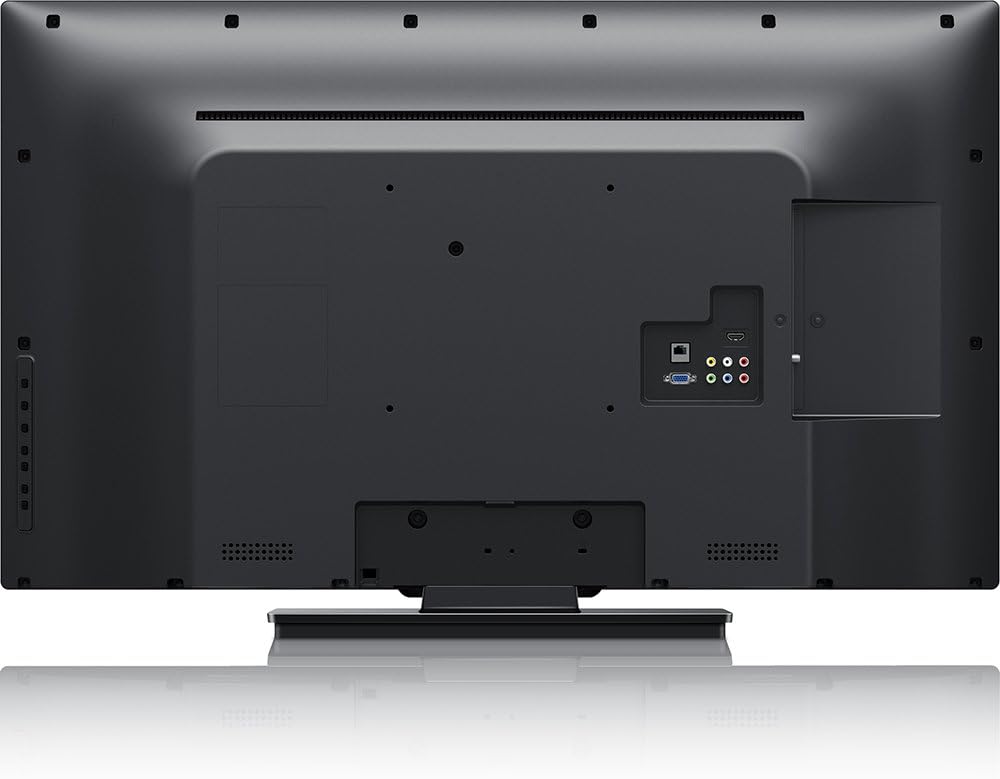
Imatge: posterior view of the Philips 40PFL4609/F8 television, highlighting the input ports including HDMI, DVI, and other audio/video connections.
- HDMI: Connect Blu-Ray players, game consoles, or other HDMI-enabled devices. This model has 1 HDMI port.
- DVI: Connect computers or other DVI-enabled devices.
- USB: Connect USB storage devices for media playback. This model has 1 USB 2.0 port.
- Antena/cable: Connecteu una antena o un senyal de televisió per cable per als canals de radiodifusió.
4.5 Assistent de configuració inicial
En encendre'l per primera vegada, el televisor us guiarà a través d'un procés de configuració inicial:
- Selecció d'idioma: Trieu el vostre idioma preferit.
- Connexió de xarxa: Connect to your home Wi-Fi network. The TV supports Wi-Fi connectivity.
- Escaneig de canals: Scan for available broadcast channels (if an antenna or cable is connected).
5. Funcionament del televisor
5.1 Control remotview
The included remote control allows you to navigate menus, adjust settings, and control playback. Insert two AAA batteries into the remote control, ensuring correct polarity.
5.2 Funcions bàsiques
- Potència: Premeu el botó d'engegada per encendre o apagar el televisor.
- Volum: Utilitzeu els botons de volum per ajustar el nivell de so.
- Canal: Use the channel buttons to change TV channels.
- Entrada: Press the input button to select connected devices (HDMI, DVI, etc.).
5.3 Smart TV Features (Net TV)
Your Philips TV features Net TV, providing access to online content and applications.
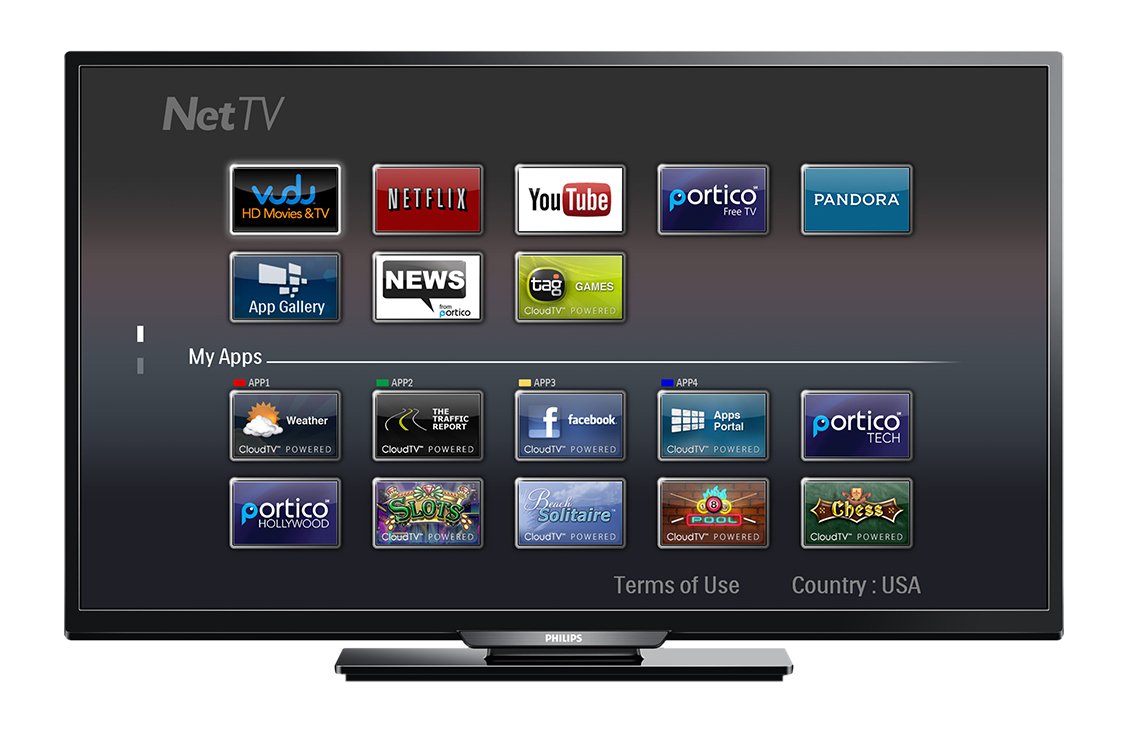
Imatge: Davant view of the Philips 40PFL4609/F8 television, showing the Net TV interface with various application icons such as Netflix, YouTube, and other streaming services.
- Accés a les aplicacions: Use the remote control to navigate to the Net TV menu and select applications like Netflix and YouTube.
- Connectivitat Wi-Fi: Ensure your TV is connected to a stable Wi-Fi network for optimal Smart TV performance.
5.4 Configuració de la imatge
Adjust picture settings to enhance your viewExperiència:
- Pixel Plus HD: This video engine enhances detail, depth, and clarity.
- 120Hz PMR (Perfect Motion Rate): Provides sharp images in fast-moving scenes.
- Access the picture menu to adjust brightness, contrast, color, and sharpness.
5.5 Configuració de so
Optimize audio output:
- SRS TruSurround: Enjoy immersive sound with this integrated surround sound format.
- Access the audio menu to adjust bass, treble, and sound modes.
5.6 Reproducció multimèdia via USB
Connect a USB storage device to the TV's USB 2.0 port to view fotos, reproduir música o mirar vídeos.
6. Manteniment
6.1 Neteja de la pantalla
Netegeu suaument la pantalla amb un drap suau i sense borrissol. Per a marques difícils, dampNetegeu el drap amb una mica d'aigua o amb un netejador de pantalles especialitzat. No ruixeu líquid directament sobre la pantalla.
6.2 Neteja de la Casing
Netegeu el televisor casinNetegeu amb un drap suau i sec. Eviteu utilitzar productes de neteja o dissolvents abrasius.
6.3 Actualitzacions de programari
This model may not support automatic software updates via the internet. Check the Philips support website for information on manual firmware updates, if available, to ensure optimal performance and access to the latest features.
7. Solució De Problemes
Si teniu problemes amb el televisor, consulteu les solucions habituals següents:
- Sense energia: Ensure the power cord is securely plugged into both the TV and the electrical outlet. Check the power outlet with another device.
- Sense imatge/so: Verify the correct input source is selected. Check all cable connections (HDMI, DVI, antenna).
- Sense connexió de xarxa: Ensure your Wi-Fi router is working correctly. Re-enter your Wi-Fi password if necessary.
- Net TV Limitations: Some users have reported that the Net TV functionality on this model can be basic or limited in terms of additional app installation or software updates. If you find the built-in Smart TV features insufficient, consider connecting an external streaming device.
- Danys físics: Upon unboxing, carefully inspect the screen and casing for any damage, especially along the edges, which could affect display quality. Contact your retailer immediately if damage is found.
- El control remot no funciona: Substituïu les piles AAA. Assegureu-vos que no hi hagi cap obstrucció entre el comandament a distància i el sensor d'infrarojos del televisor.
8. Especificacions

Imatge: lateral view of the Philips 40PFL4609/F8 television, illustrating its slim profile and side-mounted connectivity options.
| Característica | Descripció |
|---|---|
| Nom del model | PHILIPS 40PFL4609/F8 |
| Mida de la pantalla | 40 polzades (100.3 centímetres) |
| Tecnologia de visualització | LED, LCD |
| Resolució | 1080p Full HD |
| Freqüència d'actualització | 120 Hz (120Hz PMR) |
| Relació d'aspecte | 16:9 |
| Tecnologia de connectivitat | Wi-Fi |
| Serveis d'Internet compatibles | Netflix, YouTube |
| Característiques especials | Blu-Ray compatible, DVI Input, HDMI Input, Full HD, HD Compatible, Internet, Surround Sound |
| Ports HDMI | 1 |
| Ports USB 2.0 | 1 |
| Mode de sortida d'àudio | Estèreo, so envoltant |
| Integrated Surround Sound Format | SRS TruSurround |
| Descripció del ponent | SRS TruSurround |
| Consum d'energia | 89 watts |
| Voltage | 110 VAC 60 Hz |
| Pes de l'article | 8200 grams |
| Estàndard de muntatge VESA | 200 x 200 mm |
| Color | Negre |
| Dispositius compatibles | Laptop, Tablet, Game Console, Headphones |
| Any model | 2016 |
9. Informació de la garantia
This Philips television comes with a Garantia limitada de 12 mesos provided by the manufacturer. Please retain your proof of purchase for warranty claims. The warranty covers manufacturing defects under normal use conditions.
10. Atenció al client
For further assistance, technical support, or warranty inquiries, please contact Philips customer service. Refer to the official Philips weblloc web o l'embalatge del producte per obtenir dades de contacte específiques de la vostra regió.