Introducció
This manual provides detailed instructions for the Inateck Bluetooth 4.1 Sport Headset, Model P20 (BH1001). Please read this guide thoroughly before using the product to ensure proper operation and to maximize your listening experience. This headset is designed for active lifestyles, offering wireless audio with a secure fit and integrated microphone.
1. Configuració
1.1 Contingut del paquet
Verifiqueu que tots els elements siguin presents al paquet:
- Inateck Bluetooth Sport Headset (P20 / BH1001)
- Cable de càrrega USB
- Diversos parells de puntes d'orella de silicona (diverses mides)
- Bossa de transport
- Manual d'usuari (aquest document)
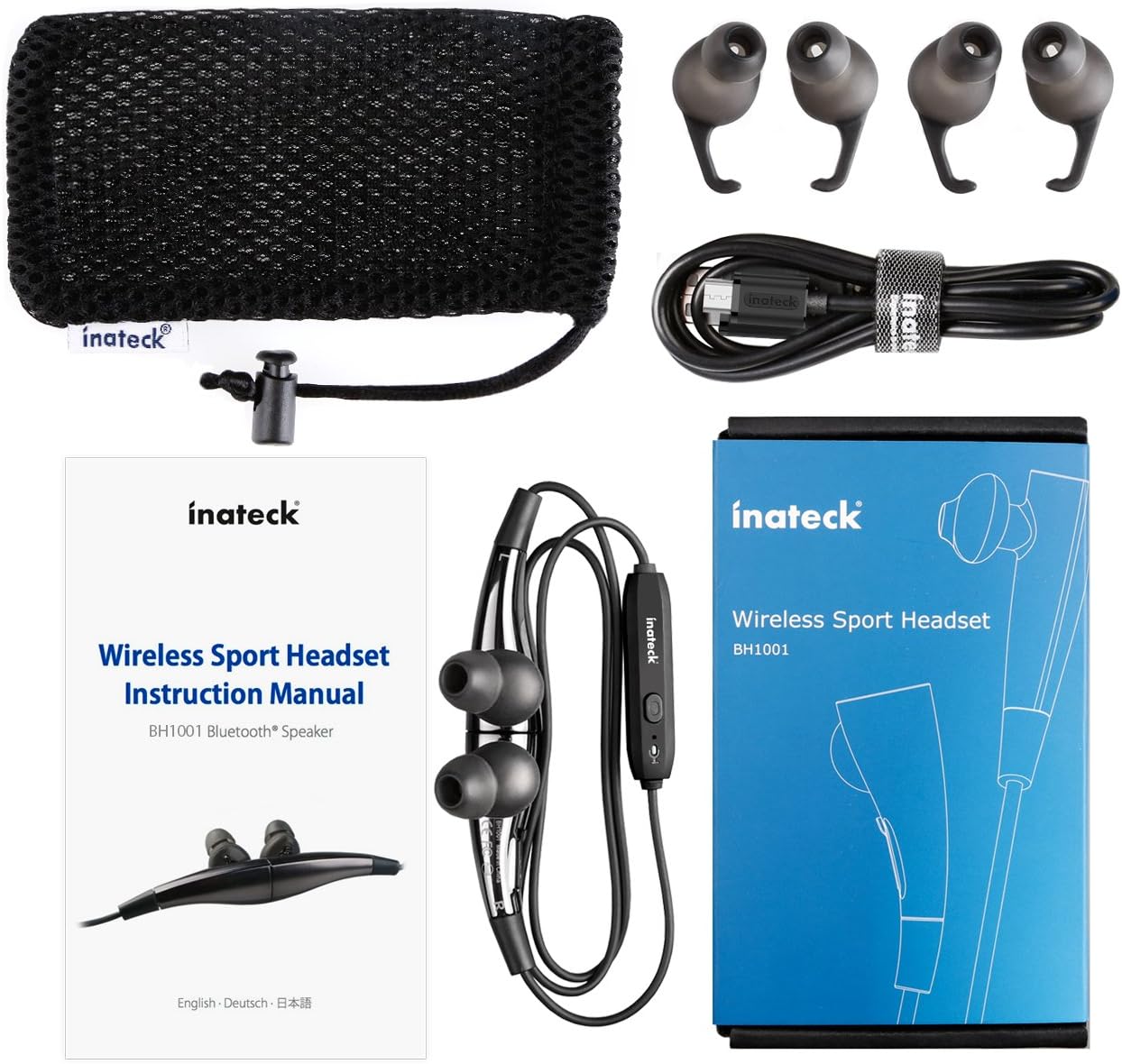
Figura 1.1: Contents of the Inateck Bluetooth Sport Headset package.
1.2 Càrrega dels auriculars
Before first use, fully charge the headset. A full charge takes approximately 3 hours and provides at least 8 hours of music playback.
- Locate the Micro USB charging port on the headset.
- Connect the small end of the provided USB charging cable to the headset's Micro USB port.
- Connecteu l'extrem més gran del cable USB a una font d'alimentació USB (per exemple, un port USB de l'ordinador o un adaptador de paret USB).
- The status indicator light will illuminate during charging. It will change color or turn off once charging is complete.

Figura 1.2: Charging the Inateck Bluetooth Sport Headset via Micro USB.
1.3 Emparellament amb un dispositiu Bluetooth
To connect your headset to a smartphone or other Bluetooth-enabled device:
- Assegureu-vos que els auriculars estan apagats.
- Press and hold the Multifunction Key (MFB) on the inline control unit for approximately 5-7 seconds until the status indicator light flashes red and blue alternately. This indicates pairing mode.
- Al dispositiu Bluetooth, activeu Bluetooth i cerqueu dispositius nous.
- Select "Inateck BH1001" or "Inateck P20" from the list of available devices.
- Once paired, the status indicator light on the headset will flash blue slowly, and you may hear an audible confirmation.
- The headset will automatically attempt to reconnect to the last paired device when turned on.

Figura 1.3: Inateck Headset paired with a mobile device for music playback.
2. Instruccions de funcionament
2.1 Controls dels auriculars
The inline control unit provides easy access to various functions:

Figura 2.1: Acabatview of the Inateck Headset control unit.
- Multifunction Key (MFB):
- Premeu i manteniu premut (5-7 s): Engegueu/apagueu, entreu al mode d'emparellament
- Pressió curta: Reproduir/Pausar música, Respondre/Finalitzar trucada
- Long press (during incoming call): Reject call
- Pujar volum (+) / Pista següent:
- Premsa curta: augmenta el volum
- Premsa llarga: passa a la pista següent
- Baixar volum (-) / Pista anterior:
- Premsa curta: disminueix el volum
- Long press: Go to previous track
- Port micro USB: Per carregar els auriculars.
- Indicador d'estat: Mostra l'estat d'energia, emparellament i càrrega.
- Micròfon: Per trucades mans lliures.
2.2 Com portar els auriculars
Select the ear tips that provide the most comfortable and secure fit for your ears. The headset is designed to be worn with the cable behind your neck, ensuring stability during physical activity.

Figura 2.2: Proper wearing of the Inateck Sport Headset for active use.
2.3 Magnetic Earbuds Feature
The earbuds feature integrated magnets. When not in use, you can connect the two earbuds together, forming a necklace around your neck. This action automatically pauses music playback and prevents the headset from falling off.

Figura 2.3: Magnetic earbuds feature for secure wearing around the neck.

Figura 2.4: Headset worn as a necklace using the magnetic feature.
3. Manteniment
- Neteja: Netegeu els auriculars amb un drap suau i sec. No utilitzeu productes de neteja abrasius ni dissolvents.
- Consells per a les orelles: Regularly remove and clean the silicone ear tips with mild soap and water. Ensure they are completely dry before reattaching.
- Emmagatzematge: When not in use, store the headset in the provided carrying pouch to protect it from dust and damage. Avoid extreme temperatures.
- Resistència a l'aigua: The headset is designed to be water-resistant for sports and exercise (e.g., sweat, light rain). Do not submerge it in water or expose it to heavy rain.
4. Solució De Problemes
4.1 No es pot encendre
Ensure the headset is fully charged. Connect it to a power source using the USB cable and allow it to charge for at least 30 minutes before attempting to power on again.
4.2 No es pot emparellar amb el dispositiu
- Ensure the headset is in pairing mode (status indicator flashing red and blue alternately).
- Make sure Bluetooth is enabled on your device and it is within range (typically 10 meters or 33 feet).
- Desactiva i activa la funció Bluetooth del dispositiu.
- If previously paired, try "forgetting" or "unpairing" the headset from your device's Bluetooth settings and then re-pair.
- Assegureu-vos que cap altre dispositiu Bluetooth interfereixi amb la connexió.
4.3 Sense so o mala qualitat de so
- Comproveu el nivell de volum tant als auriculars com al dispositiu connectat.
- Assegureu-vos que els auriculars estiguin correctament emparellats i connectats al dispositiu.
- Move closer to your device to reduce potential interference or range issues.
- Ensure the ear tips are correctly seated in your ears for optimal sound delivery.
- Reboot both the headset and your connected device.
4.4 Intermittent Connection
- Ensure there are no physical obstructions between the headset and your device.
- Avoid placing your device in areas where the signal might be blocked (e.g., deep pockets, behind thick walls).
- Minimitzar les interferències d'altres dispositius sense fil (encaminadors Wi-Fi, altres dispositius Bluetooth).
- Keep the headset and your device within the recommended Bluetooth range.
5. Especificacions
| Marca | Inateck |
| Nom del model | P20 |
| Número de model | BH1001 |
| Tecnologia de connectivitat | Bluetooth 4.1 |
| Factor de forma | In-orella |
| Col·locació de l'orella | Intra-aural |
| Conector d'auriculars | USB (per carregar) |
| Nivell de resistència a l'aigua | Waterproof (suitable for sweat/light rain) |
| Característiques especials | Sports and exercise, integrated microphone, magnetic earbuds |
| Pes de l'article | 78 grams |
| Tipus de control | Volume Control, Multifunction Button |
| Material | Plàstic |
6. Informació de la garantia
Inateck products typically come with a limited warranty. For specific warranty terms and conditions applicable to your Inateck Bluetooth Sport Headset, please refer to the warranty card included in your product packaging or visit the official Inateck weblloc web. Conserveu el comprovant de compra per a reclamacions de garantia.
7. Atenció al client
If you encounter any issues not covered in this manual or require further assistance, please contact Inateck customer support. You can usually find contact information, FAQs, and additional resources on the official Inateck weblloc:
Weblloc: www.inateck.com
Please have your product model (P20 / BH1001) and purchase details ready when contacting support.