
Introducció
This manual provides instructions for the HAVIT HV-KB366L RGB Backlit Mechanical Gaming Keyboard. This keyboard features blue mechanical switches, full anti-ghosting, and customizable RGB backlighting, designed for reliable performance.
Instruccions de configuració
Connexió del teclat
- Localitzeu un port USB disponible al vostre ordinador.
- Connect the USB cable from the HAVIT HV-KB366L keyboard to the USB port on your computer.
- El teclat és plug-and-play i el sistema operatiu l'hauria de reconèixer automàticament.
Compatibilitat del sistema
- Compatible with Windows 10 and other Windows operating systems.
- Mac OS supports 6-key rollover only.
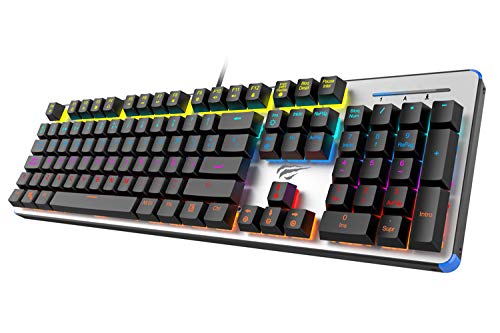
Figure 1: HAVIT HV-KB366L RGB Backlit Mechanical Gaming Keyboard. An overhead view del teclat, mostraasing its full layout with RGB lighting on the keys and a white frame.
Instruccions de funcionament
Interruptors de clau mecànica
The keyboard is equipped with blue mechanical switches, providing tactile feedback and an audible click with each keystroke. This design is intended for precise input during typing and gaming.
Anti-Ghosting Feature
The full key anti-ghosting mechanism ensures that all key presses are registered accurately, even when multiple keys are pressed simultaneously. This feature is beneficial for fast-paced gaming.
Ajust de la llum de fons
- To change the backlight color or mode, press the Fn tecla simultàniament amb la Retroil·luminat key. Repeated presses will cycle through available modes and colors.
- Marquee Mode: In 7-color backlit mode (non-breathing), press the Retroil·luminat key once to activate marquee mode. Press the Retroil·luminat key again to deactivate marquee mode and return to 7-color backlit mode.
- Nivells de brillantor: The backlight offers 4 levels of brightness adjustment.
- Freqüència respiratòria: The breathing effect has 10 adjustable levels.
Manteniment
Neteja del teclat
- Desconnecteu el teclat de l'ordinador abans de netejar-lo.
- Feu servir un drap suau i sec per netejar la superfície del teclat.
- Per a la pols i les restes entre les tecles, feu servir aire comprimit.
- Avoid using harsh chemicals or abrasive materials, as these can damage the finish or keycaps.
Durabilitat
The keyboard features an aluminum top housing with a sanded finish and a metal base, contributing to its overall durability and stable performance.
Resolució de problemes
El teclat no respon
- Assegureu-vos que el cable USB estigui connectat correctament tant al teclat com a l'ordinador.
- Prova de connectar el teclat a un port USB diferent de l'ordinador.
- Test the keyboard on another computer to determine if the issue is with the keyboard or the computer's USB port.
La retroiluminació no funciona o és incorrecta
- Verifiqueu que el teclat estigui connectat correctament i que rebi alimentació.
- Premeu Fn + Backlit key to cycle through backlight modes and ensure it is not turned off or set to a very low brightness.
- Refer to the "Backlight Adjustment" section for detailed instructions on changing modes and brightness.
Especificacions
| Marca | HAVIT |
| Número de model | HV-KB366L |
| Fabricant | HAVIT |
| Dimensions del producte | 50.5 x 17.6 x 6 centímetres |
| Pes de l'article | 1.33 kg |
| Tecnologia de connectivitat | Amb cable (USB) |
| Descripció del teclat | Teclat mecànic per a jocs |
| Característica especial | RGB Backlit, Anti-Ghosting |
| Plataforma de maquinari | Portàtil, PC |
| Sistema operatiu | Windows 10 (and compatible), Mac OS (6-key rollover) |
| Voltage | 5 Volts |
| Components inclosos | Cable USB |
Garantia i suport
Informació de la garantia
Specific warranty details for the HAVIT HV-KB366L keyboard are not provided in the product data. Please refer to the product packaging or contact HAVIT directly for warranty terms and conditions.
Atenció al client
For technical assistance, troubleshooting, or further inquiries, please contact HAVIT customer support through their official weblloc web o la informació de contacte proporcionada amb la compra.


