
Introducció
Thank you for choosing the Sangean RCR-11 WF Digital Clock Internet Radio. This device combines Internet Radio, DAB+, and FM radio functionalities with an alarm clock, offering a versatile audio experience. This manual provides essential information for the proper setup, operation, and maintenance of your device.
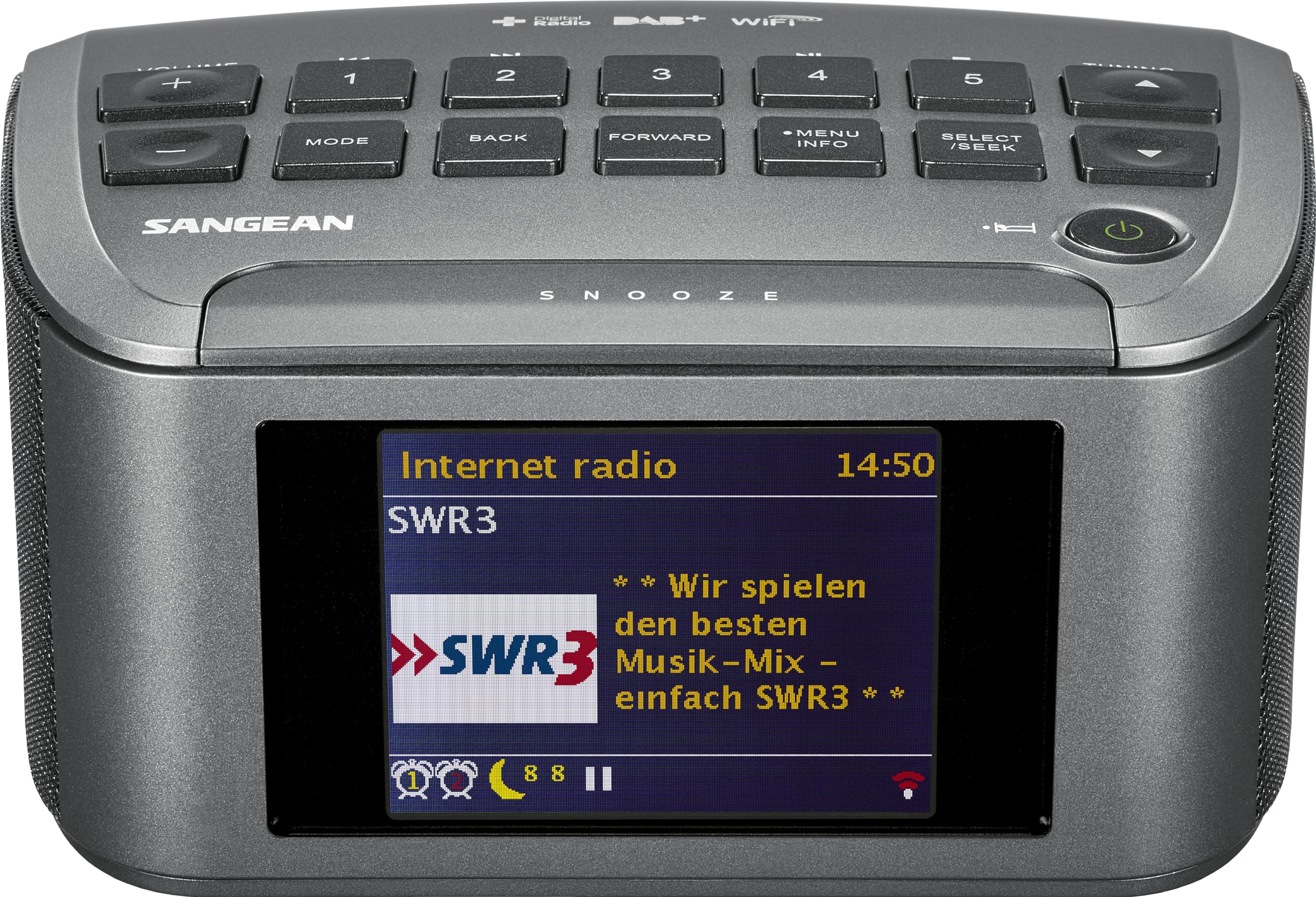
Figura 1: Frontal view of the Sangean RCR-11 WF Digital Clock Internet Radio, displaying an internet radio station.
Característiques clau
- Integrated Internet Radio with access to over 15,000 stations.
- DAB+ and FM radio tuner with 15 preset stations (5 for Internet Radio, 5 for DAB+, and 5 for FM).
- Remote control capability via the UNDOK app for smartphones and tablets.
- Clear audio output through dual speakers.
- Functions as a digital alarm clock with multiple alarm settings.
- Built-in Wi-Fi Dual-band 5G/2.4GHz antenna for stable internet connectivity.
Configuració
1. Desembalatge i col·locació
- Traieu amb cura la ràdio del seu embalatge.
- Col·loqueu la ràdio sobre una superfície estable i plana, allunyada de la llum solar directa, de fonts de calor i de la humitat.
- Assegureu-vos que hi hagi una ventilació adequada al voltant de la unitat.
2. Connexió d'alimentació
- Connect the provided power adapter to the "DC IN" port on the rear of the radio.
- Connecteu l'adaptador d'alimentació a una presa de corrent estàndard.
3. Connexió d'antena
For optimal DAB+ and FM reception, connect the external antenna to the "ANT. 1" port on the rear panel. Extend the antenna fully for best signal quality.

Figure 2: Rear panel connections including antenna, AUX IN, DC IN, and USB port.
4. Connexió de xarxa (Wi-Fi)
- Upon first power-on, the radio will guide you through the initial setup, including language selection and network configuration.
- Seleccioneu la vostra xarxa Wi-Fi de la llista de xarxes disponibles.
- Enter your Wi-Fi password using the radio's controls. The radio supports dual-band 5G/2.4GHz Wi-Fi.
- Once connected, the radio will synchronize the time and date automatically.
Instruccions de funcionament
1. Controls sobreview

Figure 3: Top panel controls of the Sangean RCR-11 WF.
- Botó d'engegada: Press to turn the radio on or off.
- Volum +/-: Adjusts the audio volume.
- Mode: Cycles through available radio modes (Internet Radio, DAB+, FM, AUX, USB).
- Endarrere / Endavant: Navigates through menus or skips tracks.
- Menú / Informació: Accesses the main menu or displays station information.
- Select / Seek: Confirms selections or initiates station scanning.
- Afinació amunt/avall: Manually tunes frequencies or navigates lists.
- Botons predefinits (1-5): Quickly access stored favorite stations.
- Posposa: Temporarily silences the alarm.
2. Radio Modes
Premeu el botó Mode button to switch between Internet Radio, DAB+, and FM modes.
Ràdio per Internet
- Ensure the radio is connected to Wi-Fi.
- Utilitza el Afinació buttons to browse stations by genre, location, or search.
- Premeu Select / Seek per confirmar la seva elecció.
- To save a station as a preset, press and hold one of the Predefinició (1-5) botons.
Ràdio DAB+
- In DAB+ mode, the radio will automatically scan for available stations.
- Utilitza el Afinació buttons to scroll through the station list.
- Premeu Select / Seek per escoltar una emissora.
- Save presets by pressing and holding a Predefinició (1-5) botó.
Ràdio FM
- En mode FM, premeu Select / Seek per buscar automàticament la següent estació disponible.
- Utilitza el Afinació buttons for manual fine-tuning.
- Save presets by pressing and holding a Predefinició (1-5) botó.
3. Alarm Clock Functionality
The RCR-11 WF features multiple alarm settings.
- Access the Alarm settings via the Menú botó.
- Seleccioneu Alarma 1 o Alarma 2.
- Set the desired alarm time, source (buzzer, Internet Radio, DAB+, FM), and volume.
- Choose the alarm recurrence (e.g., daily, weekdays, weekends, once).
- Activa l'alarma.
Quan soni l'alarma, premeu el botó Posposa button to temporarily pause it. Press the Poder botó per apagar l'alarma.
4. UNDOK App Control
Download the free UNDOK app from your smartphone's app store to control your Sangean RCR-11 WF remotely. The app allows full control over radio functions, station selection, and settings.
5. Auxiliary Input (AUX IN) and USB Playback
- AUX IN: Connect an external audio device (e.g., MP3 player) to the 3.5mm AUX IN port on the rear panel using an audio cable. Select AUX mode using the Mode botó.
- Reproducció USB: Insert a USB flash drive into the USB port on the rear panel to play compatible audio files. Select USB mode using the Mode botó.
Manteniment
Neteja
- Desconnecteu sempre l'adaptador d'alimentació abans de netejar-lo.
- Feu servir un drap suau i sec per netejar l'exterior de la ràdio.
- No utilitzeu netejadors abrasius, ceres o dissolvents, ja que poden danyar l'acabat.
- Avoid spraying liquids directly onto the radio.
Actualitzacions de programari
Periodically check for software updates through the radio's menu system to ensure optimal performance and access to new features. Refer to the "Software Update" section in the radio's menu.
Resolució de problemes
If you encounter issues with your Sangean RCR-11 WF, please refer to the following common problems and solutions:
| Problema | Possible causa/solució |
|---|---|
| Sense poder |
|
| Sense so ni amb una mala qualitat de so |
|
| No es pot connectar a la Wi-Fi |
|
| Alarm not sounding or difficult to set |
|
| Display issues or incorrect information |
|
Especificacions
| Característica | Detall |
|---|---|
| Número de model | A500356 |
| Marca | Sangean |
| Dimensions del producte (L x A x A) | 14.5 x 17.2 x 8.8 cm |
| Pes | 680 g |
| Color | Negre |
| Tecnologia del sintonitzador | DAB |
| Bandes de ràdio compatibles | DAB, DAB+, FM, ràdio per Internet |
| Tecnologia de connectivitat | USB, Wi-Fi (Dual-band 5G/2.4GHz) |
| Font d'alimentació | Cable elèctric |
| Tipus de visualització | LCD o LED |
| Material | Plàstic |
| Components inclosos | Manual d'usuari |

Figure 4: Product dimensions of the Sangean RCR-11 WF.
Informació de la garantia
The Sangean RCR-11 WF Digital Clock Internet Radio comes with a 2 any de garantia from the date of purchase. Please retain your proof of purchase for warranty claims. This warranty covers manufacturing defects and workmanship under normal use. It does not cover damage caused by misuse, accidents, unauthorized modifications, or external factors.
Suport
For further assistance, technical support, or warranty inquiries, please contact Sangean customer service. Refer to the contact information provided in your product packaging or visit the official Sangean weblloc.