
1. Introducció
Thank you for choosing the Remax RB-S2 Sports Bluetooth Headset. This manual provides essential information for the proper setup, operation, and maintenance of your device. Please read it thoroughly before use to ensure optimal performance and longevity of your headset.
2. Contingut del paquet
- Remax RB-S2 Sports Bluetooth Headset
- Cable de càrrega USB
- Puntes per a les orelles (diverses mides)
- Manual d'usuari
3. Producte acabatview
The Remax RB-S2 is a wireless in-ear headset designed for active lifestyles, featuring Bluetooth 4.0 connectivity and a magnetic design for convenient storage.

Figure 3.1: Remax RB-S2 Sports Bluetooth Headset, front view. A clear front view of the Remax RB-S2 Sports Bluetooth Headset, showcasing its in-ear design and connecting cable.

Figure 3.2: Remax RB-S2 Sports Bluetooth Headset in black and white variants. Two Remax RB-S2 headsets, one in black and one in white, highlighting the different color options available.
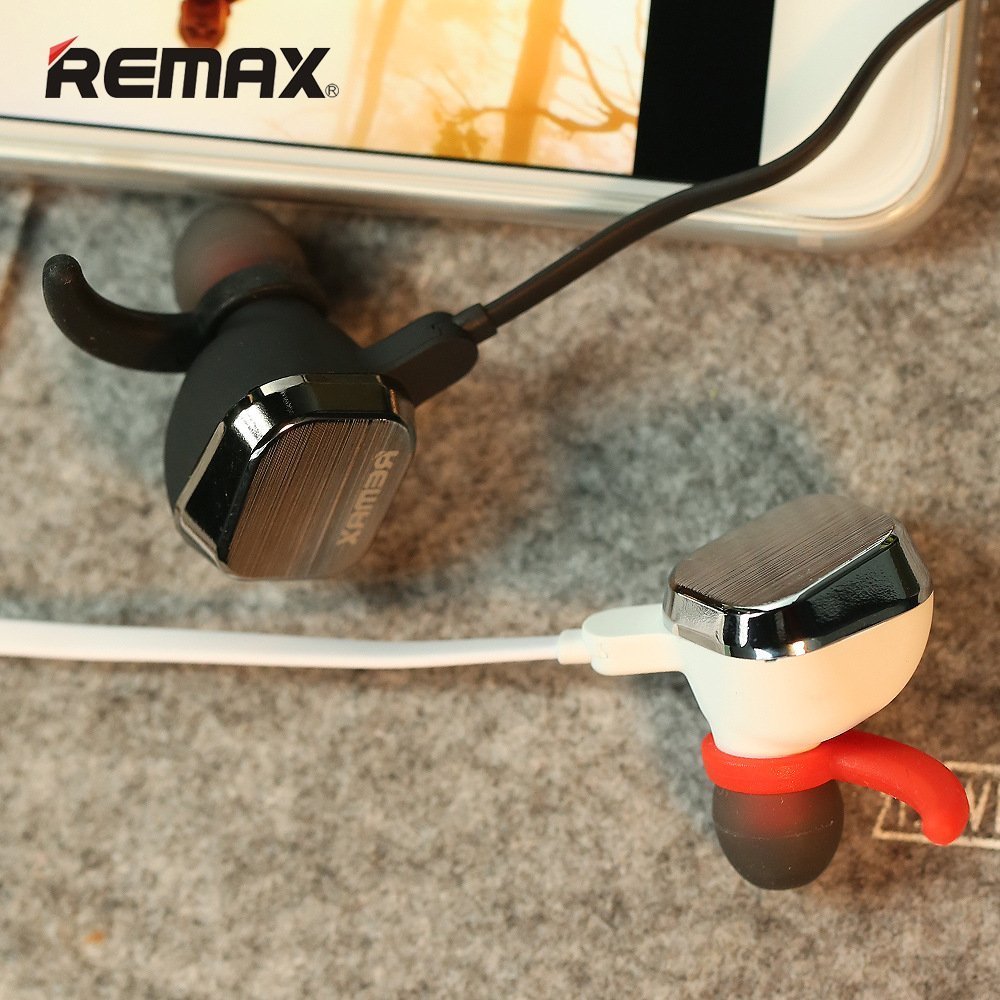
Figure 3.3: Close-up of Remax RB-S2 earbud with magnetic feature. A detailed close-up of the Remax RB-S2 earbud, showing the magnetic back for secure storage around the neck.

Figure 3.4: Remax RB-S2 in-line control panel. A close-up of the in-line control panel on the Remax RB-S2 headset, featuring volume buttons and a multi-function button.
4. Configuració
4.1 Càrrega dels auriculars
- Connecteu el cable de càrrega USB al port de càrrega dels auriculars.
- Connecteu l'altre extrem del cable USB a una font d'alimentació (per exemple, un port USB de l'ordinador o un adaptador de paret USB).
- The indicator light will illuminate during charging and turn off or change color when fully charged.
- El temps de càrrega és d'aproximadament 2 hores.
4.2 Vinculació Bluetooth
- Assegureu-vos que els auriculars estiguin completament carregats.
- Press and hold the Power Key (multi-function button) until the indicator light flashes red and blue alternately, indicating pairing mode.
- Al dispositiu (telèfon intel·ligent, tauleta, etc.), activeu el Bluetooth i cerqueu els dispositius disponibles.
- Select "RB-S2" from the list of found devices.
- Once paired, the indicator light will flash blue periodically, and you may hear a confirmation tone.
- The headset supports a transmission distance of up to 10 meters (33 feet) in an open environment.
5. Instruccions de funcionament
5.1 Encès/Apagat
- Encès: Press and hold the Power Key for approximately 3 seconds until the blue indicator light flashes.
- Apagar: Press and hold the Power Key for approximately 3 seconds until the red indicator light flashes and then turns off.
5.2 Reproducció de música
- Reproduir/pausa: Press the Power Key once.
- Pista següent: Premeu i manteniu premut el botó de pujar el volum (+).
- Pista anterior: Premeu i manteniu premut el botó per baixar el volum (-).
5.3 Gestió de trucades
- Respondre/Finalitzar la trucada: Press the Power Key once.
- Rebutja la trucada: Press and hold the Power Key for approximately 2 seconds.
- Torna a marcar l'últim número: Double-press the Power Key.
5.4 Ajust de volum
- Augmenta el volum: Premeu el botó Pujar volum (+).
- Disminueix el volum: Premeu el botó per baixar el volum (-).
5.5 Remote Camera Function
- When your phone's camera app is open, double-click the Volume Up (+) button to take a picture.
6. Manteniment
- Netegeu els auriculars regularment amb un drap suau i sec.
- Avoid exposing the headset to extreme temperatures, humidity, or corrosive substances.
- Do not attempt to disassemble or modify the headset, as this will void the warranty.
- Guardeu els auriculars en un lloc fresc i sec quan no els feu servir.
- Mantingueu el port de càrrega net de pols i deixalles.
7. Solució De Problemes
| Problema | Solució |
|---|---|
| Els auriculars no s'encén. | Ensure the headset is fully charged. Press and hold the Power Key for a longer duration. |
| No es pot emparellar amb el dispositiu. | Ensure the headset is in pairing mode (flashing red and blue). Turn off and on Bluetooth on your device. Move closer to the headset (within 10 meters). |
| Sense so o amb un volum baix. | Comproveu els nivells de volum tant als auriculars com al dispositiu connectat. Assegureu-vos que els auriculars estiguin correctament emparellats. |
| Connexió intermitent. | Ensure no obstacles are between the headset and your device. Move away from sources of strong electromagnetic interference. Recharge the headset. |
| Remote camera function not working. | Ensure your phone's camera app is open and active. Some camera apps may not fully support this feature. |
8. Especificacions
| Característica | Detall |
|---|---|
| Marca | Remax |
| Model | RB-S2 |
| Versió Bluetooth | 4.0 |
| Material | Metal + Silicone |
| Distància de transmissió | 10M |
| Temps d'espera | 160 hores |
| Temps de conversa | 5-8 hores |
| Temps de reproducció de música | 4-6 hores |
| Temps de càrrega | 2 hores |
| Sensibilitat del micròfon | -41 ± 1DB |
| Resposta de freqüència | 20-20000 HZ |
| Sensibilitat de sortida | 92 ± 3DB |
| Impedància | 16 ± 10% |
| Potència nominal d'entrada | 10 MW |
| Distorsió | ≤1% |
| Longitud del cable | 75 MM |
| Nivell de resistència a l'aigua | Impermeable |
| Pes de l'article | 180 g |
9. Garantia i Suport
9.1 Informació de la garantia
The Remax RB-S2 Sports Bluetooth Headset comes with a 6-month limited warranty from the date of purchase. This warranty covers manufacturing defects. It does not cover damage caused by misuse, accidents, unauthorized modifications, or normal wear and tear. Please retain your proof of purchase for warranty claims.
9.2 Atenció al client
For technical support, warranty claims, or any questions regarding your Remax RB-S2 headset, please contact our customer service team. Refer to the contact information provided on the product packaging or the official Remax weblloc.


