
Introducció
This manual provides detailed instructions for the setup, operation, and maintenance of your Homtime C12PRO Docking Station Speaker. The C12PRO integrates a Bluetooth speaker, FM radio, alarm clock, and dual USB charging capabilities, designed for convenient everyday use.
Contingut del paquet
Si us plau, verifiqueu que tots els elements que s'enumeren a continuació estiguin inclosos al vostre paquet:
- 1 x Homtime C12PRO Speaker Unit
- 1 x adaptador de corrent
- 1 x Manual d'usuari
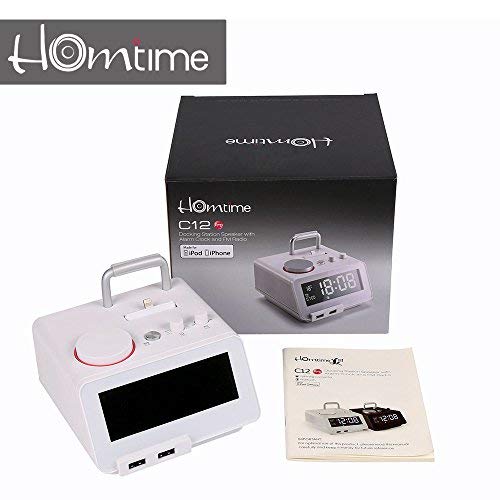
Imatge: Contents of the Homtime C12PRO package, showing the main speaker unit, power adapter, and the user manual.
Producte acabatview
Familiarize yourself with the various components and controls of your C12PRO unit.

Imatge: Davant view of the Homtime C12PRO with an iPhone docked. The large digital display shows time and temperature, and the front features dual USB charging ports.

Imatge: Davant view of the Homtime C12PRO without a phone docked. This image clearly shows the digital display, the docking connector, and the control buttons on the top surface.
Panell frontal i pantalla
- Large 4.2-inch LCD Display: Shows time, alarm status, and room temperature (Celsius or Fahrenheit). Brightness is adjustable.
- Ports de càrrega USB duals: Located at the front base for convenient charging of external devices.
Controls del tauler superior
- Docking Connector: Apple Certified Lightning connector for iPod/iPhone.
- Control Buttons/Knobs: For setting time, alarm, volume, mode selection, and FM radio tuning.
Connexions del panell posterior
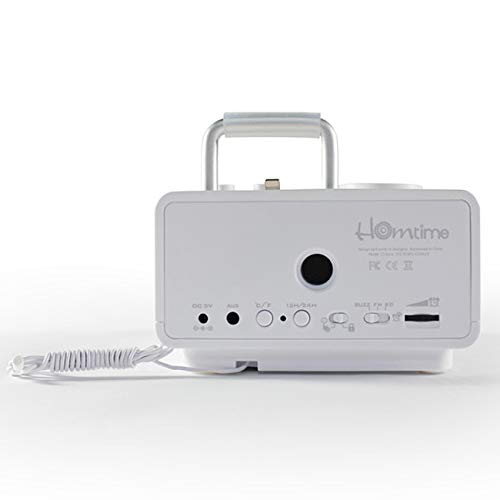
Imatge: posterior view of the Homtime C12PRO. This image displays the DC 9V power input, AUX-in port, 12H/24H time format button, and other rear controls.
- Entrada d'alimentació DC 9V: Connecteu aquí l'adaptador de corrent proporcionat.
- Port d'entrada AUX: Jack de 3.5 mm per connectar fonts d'àudio externes.
- Botó 12H/24H: Toggles between 12-hour and 24-hour time display formats.
- Altres controls: May include snooze/dimmer, alarm on/off, and FM antenna connection.
Configuració
- Desempaquetar la unitat: Carefully remove the C12PRO speaker and all accessories from the packaging.
- Connectar l'alimentació: Insert the DC plug of the power adapter into the DC 9V input port on the rear of the unit. Plug the power adapter into a standard wall outlet. The display will illuminate.
- Configuració de l'hora inicial:
- Manteniu premut el botó HORA CONFIGURADA button (location may vary, typically on top or rear).
- Utilitza el +/- buttons or rotary knob to adjust the hour. Press HORA CONFIGURADA de nou per confirmar.
- Adjust the minute using the +/- buttons or rotary knob. Press HORA CONFIGURADA per confirmar i sortir del mode de configuració de l'hora.
- Per canviar entre el format de 12 hores i el de 24 hores, premeu la tecla 12H/24H botó del panell posterior.
- Ajusta la brillantor de la pantalla: Premeu el botó SNOOZE / DIMMER button (often combined) repeatedly to cycle through brightness levels.
- Unitat de temperatura establerta: Si escau, premeu el botó ° C / ° F button to switch between Celsius and Fahrenheit display for room temperature.
Instruccions de funcionament
Encès/Apagat
Premeu el botó PODER button to turn the unit on or off. When off, the clock display remains active.
Configuració de l'Alarma
- Manteniu premut el botó CONJUNT D'ALARMES botó. L'hora de l'alarma parpellejarà.
- Utilitza el +/- buttons or rotary knob to adjust the alarm hour. Press CONJUNT D'ALARMES per confirmar.
- Adjust the alarm minute. Press CONJUNT D'ALARMES per confirmar.
- Select the alarm source (Buzzer, FM Radio, or Docked Device). Use +/- or rotary knob and press CONJUNT D'ALARMES per confirmar.
- Per activar/desactivar l'alarma, premeu el botó ALARMA ON / OFF botó. Apareixerà una icona d'alarma a la pantalla quan estigui activa.
- Quan soni l'alarma, premeu el botó DORMITAR button to temporarily silence it for a few minutes. Press PODER per apagar l'alarma durant el dia.
Funcionament de la ràdio FM
- Premeu el botó MODE fins que aparegui "FM" a la pantalla.
- For automatic station scanning, press and hold the REPRODUCCIÓ/PAUSA button (or a dedicated ESCANEAR button). The radio will scan and save available stations.
- Per sintonitzar manualment, utilitzeu ANTERIOR / SEGÜENT buttons or rotary knob to adjust the frequency.
- To select a saved station, press the PRESET botó i després feu servir ANTERIOR / SEGÜENT per navegar.
- Ajusteu el volum amb el botó VOLUM knob or buttons.
Emparellament Bluetooth
- Premeu el botó MODE button until "BT" or "Bluetooth" appears on the display. The Bluetooth indicator will flash, indicating pairing mode.
- Al dispositiu mòbil, activa el Bluetooth i cerca dispositius nous.
- Select "Homtime C12PRO" from the list of available devices.
- Once paired, the Bluetooth indicator on the C12PRO will stop flashing and remain solid. You can now play audio wirelessly from your device.
- Adjust volume on both the C12PRO and your connected device.
Ús de l'estació d'acoblament
The C12PRO features an Apple Certified Lightning connector for compatible iPod/iPhone devices.
- Carefully align your iPhone/iPod with the Lightning connector on the top of the unit.
- Gently push down until the device is securely seated.
- The C12PRO will automatically charge your device and can play audio from it.
- Premeu el botó MODE button to select the docking station as the audio source.
Càrrega USB
The unit includes dual USB ports for charging other devices.
- Connect your USB charging cable to one of the USB ports on the front of the C12PRO.
- Connect the other end of the cable to your device (e.g., Android phone, tablet).
- The C12PRO will provide power to charge your device.
AUX-in Connection
Connect external audio players via the 3.5mm AUX-in port.
- Connect a 3.5mm audio cable (not included) from your external audio device's headphone jack to the AUX-in port on the rear of the C12PRO.
- Premeu el botó MODE botó fins que aparegui "AUX" a la pantalla.
- Play audio from your external device. Adjust volume on both the C12PRO and the external device.
Manteniment
- Neteja: Disconnect the power adapter before cleaning. Use a soft, dry cloth to wipe the exterior surfaces. Do not use abrasive cleaners, waxes, or solvents.
- Emmagatzematge: Si guardeu la unitat durant un període prolongat, desconnecteu-la de l'alimentació i guardeu-la en un lloc fresc i sec, allunyat de la llum solar directa i de temperatures extremes.
- Bateria: The unit contains a CR2 battery (included) for clock memory backup. This battery is not user-replaceable for general operation and should only be replaced by qualified service personnel if necessary.
Resolució de problemes
| Problema | Causa possible | Solució |
|---|---|---|
| Sense engegada/Pantalla apagada | L'adaptador de corrent no està connectat o la presa de corrent està defectuosa. | Assegureu-vos que l'adaptador de corrent estigui ben connectat a la unitat i a una presa de corrent que funcioni. |
| No hi ha so de l'altaveu | Volume too low; incorrect source selected; device not connected properly. | Augmenta el volum. Prem MODE to select the correct audio source (BT, FM, Dock, AUX). Reconnect Bluetooth device or docked phone. |
| L'aparellament de Bluetooth falla | C12PRO not in pairing mode; device too far; interference. | Ensure C12PRO is in BT mode and flashing. Move device closer. Turn off other Bluetooth devices. |
| FM radio static/poor reception | Senyal feble; antena no estesa. | Extend the FM antenna fully. Reposition the unit for better reception. Perform auto-scan again. |
| L'alarma no sona | Alarm not activated; alarm volume too low. | Ensure the alarm icon is visible on the display. Check alarm volume settings. |
| Device not charging via USB/Dock | Cable issue; device not compatible; unit not powered. | Try a different USB cable. Ensure the C12PRO is powered on. Verify device compatibility with the Lightning dock. |
Especificacions

Imatge: A table detailing the specifications of the Homtime C12PRO, including driver units, S/N ratio, Bluetooth version, range, radio frequency, power, and dimensions.
| Model | C12 Pro |
| Unitats conductores | 2x40mm |
| Relació S/N | > 70 dB |
| Versió Bluetooth | 2.1 + EDR |
| Interval Bluetooth | 10M |
| Rang de freqüència de ràdio | 87.5 MHz - 108 MHz |
| Dispositius compatibles | iPad, iPhone, Android, Windows Phone, Computer |
| Adaptador d'alimentació | AC100-240V, 50/60Hz, DC 5V 3A |
| Potència de sortida | 3W + 3W (6 Watts total) |
| Dimensions (LxWxH) | 12.8 x 12.9 x 10.7 cm |
| Pes de l'article | 800 g |
| Fonts d'àudio | Apple Lightning, USB, Bluetooth, Aux-in |
| Tipus de visualització | Digital LCD (4.2 inches) |
| Bateries | 1 CR2 battery required (included for clock memory) |
Garantia i Suport
Informació de la garantia
The Homtime C12PRO comes with a Garantia limitada de 1 anys from the date of purchase. This warranty covers manufacturing defects in materials and workmanship under normal use. It does not cover damage caused by misuse, accidents, unauthorized modifications, or external causes.
Conserveu el vostre comprovant de compra per a reclamacions de garantia.
Atenció al client
For technical assistance, troubleshooting not covered in this manual, or warranty inquiries, please contact Homtime customer support. Refer to the contact information provided with your product packaging or visit the official Homtime weblloc web per obtenir els detalls d'assistència més actualitzats.