
Introducció
This manual provides instructions for the setup, operation, maintenance, and troubleshooting of your Soundcandy Rave Ball Light Show Bluetooth Speaker. Please read this manual thoroughly before using the device to ensure proper function and longevity.
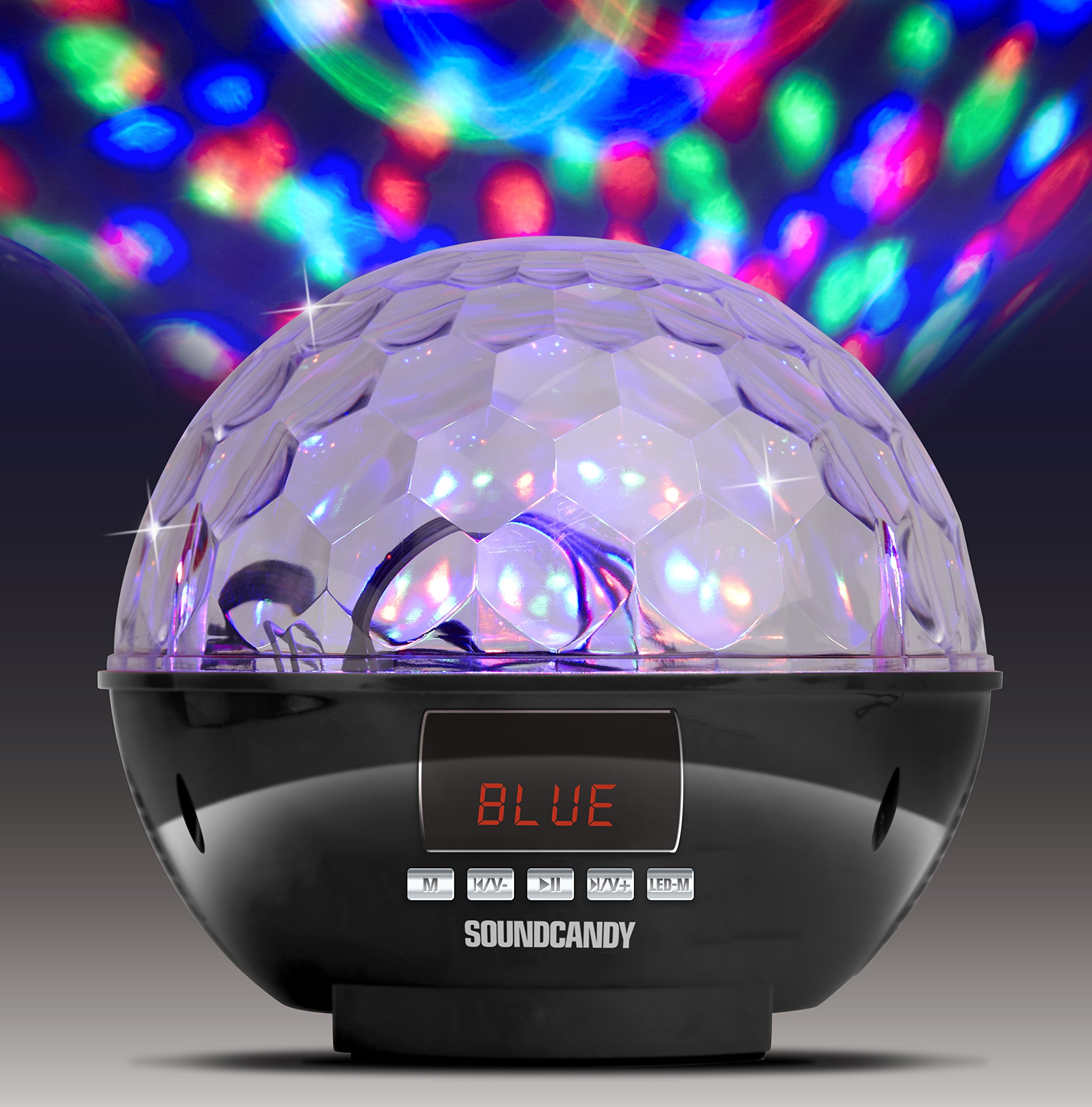
Image: The Soundcandy Rave Ball Light Show Bluetooth Speaker, a spherical device with a faceted top surface designed to project light patterns. The base contains control buttons and input ports.
Què hi ha a la caixa
En desembalar, assegureu-vos que hi hagi tots els components:
- Altaveu Rave Ball
- Cable de càrrega USB (Note: Some packages may not include this cable.)
- 3.5mm Audio Cable (Note: Some packages may not include this cable.)
If any items are missing, please contact customer support.
Configuració
1. Carregant l’altaveu
- Localitzeu el port de càrrega de l'altaveu.
- Connect the provided USB charging cable to the speaker and a compatible USB power adapter (not included) or computer USB port.
- L'indicador lluminós de càrrega s'il·luminarà. Espereu aproximadament de 2 a 3 hores per a una càrrega completa.
- Una càrrega completa proporciona fins a 4 hores de reproducció.
2. Encès / apagat
- To power on, press and hold the Power button until the device activates.
- To power off, press and hold the Power button again until the device shuts down.
Instruccions de funcionament
1. Emparellament Bluetooth
- Ensure the speaker is powered on and in Bluetooth mode (indicated by a specific light or display).
- Al dispositiu mòbil, activeu el Bluetooth i cerqueu els dispositius disponibles.
- Select "Soundcandy Rave Ball" from the list of devices.
- Once paired, the speaker will emit an audible confirmation, and you can begin playing audio from your device.
2. Playing Music from USB Drive or Micro SD Card
- Insert a USB drive or Micro SD card containing MP3 audio files al port corresponent de l'altaveu.
- L'altaveu detectarà automàticament el dispositiu d'emmagatzematge i començarà a reproduir música.
- Use the control buttons on the speaker to navigate tracks (next/previous) and adjust volume.
3. Using Aux-in Connection
- Connect one end of a 3.5mm audio cable (if included) to the Aux-in port on the speaker.
- Connect the other end of the cable to the headphone jack or audio output of your external device (smartphone, radio, etc.).
- The speaker will automatically switch to Aux-in mode. Play audio from your external device.
4. Funcionament de la ràdio FM
- Canvia l'altaveu al mode de ràdio FM.
- Use the control buttons to scan for available radio stations. The digital LCD display will show the station frequency.
- Ajusteu el volum segons sigui necessari.
5. Light Show Modes
- The speaker features a built-in rotation motor that creates a spinning light effect.
- There are four different light modes with various rotating lighting effects and colors.
- Press the "Light Mode" button (or similar, refer to device markings) to cycle through the available light patterns.
- The light effects are designed to fill a room with dynamic visuals.
Manteniment
Neteja
To maintain the appearance and functionality of your speaker:
- Netegeu les superfícies exteriors amb un drap suau i sec.
- No utilitzeu netejadors abrasius, dissolvents ni productes químics agressius.
- Eviteu que entri humitat a cap obertura.
Cura de la bateria
- Per allargar la durada de la bateria, eviteu descarregar-la completament amb freqüència.
- Si guardeu l'altaveu durant un període prolongat, carregueu-lo aproximadament al 50% cada pocs mesos.
Resolució de problemes
| Problema | Causa possible | Solució |
|---|---|---|
| Sense poder | La bateria està descarregada. | Carregueu l'altaveu amb el cable de càrrega USB. |
| No es pot emparellar per Bluetooth | L'altaveu no està en mode d'emparellament o està massa lluny del dispositiu. | Ensure speaker is in Bluetooth mode. Move device closer to speaker. Restart both devices. |
| Sense so | Volume too low, incorrect input mode, or faulty connection. | Increase volume on both speaker and connected device. Verify correct input mode (Bluetooth, USB, Aux, FM). Check cable connections. |
| L'espectacle de llums no funciona | Light mode is off or device malfunction. | Press the "Light Mode" button to activate or change patterns. If issue persists, contact support. |
Especificacions
| Característica | Detall |
|---|---|
| Número de model | SC3002BKB-BT |
| Marca | soundcandy |
| Color | Plata |
| Forma | Ronda |
| Material | Plàstic |
| Tipus d'acabat | Plata metàl·lica |
| Tipus de font de llum | Díode emissor de llum (LED) |
| Font d'alimentació | Funciona amb piles, elèctric amb cable |
| Tipus de bateria | 1 bateria de polímer de liti (inclosa) |
| Durada de la bateria | Fins a 4 hores de joc |
| Tipus de muntatge | Muntatge endoll |
| Característiques especials | Light Modes, FM Radio, Rechargeable Battery, Bluetooth Connectivity, USB/Micro SD Playback, Aux-in |
| Nombre de fonts de llum | 4 |
| Pes de l'article | 1.2 lliures |
| Fabricant | Gluten Free Palace - HPC |
| UPC | 814092020231 |
| ASIN | B017DV02P6 |
Garantia i Suport
Informació de la garantia
This product comes with a standard manufacturer's warranty. Please retain your proof of purchase for warranty claims. For specific warranty terms and conditions, refer to the documentation included with your purchase or contact the manufacturer directly.
Atenció al client
If you encounter any issues not covered in the troubleshooting section or require further assistance, please contact Soundcandy customer support. Contact details can typically be found on the product packaging or the official Soundcandy weblloc.