
1. Introducció
This manual provides essential instructions for the installation, operation, maintenance, and troubleshooting of the APC Smart-UPS SRT3000RMXLT 3kVA 208V Rackmount Uninterruptible Power Supply (UPS). Please read this manual thoroughly before installing or operating the equipment to ensure proper usage and safety.
2. Informació de seguretat
Observeu tots els avisos i les instruccions d'ús d'aquest manual. Si no ho feu, podeu patir lesions o danys a l'equip.
- Seguretat elèctrica: Aquesta unitat conté volums perillosostages. Do not attempt to disassemble the UPS. Servicing should only be performed by qualified personnel.
- Seguretat de la bateria: Batteries can present a risk of electrical shock and high short-circuit current. Remove watches, rings, or other metal objects before handling batteries. Use tools with insulated handles.
- Pes: The UPS is heavy. Use proper lifting techniques and ensure adequate support during installation.
- Medi ambient: Install the UPS indoors in a controlled environment, free from excessive dust, moisture, and extreme temperatures.
3. Contingut del paquet
Carefully unpack the UPS and inspect for shipping damage. The package should contain the following items:
- APC Smart-UPS SRT3000RMXLT Unit
- Power Supply (Built-In)
- Maquinari de muntatge en bastidor
- CD de documentació
- cable USB
- Cable sèrie
4. Configuració
4.1 Instal·lació física
The SRT3000RMXLT is designed for rack installation. Ensure the rack is stable and capable of supporting the UPS weight (approximately 69 pounds).
- Mount the UPS into a standard 19-inch rack using the provided rack-mounting hardware.
- Assegureu-vos que hi hagi un flux d'aire adequat al voltant de la unitat. No bloquegeu les obertures de ventilació.

Figura 4.1: Frontal view of the APC Smart-UPS SRT3000RMXLT. This image shows the front panel with the display and ventilation grille.
4.2 Connecting the UPS
Connect the UPS to the utility power and your equipment.
- Connect the UPS input power cord to a dedicated 208V AC outlet. The UPS uses a Type B - 3 pin (North American) power plug.
- Connect your equipment to the output receptacles on the rear of the UPS. The unit provides 12 IEC 320 C13/C14 outlets.
- For communication, connect the USB cable or serial cable from the UPS to your computer or network management card.
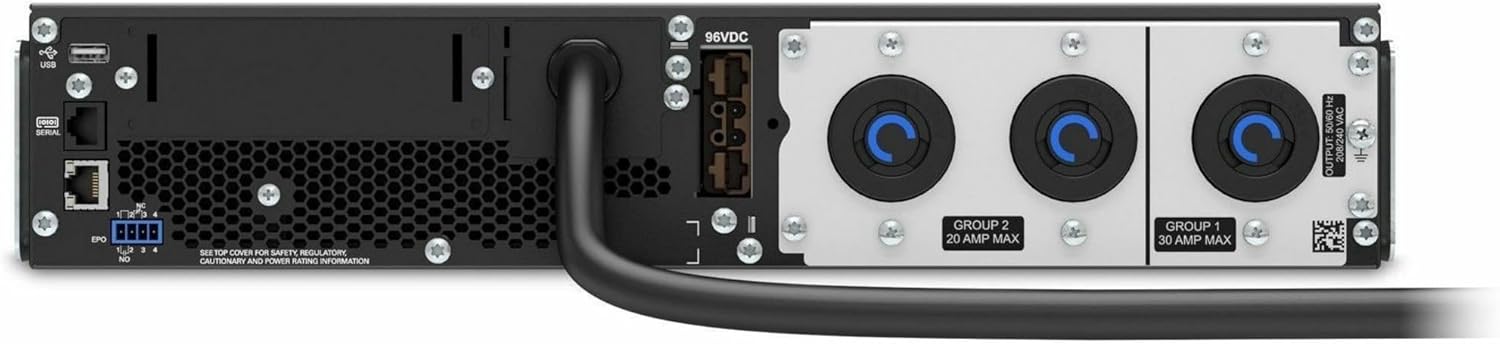
Figura 4.2: posterior view of the APC Smart-UPS SRT3000RMXLT. This image displays the various input and output ports, including USB, serial, EPO, and the 12 output receptacles, along with the main power input.
4.3 Engegada inicial
Després que totes les connexions siguin segures:
- Premeu el botó d'engegada del panell frontal per engegar el SAI.
- The UPS will perform a self-test and the display will show the current status.
- Allow the batteries to charge for at least 6 hours before relying on them for extended backup time.
5. Funcionament del SAI
5.1 Front Panel Display and Controls
The front panel features an LCD display and control buttons for monitoring and configuring the UPS.
- Pantalla LCD: Shows real-time status, load, battery charge, input/output voltage, and event logs.
- Botó ESC: Surt del menú actual o cancel·la una operació.
- Botó D'acord: Confirma una selecció o entra a un menú.
- Fletxes amunt/avall: Navigate through menu options or adjust settings.
5.2 Funcionament bàsic
- Encesa: Premeu i manteniu premut el botó d'engegada fins que la pantalla s'il·lumini.
- Apagat: Press and hold the power button until the UPS powers down. Ensure all connected equipment is safely shut down first.
- Mode de bateria: En cas d'una potènciatage, the UPS will automatically switch to battery power. The display will indicate 'On Battery'.
- Autocomprovació: Initiate a manual self-test through the front panel menu to verify battery and UPS functionality.
6. Manteniment
6.1 Substitució de la bateria
The UPS uses sealed lead-acid batteries. Battery life is typically 3-5 years, depending on environmental conditions and usage. Replace batteries when the UPS indicates a 'Battery Fault' or 'Replace Battery' warning.
- Contact APC support or a certified service technician for battery replacement.
- Always use genuine APC replacement battery cartridges (RBCs) to ensure compatibility and optimal performance.
- Recycle old batteries responsibly.
6.2 Neteja
Keep the UPS free from dust and debris to ensure proper ventilation.
- Feu servir un drap suau i sec per netejar l'exterior del SAI.
- No utilitzeu netejadors líquids ni dissolvents.
- Assegureu-vos que les obertures de ventilació estiguin lliures d'obstruccions.
7. Solució De Problemes
This section provides solutions to common issues. For more complex problems, contact technical support.
| Problema | Causa possible | Solució |
|---|---|---|
| El SAI no s'encén | No input power; Battery disconnected or discharged | Check power cord connection; Ensure utility power is present; Allow batteries to charge. |
| El SAI emet un so continu | On battery power; Overload condition | Check utility power; Reduce connected load. |
| Indicador "Substituir la bateria" | La bateria s'acosta al final de la vida útil | Demana i substitueix el cartutx de bateria. |
| UPS not providing power to outlets | Output circuit breaker tripped; UPS in fault mode | Reset circuit breaker; Check display for fault codes and consult manual. |
8. Especificacions
Key technical specifications for the APC Smart-UPS SRT3000RMXLT.
| Característica | Especificació |
|---|---|
| Número de model | SRT3000RMXLT |
| Marca | APC |
| Capacitat de potència de sortida | 3000 VA / 2700 watts |
| Volum de sortida nominaltage | 208 V AC |
| Volum d’entrada nominaltage | 208 V AC / 230 V AC |
| Freqüència d'entrada | 60 Hz |
| Connexions de sortida | 12 x IEC 320 C13/C14 |
| Tipus de bateria | Àcid de plom |
| Temps de recàrrega típic | 6 hores |
| Temps de còpia de seguretat típic (càrrega completa) | 4 minuts |
| Factor de forma | Rack |
| Dimensions (A x A x P) | 9 x 23 x 34 polzades |
| Pes | 69 lliures |
| Temperatura de funcionament | 0 - 40 °C (32 - 104 °F) |
9. Garantia i Suport
9.1 Informació de la garantia
APC provides a standard warranty for this product. Please refer to the warranty card included with your product or visit the official APC weblloc web per obtenir informació detallada sobre els termes i condicions de garantia específics de la vostra regió.
9.2 Suport tècnic
For technical assistance, product information, or troubleshooting beyond the scope of this manual, please contact APC customer support. Have your model number (SRT3000RMXLT) and serial number ready when contacting support.
- Visita l'APC oficial weblloc web amb recursos de suport, preguntes freqüents i informació de contacte.
- Online resources often include updated manuals, firmware, and diagnostic tools.