
1. Acabatview
The HDWR HD-PS6C is a versatile 2-in-1 device that combines the functionality of a wireless barcode reader and a data collector. This integrated solution significantly enhances daily work comfort and convenience, making tasks easier and more efficient. It is designed for various applications requiring efficient 1D barcode scanning and data storage, such as inventory management, retail, and logistics.
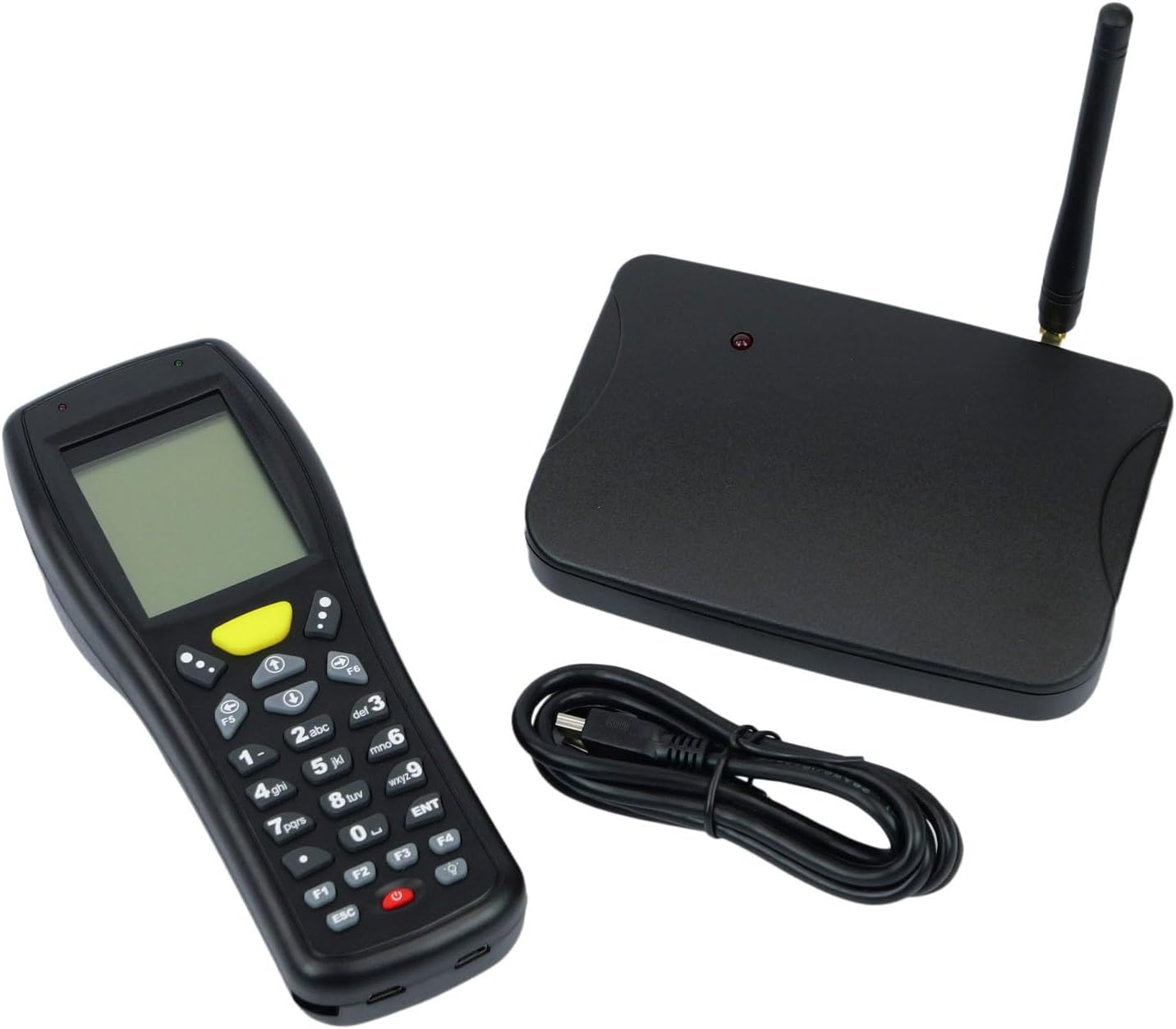
Image: The HDWR HD-PS6C wireless data collector shown with its wireless receiver and USB cable, illustrating the complete package.
2. Característiques clau
- Two-in-One Functionality: Combines a wireless barcode reader and a data collector in a single device.
- Interfície fàcil d'utilitzar: Equipped with a clear screen and a practical keyboard for easy navigation and manual data entry, especially for damaged or unclear codes.
- Mode d'inventari: Allows storage of up to 50,000 scanned codes in its integrated memory, ideal for extensive inventory tasks.
- Compatibilitat amb codis de barres 1D: Supports a wide range of 1D barcode types including EAN13, EAN8, Code 39, Code 93, Code 128, Interleaved 2 of 5 (IT25), Codabar, UPCA, UPCE, and more.
- Ampli suport de sistemes operatius: Compatible with Windows XP/7/8/8.1/10, Android, and iOS operating systems.

Image: The HD-PS6C highlighting its dual functionality as a data collector and barcode scanner.

Imatge: Un primer pla view of the integrated laser barcode scanner, capable of reading 1D codes.

Image: Visual representation of the wireless USB receiver, 50,000 code internal memory, and the clear screen with keyboard for easy navigation.
3. Guia de configuració
3.1. Contingut del paquet
Abans de començar, assegureu-vos que tots els elements estiguin presents al paquet:
- HDWR HD-PS6C Wireless Data Collector
- Receptor USB sense fil
- Cable USB
- 2 piles AA (incloses)
3.2. Instal·lació de la bateria
- Locate the battery compartment on the back of the HD-PS6C device.
- Obriu la tapa del compartiment de la bateria.
- Introduïu les 2 piles AA, assegurant-vos de la polaritat correcta (+/-).
- Tanqueu bé la tapa del compartiment de la bateria.
3.3. Connexió del receptor sense fil
- Plug the wireless USB receiver into an available USB port on your computer or host device.
- The system should automatically detect and install the necessary drivers. If not, refer to the Troubleshooting section.
3.4. Engegada inicial
- Press and hold the power button (usually red) on the HD-PS6C until the screen illuminates.
- The device will boot up and display the main menu or a default mode.
Vídeo: Un overview of the HDWR HD-PS6C, showcasing its design, features, and how it sits on its charging/communication base. This video provides a visual introduction to the product.
4. Instruccions de funcionament
4.1. Navegació bàsica
- Use the arrow keys (up, down, left, right) to navigate through menu options on the screen.
- Press the 'ENT' (Enter) key to select an option or confirm an action.
- Press the 'ESC' key to go back to the previous menu or cancel an operation.
- The numeric keypad can be used for manual data input.

Imatge: Frontal view of the HDWR HD-PS6C, clearly showing the screen and the full alphanumeric keypad for navigation and data entry.
4.2. Mode d'inventari
In Inventory Mode, the device stores scanned barcodes in its internal memory for later transfer.
- From the main menu, select 'Inventory Mode' (or similar option).
- Point the scanner window at a 1D barcode and press the scan button (often a large yellow button or a trigger).
- The scanned code will appear on the screen and be stored in memory.
- Repeat for all items. The device can store up to 50,000 codes.
4.3. Escaneig de codis de barres
The HD-PS6C is designed to read various 1D barcodes:
- EAN13, EAN8
- Codi 39, Codi 93, Codi 128
- Interleaved 2 of 5 (IT25)
- Codabar
- UPCA, UPCE
- And other standard 1D codes.
Ensure the barcode is clean and well-lit for optimal scanning performance.
4.4. Manual Data Entry
If a barcode is damaged or unreadable, you can manually enter the code:
- Navigate to the manual entry option within the device's menu.
- Use the numeric and alphanumeric keys on the keypad to type the barcode.
- Press 'ENT' to confirm and save the entry.
4.5. Transferència de dades
To transfer collected data to your computer:
- Connect the HD-PS6C to your computer using the provided USB cable.
- On the device, select the 'Data Transfer' or 'Upload' option.
- Follow the on-screen prompts or software instructions on your computer to complete the transfer. Data is typically transferred as a text file.
5. Manteniment
5.1. Neteja
- Netegeu el dispositiu amb un drap suau i sec.
- Per a la brutícia tossuda, utilitzeu una mica damp drap amb sabó suau i després eixugueu-lo immediatament.
- No utilitzeu productes químics agressius, dissolvents ni netejadors abrasius.
- Keep the scanner window clean and free of dust or smudges for accurate scanning.
5.2. Cura de la bateria
- Replace batteries when the low battery indicator appears on the screen.
- Si no heu d'utilitzar el dispositiu durant un període prolongat, traieu-ne les piles per evitar fuites.
- Eliminar les bateries usades d'acord amb la normativa local.
6. Solució De Problemes
| Problema | Causa possible | Solució |
|---|---|---|
| El dispositiu no s'encén. | Low or dead batteries; incorrectly installed batteries. | Replace batteries with new ones; ensure batteries are installed with correct polarity. |
| No es poden escanejar codis de barres. | Barcode is damaged or unclear; scanner window is dirty; incorrect scanning mode. | Try scanning a different barcode; clean the scanner window; ensure the device is in the correct scanning mode. Use manual entry if necessary. |
| Data transfer fails or device not recognized by PC. | Missing or incorrect drivers; loose USB connection; incompatible OS. | Ensure the wireless receiver is properly connected; try a different USB port or cable. For Windows, check Device Manager for driver issues. If drivers are missing, search for 'HDWR HD-PS6C drivers' online. Verify your OS is supported (Windows XP/7/8/8.1/10, Android, iOS). |
| La pantalla està en blanc o no respon. | Dispositiu bloquejat; bateria baixa. | Try restarting the device by holding the power button. If unresponsive, remove and reinsert batteries. Check battery level. |
7. Especificacions tècniques
| Característica | Detall |
|---|---|
| Número de model | HDPS6C |
| Marca | HDWR |
| Tecnologia de connectivitat | USB (Wireless 2.4G via receiver) |
| Font d'alimentació | Alimentat per piles (2 piles AA incloses) |
| Dispositius compatibles | Ordinador d'escriptori |
| Vol. Operatiutage | 5 Volts |
| Temperatura màxima d'emmagatzematge | 50 graus centígrads |
| Pes de l'article | 349 grams |
| País d'origen | Xina |
8. Garantia i Suport
The HDWR HD-PS6C comes with a 2 any de garantia des de la data de compra. Aquesta garantia cobreix defectes de fabricació i avaries en condicions d'ús normals.
For technical support, warranty claims, or further assistance, please contact HDWR customer service through your retailer or the official HDWR website. Please have your purchase receipt and product model number (HDPS6C) ready when contacting support.